
windows live photo gallery 2011 error

vaidas3

New member
Hello im new here.
Maybe someone can help me?
I did fresh instal of windows 7 pro 32bit
and installed windows live essentials 2011,
but strange thing that windows live photo gallery
can not open files from history in start menu and recent items
i get an error
code 0x80010108 (error message picture attached)
otherwise everything is fine it opens pictures no problem. (get error just when i try open from recent items menu, other programs open files from recent menu just fine)
Reinstal did not work, rebuilding database too.
please help.
 

Attachments
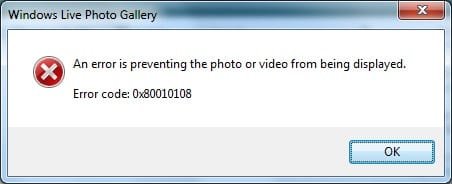
  • gallery crash.jpg
    gallery crash.jpg
    23.5 KB · Views: 33

My Computer

Computer type
PC/Desktop
Computer Manufacturer/Model Number
Self Built PC
OS
Windows 7 pro 64bit. (SP1)
CPU
Intel core I5 2400
Motherboard
Gigabyte H61
Memory
8GB DDR3 Kingston
Graphics Card(s)
Gigabyte GF GTX650OC
Sound Card
Realtek HD audio
Monitor(s) Displays
LCD 20"
Screen Resolution
1600x900
Hard Drives
INTEL SSD 320 80GB +Seagate 7200.12 1TBx3
PSU
Coolermaster RX450W
Case
Coolermaster atx case
Cooling
stock cooler
Keyboard
logitech
Mouse
logitech
Internet Speed
FTTD 100mbps
no one knows solution?
i found workaround for now if i right click recent items file to get context menu and click open it opens okay but left click gets me error.
i would like to know reason why it is not working
 

My Computer

Computer type
PC/Desktop
Computer Manufacturer/Model Number
Self Built PC
OS
Windows 7 pro 64bit. (SP1)
CPU
Intel core I5 2400
Motherboard
Gigabyte H61
Memory
8GB DDR3 Kingston
Graphics Card(s)
Gigabyte GF GTX650OC
Sound Card
Realtek HD audio
Monitor(s) Displays
LCD 20"
Screen Resolution
1600x900
Hard Drives
INTEL SSD 320 80GB +Seagate 7200.12 1TBx3
PSU
Coolermaster RX450W
Case
Coolermaster atx case
Cooling
stock cooler
Keyboard
logitech
Mouse
logitech
Internet Speed
FTTD 100mbps
I am having a problem with Windows Life Photo Gallery 2011 on my dads Windows7 user account. It works fine on mine but when he uses the program on his he receives this error.

photogalleryproblem.png


What should I do?
 

My Computer

Computer Manufacturer/Model Number
Dell Studio XPS 8100
OS
Windows 7 Home Prem 64 bit
CPU
Intel Core i7 860 @ 2.80GHz
Motherboard
Dell Inc. 0T568R (CPU 1)
Memory
8.0GB Dual-Channel DDR3 @ 532MHz
Graphics Card(s)
ATI Radeon HD 5670
Sound Card
Realtek High Definition Audio
Monitor(s) Displays
46" Samsung LED TV
Screen Resolution
1920x1080
Hard Drives
1500GB Seagate ST31000528AS (SCSI)
PSU
350W
Case
Dell XPS 8100
Cooling
Fans
Keyboard
Multimedia Dell Keyboard
Mouse
Logitech MX Performance Anywere Mouse
Other Info
Ceton infiniTV 4 digital cable tuner

My Computer

Computer type
PC/Desktop
Computer Manufacturer/Model Number
Custom Built
OS
Windows 7 Enterprise x64
CPU
i7-5820K
Motherboard
Asus X99 A
Memory
16GB DDR4
Graphics Card(s)
ASUS 2GB Nvidia 960GTX OC'd
Monitor(s) Displays
24"
Screen Resolution
1920x1080
Hard Drives
Samsung 1TB 840 SSD
Western Digital 1TB Black Drive
Seagate 2TB NAS Drive
PSU
Antec Earthwatts 650w
Case
Antec DF-85

My Computer

Computer type
PC/Desktop
Computer Manufacturer/Model Number
Custom Build
OS
Windows 7 Professional SP1 - x64 [Non-UEFI Boot]
CPU
Ivy Bridge Core i5 3570K (Delidded)
Motherboard
Asus P8Z77-V LE PLUS
Memory
G.Skill "Ares" DDR3 PC3-12800 - 1600MHz (16Gb)
Graphics Card(s)
Asus Dual-RX480-O4G
Sound Card
Creative Sound Blaster Z w/5.1 sound system
Monitor(s) Displays
Asus IPS 23"
Screen Resolution
16/9
Hard Drives
Internal:
500Go Sata 6Gb/s (x2)
500Go Sata 3Gb/s (x2)
SSD 60Go Sata 6Gb/s
PSU
In Win C 900W Series 80+ Platinum
Case
Thermaltake Chaser A71
Cooling
Custom Water Cooling Loop
Keyboard
Cooler Master QuickFire XTi
Mouse
Razer Imperator 2012 (4G)
Antivirus
MSE
Browser
IE 11.0.xxx Rtm
Other Info
"Raid0" with Intel Smart Response Technology (HDD/SSD)
I am having a problem with Windows Life Photo Gallery 2011 on my dads Windows7 user account. It works fine on mine but when he uses the program on his he receives this error.


What should I do?


thanks for hijacking my thread :)

so it seems my problem can not be solved this is what i got from microsoft windows live team support:
"We are truly sorry if we were not able to get back to you in a timely manner.

Our Product Group have informed us that this is currently a known issue with Windows Live Photo Gallery wherein it cannot find the recent photo or one of the program components.

They have also informed us that they do not have an estimated time of resolution for the said issue but the rest of Windows Live Photo Gallery should function normal.

We sincerely apologize for the inconvenience."
 

My Computer

Computer type
PC/Desktop
Computer Manufacturer/Model Number
Self Built PC
OS
Windows 7 pro 64bit. (SP1)
CPU
Intel core I5 2400
Motherboard
Gigabyte H61
Memory
8GB DDR3 Kingston
Graphics Card(s)
Gigabyte GF GTX650OC
Sound Card
Realtek HD audio
Monitor(s) Displays
LCD 20"
Screen Resolution
1600x900
Hard Drives
INTEL SSD 320 80GB +Seagate 7200.12 1TBx3
PSU
Coolermaster RX450W
Case
Coolermaster atx case
Cooling
stock cooler
Keyboard
logitech
Mouse
logitech
Internet Speed
FTTD 100mbps
Back
Top