Windows PID has expired

gerdgoebel

New member
Local time
1:16 AM
Messages
14
I purchased a W7 professional upgrade DVD from MS. Did a clean install and activated it. Windows activation shows that my version is activated.
I wanted to start a support call on the MS support web-site. One step is to provide my Windows PID what I did, but I got a message that my PID has expired.
How can that be but still show activated?
With the W7 updates I had also installed the "check for genuine version", ran it and got a confirmation that i have a genuine W7 version.
So what do I need to do to have an valid PID?
 

My Computer My Computer

At a glance

Win 7 Pro 32, Vista Business SP2
OS
Win 7 Pro 32, Vista Business SP2
Call MS tech support and they will sort it out for you. You could be typing in an incorrect character, or there is a flaw in the system.

When you speak with MS, if asked tell them you had the old qualifying XP or Vista (you have one, right?) on the HD at the time you clean installed with Upgrade version or they may send you back to do it over again. (Been happenin lately, for some reason - which is ironic since they were giving out the registry workaround in Oct.)
 
Thanks for your reply. And yes, i have a legit copy of Vista Business (came preloaded on my Thinkpad).
 

My Computer My Computer

At a glance

Win 7 Pro 32, Vista Business SP2
OS
Win 7 Pro 32, Vista Business SP2
Spoke to tech support and what that "PID expired" means is that the 90-warranty for the new product is over, which in my case is correct. MS certainly could have made the message more obvious that it relates to warranty and not activation.
 

My Computer My Computer

At a glance

Win 7 Pro 32, Vista Business SP2
OS
Win 7 Pro 32, Vista Business SP2
Been happenin lately, for some reason - which is ironic since they were giving out the registry workaround in Oct.

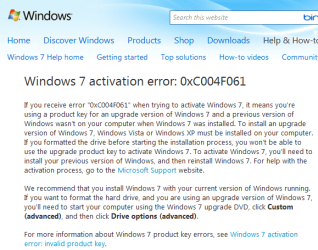
Greg, I came across this article yesterday and it was the first place I saw them saying you needed to have XP installed in order to upgrade. Do you know whether they always stated that, although also allowed the install from upgrade on a clean HD, or is this something new?
Upgrade XP.PNG
 

My Computer My Computer

At a glance

Windows 7 x64 finally!AMD Athlon II X2 240OCZ Platinum 4GB DDR2 1066 (will not work pas...MSI R4670-MD1G Radeon HD 4670 1GB 128-bit GDDR3
Computer Manufacturer/Model Number
Wally, Innc.
OS
Windows 7 x64 finally!
CPU
AMD Athlon II X2 240
Motherboard
Biostar TA790GX XE
Memory
OCZ Platinum 4GB DDR2 1066 (will not work past 800MHz)
Graphics Card(s)
MSI R4670-MD1G Radeon HD 4670 1GB 128-bit GDDR3
Sound Card
ATI High Definition Audio Device Realtek ALC888
Monitor(s) Displays
HP w19e
Screen Resolution
1440x900
Hard Drives
Western Digital Caviar Green WD5000AADS 500GB SATA
Western Digital Caviar Blue WD5000AAKS 500GB SATA
PSU
Athena Power Micro ATX 400W
Case
HEC 6T 6T10BB Black MicroATX Mini Tower
Cooling
stock
Keyboard
wired, many keys
Mouse
HP wireless, 2 buttons, 1 wheel
Internet Speed
DSL 2Mb (recently getting 1.65M!)
Saltgrass was mentioning some signs that they might be tightening Upgrade version clean install restrictions.

Have read speculation all along that that might happen once all the beta testers got Upgrade version installed with workaround.

Of course, the Vista workaround (upgrade over itself) lasts to this day for Vista (and now with Win7) so there's probably no worries they will require qualifying OS key since they didn't for Vista.

But it's still important to keep qualifying OS key readable for the life of Win7 upgrade version.
 
Thanks, I think you are right.
 

My Computer My Computer

At a glance

Windows 7 x64 finally!AMD Athlon II X2 240OCZ Platinum 4GB DDR2 1066 (will not work pas...MSI R4670-MD1G Radeon HD 4670 1GB 128-bit GDDR3
Computer Manufacturer/Model Number
Wally, Innc.
OS
Windows 7 x64 finally!
CPU
AMD Athlon II X2 240
Motherboard
Biostar TA790GX XE
Memory
OCZ Platinum 4GB DDR2 1066 (will not work past 800MHz)
Graphics Card(s)
MSI R4670-MD1G Radeon HD 4670 1GB 128-bit GDDR3
Sound Card
ATI High Definition Audio Device Realtek ALC888
Monitor(s) Displays
HP w19e
Screen Resolution
1440x900
Hard Drives
Western Digital Caviar Green WD5000AADS 500GB SATA
Western Digital Caviar Blue WD5000AAKS 500GB SATA
PSU
Athena Power Micro ATX 400W
Case
HEC 6T 6T10BB Black MicroATX Mini Tower
Cooling
stock
Keyboard
wired, many keys
Mouse
HP wireless, 2 buttons, 1 wheel
Internet Speed
DSL 2Mb (recently getting 1.65M!)
Ummm, a PID is not the same as a product key...
 

My Computer My Computer

At a glance

Windows 7 Ultimate RTM (Technet)3.00 gigahertz Intel Core2 Duo E84004GBATI Radeon X1950 Pro
Computer Manufacturer/Model Number
Custom
OS
Windows 7 Ultimate RTM (Technet)
CPU
3.00 gigahertz Intel Core2 Duo E8400
Motherboard
ASUSTeK Computer INC. P5K/EPU Rev 1.xx
Memory
4GB
Graphics Card(s)
ATI Radeon X1950 Pro
Sound Card
Built in HD Audio
Monitor(s) Displays
22" Gateway LCD
Screen Resolution
1920 x 1200
Hard Drives
ST3160023A [Hard drive] (160.04 GB) -- drive 0, rev 8.01, ST3500630AS [Hard drive] (500.11 GB) -- drive 2, rev 3.AAK
ST3500630AS [Hard drive] (500.11 GB) -- drive 1, rev 3.AAK
Keyboard
Logitech G11
Mouse
Microsoft Wireless Laser Mouse 5000
Internet Speed
13.44 Mbps
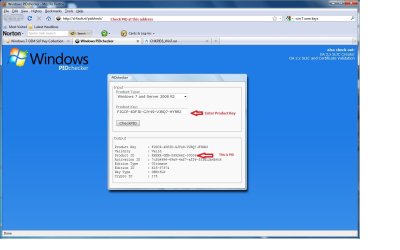
The PID is the product id assigned to each oem manufacturer by edition (ie Home Premium, Ultimate, etc.). You can find the PID for a product key by using the PID checker: Windows PIDchecker.
 

Attachments

  • Capture.jpg
    Capture.jpg
    95.5 KB · Views: 190

My Computer My Computer

At a glance

Windows 7
OS
Windows 7
Back
Top