This problem is related to sound volume, but I think the problem is not related to the sound system, but more the way Windows recognizes applications when they are launched. So here's the problem.....
I use Teamspeak a lot when I game. To be able to adjust the volume of Teamspeak relative to the game (so I can hear both properly), I have my PC volume set the 80% and I set everything else to about 15% most of the time. If I need to tweak an individual applications volume, I can open the standard Win7 volume mixer and tweak the volume for that application. Generally, that works great. I set the volume once and it stays at that volume until I change it.
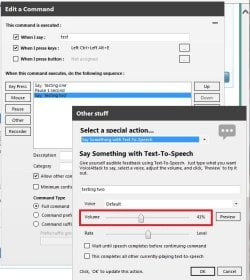
However, there are some programs where every time I launch them, they have their volume set to 80%. An example of this is the program Voice Attack. I have Voice Attack do TTS or play sounds when I run certain commands. For example, if I say, "What time is it?", Voice Attack will say, "It is xx o'clock". I have Voice Attack set up to run on startup, so every time I reboot, when I use a voice command that has audio feedback, it is damn loud because the volume is set to 80%.
I downloaded a 3rd part tool for managing volume called PowerMixer. It did not help me with my problem, but it did show me what I suspected: Every time Voice Attack runs, the mixer (both the stock Win7 mixer and PowerMixer) recognize it as a brand new application. They think this is the first time I've ever run that application.
I know that application volume is saved in the registry. I suspect that every time I run this application (or any other application that works this way), it is creating a new registry entry, with a new ID for that application.
I'm trying to figure out if there is any way I can launch that application with the same Windows internal ID or something like that. Or, failing that, contact the developer and see if they can fix it. To do that though, I'd like to be able to explain what is going on in terms that can understand, and that will be useful to them in fixing this problem.
Can anybody explain how Windows recognizes and remembers applications? Basically, can anybody explain what is going on in more detail that I've intuited? Of course, if there's a way I can fix this myself, and somebody could explain that to me, that would rock!
I use Teamspeak a lot when I game. To be able to adjust the volume of Teamspeak relative to the game (so I can hear both properly), I have my PC volume set the 80% and I set everything else to about 15% most of the time. If I need to tweak an individual applications volume, I can open the standard Win7 volume mixer and tweak the volume for that application. Generally, that works great. I set the volume once and it stays at that volume until I change it.
However, there are some programs where every time I launch them, they have their volume set to 80%. An example of this is the program Voice Attack. I have Voice Attack do TTS or play sounds when I run certain commands. For example, if I say, "What time is it?", Voice Attack will say, "It is xx o'clock". I have Voice Attack set up to run on startup, so every time I reboot, when I use a voice command that has audio feedback, it is damn loud because the volume is set to 80%.
I downloaded a 3rd part tool for managing volume called PowerMixer. It did not help me with my problem, but it did show me what I suspected: Every time Voice Attack runs, the mixer (both the stock Win7 mixer and PowerMixer) recognize it as a brand new application. They think this is the first time I've ever run that application.
I know that application volume is saved in the registry. I suspect that every time I run this application (or any other application that works this way), it is creating a new registry entry, with a new ID for that application.
I'm trying to figure out if there is any way I can launch that application with the same Windows internal ID or something like that. Or, failing that, contact the developer and see if they can fix it. To do that though, I'd like to be able to explain what is going on in terms that can understand, and that will be useful to them in fixing this problem.
Can anybody explain how Windows recognizes and remembers applications? Basically, can anybody explain what is going on in more detail that I've intuited? Of course, if there's a way I can fix this myself, and somebody could explain that to me, that would rock!
My Computer
- Computer type
- PC/Desktop
- OS
- Windows 7 Home Premium 64-bit
- CPU
- Intel i7-4790K
- Motherboard
- GA-Z97X-Gaming 7
- Memory
- Kingston 8Gb + G.Skil 8Gb
- Graphics Card(s)
- EVGA GeForce GTX 980Ti (x2)
- Sound Card
- Asus Xonar DX
- Monitor(s) Displays
- Acer Predator XB271HU (x3)
- Screen Resolution
- 7680x1440
- PSU
- EVGA SuperNOVA 1300 G2
- Keyboard
- Ducky Shine 3
- Mouse
- Corsair M45
- Antivirus
- ESET NOD32 Anitvirus

 Maybe this one will do the job.