Windows Seven slower Than xp help

johnseven

New member
Local time
8:17 AM
Messages
8
I'm trying To rip some dvds for my tablet I'm using a Windows Seven computer with 3 gig of ram,I run it through dvd shrink and then through handbrake to turn it to mp4 this takes 5hour upwards. If I use my old xp computer with one gig of ram it does it in half the time. What's going on how do I get it to rip quicker.


John
 

My Computer My Computer

OS
windows 7 premium 32 bit
I'm trying To rip some dvds for my tablet I'm using a Windows Seven computer with 3 gig of ram,I run it through dvd shrink and then through handbrake to turn it to mp4 this takes 5hour upwards. If I use my old xp computer with one gig of ram it does it in half the time. What's going on how do I get it to rip quicker.


John
Is your new computer a laptop or a desktop? Also, is your old computer a laptop or a desktop? Laptops come with slower dvd drives than desktops, so that could be your problem. Also, try ripping your dvds throught a different program.
 

My Computer My Computer

Computer type
PC/Desktop
Computer Manufacturer/Model Number
HP Pavilion P7-1010
OS
Windows 7 Professional x64 Service Pack 1
CPU
AMD Athlon X4 645
Motherboard
Foxxcon N-Alvorix RS880
Memory
6GB DDR3 1066
Graphics Card(s)
Sapphire Radeon HD 5670 512MB GDDR5
Sound Card
Realtek Integrated Audio
Monitor(s) Displays
HP 2011x
Screen Resolution
1600x900
Hard Drives
1. Crucial M4 128GB SSD
2. 1TB Seagate Barracuda 7200.12 RPM
3. 1TB Western Digital Caviar Green 5400RPM
PSU
Seasonic S12 II Bronze 380 Watt
Case
HP OEM
Cooling
Coolermaster Heatsink, AVC Case Fan
Keyboard
HP OEM- Made by Chicony
Mouse
HP OEM- Made by Logitech
Internet Speed
20MBit Down/4 Up
Antivirus
Microsoft Security Essentials
Browser
Internet Explorer 10
Both are laptops. I use dvd shrink to remove encryption which makes a copy on the hard drive this is the quickest part the slowest is ripping it to mp4 which is done off the hard drive. I've also tried format factory but both the same
 

My Computer My Computer

OS
windows 7 premium 32 bit
Both are laptops. I use dvd shrink to remove encryption which makes a copy on the hard drive this is the quickest part the slowest is ripping it to mp4 which is done off the hard drive. I've also tried format factory but both the same
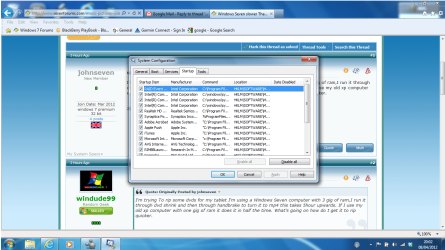
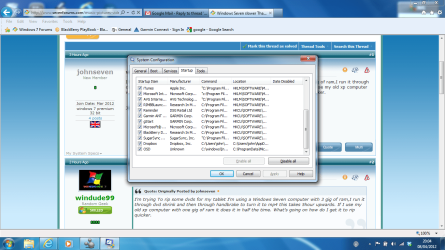
Go to start, then type mscinfig on the Windows 7 machine. Hit enter. Next, go to the startup tab. Disable everything you don't need, or post a screenshot and I'll tell you what you can disable.
 

My Computer My Computer

Computer type
PC/Desktop
Computer Manufacturer/Model Number
HP Pavilion P7-1010
OS
Windows 7 Professional x64 Service Pack 1
CPU
AMD Athlon X4 645
Motherboard
Foxxcon N-Alvorix RS880
Memory
6GB DDR3 1066
Graphics Card(s)
Sapphire Radeon HD 5670 512MB GDDR5
Sound Card
Realtek Integrated Audio
Monitor(s) Displays
HP 2011x
Screen Resolution
1600x900
Hard Drives
1. Crucial M4 128GB SSD
2. 1TB Seagate Barracuda 7200.12 RPM
3. 1TB Western Digital Caviar Green 5400RPM
PSU
Seasonic S12 II Bronze 380 Watt
Case
HP OEM
Cooling
Coolermaster Heatsink, AVC Case Fan
Keyboard
HP OEM- Made by Chicony
Mouse
HP OEM- Made by Logitech
Internet Speed
20MBit Down/4 Up
Antivirus
Microsoft Security Essentials
Browser
Internet Explorer 10
heres the screen shots
 

Attachments

  • msconfig 1.png
    msconfig 1.png
    111.1 KB · Views: 27
  • msconfig 2.png
    msconfig 2.png
    108.2 KB · Views: 14

My Computer My Computer

OS
windows 7 premium 32 bit
You can delete everything form the startup tab , just keep the antivirus.

For two pass encoding, with h246 codecs, it takes a time to encode a big file. In windows 7 it may take a bit more time, coz aero environment uses a portion of ram already. If you apply the basic theme and then encode, it might be a bit faster.

At the same time ... the larger the encoding time, the better the output quality .
 

My Computer My Computer

Computer type
PC/Desktop
Computer Manufacturer/Model Number
Self Assembled
OS
Microsoft Windows 10 Pro Insider Preview 64-bit
CPU
Intel(R) Core(TM) i3-4130 CPU @ 3.40GHz
Motherboard
Gigabyte Technology Co., Ltd. B85M-D3H
Memory
Corsair Vengence 4GB x2 (8.00GB Dual-Channel DDR3 @ 798MHz)
Graphics Card(s)
2047MB GeForce GTS 450 (ZOTAC International)
Sound Card
Onboard (Realtek High Definition Audio)
Monitor(s) Displays
LG Flatron E2040T
Screen Resolution
1600x900
Hard Drives
Western Digital 1 TB
Seagate 500 GB
PSU
Corsair VS550
Case
Cooler Master K380
Cooling
Cooler Master Seidon 120V Plus
Keyboard
Logitech MK260r
Mouse
Logitech MK260r
Internet Speed
PMPL Broadband
Antivirus
Windows Defender + MBAM
Browser
Firefox
Other Info
Dell Studio 15" Laptop
if i delete all what happens next time i start the laptop dont i need them and how did they get there

john
 

My Computer My Computer

OS
windows 7 premium 32 bit
The all programs are there ... you can open them whenever you want. Deleting form the startup tab will prevent those programs to start automatically with windows, and to run in the background, always. None of these programs are that important. !

It will enhance your computers performance, and will not do any harm. I have only three programs there ... Avast , and two desktop customization programs like objectdock and rainmeter.
 

My Computer My Computer

Computer type
PC/Desktop
Computer Manufacturer/Model Number
Self Assembled
OS
Microsoft Windows 10 Pro Insider Preview 64-bit
CPU
Intel(R) Core(TM) i3-4130 CPU @ 3.40GHz
Motherboard
Gigabyte Technology Co., Ltd. B85M-D3H
Memory
Corsair Vengence 4GB x2 (8.00GB Dual-Channel DDR3 @ 798MHz)
Graphics Card(s)
2047MB GeForce GTS 450 (ZOTAC International)
Sound Card
Onboard (Realtek High Definition Audio)
Monitor(s) Displays
LG Flatron E2040T
Screen Resolution
1600x900
Hard Drives
Western Digital 1 TB
Seagate 500 GB
PSU
Corsair VS550
Case
Cooler Master K380
Cooling
Cooler Master Seidon 120V Plus
Keyboard
Logitech MK260r
Mouse
Logitech MK260r
Internet Speed
PMPL Broadband
Antivirus
Windows Defender + MBAM
Browser
Firefox
Other Info
Dell Studio 15" Laptop
great will give it a go

a bit of a cheek i know but i posted this in the network section but never realy got a reslove wondered if you had any idea

ive got a tablet that im trying to connect it to my windows 7 laptop with out the use of a usb cord ive enabled file sharing on the tablet and laptop.when i type in the ip adress on the laptop it shows a screen with 2 folders certs and media this is correct up to now,when i try to open the media folder it hangs for about 3 mins then gives the error 0x0070035 file name not known check spelling 0r sometimes media does not have permision to use this network resource contact admin to see if you have access permision specified network name not available.
ive connected it to a old xp laptop with no problems at all.
ive been trying fix this problem for about 2 weeks and its driving me mad now.

thanks


john
 

My Computer My Computer

OS
windows 7 premium 32 bit
just disabled all in the start up laptop starts up like lighting will try a dvd


john
 

My Computer My Computer

OS
windows 7 premium 32 bit
great will give it a go

a bit of a cheek i know but i posted this in the network section but never realy got a reslove wondered if you had any idea

ive got a tablet that im trying to connect it to my windows 7 laptop with out the use of a usb cord ive enabled file sharing on the tablet and laptop.when i type in the ip adress on the laptop it shows a screen with 2 folders certs and media this is correct up to now,when i try to open the media folder it hangs for about 3 mins then gives the error 0x0070035 file name not known check spelling 0r sometimes media does not have permision to use this network resource contact admin to see if you have access permision specified network name not available.
ive connected it to a old xp laptop with no problems at all.
ive been trying fix this problem for about 2 weeks and its driving me mad now.

thanks


john
I have no idea in it . :(
 

My Computer My Computer

Computer type
PC/Desktop
Computer Manufacturer/Model Number
Self Assembled
OS
Microsoft Windows 10 Pro Insider Preview 64-bit
CPU
Intel(R) Core(TM) i3-4130 CPU @ 3.40GHz
Motherboard
Gigabyte Technology Co., Ltd. B85M-D3H
Memory
Corsair Vengence 4GB x2 (8.00GB Dual-Channel DDR3 @ 798MHz)
Graphics Card(s)
2047MB GeForce GTS 450 (ZOTAC International)
Sound Card
Onboard (Realtek High Definition Audio)
Monitor(s) Displays
LG Flatron E2040T
Screen Resolution
1600x900
Hard Drives
Western Digital 1 TB
Seagate 500 GB
PSU
Corsair VS550
Case
Cooler Master K380
Cooling
Cooler Master Seidon 120V Plus
Keyboard
Logitech MK260r
Mouse
Logitech MK260r
Internet Speed
PMPL Broadband
Antivirus
Windows Defender + MBAM
Browser
Firefox
Other Info
Dell Studio 15" Laptop
What CPUs do you have in the two machines?
 

My Computer My Computer

Computer type
PC/Desktop
Computer Manufacturer/Model Number
Alienware Aurora ALX R4
OS
Windows 10 Pro (x64)
CPU
Intel Core i7-3930K (3.2GHz - 4.5GHz)
Motherboard
Alienware Aurora-R4 x79
Memory
4x Samsung 4GB PC3-12800 DDR3 (16GB 1600MHz)
Graphics Card(s)
Nvidia Geforce GTX 690
Sound Card
SteelSeries Siberia Elite
Monitor(s) Displays
Dell UltraSharp U3011
Screen Resolution
2560x1600
Hard Drives
Samsung 850 Pro 256 GB, Seagate 1TB Desktop Hybrid HDD, 2x Western Digital 4TB Green HDD
PSU
875W Some Dell PSU <.<
Case
Alienware Aurora ALX
Cooling
Custom Liquid Cooling (EK CPU & GPU blocks) dual EK 480RAD
Keyboard
Logitech G710+ Mechanical
Mouse
Logitech G700s
Internet Speed
Verizon Fios (50 mbps average)
Other Info
Server: Intel NUC D54250WYK: i5-4250U, 16GB, 256 GB mSATA, Windows Server 2012 R2
Back
Top