I have an Alesis I/O 26 ASIO-based driver, but I also have a Realtek soundcard. However, neither one will record a signal on my Free Sound Recorder software from Free Sound Recorder: Record Anything You can Hear through Your PC to Audio Files. I uninstalled, and reinstalled my Alesis driver, and it records fine on several of my professional audio apps, so I know it's not my driver. Although, I haven't been able to get a reading on the Windows Recording input from any driver. I can't even record on Windows Recorder. I've been doing this for 25 yrs, and I can't imagine what the problem is. Can you suggest anything?
I have a recording studio, using Sonar X2 and a Roland Octa-Capture. I had an Alesis IO26 when I first started computer based recording but didn't like it and went to a Focusrite Saffire Pro 40. However, I've given up on Firewire and now only have USB with the Roland Octa-Capture and my backup an MAudio Fastrack Ultra 8R.
If the Alesis records on other DAW software but not the Free Sound Recorder, I would suspect either that application is not compatible or there is a configuration issue in the application. Along with Sonar X2, I have ProTool MP9 and I had a 30 day trial version of Pro Tools 10, and the Focusrite Saffire Pro 40 was supposed to be compatible. It took help from Focusrite, the gearslutz forum and Sweetwater Music support before I could get ProTools set so it would recognize the Saffire Pro 40.
If you are going to use the IO26, I would disable the internal PC sound so it does not conflict. I had that problem with a SoundBlaster Xfi causing conflicts in Sonar with my Saffire Pro 40 (that was my recording interface at the time). I finally had to remove (uninstall) the SoundBlaster.
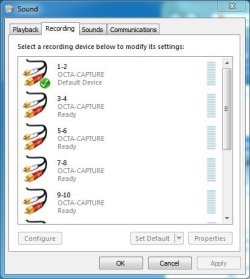
After you connect the IO26, post a screen shot of the Sound Panel Recording Section (mine is shown as an example) to see what you have.
Windows 10 64 bitIntel i7 6700K16GB Corsair DominatorIntel CPU Graphics
Computer type
PC/Desktop
Computer Manufacturer/Model Number
My Own Build
OS
Windows 10 64 bit
CPU
Intel i7 6700K
Motherboard
ASUS ROG Maximus VIII Hero
Memory
16GB Corsair Dominator
Graphics Card(s)
Intel CPU Graphics
Sound Card
RealTek
Monitor(s) Displays
27" Dell S2719dgf
Screen Resolution
2560X1440
Hard Drives
1 TB Samsung 850 EVO SSD for Win 10 Pro
500GB Samsung 850 EVO SSD for Win 10 Insider
2 TB drive for backup
PSU
EVGA Supernova 750G2
Case
BeQuiet Silent Base 600
Cooling
Deepcool Captain 120EX
Keyboard
Microsoft Wireless 2000
Mouse
Microsoft wireless
Internet Speed
100 MB/sec (Cable)
Antivirus
Microsoft Defender and Malwarebytes
Browser
Edge/Firefox
Other Info
Cakewalk (Sonar) by BandLab and Studio One 4.1 Pro recording studio software. MOTU 896Mk3 Hybrid recording interface, Frontier Tranzport wireless control unit, Behringer X-Touch Control Surface.
Five USB connected optical drives for CD Audio production using Nero BurningROM