
simmyjiff
New member
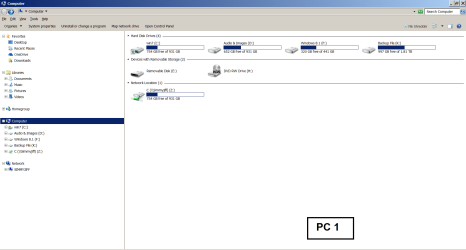
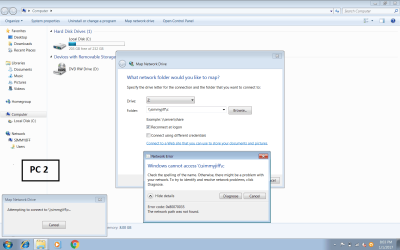
I am trying desperately to set up a shared network drive in my PC 2, (laptop) to reduce the load of addon applications in FSX (in PC 1), the drive has been mapped and can be identified in PC 1, C(\\simmyjiff) (Z) , see enclosed screen print, but nowhere to be seen on PC 2 and therefore unable to open it, or map it? set up as follows:
1.Home Network = Router BTHub 6.
2. PC1:
o/s Win 7 Home edition (64 bit) Home built desktop
Computer name: simmyjiff
Full Computer name: simmyjiff
Computer description: simmyjiff
Workgroup: simmyjiff
3. PC2:
0/s Win 7 Professional (64 bit) Dell Laptop-Precision M4600
All names as per PC 1, and both PC’s set to automatically synchronise with ‘time.windows.com’, all ‘permissions provided to ‘everyone’
4. Sharing Options for both computers:
Network discovery: On
File and Printer Sharing: On
Public Folder sharing: On
File Sharing connections: On
HomeGroup connections: Allow windows to manage.
5.Windows Network Diagnostics unable to identify any problems.
6. PC 1, Shared drive C: has been shared and the network path is \\simmyjiff\c as identified on the ‘Computer’ page (see screen print)
7. PC 2,Shared ‘drive’ not visible under ‘NETWORK’ in the left-hand column of ‘COMPUTER’ page on ‘PC 2’ pc, but computer name is.
8. PC 2, Unable to ‘map the network drive’, Folder entered in the Map Network Drive panel, Message received: ‘Windows cannot access, error message 0x80070035.’
I have spent several weeks trolling through the internet looking at, and trying various remedial works from other sites, but none, so far, have worked.(ipconfig file also attached)
Thank you for reading this post.
Jim
1.Home Network = Router BTHub 6.
2. PC1:
o/s Win 7 Home edition (64 bit) Home built desktop
Computer name: simmyjiff
Full Computer name: simmyjiff
Computer description: simmyjiff
Workgroup: simmyjiff
3. PC2:
0/s Win 7 Professional (64 bit) Dell Laptop-Precision M4600
All names as per PC 1, and both PC’s set to automatically synchronise with ‘time.windows.com’, all ‘permissions provided to ‘everyone’
4. Sharing Options for both computers:
Network discovery: On
File and Printer Sharing: On
Public Folder sharing: On
File Sharing connections: On
HomeGroup connections: Allow windows to manage.
5.Windows Network Diagnostics unable to identify any problems.
6. PC 1, Shared drive C: has been shared and the network path is \\simmyjiff\c as identified on the ‘Computer’ page (see screen print)
7. PC 2,Shared ‘drive’ not visible under ‘NETWORK’ in the left-hand column of ‘COMPUTER’ page on ‘PC 2’ pc, but computer name is.
8. PC 2, Unable to ‘map the network drive’, Folder entered in the Map Network Drive panel, Message received: ‘Windows cannot access, error message 0x80070035.’
I have spent several weeks trolling through the internet looking at, and trying various remedial works from other sites, but none, so far, have worked.(ipconfig file also attached)
Thank you for reading this post.
Jim
Attachments
My Computer
- Computer type
- PC/Desktop
- OS
- Microsoft Windows 7 Home Premium 64-bit 7601 Multiprocessor Free Service Pack 1
- CPU
- Intel(R) Core(TM) i5-3570K CPU @ 3.40GHz
- Motherboard
- ASUSTeK COMPUTER INC. P8Z77-V LX2
- Memory
- 8.00 GB
- Graphics Card(s)
- NVIDIA GeForce GTX 650 Ti
- Sound Card
- (1) NVIDIA Virtual Audio Device (Wave Extensible) (WDM) (2
- Screen Resolution
- 1920 x 1080 x 32 bits (4294967296 colors) @ 60 Hz
- Hard Drives
- (1) ST500DM002-1BD142 ATA Device (2) WDC WD10EFRX-68JCSN0 ATA Device (3) WD Ext HDD 1021 USB Device


