

I have a custom build desktop.
I have a maintenance and backup HDD drive where I boot from it and make my backups (system image and every Friday I do a data backup). This is a 1 T drive, used mainly for backup, but in an emergency I can work from it as it has all main programs on it.
My daily working drive is a SSD (C: for OS and programs) and a D: HDD for data.
After installing Win 7 64 Home Premium (on the SSD) with all latest drives and some programs, I ran the so called SP2 witch install all updates till last April. Then I run the manual Windows Update, it found some updates and installed them.
Then I cloned the two drives (SSD and HDD) to the backup HDD in two partitions.
Both are running well, except the backup drive. It doesn't run properly the Windows update.
On the backup drive, by the automatic update (only important and MS products, not Recommended updates), it finds the updates, and a icon appears on the notification area telling that there are updates to be installed. When I open Windows Update, there is nothing there.
If I choose to manually search for updates it runs for hours and hours and then I close it.
As once I had a similar problem and I deleted the C:\Windows\SoftwareDistribution folder and it began to work, I deleted it on the backup drive, but nothing changed.
Strange is that some important updates were installed automatically.
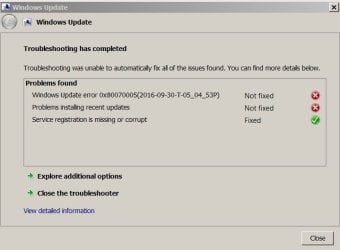
I've searched for help and I was taken to a MS site where I downloaded a WindowsUpdateDiagnostic.diagcab. When executed it opened the Diagnostic and troubleshooting wizard.
It found some problems but didn't fix all them.
Does someone knows how to fix the Windows Update on the backup drive?
I have a maintenance and backup HDD drive where I boot from it and make my backups (system image and every Friday I do a data backup). This is a 1 T drive, used mainly for backup, but in an emergency I can work from it as it has all main programs on it.
My daily working drive is a SSD (C: for OS and programs) and a D: HDD for data.
After installing Win 7 64 Home Premium (on the SSD) with all latest drives and some programs, I ran the so called SP2 witch install all updates till last April. Then I run the manual Windows Update, it found some updates and installed them.
Then I cloned the two drives (SSD and HDD) to the backup HDD in two partitions.
Both are running well, except the backup drive. It doesn't run properly the Windows update.
On the backup drive, by the automatic update (only important and MS products, not Recommended updates), it finds the updates, and a icon appears on the notification area telling that there are updates to be installed. When I open Windows Update, there is nothing there.
If I choose to manually search for updates it runs for hours and hours and then I close it.
As once I had a similar problem and I deleted the C:\Windows\SoftwareDistribution folder and it began to work, I deleted it on the backup drive, but nothing changed.
Strange is that some important updates were installed automatically.
I've searched for help and I was taken to a MS site where I downloaded a WindowsUpdateDiagnostic.diagcab. When executed it opened the Diagnostic and troubleshooting wizard.
It found some problems but didn't fix all them.
Does someone knows how to fix the Windows Update on the backup drive?
Attachments
My Computers
System One System Two
-
- Computer type
- PC/Desktop
- Computer Manufacturer/Model Number
- custom build
- OS
- Windows 7 HP 64
- CPU
- i5 6600K - 800MHz to 4200MHz
- Motherboard
- GA-Z170-HD3P
- Memory
- 4+4G GSkill DDR4 3000
- Graphics Card(s)
- IG - Intel 530
- Monitor(s) Displays
- Samsung 226BW
- Screen Resolution
- 1680x1050
- Hard Drives
- (1) -1 SM951 – 128GB M.2 AHCI PCIe SSD drive for Windows 7 and Lubuntu
(2) -1 WD SATA 3 - 1T for Data
(3) -1 WD SATA 3 - 1T for backup
- PSU
- Thermaltake 450W TR2 gold
- Keyboard
- Old and good Chicony mechanical keyboard
- Mouse
- Logitech mX performance - 9 buttons (had to disable some)
- Internet Speed
- 500Mb/s
- Browser
- Firefox 64
- Other Info
- TinyWall firewall
-
- Computer type
- Laptop
- System Manufacturer/Model Number
- Asus Q550LF
- OS
- Windows 7 Pro
- CPU
- i7-4500U 800MHz to 3.0GHz
- Motherboard
- Asus Q550LF
- Memory
- (4+4)G DDR3 1600
- Graphics Card(s)
- IG intel 4400 + NVIDIA GeForce GT 745M
- Sound Card
- Realtek
- Monitor(s) Displays
- LG Display LP156WF4-SPH1
- Screen Resolution
- 1920 x 1080
- Hard Drives
- BX500 120G SSD for Windows and programs +
1T HDD for data
- Internet Speed
- 500 Mb/s
- Browser
- Firefox
- Other Info
- TinyWall firewall


