Windows Update - Enable or Disable Automatic Restart

How to Enable or Disable Windows Updates from Automatically Restarting the Computer


   Information
This will show you how to enable or disable Vista, Windows 7, or Windows 8 from automatically restarting the computer after 5 minutes of installing a Windows Update that requires a restart to finish installing.

   Warning
Even though if you disable automatic restart for Windows Update, you will still be required to restart the computer to finish installing the Windows Update. However, you will be able to do this when you are able to instead of it doing it automatically while you were working on something and losing it.
   Tip
After you install an important update in Windows 8 and 8.1, you receive a notice that you have to restart the PC in three days. If the restart does not occur in three days, the PC displays a 15-minute countdown and then automatically restarts. By default, this automatic restart is delayed if the PC is locked, and the countdown will begin the next time that you sign in to the PC.

A new feature is now available that lets you force automatic restarts to finish installing important updates, regardless of whether you are at the PC. You can change to this new restart behavior through the following new registry key value that was introduced in the April 2013 Windows 8 cumulative update (2822241).

See also: How to force automatic restarts after important updates in Windows 8

and

Minimizing restarts after automatic updating in Windows Update - Building Windows 8 - Site Home - MSDN Blogs


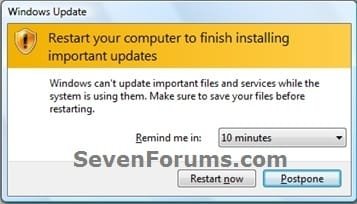
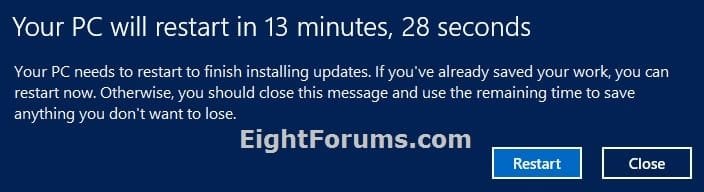
EXAMPLE: Windows Update Restart Prompt
NOTE: Enabled (left screenshot), disabled (right screenshot), Windows 8 on bottom
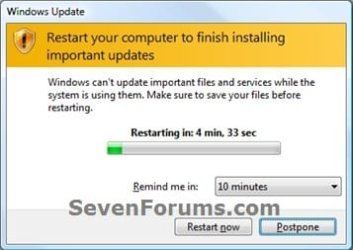
Auto_Restart.jpgRemind_Restart.jpg

8.1_Windows_Update_Restart.jpg


OPTION ONE

Using a REG File Download


1. To Enable Windows Update Automatic Restart
NOTE: This is the default setting.
A) Click on the Download button below to download the file below, and go to step 3 below.
Enable_Windows_Update_Auto_Restart.reg

Download


2. To Disable Windows Update Automatic Restart
A) Click on the Download button below to download the file below, and go to step 3 below.
Disable_Windows_Update_Auto_Restart.reg

Download


3. Save the .reg file to your desktop.

4. Double click/tap on the downloaded .reg file to merge it.

5. If prompted, click/tap on Run, Yes (UAC-Windows 7/8) or Continue (UAC-Vista), Yes, and OK to approve the mege.

6. Log off and log on, or restart the computer to apply.

7. When finished, you can delete the downloaded .reg file if you like.


OPTION TWO

Through the Local Group Policy Editor


1. Open the Local Group Policy Editor.

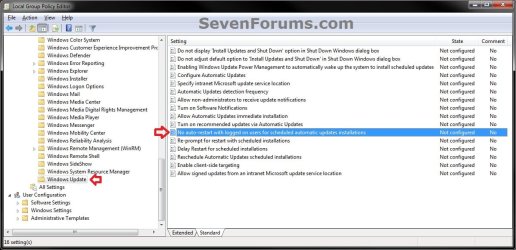
2. In the left pane, click/tap on the arrow to expand Computer Configuration, Administrative Templates, Windows Components, then click/tap on Windows Update. (see screenshot below)
GPEDIT-1.jpg
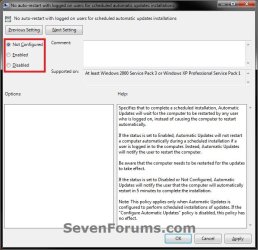
3. In the right pane of Windows Update, double click/tap on No auto-restart with logged on users for scheduled automatic updates installations to edit it. (see screenshot above)

4. To Enable Windows Update Automatic Restart
A) Select (dot) Not Configured or Disabled, and go to step 6 below. (see screenshot below step 6)
NOTE: Not Configured is the default setting.
5. To Disable Windows Update Automatic Restart
A) Select (dot) Enabled, and go to step 6 below. (see screenshot below step 6)
6. Click/tap on OK. (see screenshot below)
GPEDIT-2.jpg
7. Close the Local Group Policy Editor.
That's it,
Shawn


Attachments

Last edited:
my computer restarted when my screen was locked, but i was logged in, and i had automatic restarts turned off. does locking the screen have any effect on these restarts?
 

My Computer

OS
Windows 7 Professional x64
Last edited:

My Computer

Computer type
PC/Desktop
Computer Manufacturer/Model Number
Self built custom
OS
64-bit Windows 11 Pro for Workstations
CPU
Intel i7-8700K OC'd to 5 GHz
Motherboard
ASUS ROG Maximus XI Formula Z390
Memory
64 GB (4x16GB) G.SKILL TridentZ RGB DDR4 3600 MHz
Graphics Card(s)
ASUS ROG-STRIX-GTX1080TI-O11G-GAMING
Sound Card
Integrated
Monitor(s) Displays
2 x Samsung Odyssey G7 27"
Screen Resolution
2560x1440
Hard Drives
1TB Samsung 990 PRO M.2,
4TB Samsung 990 PRO PRO M.2,
TerraMaster F8 SSD Plus NAS
PSU
Seasonic Prime Titanium 850W
Case
Thermaltake Core P3
Cooling
Corsair Hydro H115i
Keyboard
Logitech wireless K800
Mouse
Logitech MX Master 4
Internet Speed
2 Gb/s Download and 100 Mb/s Upload
Antivirus
Malwarebyte Anti-Malware Premium
Browser
Google Chrome
Other Info
Logitech Z625 speaker system,
Logitech BRIO 4K Pro webcam,
HP Color LaserJet Pro MFP M477fdn,
APC SMART-UPS RT 1000 XL - SURT1000XLI,
Galaxy S23 Plus phone
The restart was definitely due to windows update - when I turned it back on, it had the little bubble saying something like, "windows was updated and restarted your computer". And, it just happened to me again! argh. I'm going to unset and reset the group policy for this, but don't know if that will work.
 

My Computer

OS
Windows 7 Professional x64
It has just happened to me the 3rd time this year.

On any version of windows, I always make sure that:

1) its set to ask me first if I feel like installing updates at the moment
2) that it will never automatically reboot the system after installing updates.


Each time I check after the unwanted update/reboot, I find that my settings have been reset to automatic updates with automatic reboot. (the way MS would prefer)


My only rational explanation for this happening is, that the previous to the last update has somehow reset my preferences to automatic, since I never touch those settings once they're set to the way I want.

This being my private and only computer, I use no profiles that could conflict with my update settings.

Is there any other genie in my system capable of changing things behind my back in Windows 7...?

more details:
I have a dual boot on the system, but if that was the culprit, I'd have to find my settings changed every day, rather than just 3 times in ~5 months.

Since I do keep my system updated, (I usually just finish my work before hitting the update) WindowsUpdate never asked me to install SP1, I presume cause I got it all in small patches over time.
 
Last edited:

My Computer

Computer Manufacturer/Model Number
homegrown
OS
Ubuntu, Windoze8pro64
CPU
Lentil Core i7-3770
Motherboard
Asus P8Z77-i Deluxe (OC AI on auto)
Memory
2x4GB Crucial DDR3-1600 CL8
Graphics Card(s)
Gigabyte GTX 670 OC Windforce
Sound Card
integrated Atheros
Monitor(s) Displays
Asus VG278HE
Screen Resolution
1080p
Hard Drives
OCZ Vertex 4 - 256 GB
Samsung Spinpoint Eco 2TB
Sony Optiarc BD-5850H
PSU
OCZ ModExtreme Pro 650 Watt
Case
Silverstone SG08
Cooling
Noctua NH-L12, NoiseBlocker Fans
Keyboard
Logitech illu
Mouse
Logitech G700
Internet Speed
64 kb/s with V.54 support
Other Info
System keeps running out of 'resources', something that never happened on my old E4500 slogger... Sometimes, I just wanna copy a file, and it says "not enough resources available" gonna have to figure that one out one of these days...
Hello n1315, and welcome to Seven Forums.

It would not be unusual for a Windows Update to possibly reset the settings back to default when updated.
 

My Computer

Computer type
PC/Desktop
Computer Manufacturer/Model Number
Self built custom
OS
64-bit Windows 11 Pro for Workstations
CPU
Intel i7-8700K OC'd to 5 GHz
Motherboard
ASUS ROG Maximus XI Formula Z390
Memory
64 GB (4x16GB) G.SKILL TridentZ RGB DDR4 3600 MHz
Graphics Card(s)
ASUS ROG-STRIX-GTX1080TI-O11G-GAMING
Sound Card
Integrated
Monitor(s) Displays
2 x Samsung Odyssey G7 27"
Screen Resolution
2560x1440
Hard Drives
1TB Samsung 990 PRO M.2,
4TB Samsung 990 PRO PRO M.2,
TerraMaster F8 SSD Plus NAS
PSU
Seasonic Prime Titanium 850W
Case
Thermaltake Core P3
Cooling
Corsair Hydro H115i
Keyboard
Logitech wireless K800
Mouse
Logitech MX Master 4
Internet Speed
2 Gb/s Download and 100 Mb/s Upload
Antivirus
Malwarebyte Anti-Malware Premium
Browser
Google Chrome
Other Info
Logitech Z625 speaker system,
Logitech BRIO 4K Pro webcam,
HP Color LaserJet Pro MFP M477fdn,
APC SMART-UPS RT 1000 XL - SURT1000XLI,
Galaxy S23 Plus phone
Hello n1315, and welcome to Seven Forums.

It would not be unusual for a Windows Update to possibly reset the settings back to default when updated.

It has not done this for me in the years past.

And I think it would be wrong to start that practice now, as it defeats the point of giving users a choice how to get updates.

More importantly, Microsoft should not take ANY chances in accidentally interfering with my ability to do my work on my machine.

Given that there have frequently been updates that caused problems with a certain percentage of systems, this setting should never bee changed by any entity besides the owner of the machine.

The very least we can expect is a modal warning dialog if Microsoft makes such a change.

Don't you agree?

I could fail deadlines or loose an order resulting in a loss of money I could have earned if my system develops a problem due to Microsoft remotely making changes to my system which I did not permit them to make and which they have not even asked my permission to make.

Maybe someone from Microsoft will see my post and take my point back to the windows update team...

But I had an idea... would it be possible to encapsulate the "check with me before downloading updates" setting into another .reg file, that I could somehow run everytime windows starts?
 

My Computer

Computer Manufacturer/Model Number
homegrown
OS
Ubuntu, Windoze8pro64
CPU
Lentil Core i7-3770
Motherboard
Asus P8Z77-i Deluxe (OC AI on auto)
Memory
2x4GB Crucial DDR3-1600 CL8
Graphics Card(s)
Gigabyte GTX 670 OC Windforce
Sound Card
integrated Atheros
Monitor(s) Displays
Asus VG278HE
Screen Resolution
1080p
Hard Drives
OCZ Vertex 4 - 256 GB
Samsung Spinpoint Eco 2TB
Sony Optiarc BD-5850H
PSU
OCZ ModExtreme Pro 650 Watt
Case
Silverstone SG08
Cooling
Noctua NH-L12, NoiseBlocker Fans
Keyboard
Logitech illu
Mouse
Logitech G700
Internet Speed
64 kb/s with V.54 support
Other Info
System keeps running out of 'resources', something that never happened on my old E4500 slogger... Sometimes, I just wanna copy a file, and it says "not enough resources available" gonna have to figure that one out one of these days...
I didn't say that was what happened, but only possibility since you say nothing else had been changed.

Do these settings reset when you restart the computer other than after updates?
 

My Computer

Computer type
PC/Desktop
Computer Manufacturer/Model Number
Self built custom
OS
64-bit Windows 11 Pro for Workstations
CPU
Intel i7-8700K OC'd to 5 GHz
Motherboard
ASUS ROG Maximus XI Formula Z390
Memory
64 GB (4x16GB) G.SKILL TridentZ RGB DDR4 3600 MHz
Graphics Card(s)
ASUS ROG-STRIX-GTX1080TI-O11G-GAMING
Sound Card
Integrated
Monitor(s) Displays
2 x Samsung Odyssey G7 27"
Screen Resolution
2560x1440
Hard Drives
1TB Samsung 990 PRO M.2,
4TB Samsung 990 PRO PRO M.2,
TerraMaster F8 SSD Plus NAS
PSU
Seasonic Prime Titanium 850W
Case
Thermaltake Core P3
Cooling
Corsair Hydro H115i
Keyboard
Logitech wireless K800
Mouse
Logitech MX Master 4
Internet Speed
2 Gb/s Download and 100 Mb/s Upload
Antivirus
Malwarebyte Anti-Malware Premium
Browser
Google Chrome
Other Info
Logitech Z625 speaker system,
Logitech BRIO 4K Pro webcam,
HP Color LaserJet Pro MFP M477fdn,
APC SMART-UPS RT 1000 XL - SURT1000XLI,
Galaxy S23 Plus phone
Do these settings reset when you restart the computer other than after updates?

Thank you very much for your fast answers!

About the restart, its a reasonable assumption to make, but I'd say not:

While I must admit that I don't check those settings every time i reboot the computer, this settings change would have had to occur - in a noticeable way - more than 3 times in ~5 months, as there were many more updates published by Microsoft in that time frame.

Hence, if this got reset every time i reboot my system, pretty much every one of Microsoft's updates would have had to get installed in the fully automatic manner, which they did not.

I did not count the updates, but I think there were at least 30-40 individual updates from Microsoft in 2011, ignoring that some updates contain multiple patches. Counting every patch individually would probably raise the count beyond 50 or more, but a multiple patch release wouldn't increase the count of reboots.

Out of all those updates, only 3 got installed in automatic mode. All others I did manually as per my settings.

Based on this, I'm still thinking that each time, the previous to last update was responsible for the changed settings, but I'm only guessing.


I just checked on updates that I had hidden (one update had a bad rep about causing problems, windows life and silverlight installs which looked like disk space hogs, 2 others were for media center which I don't even have (I think?), and the last one about browser choice on 64bit systems, which I can't remember why I refused that one, I'll install that one now) So the good news is, that updates/programs I had declined to install were not auto-installed.


Do you know off the top of your head, a filter I could use in the windows event viewer that would let me filter out that update settings change?
 

My Computer

Computer Manufacturer/Model Number
homegrown
OS
Ubuntu, Windoze8pro64
CPU
Lentil Core i7-3770
Motherboard
Asus P8Z77-i Deluxe (OC AI on auto)
Memory
2x4GB Crucial DDR3-1600 CL8
Graphics Card(s)
Gigabyte GTX 670 OC Windforce
Sound Card
integrated Atheros
Monitor(s) Displays
Asus VG278HE
Screen Resolution
1080p
Hard Drives
OCZ Vertex 4 - 256 GB
Samsung Spinpoint Eco 2TB
Sony Optiarc BD-5850H
PSU
OCZ ModExtreme Pro 650 Watt
Case
Silverstone SG08
Cooling
Noctua NH-L12, NoiseBlocker Fans
Keyboard
Logitech illu
Mouse
Logitech G700
Internet Speed
64 kb/s with V.54 support
Other Info
System keeps running out of 'resources', something that never happened on my old E4500 slogger... Sometimes, I just wanna copy a file, and it says "not enough resources available" gonna have to figure that one out one of these days...
I'm sorry, but I don't know of a specific event ID thay may apply to this, but you could look through the C:\Windows\WindowsUpdate.log to see if it may be able to show what you are looking for.

How to read the Windowsupdate.log file
 

My Computer

Computer type
PC/Desktop
Computer Manufacturer/Model Number
Self built custom
OS
64-bit Windows 11 Pro for Workstations
CPU
Intel i7-8700K OC'd to 5 GHz
Motherboard
ASUS ROG Maximus XI Formula Z390
Memory
64 GB (4x16GB) G.SKILL TridentZ RGB DDR4 3600 MHz
Graphics Card(s)
ASUS ROG-STRIX-GTX1080TI-O11G-GAMING
Sound Card
Integrated
Monitor(s) Displays
2 x Samsung Odyssey G7 27"
Screen Resolution
2560x1440
Hard Drives
1TB Samsung 990 PRO M.2,
4TB Samsung 990 PRO PRO M.2,
TerraMaster F8 SSD Plus NAS
PSU
Seasonic Prime Titanium 850W
Case
Thermaltake Core P3
Cooling
Corsair Hydro H115i
Keyboard
Logitech wireless K800
Mouse
Logitech MX Master 4
Internet Speed
2 Gb/s Download and 100 Mb/s Upload
Antivirus
Malwarebyte Anti-Malware Premium
Browser
Google Chrome
Other Info
Logitech Z625 speaker system,
Logitech BRIO 4K Pro webcam,
HP Color LaserJet Pro MFP M477fdn,
APC SMART-UPS RT 1000 XL - SURT1000XLI,
Galaxy S23 Plus phone
My settings do not get reset when windows update decides to reboot the machine. I also have it set to ask me about installing updates.
 

My Computer

OS
Windows 7 Professional x64
My settings do not get reset when windows update decides to reboot the machine. I also have it set to ask me about installing updates.

It normally doesn't do it for me either, just 3 times this year out of ~40 updates. And I have no proof that its actually the updates doing it. I can't even come up with a wild guess what could be doing it.

Have you done all individual updates published by microsoft this year or did you install SP1 ?


I'm still sifting through logs and event viewer, trying to find something...

EDIT:
(I did find this entry in the windows update logs: "005-06-01 18:30:03 992 7a0 Agent
*********** Agent: Initializing global settings cache ***********"
Initializing does often mean 'resetting' but who knows... gotta do some RL stuff before I keep messing with this)
 
Last edited by a moderator:

My Computer

Computer Manufacturer/Model Number
homegrown
OS
Ubuntu, Windoze8pro64
CPU
Lentil Core i7-3770
Motherboard
Asus P8Z77-i Deluxe (OC AI on auto)
Memory
2x4GB Crucial DDR3-1600 CL8
Graphics Card(s)
Gigabyte GTX 670 OC Windforce
Sound Card
integrated Atheros
Monitor(s) Displays
Asus VG278HE
Screen Resolution
1080p
Hard Drives
OCZ Vertex 4 - 256 GB
Samsung Spinpoint Eco 2TB
Sony Optiarc BD-5850H
PSU
OCZ ModExtreme Pro 650 Watt
Case
Silverstone SG08
Cooling
Noctua NH-L12, NoiseBlocker Fans
Keyboard
Logitech illu
Mouse
Logitech G700
Internet Speed
64 kb/s with V.54 support
Other Info
System keeps running out of 'resources', something that never happened on my old E4500 slogger... Sometimes, I just wanna copy a file, and it says "not enough resources available" gonna have to figure that one out one of these days...
Brink,

PC has been restarting unexpectedly so I have followed thus tutorial. In fact the last few restarts turned out to be due to (after midnight) error which I discovered via your tutorial on eventvwr.msc.

Anyway I run backups at night so I'd rather choose when the PC restarts so I did this tutorial.
I ran the .reg script then doubled checked in gpedit.mrc which seemed a bit more informative to use.
Question: why would it be that after I had disabled via the .reg approach gpedit still showed Auto Shut Down enabled?

Nick
 

My Computer

Computer type
PC/Desktop
Computer Manufacturer/Model Number
AusPC build
OS
Microsoft Windows 7 Professional 64-bit 7601 Multiprocessor Free Service Pack 1
CPU
Intel(R) Core(TM) i7-4790K CPU @ 4.00GHz
Motherboard
ASUSTeK COMPUTER INC. Z97-PRO(Wi-Fi ac)
Memory
16GB Corsair (2x8GB) DDR3 2133MHz Dimm, Unbuffered, 11
Graphics Card(s)
Leadtek nVidia Quadro K620 PCI Express 3.0 x16, 2GB DDR3, 12
Sound Card
(1) Bluetooth Hands-free Audio (2) NVIDIA High Definition
Monitor(s) Displays
Eizo
Screen Resolution
1920 x nnnn
Hard Drives
(1) Samsung SSD 840 EVO 120G SCSI Disk Device
(2) Samsung SSD 840 EVO 120G SCSI Disk Device
(3) ST2000DM 001-1CH164 SCSI Disk Device
(4) LaCie Rugged FW/USB USB Device
(5) WD Elements 10B8 USB Device
(6) WD Elements 10B8 USB Devic
PSU
850W Seasonic S12D Power Supply PSUSEAS12-D850W
Case
Black PC-9F Mid Tower Chassis (USB3)
Keyboard
Dell
Mouse
Mionix Naos 7000 Optical Gaming Mouse, ADNS-3100 Optical Sen
Antivirus
MSE plus Malwarebytes
Browser
Firefox
Hello Nick,

Did you restart the computer to apply the disabled .reg after merging it?
 

My Computer

Computer type
PC/Desktop
Computer Manufacturer/Model Number
Self built custom
OS
64-bit Windows 11 Pro for Workstations
CPU
Intel i7-8700K OC'd to 5 GHz
Motherboard
ASUS ROG Maximus XI Formula Z390
Memory
64 GB (4x16GB) G.SKILL TridentZ RGB DDR4 3600 MHz
Graphics Card(s)
ASUS ROG-STRIX-GTX1080TI-O11G-GAMING
Sound Card
Integrated
Monitor(s) Displays
2 x Samsung Odyssey G7 27"
Screen Resolution
2560x1440
Hard Drives
1TB Samsung 990 PRO M.2,
4TB Samsung 990 PRO PRO M.2,
TerraMaster F8 SSD Plus NAS
PSU
Seasonic Prime Titanium 850W
Case
Thermaltake Core P3
Cooling
Corsair Hydro H115i
Keyboard
Logitech wireless K800
Mouse
Logitech MX Master 4
Internet Speed
2 Gb/s Download and 100 Mb/s Upload
Antivirus
Malwarebyte Anti-Malware Premium
Browser
Google Chrome
Other Info
Logitech Z625 speaker system,
Logitech BRIO 4K Pro webcam,
HP Color LaserJet Pro MFP M477fdn,
APC SMART-UPS RT 1000 XL - SURT1000XLI,
Galaxy S23 Plus phone
Oops.

I'll redo the thing with a restart of my own and see what happens.
 

My Computer

Computer type
PC/Desktop
Computer Manufacturer/Model Number
AusPC build
OS
Microsoft Windows 7 Professional 64-bit 7601 Multiprocessor Free Service Pack 1
CPU
Intel(R) Core(TM) i7-4790K CPU @ 4.00GHz
Motherboard
ASUSTeK COMPUTER INC. Z97-PRO(Wi-Fi ac)
Memory
16GB Corsair (2x8GB) DDR3 2133MHz Dimm, Unbuffered, 11
Graphics Card(s)
Leadtek nVidia Quadro K620 PCI Express 3.0 x16, 2GB DDR3, 12
Sound Card
(1) Bluetooth Hands-free Audio (2) NVIDIA High Definition
Monitor(s) Displays
Eizo
Screen Resolution
1920 x nnnn
Hard Drives
(1) Samsung SSD 840 EVO 120G SCSI Disk Device
(2) Samsung SSD 840 EVO 120G SCSI Disk Device
(3) ST2000DM 001-1CH164 SCSI Disk Device
(4) LaCie Rugged FW/USB USB Device
(5) WD Elements 10B8 USB Device
(6) WD Elements 10B8 USB Devic
PSU
850W Seasonic S12D Power Supply PSUSEAS12-D850W
Case
Black PC-9F Mid Tower Chassis (USB3)
Keyboard
Dell
Mouse
Mionix Naos 7000 Optical Gaming Mouse, ADNS-3100 Optical Sen
Antivirus
MSE plus Malwarebytes
Browser
Firefox
:thumbsup:
 

My Computer

Computer type
PC/Desktop
Computer Manufacturer/Model Number
Self built custom
OS
64-bit Windows 11 Pro for Workstations
CPU
Intel i7-8700K OC'd to 5 GHz
Motherboard
ASUS ROG Maximus XI Formula Z390
Memory
64 GB (4x16GB) G.SKILL TridentZ RGB DDR4 3600 MHz
Graphics Card(s)
ASUS ROG-STRIX-GTX1080TI-O11G-GAMING
Sound Card
Integrated
Monitor(s) Displays
2 x Samsung Odyssey G7 27"
Screen Resolution
2560x1440
Hard Drives
1TB Samsung 990 PRO M.2,
4TB Samsung 990 PRO PRO M.2,
TerraMaster F8 SSD Plus NAS
PSU
Seasonic Prime Titanium 850W
Case
Thermaltake Core P3
Cooling
Corsair Hydro H115i
Keyboard
Logitech wireless K800
Mouse
Logitech MX Master 4
Internet Speed
2 Gb/s Download and 100 Mb/s Upload
Antivirus
Malwarebyte Anti-Malware Premium
Browser
Google Chrome
Other Info
Logitech Z625 speaker system,
Logitech BRIO 4K Pro webcam,
HP Color LaserJet Pro MFP M477fdn,
APC SMART-UPS RT 1000 XL - SURT1000XLI,
Galaxy S23 Plus phone
Sorry to resurrect an old thread, but I have a rather unusual Windows Update requirement.

  1. Wake up PCs at 03:55 on Second Wednesday of the month, and force Windows 7 to perform any outstanding updates, and reboot if required (PCs are set to perform automatic update at 04:00 on Wednesdays)
  2. If anything goes wrong, do not (later in the day) reboot with logged-on users
It looks to me that I need a selection from your two .REG files:
[HKEY_LOCAL_MACHINE\SOFTWARE\Policies\Microsoft\Windows\WindowsUpdate\AU]
"NoAutoRebootWithLoggedOnUsers"=dword:00000001
"AlwaysAutoRebootAtScheduledTime"=dword:00000001

Does that sound right to you? Thanks!
 

My Computer

OS
Windows 7 Pro 64-bit
Hello John,

It's no problem. That's what the tutorial is for to ask questions about at anytime. :)

What you propose should disable auto restart when a user is logged in, and allow auto restart on schedule when no user is logged in.
 

My Computer

Computer type
PC/Desktop
Computer Manufacturer/Model Number
Self built custom
OS
64-bit Windows 11 Pro for Workstations
CPU
Intel i7-8700K OC'd to 5 GHz
Motherboard
ASUS ROG Maximus XI Formula Z390
Memory
64 GB (4x16GB) G.SKILL TridentZ RGB DDR4 3600 MHz
Graphics Card(s)
ASUS ROG-STRIX-GTX1080TI-O11G-GAMING
Sound Card
Integrated
Monitor(s) Displays
2 x Samsung Odyssey G7 27"
Screen Resolution
2560x1440
Hard Drives
1TB Samsung 990 PRO M.2,
4TB Samsung 990 PRO PRO M.2,
TerraMaster F8 SSD Plus NAS
PSU
Seasonic Prime Titanium 850W
Case
Thermaltake Core P3
Cooling
Corsair Hydro H115i
Keyboard
Logitech wireless K800
Mouse
Logitech MX Master 4
Internet Speed
2 Gb/s Download and 100 Mb/s Upload
Antivirus
Malwarebyte Anti-Malware Premium
Browser
Google Chrome
Other Info
Logitech Z625 speaker system,
Logitech BRIO 4K Pro webcam,
HP Color LaserJet Pro MFP M477fdn,
APC SMART-UPS RT 1000 XL - SURT1000XLI,
Galaxy S23 Plus phone
How to do this on Windows 10? Is there any reg file for that?
 

My Computer

Computer type
PC/Desktop
OS
Win 7 Pro 64 bit

My Computer

Computer type
PC/Desktop
Computer Manufacturer/Model Number
Self built custom
OS
64-bit Windows 11 Pro for Workstations
CPU
Intel i7-8700K OC'd to 5 GHz
Motherboard
ASUS ROG Maximus XI Formula Z390
Memory
64 GB (4x16GB) G.SKILL TridentZ RGB DDR4 3600 MHz
Graphics Card(s)
ASUS ROG-STRIX-GTX1080TI-O11G-GAMING
Sound Card
Integrated
Monitor(s) Displays
2 x Samsung Odyssey G7 27"
Screen Resolution
2560x1440
Hard Drives
1TB Samsung 990 PRO M.2,
4TB Samsung 990 PRO PRO M.2,
TerraMaster F8 SSD Plus NAS
PSU
Seasonic Prime Titanium 850W
Case
Thermaltake Core P3
Cooling
Corsair Hydro H115i
Keyboard
Logitech wireless K800
Mouse
Logitech MX Master 4
Internet Speed
2 Gb/s Download and 100 Mb/s Upload
Antivirus
Malwarebyte Anti-Malware Premium
Browser
Google Chrome
Other Info
Logitech Z625 speaker system,
Logitech BRIO 4K Pro webcam,
HP Color LaserJet Pro MFP M477fdn,
APC SMART-UPS RT 1000 XL - SURT1000XLI,
Galaxy S23 Plus phone
Back
Top