windows update error code 80080005 windows 7 64 bit

Hi Noel,

Apparently, Samsung does not have such a thing..

"Thank you for contacting Samsung SSD support regarding your inquiries. Unfortunately Samsung currently does not have a diagnostics utility. We apologize for the inconvenience.
Thank You".


I will now see if I can return it; highly unlikely..


Jim
 

My Computer

OS
Windows 7 professional 64 bit
CPU
intel core i5-2500k [email protected]
Motherboard
Asus P8Z68-v Pro Gen3
Memory
4 X 4 corsair Vengeance DDR-3
Graphics Card(s)
MSI Twin Frozer (NVIDIA GeForce GTX 560Ti)
Monitor(s) Displays
Samsung SyncMaster 245B
Hard Drives
Samsung 830 series SSD 120 gb drive
Western Digital Caviar Black 1 tb
PSU
Corsair Enthusiast Series 750 watts
Case
Corsair Carbide series 500R
Cooling
Corsair Hydro Cooling H-100
What's the model number for the drive? I haven't been able to find anything on their site, either.

Samsung's support for anything they manufacture appears to be pretty minimal - they won't even provide backup disks as required by their license agreements.
 

My Computer

Computer type
Laptop
Computer Manufacturer/Model Number
Asus K52F or Lenovo B51-80
OS
Win 7 x64 Home Premium (and x86 VirtualBox VM)/Win10
CPU
i3 370M/i7 6500U
Motherboard
Asus/Lenovo
Memory
8GB - finally :)/8GB
Graphics Card(s)
it's an i3, dude!/dual Intel&nVidia
Sound Card
onboard
Monitor(s) Displays
15.6" built-in
Screen Resolution
1366x768/1920x1080
Hard Drives
750GB Seagate internal
Sundry external drives attached to other computers on the local network
1TB SSD on the Lenovo
PSU
n/a
Internet Speed
as much as I can get - usually on a dongle/phone, so <1MB/s
Antivirus
MSE/Defender
Browser
IE11/12/Edge/Chrome/FF(if I must)
Hi Noel,

Yes, I'm not very impressed! It is a Samsung 830 Series MZ-7PC128D. I'm not sure if I am allowed to post links, however, I'll post the one I have for the Samsung US site:
Support - Solid State Drives MZ-7PC128D | Samsung Memory & Storage
On this site, you will see info on "Magician Software". I did not install this, because there was conflicting information on it.

Thanks Noel.

Jim
 

My Computer

OS
Windows 7 professional 64 bit
CPU
intel core i5-2500k [email protected]
Motherboard
Asus P8Z68-v Pro Gen3
Memory
4 X 4 corsair Vengeance DDR-3
Graphics Card(s)
MSI Twin Frozer (NVIDIA GeForce GTX 560Ti)
Monitor(s) Displays
Samsung SyncMaster 245B
Hard Drives
Samsung 830 series SSD 120 gb drive
Western Digital Caviar Black 1 tb
PSU
Corsair Enthusiast Series 750 watts
Case
Corsair Carbide series 500R
Cooling
Corsair Hydro Cooling H-100
As far as I can tell, the only testing option is the SMART test in the drive Magician software. SAMSUNG
 

My Computer

Computer type
Laptop
Computer Manufacturer/Model Number
Asus K52F or Lenovo B51-80
OS
Win 7 x64 Home Premium (and x86 VirtualBox VM)/Win10
CPU
i3 370M/i7 6500U
Motherboard
Asus/Lenovo
Memory
8GB - finally :)/8GB
Graphics Card(s)
it's an i3, dude!/dual Intel&nVidia
Sound Card
onboard
Monitor(s) Displays
15.6" built-in
Screen Resolution
1366x768/1920x1080
Hard Drives
750GB Seagate internal
Sundry external drives attached to other computers on the local network
1TB SSD on the Lenovo
PSU
n/a
Internet Speed
as much as I can get - usually on a dongle/phone, so <1MB/s
Antivirus
MSE/Defender
Browser
IE11/12/Edge/Chrome/FF(if I must)
I can try installing the Magician software (ver 4) and see what happens.

Thanks Noel.
 

My Computer

OS
Windows 7 professional 64 bit
CPU
intel core i5-2500k [email protected]
Motherboard
Asus P8Z68-v Pro Gen3
Memory
4 X 4 corsair Vengeance DDR-3
Graphics Card(s)
MSI Twin Frozer (NVIDIA GeForce GTX 560Ti)
Monitor(s) Displays
Samsung SyncMaster 245B
Hard Drives
Samsung 830 series SSD 120 gb drive
Western Digital Caviar Black 1 tb
PSU
Corsair Enthusiast Series 750 watts
Case
Corsair Carbide series 500R
Cooling
Corsair Hydro Cooling H-100
Hi Noel,

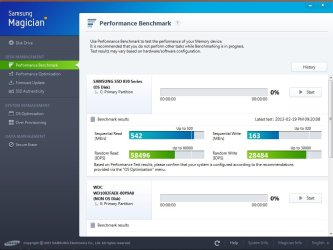
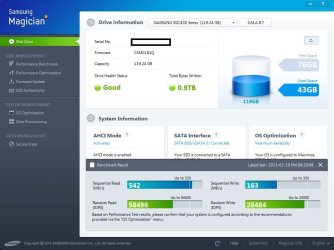
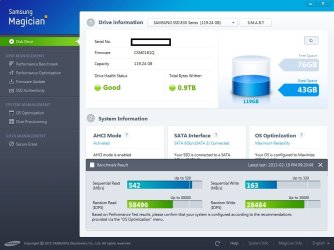
I ran the software, and did a screen capture of the drive information and a performance benchmark. There is tweaks that can be done, however, I can't get to them tonight. It reports that the drive health status is good (green).
 

Attachments

  • performance benchmark.jpg
    performance benchmark.jpg
    166 KB · Views: 9
  • drive information.jpg
    drive information.jpg
    161.4 KB · Views: 9

My Computer

OS
Windows 7 professional 64 bit
CPU
intel core i5-2500k [email protected]
Motherboard
Asus P8Z68-v Pro Gen3
Memory
4 X 4 corsair Vengeance DDR-3
Graphics Card(s)
MSI Twin Frozer (NVIDIA GeForce GTX 560Ti)
Monitor(s) Displays
Samsung SyncMaster 245B
Hard Drives
Samsung 830 series SSD 120 gb drive
Western Digital Caviar Black 1 tb
PSU
Corsair Enthusiast Series 750 watts
Case
Corsair Carbide series 500R
Cooling
Corsair Hydro Cooling H-100
Hi Noel,

I wanted to let you know I received a new message from Samsung:
"Thank you for contacting Samsung SSD Support regarding your concerns and inquiries. We apologize for any inconvenience this may be causing you. If you'd like to exchange this unit, email ******** and inform him that you'd like to RMA this drive. He may ask you some further questions to help resolve your issue because if the technicians find there is nothing wrong with the unit, it will be returned to you.

Thank you for your understanding."


My question is.. Do I backup this drive onto a portable drive, erase the SSD drive and send it back for them to check? (The thing is... it showed it was 'good' in the screen captures I posted, so I don't know what to do...)
I hope this makes sense...
Any suggestions would be greatly appreciated!


Thanks so much for any assistance; I promise, I will leave you alone!! lol... ;-)


My Computer

OS
Windows 7 professional 64 bit
CPU
intel core i5-2500k [email protected]
Motherboard
Asus P8Z68-v Pro Gen3
Memory
4 X 4 corsair Vengeance DDR-3
Graphics Card(s)
MSI Twin Frozer (NVIDIA GeForce GTX 560Ti)
Monitor(s) Displays
Samsung SyncMaster 245B
Hard Drives
Samsung 830 series SSD 120 gb drive
Western Digital Caviar Black 1 tb
PSU
Corsair Enthusiast Series 750 watts
Case
Corsair Carbide series 500R
Cooling
Corsair Hydro Cooling H-100
I know nothing worth repeating about SSD's - I've never had a chance to play with one yet, and haven't had to deal with problems involving them much.

I'll flag it to the techies here and see if they have any input...
 

My Computer

Computer type
Laptop
Computer Manufacturer/Model Number
Asus K52F or Lenovo B51-80
OS
Win 7 x64 Home Premium (and x86 VirtualBox VM)/Win10
CPU
i3 370M/i7 6500U
Motherboard
Asus/Lenovo
Memory
8GB - finally :)/8GB
Graphics Card(s)
it's an i3, dude!/dual Intel&nVidia
Sound Card
onboard
Monitor(s) Displays
15.6" built-in
Screen Resolution
1366x768/1920x1080
Hard Drives
750GB Seagate internal
Sundry external drives attached to other computers on the local network
1TB SSD on the Lenovo
PSU
n/a
Internet Speed
as much as I can get - usually on a dongle/phone, so <1MB/s
Antivirus
MSE/Defender
Browser
IE11/12/Edge/Chrome/FF(if I must)
Even though the SSD passed Samsung's test, the test could be in error.


My question is.. Do I backup this drive onto a portable drive, erase the SSD drive and send it back for them to check? (The thing is... it showed it was 'good' in the screen captures I posted, so I don't know what to do...)
I hope this makes sense...
If Samsung is willing to send you an RMA, I would follow your heart, back-up the drive, erase, and have them check it out.

At the worst you would get your old drive back (maybe refurbished), at the best they will send you a new one.
 

My Computer

Computer type
PC/Desktop
Computer Manufacturer/Model Number
Gateway DX4831-01e (Mid-Tower Desktop)
OS
Originally Win 7 Hm Prem x64 Ver 6.1.7600 Build 7601-SP1 | Upgraded to Windows 10 December 14, 2019
CPU
Intel i3 530 2.93GHz, 2933MHz 2 Cores 4 Logical Processors
Motherboard
Gateway H57M01 133 megahertz
Memory
6GB of 1,333MHz DDR3 SDRAM
Graphics Card(s)
32MB Intel Graphics Media Accelerator HD IGChip
Sound Card
Realtek High Definition Audio
Monitor(s) Displays
Gateway HX2000 20inch TFT active matrix TN
Screen Resolution
1600 x 900 x 59 hertz
Hard Drives
WDC WD10EADS-00M2B0 [HDD] (1000.20 GB) -- drive 0,
HL-DT-ST DVDRAM GH41N [CD-ROM dr]
Four card readers, and Four USB 2.0
PSU
300watts.
Case
Mid-Tower Desktop
Cooling
Stock from Gateway
Keyboard
Natural Ergonomic Keyboard 4000, see Other Info
Mouse
Orig. Gateway wore out now using Insignia USB wired optical
Internet Speed
Vz FIOS 10ms png 57.64Mbps down 65.53Mbps up Speedtest.org
Antivirus
Zamana Anti-logger with Anti-malware, MSE, Windows Firewall,
Browser
IE11.0.9600.19399-Upd ver11.0.135, Firefox 68.0.1 x64
Other Info
System Specs by Belarc.

BIOS: American Megatrends Inc. P01-A0 11/17/2009

Replaced the MS 'Natural' Standard PS/2 Enhanced 101-102 Keyboard with a new Natural Ergonomic Keyboard 4000 on August 1st 2014.

Canon Pixma MG3222 Printer.

Updated to IE11 on 12102015 | Fios Quantum Router g1100

Additional AV: SpywareBlaster, manual Mbam, SAS
Carling43, the numbers you posted... The reads seem to be good, but the write numbers are very low. The IOPS are about right on both. I agree with Anak, I would RMA the drive if they offered. Other than time, you have nothing to lose by doing so.
 

My Computers

System One System Two

  • Computer type
    PC/Desktop
    Computer Manufacturer/Model Number
    ALWAYS UNDER CONSTRUCTION
    OS
    Windows 11 Pro
    CPU
    Ryzen 9 5900X
    Motherboard
    Asus X570 Crosshair Viii Hero
    Memory
    32GB G Skill DDR4-3600
    Graphics Card(s)
    EVGA RTX 3080 FTW 3 Ultra
    Sound Card
    On Board/Sennheiser PC37X Headset
    Monitor(s) Displays
    3 X Asus 27"
    Screen Resolution
    2560x1440
    Hard Drives
    2 X 1 TB NVME drives
    PSU
    EVGA 850
    Case
    Phanteks Eclipse P400A
    Cooling
    EVGA 280 AIO
    Keyboard
    Logitech G510s/ Logitech G13
    Mouse
    Logitech G502
    Internet Speed
    24/1
    Antivirus
    ESET/MBAM Pro/SAS Pro
    Browser
    Chrome/ Firefox/ Edge
  • Computer type
    Laptop
    System Manufacturer/Model Number
    Dell 16 Plus
    OS
    Windows 11 Pro
    CPU
    Intel Ultra 9 288V
    Memory
    32 GB LPDDR5X 8533
    Monitor(s) Displays
    16" Mini-LED HDR600 Touch 90 Hz
    Screen Resolution
    2560X1600
    Hard Drives
    1 TB NVME
Perhaps you've already been over this.....
You might try using the other Intel Sata III port.

EDIT: Are you using Norton Ghost that comes with the drive?

Which port is the drive connected? And what is the version of Intel® Smart Response Technology
ASUS - - ASUS P8Z68-V PRO/GEN3
Intel® Z68 chipset :
2 x SATA 6Gb/s port(s), gray
4 x SATA 3Gb/s port(s), blue
Support Raid 0, 1, 5, 10
Support Intel® Smart Response Technology on 2nd generation Intel® Core™ processor family
Marvell® PCIe SATA 6Gb/s controller : *3
2 x SATA 6Gb/s port(s), navy blue
JMicron® JMB362 controller : *3
1 x eSATA 3Gb/s port(s), red
 

My Computer

Computer type
Laptop
Computer Manufacturer/Model Number
HP Pavilion dv6-6c10us
OS
x64 (6.3.9600) Win8.1 Pro & soon dual boot x64 (6.1.7601) Win7_SP1 HomePrem
CPU
AMD A6-3420M APU with Radeon(tm) HD Graphics
Motherboard
Hewlett-Packard 1805
Memory
6.00 GB
Graphics Card(s)
AMD Radeon(TM) HD 6520G
Sound Card
(1) AMD High Definition Audio Device (2) IDT High Definiti
Monitor(s) Displays
HP W2072a 20" LCD (1600 x 900) @ 60 Hz
Screen Resolution
1366 x 768 x 32 bits (4294967296 colors) @ 60 Hz
Hard Drives
ST640LM0 00 HM641JI SATA Disk Device
Keyboard
Logitech k520 wireless KB
Mouse
Logitech m320 wireless mouse (bundled with KB)
Internet Speed
15/5 | 54 MB Wireless 'n'
Antivirus
Realtime: Defender or Avast | On-demand: Malwarebytes, ESET
Browser
IE 11 on Win8, IE 10 on win 7
Other Info
Media: [Gimp, Audacity, VLC] || Comm: [WEmail 2012, Skype] || Productivity: [OpenOffice,| Textpad] || Utils: [Sysinternals, cCleaner, Speccy, Defraggler]
Okay.. will do.. .thank you all.. I'll keep you informed.. I was just worried about the questions the Samsung guy will ask me, since I know very little.. lol

Cheers,

Jim
 

My Computer

OS
Windows 7 professional 64 bit
CPU
intel core i5-2500k [email protected]
Motherboard
Asus P8Z68-v Pro Gen3
Memory
4 X 4 corsair Vengeance DDR-3
Graphics Card(s)
MSI Twin Frozer (NVIDIA GeForce GTX 560Ti)
Monitor(s) Displays
Samsung SyncMaster 245B
Hard Drives
Samsung 830 series SSD 120 gb drive
Western Digital Caviar Black 1 tb
PSU
Corsair Enthusiast Series 750 watts
Case
Corsair Carbide series 500R
Cooling
Corsair Hydro Cooling H-100
Hi Slartybart,
I can try that before sending it back.... thanks, good suggestion!

I'll keep you all posted..

Jim
 

My Computer

OS
Windows 7 professional 64 bit
CPU
intel core i5-2500k [email protected]
Motherboard
Asus P8Z68-v Pro Gen3
Memory
4 X 4 corsair Vengeance DDR-3
Graphics Card(s)
MSI Twin Frozer (NVIDIA GeForce GTX 560Ti)
Monitor(s) Displays
Samsung SyncMaster 245B
Hard Drives
Samsung 830 series SSD 120 gb drive
Western Digital Caviar Black 1 tb
PSU
Corsair Enthusiast Series 750 watts
Case
Corsair Carbide series 500R
Cooling
Corsair Hydro Cooling H-100
PS, no I did not use Norton Ghost..
 

My Computer

OS
Windows 7 professional 64 bit
CPU
intel core i5-2500k [email protected]
Motherboard
Asus P8Z68-v Pro Gen3
Memory
4 X 4 corsair Vengeance DDR-3
Graphics Card(s)
MSI Twin Frozer (NVIDIA GeForce GTX 560Ti)
Monitor(s) Displays
Samsung SyncMaster 245B
Hard Drives
Samsung 830 series SSD 120 gb drive
Western Digital Caviar Black 1 tb
PSU
Corsair Enthusiast Series 750 watts
Case
Corsair Carbide series 500R
Cooling
Corsair Hydro Cooling H-100

My Computer

Computer type
PC/Desktop
Computer Manufacturer/Model Number
Home made Desktop
OS
Windows 10 Pro. 64/ version 1709 Windows 7 Pro/64
CPU
Intel i7-6800K @ 4.3
Motherboard
ASUS X-99 Deluxe II
Memory
Corsair Platinum 16 gig @2400
Graphics Card(s)
EVGA GTX 1070 OC
Monitor(s) Displays
Asus 27" LED LCD/VE278Q
Screen Resolution
1920-1080 or 1280-720 HDMI
Hard Drives
INTEL SSD 730-240 Gb Sata 3.0/
PSU
EVGA Platium 1200W
Case
Phanteks Luxe Tempered Glass 8 fans/ one radiator
Cooling
XSPC/ Water Cooled CPU
Keyboard
Das 4 Professional
Mouse
Logitech M705/MX Anywhere 2-S
Internet Speed
100 mbits
Antivirus
Microsoft Security Essentials/ Malwarebytes Premium 3.0/ SAS
Browser
I.E. 11 default/Firefox/ ISP Time Warner Cable/Spectrum
Other Info
LG BluRay Burner/
Sound system-KLipsch-THX/
Icy Dock ssd Hot Swap bays.
carling43, thanks.

How are things now, I've had "connectivity" issues and am in the process of switching providers.
 

My Computer

Computer type
Laptop
Computer Manufacturer/Model Number
HP Pavilion dv6-6c10us
OS
x64 (6.3.9600) Win8.1 Pro & soon dual boot x64 (6.1.7601) Win7_SP1 HomePrem
CPU
AMD A6-3420M APU with Radeon(tm) HD Graphics
Motherboard
Hewlett-Packard 1805
Memory
6.00 GB
Graphics Card(s)
AMD Radeon(TM) HD 6520G
Sound Card
(1) AMD High Definition Audio Device (2) IDT High Definiti
Monitor(s) Displays
HP W2072a 20" LCD (1600 x 900) @ 60 Hz
Screen Resolution
1366 x 768 x 32 bits (4294967296 colors) @ 60 Hz
Hard Drives
ST640LM0 00 HM641JI SATA Disk Device
Keyboard
Logitech k520 wireless KB
Mouse
Logitech m320 wireless mouse (bundled with KB)
Internet Speed
15/5 | 54 MB Wireless 'n'
Antivirus
Realtime: Defender or Avast | On-demand: Malwarebytes, ESET
Browser
IE 11 on Win8, IE 10 on win 7
Other Info
Media: [Gimp, Audacity, VLC] || Comm: [WEmail 2012, Skype] || Productivity: [OpenOffice,| Textpad] || Utils: [Sysinternals, cCleaner, Speccy, Defraggler]
Hi All,

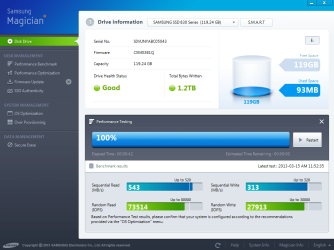
Just a quick update. I sent the SSD drive back to Samsung. They tested it and reported it be fine I will post their test.
I have attached both my test and theirs.. mine is the lower report on the right. I did not have the SSD drive attached to the Marvell connector. I did move it to another port, but, still it isn't doing too well. I'm now going through the setup of the board again to see if something is still wrong. I'm back to square one with BSOD and worst of all, no Windows Updates... this is very frustrating...
Thanks everyone for all of your help and suggestions; I greatly appreciate it!

Cheers
 

Attachments

  • samsungs test.PNG
    samsungs test.PNG
    140.3 KB · Views: 6
  • drive information.jpg
    drive information.jpg
    161.4 KB · Views: 7

My Computer

OS
Windows 7 professional 64 bit
CPU
intel core i5-2500k [email protected]
Motherboard
Asus P8Z68-v Pro Gen3
Memory
4 X 4 corsair Vengeance DDR-3
Graphics Card(s)
MSI Twin Frozer (NVIDIA GeForce GTX 560Ti)
Monitor(s) Displays
Samsung SyncMaster 245B
Hard Drives
Samsung 830 series SSD 120 gb drive
Western Digital Caviar Black 1 tb
PSU
Corsair Enthusiast Series 750 watts
Case
Corsair Carbide series 500R
Cooling
Corsair Hydro Cooling H-100
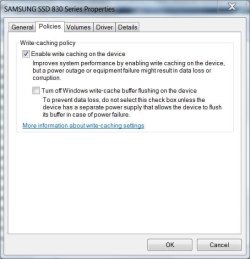
Try clicking the start button and typing device manager, open the device manager entry and expand disk drives. Right click your SSD and select properties the the policies tab. make sure it looks like this, with enable write caching checked.

z.JPG
 

My Computers

System One System Two

  • Computer type
    PC/Desktop
    Computer Manufacturer/Model Number
    ALWAYS UNDER CONSTRUCTION
    OS
    Windows 11 Pro
    CPU
    Ryzen 9 5900X
    Motherboard
    Asus X570 Crosshair Viii Hero
    Memory
    32GB G Skill DDR4-3600
    Graphics Card(s)
    EVGA RTX 3080 FTW 3 Ultra
    Sound Card
    On Board/Sennheiser PC37X Headset
    Monitor(s) Displays
    3 X Asus 27"
    Screen Resolution
    2560x1440
    Hard Drives
    2 X 1 TB NVME drives
    PSU
    EVGA 850
    Case
    Phanteks Eclipse P400A
    Cooling
    EVGA 280 AIO
    Keyboard
    Logitech G510s/ Logitech G13
    Mouse
    Logitech G502
    Internet Speed
    24/1
    Antivirus
    ESET/MBAM Pro/SAS Pro
    Browser
    Chrome/ Firefox/ Edge
  • Computer type
    Laptop
    System Manufacturer/Model Number
    Dell 16 Plus
    OS
    Windows 11 Pro
    CPU
    Intel Ultra 9 288V
    Memory
    32 GB LPDDR5X 8533
    Monitor(s) Displays
    16" Mini-LED HDR600 Touch 90 Hz
    Screen Resolution
    2560X1600
    Hard Drives
    1 TB NVME
Hi essenbe,

The Write-caching is enabled. Thank you for the suggestion though..

Cheers,
 

My Computer

OS
Windows 7 professional 64 bit
CPU
intel core i5-2500k [email protected]
Motherboard
Asus P8Z68-v Pro Gen3
Memory
4 X 4 corsair Vengeance DDR-3
Graphics Card(s)
MSI Twin Frozer (NVIDIA GeForce GTX 560Ti)
Monitor(s) Displays
Samsung SyncMaster 245B
Hard Drives
Samsung 830 series SSD 120 gb drive
Western Digital Caviar Black 1 tb
PSU
Corsair Enthusiast Series 750 watts
Case
Corsair Carbide series 500R
Cooling
Corsair Hydro Cooling H-100
Back
Top