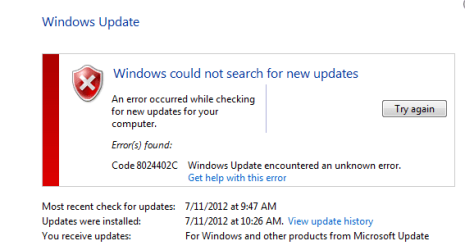
Windows Update Error code 8024402C

echipbk

New member
Hi,
I have tried every possible solution including scanning system using nod32, disabling firewall, adding trusted sites, checking host file, checking proxy, microsoft fix it service, and resetting windows update components; but it doesn't work. Can anybody help me? Thank you very much.
 

Attachments

  • error.png
    error.png
    18.8 KB · Views: 62

My Computer

OS
windows 7 Professional 32 bit SP1
Change the dns addresses

PREFERRED 4.2.2.1
ALTERNATE 4.2.2.2

Reboot the system.Updates should work
 

My Computer

OS
32 bit
Unlikely, since the Windows updates addressesare pretty much hard-coded into the system to prevent spoofing.

It may be worth checking DNS, though, as malware can get in the way.

@echipbk
Welcome to the Forums!


Please open an Elevated Command Prompt window, and run the following command

IPCONFIG /ALL

copy and paste the results to your reply


Here are some instructions to make life easier :)
1) To open an Elevated Command Prompt Window (the CP window), click on Start, All Programs, Accessories – then right-click on Command Prompt, and select Run as Administrator. Accept the UAC prompt.
2) To run the commands easier, highlight the block of commands, and right-click on the highlight – select Copy. In the CP Windows, click on the black/white icon at top left – select Paste. The commands will run but may not complete the last command, so hit the Enter Key once.
3) To copy the results... click on the Black/White icon in the top left, and select Edit... 'Select All', and hit the Enter key - then use Ctrl+V or r-click+Paste to paste it into your response.

 

My Computer

Computer type
Laptop
Computer Manufacturer/Model Number
Asus K52F or Lenovo B51-80
OS
Win 7 x64 Home Premium (and x86 VirtualBox VM)/Win10
CPU
i3 370M/i7 6500U
Motherboard
Asus/Lenovo
Memory
8GB - finally :)/8GB
Graphics Card(s)
it's an i3, dude!/dual Intel&nVidia
Sound Card
onboard
Monitor(s) Displays
15.6" built-in
Screen Resolution
1366x768/1920x1080
Hard Drives
750GB Seagate internal
Sundry external drives attached to other computers on the local network
1TB SSD on the Lenovo
PSU
n/a
Internet Speed
as much as I can get - usually on a dongle/phone, so <1MB/s
Antivirus
MSE/Defender
Browser
IE11/12/Edge/Chrome/FF(if I must)
It is very weird as it is working now. Currently I am using 4G telstra mobile network. I have read some information regarding error code 8024402C, and one of the things is about proxy server. I have checked everything including proxy server configuration (in Internet Explorer), but nothing went wrong. Then I came up with the idea of switching to another network (use my friend's wifi network), & it worked. After that, I switched back to my own network, & the error came up again :) . I think it is more related to my ISP network configuration. Anyway, thank you very much for your helps, guys.
 

My Computer

OS
windows 7 Professional 32 bit SP1
I have occasional problems with my 3G provider as well - they use transparent proxies, and it may be that it's these that are causing the problems.
 

My Computer

Computer type
Laptop
Computer Manufacturer/Model Number
Asus K52F or Lenovo B51-80
OS
Win 7 x64 Home Premium (and x86 VirtualBox VM)/Win10
CPU
i3 370M/i7 6500U
Motherboard
Asus/Lenovo
Memory
8GB - finally :)/8GB
Graphics Card(s)
it's an i3, dude!/dual Intel&nVidia
Sound Card
onboard
Monitor(s) Displays
15.6" built-in
Screen Resolution
1366x768/1920x1080
Hard Drives
750GB Seagate internal
Sundry external drives attached to other computers on the local network
1TB SSD on the Lenovo
PSU
n/a
Internet Speed
as much as I can get - usually on a dongle/phone, so <1MB/s
Antivirus
MSE/Defender
Browser
IE11/12/Edge/Chrome/FF(if I must)
Greetings Noel DP,

I got the exact problem with this thread's starter but unfortunately I got no other ISP to turn to. Here's the result from the CP windows like you suggested:

Microsoft Windows [Version 6.1.7600]
Copyright (c) 2009 Microsoft Corporation. All rights reserved.
C:\Users\AZNET02>ipconfig /all
Windows IP Configuration
Host Name . . . . . . . . . . . . : GUESSWHO02
Primary Dns Suffix . . . . . . . :
Node Type . . . . . . . . . . . . : Hybrid
IP Routing Enabled. . . . . . . . : No
WINS Proxy Enabled. . . . . . . . : No
Wireless LAN adapter Wireless Network Connection:
Connection-specific DNS Suffix . :
Description . . . . . . . . . . . : Realtek RTL8188CE Wireless LAN 802.11n PC
I-E NIC
Physical Address. . . . . . . . . : B4-74-9F-E1-05-3D
DHCP Enabled. . . . . . . . . . . : Yes
Autoconfiguration Enabled . . . . : Yes
Link-local IPv6 Address . . . . . : fe80::e1aa:8be8:55c5:62ef%13(Preferred)
IPv4 Address. . . . . . . . . . . : 192.168.2.39(Preferred)
Subnet Mask . . . . . . . . . . . : 255.255.255.0
Lease Obtained. . . . . . . . . . : Tuesday, 14 August 2012 5:37:07 AM
Lease Expires . . . . . . . . . . : Tuesday, 14 August 2012 10:37:06 AM
Default Gateway . . . . . . . . . : 192.168.2.1
DHCP Server . . . . . . . . . . . : 192.168.2.1
DHCPv6 IAID . . . . . . . . . . . : 313816223
DHCPv6 Client DUID. . . . . . . . : 00-01-00-01-17-BC-08-3F-00-26-6C-C1-EC-AD
DNS Servers . . . . . . . . . . . : 208.67.222.222
8.8.8.8
NetBIOS over Tcpip. . . . . . . . : Enabled
Ethernet adapter Local Area Connection:
Media State . . . . . . . . . . . : Media disconnected
Connection-specific DNS Suffix . :
Description . . . . . . . . . . . : Atheros AR8152/8158 PCI-E Fast Ethernet C
ontroller (NDIS 6.20)
Physical Address. . . . . . . . . : 00-26-6C-C1-EC-AD
DHCP Enabled. . . . . . . . . . . : Yes
Autoconfiguration Enabled . . . . : Yes
Tunnel adapter isatap.{293B7E8A-EA96-4C11-BBD1-2C7C022B7707}:
Media State . . . . . . . . . . . : Media disconnected
Connection-specific DNS Suffix . :
Description . . . . . . . . . . . : Microsoft ISATAP Adapter
Physical Address. . . . . . . . . : 00-00-00-00-00-00-00-E0
DHCP Enabled. . . . . . . . . . . : No
Autoconfiguration Enabled . . . . : Yes
Tunnel adapter isatap.{91E33284-D4A5-4464-B7E6-C28903CD81A0}:
Media State . . . . . . . . . . . : Media disconnected
Connection-specific DNS Suffix . :
Description . . . . . . . . . . . : Microsoft ISATAP Adapter #2
Physical Address. . . . . . . . . : 00-00-00-00-00-00-00-E0
DHCP Enabled. . . . . . . . . . . : No
Autoconfiguration Enabled . . . . : Yes
Tunnel adapter Teredo Tunneling Pseudo-Interface:
Connection-specific DNS Suffix . :
Description . . . . . . . . . . . : Microsoft Teredo Tunneling Adapter
Physical Address. . . . . . . . . : 00-00-00-00-00-00-00-E0
DHCP Enabled. . . . . . . . . . . : No
Autoconfiguration Enabled . . . . : Yes
IPv6 Address. . . . . . . . . . . : 2001:0:9d38:953c:24a1:ecd:3f57:fdd8(Prefe
rred)
Link-local IPv6 Address . . . . . : fe80::24a1:ecd:3f57:fdd8%24(Preferred)
Default Gateway . . . . . . . . . : ::
NetBIOS over Tcpip. . . . . . . . : Disabled
C:\Users\AZNET02>

Thank you and God Bless,

Zeamann

Unlikely, since the Windows updates addressesare pretty much hard-coded into the system to prevent spoofing.

It may be worth checking DNS, though, as malware can get in the way.

@echipbk
Welcome to the Forums!


Please open an Elevated Command Prompt window, and run the following command

IPCONFIG /ALL

copy and paste the results to your reply


Here are some instructions to make life easier :)
1) To open an Elevated Command Prompt Window (the CP window), click on Start, All Programs, Accessories – then right-click on Command Prompt, and select Run as Administrator. Accept the UAC prompt.
2) To run the commands easier, highlight the block of commands, and right-click on the highlight – select Copy. In the CP Windows, click on the black/white icon at top left – select Paste. The commands will run but may not complete the last command, so hit the Enter Key once.
3) To copy the results... click on the Black/White icon in the top left, and select Edit... 'Select All', and hit the Enter key - then use Ctrl+V or r-click+Paste to paste it into your response.
 

My Computer

Computer type
Laptop
Computer Manufacturer/Model Number
Toshiba Satellite C875
OS
Windows 7 Ultimate x64 SP1
CPU
Intel Core i3-3110M CPU @ 2.4GHz, 2 Core (s), 4 Logical Proc
Memory
4.0GB RAM
Graphics Card(s)
Intel HD Graphics 4000
@zeamann

Please start a new thread of your own - it will ensure that you get best attention (networking is not my strongest suit!)
Having said that, I can;t see any reference in the DNS to your router/Access point/Gateway - it's referring direct to OpenDNS and GoogleDNS servers. I would normally expect a reference to the access point, unless you have manually set DNS using those servers.
You should consider setting the adapter settings back to default throughout, until the problem is isolated and resolved - some ISP's can get snotty about you not using their DNS servers, I believe.
 

My Computer

Computer type
Laptop
Computer Manufacturer/Model Number
Asus K52F or Lenovo B51-80
OS
Win 7 x64 Home Premium (and x86 VirtualBox VM)/Win10
CPU
i3 370M/i7 6500U
Motherboard
Asus/Lenovo
Memory
8GB - finally :)/8GB
Graphics Card(s)
it's an i3, dude!/dual Intel&nVidia
Sound Card
onboard
Monitor(s) Displays
15.6" built-in
Screen Resolution
1366x768/1920x1080
Hard Drives
750GB Seagate internal
Sundry external drives attached to other computers on the local network
1TB SSD on the Lenovo
PSU
n/a
Internet Speed
as much as I can get - usually on a dongle/phone, so <1MB/s
Antivirus
MSE/Defender
Browser
IE11/12/Edge/Chrome/FF(if I must)
most grateful for your prompt response. i will start a new one and explain my network to my best ability.

thanks again and God Bless,

Zeamann.
 

My Computer

Computer type
Laptop
Computer Manufacturer/Model Number
Toshiba Satellite C875
OS
Windows 7 Ultimate x64 SP1
CPU
Intel Core i3-3110M CPU @ 2.4GHz, 2 Core (s), 4 Logical Proc
Memory
4.0GB RAM
Graphics Card(s)
Intel HD Graphics 4000
Back
Top