Solved Windows Update KB3071756 Error Code 8007054f

gpmen

New member
Local time
4:00 PM
Messages
5
Hi all,

I am seeking help in relation to Windows Update KB3071756 which won't install on our family laptop. The behaviour is always the same: it seems to install the update fine, it then reboots and fails to configure the update at the final stage and rolls back. It does that repeatedly so I have disabled automatic updates until I could find a solution. I have been searching around and I can see that many people have been battling with similar issue. I am grateful to any suggestion you coud offer - I am hopeful as I have seen some happy outcome in some other threads.

I have followed the instructions on posting, please find see attached the SURT log file, I had to remove the .cab files otherwise the compressed file was over 8 MB. I have also attached the Windows Updates log file as well as screenshot of output of command "sfs /scanow" which did not report any errors (screenshots below).

Thank you :)

windows_update_error.jpg
sfc_scanlog.jpg
View attachment 372088
View attachment 372085
 

My Computer

Computer type
Laptop
Computer Manufacturer/Model Number
Asus Eee PC 1215N
OS
Windows 7 Home Premium 32bit
CPU
CPU D525 @1.8 GHz
Memory
2 GB
Antivirus
Avast
Browser
Mozilla SeamMonkey
You have rather a mess of errors there - and some relate to very early updates
Code:
Checking Package Watchlist
(f)	CBS Watchlist Package Missing	0x80070002	Microsoft-Windows-MediaCenter-Package~31bf3856ad364e35~x86~~0.0.0.0	Package_6_for_KB2631813~31bf3856ad364e35~x86~~6.1.1.1	Package registry presence failed, possibly an orphaned package on package watchlist

Checking Component Watchlist
(f)	CBS Watchlist Component Missing	0x80070002	x86_microsoft-windows-ehome-mstvcapn_31bf3856ad364e35_0.0.0.0_none_7e2ac1fd42adabd1	Package_6_for_KB2631813~31bf3856ad364e35~x86~~6.1.1.1	Package registry presence failed, possibly an orphaned package on package watchlist

Checking Packages
(f)	CBS Registry Error	0x80070103	Microsoft-Windows-Client-Drivers-Package~31bf3856ad364e35~x86~~6.1.7601.17514		failed to get owner for package.
(f)	CBS Registry Error	0x80070103	Microsoft-Windows-SystemRestore-Package~31bf3856ad364e35~x86~~6.1.7601.17514		failed to get owner for package.
(f)	CBS Registry Error	0x80070002	Package_1_for_KB972636~31bf3856ad364e35~x86~~6.1.1.0		failed to get CurrentState
(f)	CBS Registry Error	0x80070002	Package_1_for_KB972636~31bf3856ad364e35~x86~~6.1.1.0		failed to get Visibility
(f)	CBS Registry Error	0x80070002	Package_1_for_KB973874~31bf3856ad364e35~x86~~6.1.1.0		failed to get CurrentState
(f)	CBS Registry Error	0x80070002	Package_1_for_KB973874~31bf3856ad364e35~x86~~6.1.1.0		failed to get Visibility
(f)	CBS Registry Error	0x80070002	Package_1_for_KB975364~31bf3856ad364e35~x86~~6.1.1.0		failed to get CurrentState
(f)	CBS Registry Error	0x80070002	Package_1_for_KB975364~31bf3856ad364e35~x86~~6.1.1.0		failed to get Visibility
(f)	CBS Registry Error	0x80070002	Package_1_for_KB978506~31bf3856ad364e35~x86~~6.1.1.0		failed to get CurrentState
(f)	CBS Registry Error	0x80070002	Package_1_for_KB978506~31bf3856ad364e35~x86~~6.1.1.0		failed to get Visibility
(f)	CBS Registry Error	0x80070002	Package_1_for_KB982519~31bf3856ad364e35~x86~~6.1.1.1		failed to get CurrentState
(f)	CBS Registry Error	0x80070002	Package_1_for_KB982519~31bf3856ad364e35~x86~~6.1.1.1		failed to get Visibility
(f)	CBS Registry Error	0x80070002	Package_1_for_KB982665~31bf3856ad364e35~x86~~6.1.1.2		failed to get CurrentState
(f)	CBS Registry Error	0x80070002	Package_1_for_KB982665~31bf3856ad364e35~x86~~6.1.1.2		failed to get Visibility
(f)	CBS Registry Error	0x80070002	Package_2_for_KB2644615~31bf3856ad364e35~x86~~6.1.1.0		failed to get CurrentState
(f)	CBS Registry Error	0x80070002	Package_2_for_KB974455~31bf3856ad364e35~x86~~6.1.1.0		failed to get CurrentState
(f)	CBS Registry Error	0x80070002	Package_2_for_KB974455~31bf3856ad364e35~x86~~6.1.1.0		failed to get Visibility
(f)	CBS Registry Error	0x80070002	Package_2_for_KB976325~31bf3856ad364e35~x86~~6.1.1.1		failed to get CurrentState
(f)	CBS Registry Error	0x80070002	Package_2_for_KB976325~31bf3856ad364e35~x86~~6.1.1.1		failed to get Visibility
(f)	CBS Registry Error	0x80070002	Package_2_for_KB976749~31bf3856ad364e35~x86~~6.1.1.0		failed to get CurrentState
(f)	CBS Registry Error	0x80070002	Package_2_for_KB976749~31bf3856ad364e35~x86~~6.1.1.0		failed to get Visibility
(f)	CBS Registry Error	0x80070002	Package_4_for_KB978207~31bf3856ad364e35~x86~~6.1.1.1		failed to get CurrentState
(f)	CBS Registry Error	0x80070002	Package_4_for_KB978207~31bf3856ad364e35~x86~~6.1.1.1		failed to get Visibility
(f)	CBS Registry Error	0x80070002	Package_for_KB2446710_SP1~31bf3856ad364e35~x86~~6.1.1.3		failed to get Visibility
(f)	CBS Registry Error	0x80070103	Package_for_KB2507938~31bf3856ad364e35~x86~~6.1.1.4		failed to get owner for package.
(f)	CBS Registry Error	0x80070002	Package_for_KB3046482~31bf3856ad364e35~x86~~6.1.1.0		failed to get CurrentState
(f)	CBS Registry Error	0x80070002	Package_for_KB3046482~31bf3856ad364e35~x86~~6.1.1.0		failed to get Visibility
(f)	CBS Registry Error	0x80070002	Package_for_KB972636_RTM~31bf3856ad364e35~x86~~6.1.1.0		failed to get CurrentState
(f)	CBS Registry Error	0x80070002	Package_for_KB972636_RTM~31bf3856ad364e35~x86~~6.1.1.0		failed to get Visibility
(f)	CBS Registry Error	0x80070002	Package_for_KB972636~31bf3856ad364e35~x86~~6.1.1.0		failed to get CurrentState
(f)	CBS Registry Error	0x80070002	Package_for_KB972636~31bf3856ad364e35~x86~~6.1.1.0		failed to get Visibility
(f)	CBS Registry Error	0x80070002	Package_for_KB973874_RTM~31bf3856ad364e35~x86~~6.1.1.0		failed to get CurrentState
(f)	CBS Registry Error	0x80070002	Package_for_KB973874_RTM~31bf3856ad364e35~x86~~6.1.1.0		failed to get Visibility
(f)	CBS Registry Error	0x80070002	Package_for_KB973874~31bf3856ad364e35~x86~~6.1.1.0		failed to get CurrentState
(f)	CBS Registry Error	0x80070002	Package_for_KB973874~31bf3856ad364e35~x86~~6.1.1.0		failed to get Visibility
(f)	CBS Registry Error	0x80070002	Package_for_KB974455_RTM~31bf3856ad364e35~x86~~6.1.1.0		failed to get CurrentState
(f)	CBS Registry Error	0x80070002	Package_for_KB974455_RTM~31bf3856ad364e35~x86~~6.1.1.0		failed to get Visibility
(f)	CBS Registry Error	0x80070002	Package_for_KB975364_RTM~31bf3856ad364e35~x86~~6.1.1.0		failed to get CurrentState
(f)	CBS Registry Error	0x80070002	Package_for_KB975364_RTM~31bf3856ad364e35~x86~~6.1.1.0		failed to get Visibility
(f)	CBS Registry Error	0x80070002	Package_for_KB976325_RTM~31bf3856ad364e35~x86~~6.1.1.1		failed to get CurrentState
(f)	CBS Registry Error	0x80070002	Package_for_KB976325_RTM~31bf3856ad364e35~x86~~6.1.1.1		failed to get Visibility
(f)	CBS Registry Error	0x80070002	Package_for_KB976749_RTM~31bf3856ad364e35~x86~~6.1.1.0		failed to get CurrentState
(f)	CBS Registry Error	0x80070002	Package_for_KB976749_RTM~31bf3856ad364e35~x86~~6.1.1.0		failed to get Visibility
(f)	CBS Registry Error	0x80070002	Package_for_KB978207_RTM~31bf3856ad364e35~x86~~6.1.1.1		failed to get CurrentState
(f)	CBS Registry Error	0x80070002	Package_for_KB978207_RTM~31bf3856ad364e35~x86~~6.1.1.1		failed to get Visibility
(f)	CBS Registry Error	0x80070002	Package_for_KB978506_RTM~31bf3856ad364e35~x86~~6.1.1.0		failed to get CurrentState
(f)	CBS Registry Error	0x80070002	Package_for_KB978506_RTM~31bf3856ad364e35~x86~~6.1.1.0		failed to get Visibility
(f)	CBS Registry Error	0x80070002	Package_for_KB982519_RTM~31bf3856ad364e35~x86~~6.1.1.1		failed to get CurrentState
(f)	CBS Registry Error	0x80070002	Package_for_KB982519_RTM~31bf3856ad364e35~x86~~6.1.1.1		failed to get Visibility
(f)	CBS Registry Error	0x80070002	Package_for_KB982665_RTM~31bf3856ad364e35~x86~~6.1.1.2		failed to get CurrentState
(f)	CBS Registry Error	0x80070002	Package_for_KB982665_RTM~31bf3856ad364e35~x86~~6.1.1.2		failed to get Visibility
(f)	CBS Registry Error	0x80070002	Win8IP-Microsoft-Windows-DownlevelApisets-Com-WinIP-Package~31bf3856ad364e35~x86~ro-RO~7.1.7601.16492		failed to get CurrentState
(f)	CBS Registry Error	0x80070002	Win8IP-Microsoft-Windows-DownlevelApisets-Com-WinIP-Package~31bf3856ad364e35~x86~ro-RO~7.1.7601.16492		failed to get Visibility
(f)	CBS Registry Error	0x80070002	Win8IP-Microsoft-Windows-DownlevelApisets-Com-WinIP-Package~31bf3856ad364e35~x86~~7.1.7601.16492		failed to get CurrentState
(f)	CBS Registry Error	0x80070002	Win8IP-Microsoft-Windows-DownlevelApisets-Com-WinIP-Package~31bf3856ad364e35~x86~~7.1.7601.16492		failed to get Visibility

Checking Component Store

Summary:
Seconds executed: 5018
 Found 57 errors
  CBS Registry Error Total count: 55
  CBS Watchlist Package Missing Total count: 1
  CBS Watchlist Component Missing Total count: 1

I think your best option is a repair install if you have access to appropriate media - or a reset back to factory condition if not.

MS appear to have recently opened their download site to OEM customers, so you could try there - https://www.microsoft.com/en-gb/software-download/home - and then follow the instructions for a repair install here... http://www.sevenforums.com/tutorials/3413-repair-install.html?ltr=R
 

My Computer

Computer type
Laptop
Computer Manufacturer/Model Number
Asus K52F or Lenovo B51-80
OS
Win 7 x64 Home Premium (and x86 VirtualBox VM)/Win10
CPU
i3 370M/i7 6500U
Motherboard
Asus/Lenovo
Memory
8GB - finally :)/8GB
Graphics Card(s)
it's an i3, dude!/dual Intel&nVidia
Sound Card
onboard
Monitor(s) Displays
15.6" built-in
Screen Resolution
1366x768/1920x1080
Hard Drives
750GB Seagate internal
Sundry external drives attached to other computers on the local network
1TB SSD on the Lenovo
PSU
n/a
Internet Speed
as much as I can get - usually on a dongle/phone, so <1MB/s
Antivirus
MSE/Defender
Browser
IE11/12/Edge/Chrome/FF(if I must)
Hi NoelDP,

Thank you for your reply - I feared that much.
This is an old installation of Windows 7, I've been using CCleaner to keep things running smoothly. I wonder whether the cleaning of the registry could have caused these errors.
Thanks for the links as well, this is very useful to know. It is always a struggle with windows OEM as often the standard recovery option from the manufacturer is to revert to factory settings which is rarely a desirable option.
Anyway, this is a job for the weekend and I'll make sure I back up my disks beforehand. Would you know of any proven reliable backup solution for W7 outside of MS backup/restore service?
 

My Computer

Computer type
Laptop
Computer Manufacturer/Model Number
Asus Eee PC 1215N
OS
Windows 7 Home Premium 32bit
CPU
CPU D525 @1.8 GHz
Memory
2 GB
Antivirus
Avast
Browser
Mozilla SeamMonkey
personally, I rely on copy/paste - but then I have the tools and storage available for that. There are a number of free imaging tools available which will do the job nicely, but I have no experience with them. Acronis is often spoken well of in these forums.
 

My Computer

Computer type
Laptop
Computer Manufacturer/Model Number
Asus K52F or Lenovo B51-80
OS
Win 7 x64 Home Premium (and x86 VirtualBox VM)/Win10
CPU
i3 370M/i7 6500U
Motherboard
Asus/Lenovo
Memory
8GB - finally :)/8GB
Graphics Card(s)
it's an i3, dude!/dual Intel&nVidia
Sound Card
onboard
Monitor(s) Displays
15.6" built-in
Screen Resolution
1366x768/1920x1080
Hard Drives
750GB Seagate internal
Sundry external drives attached to other computers on the local network
1TB SSD on the Lenovo
PSU
n/a
Internet Speed
as much as I can get - usually on a dongle/phone, so <1MB/s
Antivirus
MSE/Defender
Browser
IE11/12/Edge/Chrome/FF(if I must)
Hi NoelDP,

Thank you very much for your time and advice.
I will close this thread and attempt to repair my Windows 7.
 
Last edited:

My Computer

Computer type
Laptop
Computer Manufacturer/Model Number
Asus Eee PC 1215N
OS
Windows 7 Home Premium 32bit
CPU
CPU D525 @1.8 GHz
Memory
2 GB
Antivirus
Avast
Browser
Mozilla SeamMonkey
Good luck!
 

My Computer

Computer type
Laptop
Computer Manufacturer/Model Number
Asus K52F or Lenovo B51-80
OS
Win 7 x64 Home Premium (and x86 VirtualBox VM)/Win10
CPU
i3 370M/i7 6500U
Motherboard
Asus/Lenovo
Memory
8GB - finally :)/8GB
Graphics Card(s)
it's an i3, dude!/dual Intel&nVidia
Sound Card
onboard
Monitor(s) Displays
15.6" built-in
Screen Resolution
1366x768/1920x1080
Hard Drives
750GB Seagate internal
Sundry external drives attached to other computers on the local network
1TB SSD on the Lenovo
PSU
n/a
Internet Speed
as much as I can get - usually on a dongle/phone, so <1MB/s
Antivirus
MSE/Defender
Browser
IE11/12/Edge/Chrome/FF(if I must)
they were giant idiots for not doing so long before.
their official policy was that the user has to buy and wait for the recovery disks to be shipped from the OEM. obviously the OEMs are such cheap losers that they won't allow the images to be digitally delivered like in the case of OS X.
Honest people had to resort to sneaking around on torrent sites. An effing shame.
 

My Computer

Computer type
PC/Desktop
OS
Windows 7 X64
It's actually part of the licensing requirement that the OEM's do no distribute electronically. MS tends to enforce that policy.
As far as I know only Dell and H-P can distribute MS software electronically (And I think even then it's only for Office)
 

My Computer

Computer type
Laptop
Computer Manufacturer/Model Number
Asus K52F or Lenovo B51-80
OS
Win 7 x64 Home Premium (and x86 VirtualBox VM)/Win10
CPU
i3 370M/i7 6500U
Motherboard
Asus/Lenovo
Memory
8GB - finally :)/8GB
Graphics Card(s)
it's an i3, dude!/dual Intel&nVidia
Sound Card
onboard
Monitor(s) Displays
15.6" built-in
Screen Resolution
1366x768/1920x1080
Hard Drives
750GB Seagate internal
Sundry external drives attached to other computers on the local network
1TB SSD on the Lenovo
PSU
n/a
Internet Speed
as much as I can get - usually on a dongle/phone, so <1MB/s
Antivirus
MSE/Defender
Browser
IE11/12/Edge/Chrome/FF(if I must)
I stand corrected. Still, that's more of a reason to allow people to download it. I spent a few days on torrent sites to get the brazillian version of Windows. Another time I had to copy the recovery partition from another laptop becuase the built in Windows 8 key wouldn't work.
 

My Computer

Computer type
PC/Desktop
OS
Windows 7 X64
Hi,

i thought I would report back as I think it may be of interest to others.
I am not out of the water yet, although I must have spent over 8 hours on this problem.
In the plus side, I am learning a lot but it is painful ...
So, i followed the advice given earlier and went on a hunt of a MS W7 installation disks. Some time ago, I remembered that I was able to download a 64 bits W7 iso file from Digital Rivers for a test machine I was trying to build. So I set out on the same path but it didn't take long for me to realise that this option has been taken away by MS. Instead MS provide a software recovery which as I am sure you know does not let you download iso files if you have an OEM version of Windows 7. Like many I guess, I am baffled by this: MS took away a very helpful and useful feature when we experience trouble like mine. I am sure that they have their reason, the system must have been abused. Anyway, I considered the following options:

1 - Calling the OEM provider (Asus) and ask whether they would send me some disks.
2 - Calling MS customer service and plead for some spare disks.
3 - Buy cheap disks online.

I quickly discarded option 1, as my machine being 5 years old and out of support, the chances of getting a disk from them are remote. And also I am not sure that they are allowed to send installation disks for OEM versions of w7.
I don't have much hope in Option 2 neither because MS have little interest in letting me have a copy, they have no obligation to do so, they might just maybe just be sympathetic to my cause. And I looked at buying some unofficial looking disks which seemed dodgy. So, what to do? Well it didn't take long to find a torrent source that had the iso file I was after. I followed the advice read somewhere which was to carefully compare the sha1 and md5 checksum against MS sources. This gave me a boost I confidence that I had a genuine iso file. Perhaps one of the lesson to take from this is to always try and get installation disks with OEM to cater for exactly this type of problems.
So, passed the first hurdle, I engaged into the actual repair which went like a breeze thanks to the tutorial. I left it running overnight and in the morning it was prompting me for the product key which I duly keyed in. I spent the next 3 hours sourcing and installing the specific drivers for various devices. And finally, I thought I needed to thoroughly check for malware/adware/viruses. I also installed a well thought of disk imaging system such as Macrium as I had plenty of problems with MS backup/restore. Malwarebytes found some PUP (Babylon) so I proceeded of getting rid of that and the procedure from Malwarebyte site involved using additional tools such adwcleaner and Hitmanpro. After succeeding in this, I have what seems to be a valid system with all my software as they were *but* Windows Update still doesn’t work. It starts searching for updating and hangs, never return. I checked that my copy of W7 was correctly activated by entering the key again and checking the confirmation pop-up.
Some more research pointed at some solutions from MS which I tried:
https://support.microsoft.com/en-gb/kb/971058
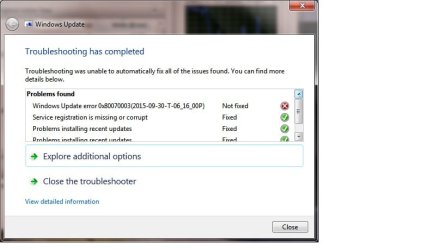
With no success, MS troubleshooter found quite a few problems and fixed them all except one as seen in the screenshot below.
windows_update_troubleshooter.jpg
Although after this, the behaviour seemed changed: the windows updates search functin failed with code 80080005 this time. I restarted it again and it is running for a long time now, not looking hopeful. As I write, I am trying to figure out my next move. If anybody has any ideas, please let me know, I will be reading and I will keep you posted.
Thanks folks, the battle continues. I am starting to get bleary eyes though.
 

My Computer

Computer type
Laptop
Computer Manufacturer/Model Number
Asus Eee PC 1215N
OS
Windows 7 Home Premium 32bit
CPU
CPU D525 @1.8 GHz
Memory
2 GB
Antivirus
Avast
Browser
Mozilla SeamMonkey
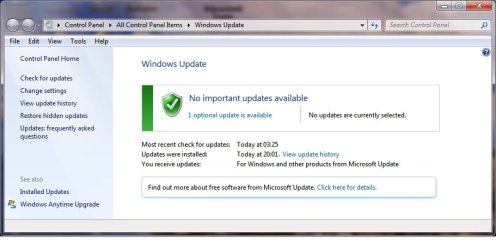
Well after many many hours, I am pleased to report success at last. I have learnt some lessons in the process which I am sharing here.
So, I had my repaired my Windows 7 installation as advised and I kicked off the Windows updates process manually. One hour or two passed and it remained stuck on "searching for Updates". My laptop became very sluggish and unresponsive. I identified that a process named "svchost.exe" was using more than 1 GBytes of memory. I killed the process and my machine started to respond again. But it also killed the update process with the error code mentioned in my earlier post. I did some more research and it has to be said that this site has a mine of very useful information. I noticed that NoelDP had mentioned on another thread to that updates can take a very long time on computers with what is nowadays a small configuration (2 GB RAM). I had also "reset" Windows Updates component by following a procedure found on Microsoft support site and for which there is a very handy batch script in a tutorial here.
I let mine run overnight and in the morning it had found 206 updates to installs. I let it run with all the updates and .... found that it failed after 3 hours and installing only few dozens. I followed the reset procedure again. And restarted manually the updates leaving it running overnight. It seems to take 5 hours to search and find some updates to intall again. I have read somewhere that there may be an issue when running the updates manually as opposed to letting the computer searching and installing updates automatically which my machine was configured to do at 3 am. I proceeded with installing the updates by batches this time, sorting them by categories. And after many days and night, eventually all updates seem to be properly installed. I also noticed that some individual .NET updates took hours to install so the only advise I can give is to be patient. Good luck to whoever is reading I am off to create a system image now because I don't want to have to go through this again. And thank you to members of this forum who provide a helping hand in dire time where it feels like throwing the machine away.

wu_success.jpg
 

My Computer

Computer type
Laptop
Computer Manufacturer/Model Number
Asus Eee PC 1215N
OS
Windows 7 Home Premium 32bit
CPU
CPU D525 @1.8 GHz
Memory
2 GB
Antivirus
Avast
Browser
Mozilla SeamMonkey
Back
Top