Windows won't remember wifi passwords

freelancer91

New member
Local time
5:09 PM
Messages
71
For some reason, on my desktop, I have to input the wifi password to a network every single time I want to connect. If my connection drops, I have to resubmit the password. This is on a network with a WEP passcode (I'm not the one who manages the network in my house so don't ask why we haven't switched to WPA2.). On my laptop, it works as it should. What could cause Windows 7 x64 to behave this way?
 

My Computer My Computer

Computer Manufacturer/Model Number
Custom Desktop, Dell Studio XPS 1340 laptop
OS
DT and LT: Windows 7 and Fedora 14
CPU
DT: Intel QX9770, LT: Intel P8600
Motherboard
DT: Intel DX48BT2
Memory
DT: 8GB OCZ DDR3 PC3-10666 Gold Edition LT: 4GB DDR3-1066
Graphics Card(s)
DT: BFG Geforce GTX 295 (B), LT: NVidia Geforce 9400M G
Sound Card
DT: Integrated LT: Integrated
Monitor(s) Displays
DT: Acer 23 inch 1920x1080 monitors, LT: 13 inch
Screen Resolution
DT: 3840x1080 LT: 1280x800
Hard Drives
DT: Samsung SpinPoint 1TB HD103UJ 7200RPM HDD+Fantom Drives 2TB 7200rpm External+OCZ Vertex Series 30GB SSD (boot)
LT: Seagate Momentus 7200RPM 320GB 2.5'' HDD
PSU
DT: Rosewill Bronze Series 1000W LT: 6 cell 62837mWh Li-ion
Case
DT:Thermaltake Armor Series LCS, LT:Dell Black Studio XPS 13
Cooling
DT: Custom watercooling setup
Keyboard
DT: Kengsinton PC/Mac LT: Integrated backlit keyboard
Mouse
DT: Logitech USB Optical Mouse LT: Integrated Track Pad
Internet Speed
380KB/s download on a good day...
Other Info
DT: CD/DVDRW Drive: Hp dvd1140, Multifunction front panel w/ 4 USB ports (2 Powered with 5V and 12V), Powered External SATA, 25-in-1 card reader, and audio ports

LT: Integrated Webcam with Microphone array, 8-in-1 card reader
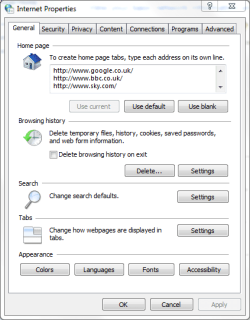
Go into Internet Options and look under Browsing History and make sure that "Delete browsing history on exit" is unchecked.

IEProperties.PNG
 

My Computer My Computer

Computer Manufacturer/Model Number
HP Pavilion Elite 495UK
OS
Windows 7 Ultimate SP1 64-Bit
CPU
Intel Core i7 870 @ 2.93GHz
Motherboard
MSI 2A9C (CPU1)
Memory
8Gb Dual-Channel DDR3 @ 664MHz
Graphics Card(s)
nVidia GeForce GTX 460 1024MB dedicated RAM
Sound Card
Realtek HD Audio
Monitor(s) Displays
HP2310i
Screen Resolution
1920 x 1080
Hard Drives
1x1954GB Hitachi HDS22020ALA 330 (RAID), 1x1954GB Hitachi External for backup and storage
PSU
460W
Case
HP Elite
Cooling
Air cooled
Keyboard
Logitech K750 solar-powered keyboard
Mouse
Logitech Wireless M180 mouse
Internet Speed
2Mb
Other Info
Pure Avanti Flow Internet Radio with iPod Dock, 64Gb iPod, HP USB Speakers, Sony MDR-V500 Headphones, Sony Vaio F-Series Laptop
No, I'm not talking about passwords within the browser. I'm talking about the key you must put in to gain access to an encrypted wireless network. On my desktop, it never seems to store these passwords and asks me every single time to put it in. It never does this on my laptop.
 

My Computer My Computer

Computer Manufacturer/Model Number
Custom Desktop, Dell Studio XPS 1340 laptop
OS
DT and LT: Windows 7 and Fedora 14
CPU
DT: Intel QX9770, LT: Intel P8600
Motherboard
DT: Intel DX48BT2
Memory
DT: 8GB OCZ DDR3 PC3-10666 Gold Edition LT: 4GB DDR3-1066
Graphics Card(s)
DT: BFG Geforce GTX 295 (B), LT: NVidia Geforce 9400M G
Sound Card
DT: Integrated LT: Integrated
Monitor(s) Displays
DT: Acer 23 inch 1920x1080 monitors, LT: 13 inch
Screen Resolution
DT: 3840x1080 LT: 1280x800
Hard Drives
DT: Samsung SpinPoint 1TB HD103UJ 7200RPM HDD+Fantom Drives 2TB 7200rpm External+OCZ Vertex Series 30GB SSD (boot)
LT: Seagate Momentus 7200RPM 320GB 2.5'' HDD
PSU
DT: Rosewill Bronze Series 1000W LT: 6 cell 62837mWh Li-ion
Case
DT:Thermaltake Armor Series LCS, LT:Dell Black Studio XPS 13
Cooling
DT: Custom watercooling setup
Keyboard
DT: Kengsinton PC/Mac LT: Integrated backlit keyboard
Mouse
DT: Logitech USB Optical Mouse LT: Integrated Track Pad
Internet Speed
380KB/s download on a good day...
Other Info
DT: CD/DVDRW Drive: Hp dvd1140, Multifunction front panel w/ 4 USB ports (2 Powered with 5V and 12V), Powered External SATA, 25-in-1 card reader, and audio ports

LT: Integrated Webcam with Microphone array, 8-in-1 card reader
In that case, as it is only your Window 7 setup that does this I think you should ask your "network controller" (your Dad?) to go into the router settings and change them from WEP to WPA2.

This will mean, of course, that all the computer wifi settings on the network would need to be updated too.
 

My Computer My Computer

Computer Manufacturer/Model Number
HP Pavilion Elite 495UK
OS
Windows 7 Ultimate SP1 64-Bit
CPU
Intel Core i7 870 @ 2.93GHz
Motherboard
MSI 2A9C (CPU1)
Memory
8Gb Dual-Channel DDR3 @ 664MHz
Graphics Card(s)
nVidia GeForce GTX 460 1024MB dedicated RAM
Sound Card
Realtek HD Audio
Monitor(s) Displays
HP2310i
Screen Resolution
1920 x 1080
Hard Drives
1x1954GB Hitachi HDS22020ALA 330 (RAID), 1x1954GB Hitachi External for backup and storage
PSU
460W
Case
HP Elite
Cooling
Air cooled
Keyboard
Logitech K750 solar-powered keyboard
Mouse
Logitech Wireless M180 mouse
Internet Speed
2Mb
Other Info
Pure Avanti Flow Internet Radio with iPod Dock, 64Gb iPod, HP USB Speakers, Sony MDR-V500 Headphones, Sony Vaio F-Series Laptop
Sorted!

It happened exactly the same for me too. Except I AM running WPA2 security!

The WLAN password is encrypted and stored in an XML file in c:\Program Data\Microsoft\Wlansvc\Profiles\Interfaces\..GUID\.
However, the xml file was being deleted so the settings not kept. I made the file RO after logging in and connecting and now all is fixed.
Goodness knows why this is happening though.
(You need admin rights to be able to change the file attributes).
 

My Computer My Computer

OS
Win7 x64
Aweome! Unfortunately, my wifi antenna just died a few days ago and I have a new one in the mail. Will try it out when it arrives...
 

My Computer My Computer

Computer Manufacturer/Model Number
Custom Desktop, Dell Studio XPS 1340 laptop
OS
DT and LT: Windows 7 and Fedora 14
CPU
DT: Intel QX9770, LT: Intel P8600
Motherboard
DT: Intel DX48BT2
Memory
DT: 8GB OCZ DDR3 PC3-10666 Gold Edition LT: 4GB DDR3-1066
Graphics Card(s)
DT: BFG Geforce GTX 295 (B), LT: NVidia Geforce 9400M G
Sound Card
DT: Integrated LT: Integrated
Monitor(s) Displays
DT: Acer 23 inch 1920x1080 monitors, LT: 13 inch
Screen Resolution
DT: 3840x1080 LT: 1280x800
Hard Drives
DT: Samsung SpinPoint 1TB HD103UJ 7200RPM HDD+Fantom Drives 2TB 7200rpm External+OCZ Vertex Series 30GB SSD (boot)
LT: Seagate Momentus 7200RPM 320GB 2.5'' HDD
PSU
DT: Rosewill Bronze Series 1000W LT: 6 cell 62837mWh Li-ion
Case
DT:Thermaltake Armor Series LCS, LT:Dell Black Studio XPS 13
Cooling
DT: Custom watercooling setup
Keyboard
DT: Kengsinton PC/Mac LT: Integrated backlit keyboard
Mouse
DT: Logitech USB Optical Mouse LT: Integrated Track Pad
Internet Speed
380KB/s download on a good day...
Other Info
DT: CD/DVDRW Drive: Hp dvd1140, Multifunction front panel w/ 4 USB ports (2 Powered with 5V and 12V), Powered External SATA, 25-in-1 card reader, and audio ports

LT: Integrated Webcam with Microphone array, 8-in-1 card reader
Thankyou i love you!

Sorry for digging up an old post, but i just want to say to robbieg: I F***NG LOVE YOU MAN!!! This has been killing me for ages! YOU ROCK MY SOX!

I never do this, but I only registered so I could send my appreciation to you. You have just cured a long term headache for me! :party::party::party:
 

My Computer My Computer

Computer type
PC/Desktop
OS
W7Ux64
this worked for me. I've been trying to figure this out for months why it would not remember the wifi password. thanks!


It happened exactly the same for me too. Except I AM running WPA2 security!

The WLAN password is encrypted and stored in an XML file in c:\Program Data\Microsoft\Wlansvc\Profiles\Interfaces\..GUID\.
However, the xml file was being deleted so the settings not kept. I made the file RO after logging in and connecting and now all is fixed.
Goodness knows why this is happening though.
(You need admin rights to be able to change the file attributes).
 

My Computer My Computer

Computer type
PC/Desktop
OS
Win 7 Pro, Mac OS Sierra
Internet Speed
fast. ;)
Antivirus
panda free
Browser
firefox mostly, safari, anything but IE. IE sucks!
Other Info
Mac user 27+, but I like windows 7. Very Mac like. My A+ cert is from 2008 and I don't work on computers every day, so i'm getting rusty. This forum is a BIG help.
It happened exactly the same for me too. Except I AM running WPA2 security!

The WLAN password is encrypted and stored in an XML file in c:\Program Data\Microsoft\Wlansvc\Profiles\Interfaces\..GUID\.
However, the xml file was being deleted so the settings not kept. I made the file RO after logging in and connecting and now all is fixed.
Goodness knows why this is happening though.
(You need admin rights to be able to change the file attributes).

I made an account just so I can reply to this thread because this really helped me.

Though instead of changing the file extension (which wasn't so helpful because apparently my problem was there was a conflict between the settings of my profiles), I opted to DELETE all of the profiles under Interfaces. LOL Yeah, it will forget all of the other remembered passwords but at least I only have to input them once; compared to before when I had to re-type the password every time I turn on my laptop.

Kudos to robbieg and sevenforums!
 

My Computer My Computer

Computer type
Laptop
Computer Manufacturer/Model Number
HP 14 TouchSmart Notebook
OS
Windows 10 Home Singe Language 64-bit
CPU
Intel(R) Core(TM) i3-3110M CPU @ 2.40GHz
Memory
4GB Elpida 1600MHz
Graphics Card(s)
NVIDIA GeForce 820M
Hard Drives
ST500LT012-1DG142
Antivirus
Panda Free Antivirus
Browser
Google Chrome
No, I'm not talking about passwords within the browser. I'm talking about the key you must put in to gain access to an encrypted wireless network. On my desktop, it never seems to store these passwords and asks me every single time to put it in. It never does this on my laptop. Domain Sorgulama | Alan adi Sorgulama
 

My Computer My Computer

Computer type
PC/Desktop
Computer Manufacturer/Model Number
Hp
OS
Windows 7
Graphics Card(s)
Nvidia
Antivirus
Kaspersky
Browser
Google Chrome
password

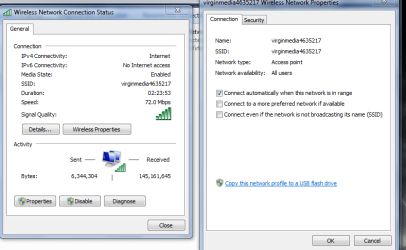
Are your settings like this..


Roy
 

Attachments

  • pword.PNG
    pword.PNG
    24.9 KB · Views: 1

My Computer My Computer

Computer type
PC/Desktop
Computer Manufacturer/Model Number
medionl/Aspire 6930G/acer x55a
OS
W7 home premium 32bit/W7HP 64bit/w10 tp insider ring
CPU
E5300 dual core
Motherboard
medion MS7366
Memory
3gb
Graphics Card(s)
Nvidia Geforce 7100 Nforce 630i
Monitor(s) Displays
avixc
Internet Speed
n (isp resticted to 72)
Antivirus
mse/pands
Browser
palemoon
Other Info
Belkin Fd7050 n USB using Railink RT2870 drivers, more upto date
Back
Top