Windows & x64 Says RAM 8gb (4gb useable). Hardware Reserved the rest

suiko2fan2

New member
Local time
4:54 PM
Messages
5
Windows & x64 Says RAM 8gb (4gb useable). Hardware Reserved the rest

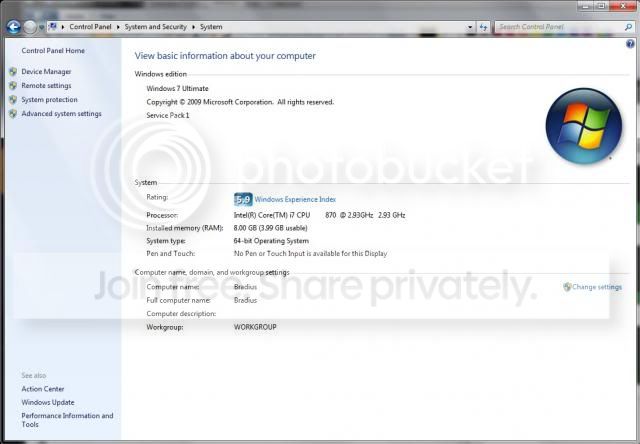
I got a new cpu intel core i7-870 for computer. I also replaced the heat sink, Anyhow now my computer still acknowledges the 8gb but says only 4gb is usable. In order to add new heatsink i took my pc apart and reattached the graphics and ram and everything else back to MOBO (yes correctly). The 4 of 8 issue was happening before i took everything apart to install new heatsink. Everything worked fine with my old processor an i3 when running my 64bitOS. Below is a list of things I have tried! Am I missing anything else?


The Problem
report.jpg


Hardware Reserved
4of8gb.jpg


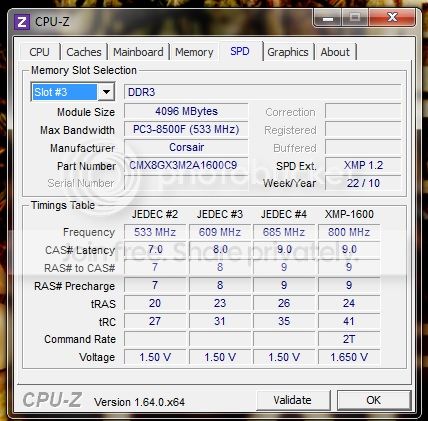
Both Slots RAM are working
ram.jpg


What I Have Tried

1. Removed and restarted the i7 processor. (Several Times)
2. Removed and swapped around RAM sticks. Both work fine in either port. Even tried booting with 1 at a time
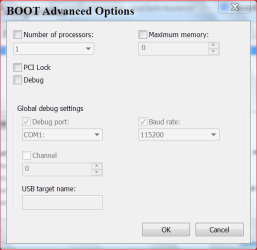
3. Tried the Msconfig Max Mem trick with Adv setting. Made my pc BSOD and i had to fix it in Safe Mode
4. Have updated bios and VGA drivers from the Bio star website.
5. I ran RAMmap, but i still can't figure out how to read the program very well and figure out where my other 4gb are being allocated too.
6. I tied turning on/off memory remapping. Turning it off made it worse only had 3.2 after that.
7. Took Batt outta mobo and even did cmos jumper reset. Neither fixed it!

Any help or suggestions would be most appreciative. Thank you!!

Specs:
Graphics: GeForce GTX 260 Core 216 896MB 448-bit
CPU: i7-870 Processor (8M Cache, 2.93 GHz)
RAM: DDR3 8GB
MOBO: BIOSTAR H55 HD
OS: Windows 7 Ultimate x64 bit
 
Last edited:

My Computer My Computer

At a glance

Windows 7 Ultimate x64 biti7-870 Processor (8M Cache, 2.93 GHz)DDR3 8GBGeForce GTX 260 Core 216 896MB 448-bit
Computer type
PC/Desktop
OS
Windows 7 Ultimate x64 bit
CPU
i7-870 Processor (8M Cache, 2.93 GHz)
Motherboard
H55 HD
Memory
DDR3 8GB
Graphics Card(s)
GeForce GTX 260 Core 216 896MB 448-bit
Try the following: –

In msconfig

msconfig, boot tab, advanced options, uncheck the maximum memory box.
 

My Computer My Computer

At a glance

Win 7 64 bit professionalCPU: 3930K @ 4.8 MHz Stable as a rockCORSAIR DOMINATOR GT 16GB (4 x 4GB) 240-Pin DDR3EVGA SuperClocked+ GeForce GTX 680
Computer Manufacturer/Model Number
Homemade
OS
Win 7 64 bit professional
CPU
CPU: 3930K @ 4.8 MHz Stable as a rock
Motherboard
ASUS Rampage IV Extreme LGA 2011
Memory
CORSAIR DOMINATOR GT 16GB (4 x 4GB) 240-Pin DDR3
Graphics Card(s)
EVGA SuperClocked+ GeForce GTX 680
Monitor(s) Displays
Dell 3007WFP
Screen Resolution
2560 x 1600
Hard Drives
Vector(256gb) x 2
RevoDrive 3 X2 space (240 GB)
Crucial C300 256 GB SSD
PSU
CORSAIR AX1200i 1200W Digital ATX12V v2.31 and EPS 2.92 SLI
Cooling
Water cooling EK Supremacy ELITE
Mouse
ratZ-7
Other Info
WEI-7.8
Try the following: –

In msconfig

msconfig, boot tab, advanced options, uncheck the maximum memory box.

Number 3 on my already tried!
 

My Computer My Computer

At a glance

Windows 7 Ultimate x64 biti7-870 Processor (8M Cache, 2.93 GHz)DDR3 8GBGeForce GTX 260 Core 216 896MB 448-bit
Computer type
PC/Desktop
OS
Windows 7 Ultimate x64 bit
CPU
i7-870 Processor (8M Cache, 2.93 GHz)
Motherboard
H55 HD
Memory
DDR3 8GB
Graphics Card(s)
GeForce GTX 260 Core 216 896MB 448-bit
The only times I have seen Hardware ram that high is when the ram is not the correct ram or it is installed improperly or this. Should look like this.

ADVANCE BOOT.PNG

Max memory should be Zero.

I'm not sure how cpuz is reading slot #3 on a two slot board.
 

My Computer My Computer

At a glance

Windows 10 Pro. 64/ version 1709 Windows 7 Pr...Intel i7-6800K @ 4.3Corsair Platinum 16 gig @2400EVGA GTX 1070 OC
Computer type
PC/Desktop
Computer Manufacturer/Model Number
Home made Desktop
OS
Windows 10 Pro. 64/ version 1709 Windows 7 Pro/64
CPU
Intel i7-6800K @ 4.3
Motherboard
ASUS X-99 Deluxe II
Memory
Corsair Platinum 16 gig @2400
Graphics Card(s)
EVGA GTX 1070 OC
Monitor(s) Displays
Asus 27" LED LCD/VE278Q
Screen Resolution
1920-1080 or 1280-720 HDMI
Hard Drives
INTEL SSD 730-240 Gb Sata 3.0/
PSU
EVGA Platium 1200W
Case
Phanteks Luxe Tempered Glass 8 fans/ one radiator
Cooling
XSPC/ Water Cooled CPU
Keyboard
Das 4 Professional
Mouse
Logitech M705/MX Anywhere 2-S
Internet Speed
100 mbits
Antivirus
Microsoft Security Essentials/ Malwarebytes Premium 3.0/ SAS
Browser
I.E. 11 default/Firefox/ ISP Time Warner Cable/Spectrum
Other Info
LG BluRay Burner/
Sound system-KLipsch-THX/
Icy Dock ssd Hot Swap bays.
As I already stated the Boot adv memory is correct and the ram is properly installed.it was working just fine as 8gb before installed the the i7. Afterward installed it started doing this hardware reserved crap. I put the old i3 back in and its giving me the same BS now. I checked the Pins on the processor nothing seemed dmg or outta place. SO i dont know
 

My Computer My Computer

At a glance

Windows 7 Ultimate x64 biti7-870 Processor (8M Cache, 2.93 GHz)DDR3 8GBGeForce GTX 260 Core 216 896MB 448-bit
Computer type
PC/Desktop
OS
Windows 7 Ultimate x64 bit
CPU
i7-870 Processor (8M Cache, 2.93 GHz)
Motherboard
H55 HD
Memory
DDR3 8GB
Graphics Card(s)
GeForce GTX 260 Core 216 896MB 448-bit
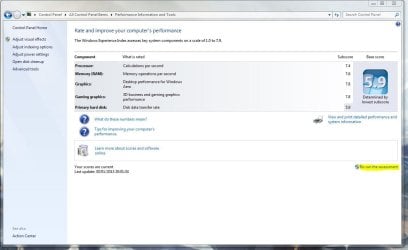
I had this problem before, a solution that I found to work was to re-run the Windows Experience Index assessment.

To do this click on your WEI score which shows 5.9 and then click on the re-run assessment option

assessment.JPG

EDIT: Make sure you restart your machine after running the assessment!

Hope This Helps,
Josh! :)
 

My Computer My Computer

At a glance

Windows 7 Professional x64 SP1 ; Windows Serv...Intel Core i5 2400 @ 3.10GHz8.0GB DDR3 @ 665MHz (2GBx4)AMD Radeon HD 6870
Computer type
PC/Desktop
Computer Manufacturer/Model Number
Custom Built
OS
Windows 7 Professional x64 SP1 ; Windows Server 2012 R2 Standard
CPU
Intel Core i5 2400 @ 3.10GHz
Motherboard
Foxconn H67MP-S/-V/H67MP
Memory
8.0GB DDR3 @ 665MHz (2GBx4)
Graphics Card(s)
AMD Radeon HD 6870
Sound Card
Realtek High Definition Audio
Monitor(s) Displays
AOC 2243W & SMB1930NW
Screen Resolution
1440x900 & 1920x1080
Hard Drives
977GB Seagate ST31000524AS ATA Drive (SATA)
250GB WD iSCSI attached Drive
PSU
750W Gaming PSU
Case
Novatech Night
Cooling
Fan
Keyboard
Dell Standard PS/2 Keyboard
Mouse
R.A.T 07 Gaming Mouse
Internet Speed
Download: 10 Mbps Ping: 30ms Upload: 0.81 Mbps
Browser
Google Chrome
Other Info
Optiarc DVD RW AD-5260S ATA Device
Suiko we do and have read your post and don't need reminded of that point. What we don't know from where we sit is what settings you call correct. That is why we ask questions and post pictures.
Shadowjk has a very good idea in post #6.
 

My Computer My Computer

At a glance

Windows 10 Pro. 64/ version 1709 Windows 7 Pr...Intel i7-6800K @ 4.3Corsair Platinum 16 gig @2400EVGA GTX 1070 OC
Computer type
PC/Desktop
Computer Manufacturer/Model Number
Home made Desktop
OS
Windows 10 Pro. 64/ version 1709 Windows 7 Pro/64
CPU
Intel i7-6800K @ 4.3
Motherboard
ASUS X-99 Deluxe II
Memory
Corsair Platinum 16 gig @2400
Graphics Card(s)
EVGA GTX 1070 OC
Monitor(s) Displays
Asus 27" LED LCD/VE278Q
Screen Resolution
1920-1080 or 1280-720 HDMI
Hard Drives
INTEL SSD 730-240 Gb Sata 3.0/
PSU
EVGA Platium 1200W
Case
Phanteks Luxe Tempered Glass 8 fans/ one radiator
Cooling
XSPC/ Water Cooled CPU
Keyboard
Das 4 Professional
Mouse
Logitech M705/MX Anywhere 2-S
Internet Speed
100 mbits
Antivirus
Microsoft Security Essentials/ Malwarebytes Premium 3.0/ SAS
Browser
I.E. 11 default/Firefox/ ISP Time Warner Cable/Spectrum
Other Info
LG BluRay Burner/
Sound system-KLipsch-THX/
Icy Dock ssd Hot Swap bays.
Sorry it was a very frustrating day, trying to figure this crap out the last few days, I do appreciate the suggestions. :)
 

My Computer My Computer

At a glance

Windows 7 Ultimate x64 biti7-870 Processor (8M Cache, 2.93 GHz)DDR3 8GBGeForce GTX 260 Core 216 896MB 448-bit
Computer type
PC/Desktop
OS
Windows 7 Ultimate x64 bit
CPU
i7-870 Processor (8M Cache, 2.93 GHz)
Motherboard
H55 HD
Memory
DDR3 8GB
Graphics Card(s)
GeForce GTX 260 Core 216 896MB 448-bit
Did you reset the BIOS to default factory settings? If not, try that.
 

My Computer My Computer

At a glance

Windows 10 Pro (x64)Intel Core i7-3930K (3.2GHz - 4.5GHz)4x Samsung 4GB PC3-12800 DDR3 (16GB 1600MHz)Nvidia Geforce GTX 690
Computer type
PC/Desktop
Computer Manufacturer/Model Number
Alienware Aurora ALX R4
OS
Windows 10 Pro (x64)
CPU
Intel Core i7-3930K (3.2GHz - 4.5GHz)
Motherboard
Alienware Aurora-R4 x79
Memory
4x Samsung 4GB PC3-12800 DDR3 (16GB 1600MHz)
Graphics Card(s)
Nvidia Geforce GTX 690
Sound Card
SteelSeries Siberia Elite
Monitor(s) Displays
Dell UltraSharp U3011
Screen Resolution
2560x1600
Hard Drives
Samsung 850 Pro 256 GB, Seagate 1TB Desktop Hybrid HDD, 2x Western Digital 4TB Green HDD
PSU
875W Some Dell PSU <.<
Case
Alienware Aurora ALX
Cooling
Custom Liquid Cooling (EK CPU & GPU blocks) dual EK 480RAD
Keyboard
Logitech G710+ Mechanical
Mouse
Logitech G700s
Internet Speed
Verizon Fios (50 mbps average)
Other Info
Server: Intel NUC D54250WYK: i5-4250U, 16GB, 256 GB mSATA, Windows Server 2012 R2
Yes, i reset the Bios. Most Bios will ask for a reset after installing a new CPU anyhow.
 

My Computer My Computer

At a glance

Windows 7 Ultimate x64 biti7-870 Processor (8M Cache, 2.93 GHz)DDR3 8GBGeForce GTX 260 Core 216 896MB 448-bit
Computer type
PC/Desktop
OS
Windows 7 Ultimate x64 bit
CPU
i7-870 Processor (8M Cache, 2.93 GHz)
Motherboard
H55 HD
Memory
DDR3 8GB
Graphics Card(s)
GeForce GTX 260 Core 216 896MB 448-bit
Same Problems

I have had the same problem with my pc ever since I put the darn thing together last january. It has never used all 8 gb of RAM that I put in it! It has always said 4Gb was "hardware reserved". Any current news on this? Its probably hardware related since it is cross OS. Anyone still around paying attention to this old thread???
 

My Computer My Computer

At a glance

Windows 8 x64AMD FX 41008 GB DDR3 @1600MhzEVGA 2 GB Nvidia GeForce 770
Computer type
PC/Desktop
Computer Manufacturer/Model Number
Custom Build
OS
Windows 8 x64
CPU
AMD FX 4100
Motherboard
AsRock Extreme 3
Memory
8 GB DDR3 @1600Mhz
Graphics Card(s)
EVGA 2 GB Nvidia GeForce 770
Hard Drives
1 x Seagate 1 TB Drive
Antivirus
Norton
Browser
Firefox
Back
Top