
Windows XP Mode Help

DQScott95

New member
Ok so im running windows 7 ultimate x64 and i installed windows XP Mode... Everything works fine except that XP Mode lags a lot. how can i change this to make it run really smooth like it was a main OS...?
 

My Computer

Computer Manufacturer/Model Number
Acer Aspire 5738Z-4333
OS
Windows 7 Ultimate x64
CPU
Intel Pentium T4400 @ 2.20GHz
Motherboard
Acer JV50 (U2E1)
Memory
4.0GB Dual-Channel DDR3 @ 398MHz
Graphics Card(s)
Mobile Mobile Intel(R) 4 Series Express Chipset Family
Sound Card
Intel(R)/Realtek High Definition Audio HDMI
Screen Resolution
1366x768
Hard Drives
488GB Western Digital WDC WD5000BEVT-22ZAT0 (IDE)
Mouse
Synaptics PS/2 Port TouchPad/ HP lasersmart optical mouse
Other Info
Dual booting with Windows 7 Ultimate & Ubuntu 10.04
Ok so im running windows 7 ultimate x64 and i installed windows XP Mode... Everything works fine except that XP Mode lags a lot. how can i change this to make it run really smooth like it was a main OS...?


Where/ how does it lag? does it lag in a browser, or on launching an app?
 

My Computer

Computer Manufacturer/Model Number
HP Pavillion dv-7 1005 Tx
OS
Win 8 Release candidate 8400
CPU
[email protected]
Memory
4 gigs
Graphics Card(s)
Nvidia 9600M
Sound Card
HD built-in
Monitor(s) Displays
17" Wxga
Screen Resolution
1440x900
Cooling
none
Internet Speed
45Mb down 5Mb up
It just lags in general like when i click a folder to open it i have to wait like 3 seconds for it to respond plus sometimes my apps wont even respond
 

My Computer

Computer Manufacturer/Model Number
Acer Aspire 5738Z-4333
OS
Windows 7 Ultimate x64
CPU
Intel Pentium T4400 @ 2.20GHz
Motherboard
Acer JV50 (U2E1)
Memory
4.0GB Dual-Channel DDR3 @ 398MHz
Graphics Card(s)
Mobile Mobile Intel(R) 4 Series Express Chipset Family
Sound Card
Intel(R)/Realtek High Definition Audio HDMI
Screen Resolution
1366x768
Hard Drives
488GB Western Digital WDC WD5000BEVT-22ZAT0 (IDE)
Mouse
Synaptics PS/2 Port TouchPad/ HP lasersmart optical mouse
Other Info
Dual booting with Windows 7 Ultimate & Ubuntu 10.04
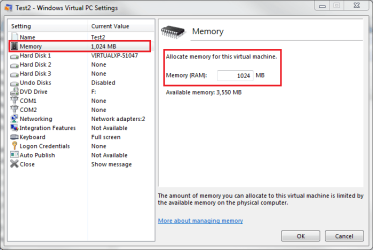
First thing to do is to add RAM to XP Mode. To do this, turn XP Mode off and go to its settings and assign the amount of RAM you want:

XPM_Memory.png

My recommendation is to use at least 1GB, 2GB's if your host has more than 3GB.

Next, modify the options.xml:
  • Turn off all running virtual machines
  • Open C:\Users\Your_Username\AppData\Local\Microsoft\Windows Virtual PC\Options.xml with Notepad
  • Add this somewhere between the Preferences tags:
    Code:
    <virtual_machines>
    <enable_idle_thread type="boolean">true</enable_idle_thread>
    </virtual_machines><br/>
  • Save the file
This allows your virtual machines to use more of the hosts resources, thus increasing the performance. A clear difference!

Kari
 

My Computer

Computer type
Laptop
Computer Manufacturer/Model Number
HP ENVY 17-1150eg
OS
Windows 10 Pro x64 EN-GB
CPU
1.6 GHz Intel Core i7-720QM Processor
Memory
6 GB
Graphics Card(s)
ATI Mobility Radeon HD 5850 Graphics
Sound Card
Beats sound system with integrated subwoofer
Monitor(s) Displays
17" laptop display, 22" LED and 32" Full HD TV through HDMI
Screen Resolution
1600*900 (1), 1920*1080 (2&3)
Hard Drives
Internal: 2 x 500 GB SATA Hard Disk Drive 7200 rpm
External: 2TB for backups, 3TB USB3 network drive for media
Cooling
As Envy runs a bit warm, I have it on a Cooler Master pad
Keyboard
Logitech diNovo Media Desktop Laser (bluetooth)
Mouse
Logitech Performance Mouse MX
Internet Speed
50/10 Mbps VDSL
Antivirus
Windows Defender 4.3.9431.0
Browser
Maxthon 3.5.2., IE11
First thing to do is to add RAM to XP Mode. To do this, turn XP Mode off and go to its settings and assign the amount of RAM you want:

View attachment 65442

My recommendation is to use at least 1GB, 2GB's if your host has more than 3GB.


Next, modify the options.xml:
  • Turn off all running virtual machines
  • Open C:\Users\Your_Username\AppData\Local\Microsoft\Windows Virtual PC\Options.xml with Notepad
  • Add this somewhere between the Preferences tags:
    Code:
    <virtual_machines>
    <enable_idle_thread type="boolean">true</enable_idle_thread>
    </virtual_machines><br/>
  • Save the file
This allows your virtual machines to use more of the hosts resources, thus increasing the performance. A clear difference!

Kari

Well i already increased the ram to 1GB i have 4 total on my puter should i set it to 2GB (what is 2 gigs in MegaBytes) and as for the lines you told me to type in the XML where in it exactly should i paste it
 

My Computer

Computer Manufacturer/Model Number
Acer Aspire 5738Z-4333
OS
Windows 7 Ultimate x64
CPU
Intel Pentium T4400 @ 2.20GHz
Motherboard
Acer JV50 (U2E1)
Memory
4.0GB Dual-Channel DDR3 @ 398MHz
Graphics Card(s)
Mobile Mobile Intel(R) 4 Series Express Chipset Family
Sound Card
Intel(R)/Realtek High Definition Audio HDMI
Screen Resolution
1366x768
Hard Drives
488GB Western Digital WDC WD5000BEVT-22ZAT0 (IDE)
Mouse
Synaptics PS/2 Port TouchPad/ HP lasersmart optical mouse
Other Info
Dual booting with Windows 7 Ultimate & Ubuntu 10.04
I would give it 2 gigs (2 GB = 2048 MB)

Add the lines anywhere between the Preferences tags. I have them quite in the beginning of the file:
Code:
[FONT="Verdana"]<?xml version="1.0" encoding="UTF-16"?>
<!-- Microsoft Virtual Machine Options and Settings -->
[B][I][COLOR="DarkRed"]<preferences>[/COLOR][/I][/B]
	<version type="string">2.0</version>
	<properties>
		<modifier>
			<build type="string">6.1.7600.16495</build>
			<name type="string">Virtual PC</name>
		</modifier>
	</properties>
	[COLOR="DarkRed"][B]<virtual_machines>
		<enable_idle_thread type="boolean">true</enable_idle_thread>
	</virtual_machines>[/B][/COLOR]
	<br />
	<virtual_machines>
		<power>
			<mm_timer_duration type="integer">10</mm_timer_duration>
		</power>
	</virtual_machines>
	<br />
	<virtual_gateway id="0">
		<id type="integer">0</id>
		<type type="integer">0</type>
	</virtual_gateway>
        ...
        ...
        ...[/FONT]

(The above is an extract of my options.xml file.)

Kari
 

My Computer

Computer type
Laptop
Computer Manufacturer/Model Number
HP ENVY 17-1150eg
OS
Windows 10 Pro x64 EN-GB
CPU
1.6 GHz Intel Core i7-720QM Processor
Memory
6 GB
Graphics Card(s)
ATI Mobility Radeon HD 5850 Graphics
Sound Card
Beats sound system with integrated subwoofer
Monitor(s) Displays
17" laptop display, 22" LED and 32" Full HD TV through HDMI
Screen Resolution
1600*900 (1), 1920*1080 (2&3)
Hard Drives
Internal: 2 x 500 GB SATA Hard Disk Drive 7200 rpm
External: 2TB for backups, 3TB USB3 network drive for media
Cooling
As Envy runs a bit warm, I have it on a Cooler Master pad
Keyboard
Logitech diNovo Media Desktop Laser (bluetooth)
Mouse
Logitech Performance Mouse MX
Internet Speed
50/10 Mbps VDSL
Antivirus
Windows Defender 4.3.9431.0
Browser
Maxthon 3.5.2., IE11
that worked it runs much better thank you
 

My Computer

Computer Manufacturer/Model Number
Acer Aspire 5738Z-4333
OS
Windows 7 Ultimate x64
CPU
Intel Pentium T4400 @ 2.20GHz
Motherboard
Acer JV50 (U2E1)
Memory
4.0GB Dual-Channel DDR3 @ 398MHz
Graphics Card(s)
Mobile Mobile Intel(R) 4 Series Express Chipset Family
Sound Card
Intel(R)/Realtek High Definition Audio HDMI
Screen Resolution
1366x768
Hard Drives
488GB Western Digital WDC WD5000BEVT-22ZAT0 (IDE)
Mouse
Synaptics PS/2 Port TouchPad/ HP lasersmart optical mouse
Other Info
Dual booting with Windows 7 Ultimate & Ubuntu 10.04
Good to hear that.
 

My Computer

Computer type
Laptop
Computer Manufacturer/Model Number
HP ENVY 17-1150eg
OS
Windows 10 Pro x64 EN-GB
CPU
1.6 GHz Intel Core i7-720QM Processor
Memory
6 GB
Graphics Card(s)
ATI Mobility Radeon HD 5850 Graphics
Sound Card
Beats sound system with integrated subwoofer
Monitor(s) Displays
17" laptop display, 22" LED and 32" Full HD TV through HDMI
Screen Resolution
1600*900 (1), 1920*1080 (2&3)
Hard Drives
Internal: 2 x 500 GB SATA Hard Disk Drive 7200 rpm
External: 2TB for backups, 3TB USB3 network drive for media
Cooling
As Envy runs a bit warm, I have it on a Cooler Master pad
Keyboard
Logitech diNovo Media Desktop Laser (bluetooth)
Mouse
Logitech Performance Mouse MX
Internet Speed
50/10 Mbps VDSL
Antivirus
Windows Defender 4.3.9431.0
Browser
Maxthon 3.5.2., IE11
I love how much faster it runs nowe i dont have to wait forever for something to load but "Kari" your using windows 7 right, well is there any way to make it run as fast as windows 7 or no???
 

My Computer

Computer Manufacturer/Model Number
Acer Aspire 5738Z-4333
OS
Windows 7 Ultimate x64
CPU
Intel Pentium T4400 @ 2.20GHz
Motherboard
Acer JV50 (U2E1)
Memory
4.0GB Dual-Channel DDR3 @ 398MHz
Graphics Card(s)
Mobile Mobile Intel(R) 4 Series Express Chipset Family
Sound Card
Intel(R)/Realtek High Definition Audio HDMI
Screen Resolution
1366x768
Hard Drives
488GB Western Digital WDC WD5000BEVT-22ZAT0 (IDE)
Mouse
Synaptics PS/2 Port TouchPad/ HP lasersmart optical mouse
Other Info
Dual booting with Windows 7 Ultimate & Ubuntu 10.04
No. It is a virtual machine, using resources of the host computer, which makes everything takes longer.

Running XP Mode smoothly like host OS is not possible. XP Mode is OK when running legacy software in Win7, but because of this speed issue and emulated old S3 graphics it is not a good alternative for a gamer.

Kari
 

My Computer

Computer type
Laptop
Computer Manufacturer/Model Number
HP ENVY 17-1150eg
OS
Windows 10 Pro x64 EN-GB
CPU
1.6 GHz Intel Core i7-720QM Processor
Memory
6 GB
Graphics Card(s)
ATI Mobility Radeon HD 5850 Graphics
Sound Card
Beats sound system with integrated subwoofer
Monitor(s) Displays
17" laptop display, 22" LED and 32" Full HD TV through HDMI
Screen Resolution
1600*900 (1), 1920*1080 (2&3)
Hard Drives
Internal: 2 x 500 GB SATA Hard Disk Drive 7200 rpm
External: 2TB for backups, 3TB USB3 network drive for media
Cooling
As Envy runs a bit warm, I have it on a Cooler Master pad
Keyboard
Logitech diNovo Media Desktop Laser (bluetooth)
Mouse
Logitech Performance Mouse MX
Internet Speed
50/10 Mbps VDSL
Antivirus
Windows Defender 4.3.9431.0
Browser
Maxthon 3.5.2., IE11
Back
Top