Wired internet not working in Normal or Safe modes on a new W7 laptop

Viktor1

New member
Local time
11:12 PM
Messages
4
Location
London
Hi all,

I have recently purchased a new laptop: Samsung 700Z5A-S05 running Windows 7 Home Premium 64-bit. This is the first time I am using a machine running an operating system other than XP.
We use wired internet in our flat, with no problems on other machines, including my older laptop running XP.

I had issues with the internet straight away after switching the laptop on. It would connect for 30s or so and then dissapear. I disabled Internet Protocol 6, hoping that would help. However, the problem persisted. Problem did not dissapear when running the laptop in Safe mode with networking.

I thought the problem might be caused by some of the software installed by Samsung. So I reinstalled Windows and installed all the drivers from Samsung's support website. However, this hasn't solved the problem. I don't seem to be able to connect to the internet in normal mode at all and can only connect for a couple of minutes in Safe mode.

I would be grateful if someone could please advise on potential reasons behind the issue and any solutions.

Many thanks,

Viktor
 

My Computer My Computer

At a glance

Window 7 Home Premium 64-bitIntel Core i7 2675QM8BGAMD HD6750M GDDR5 1GB Hybrid
Computer Manufacturer/Model Number
Samsung 700Z5A-S05
OS
Window 7 Home Premium 64-bit
CPU
Intel Core i7 2675QM
Memory
8BG
Graphics Card(s)
AMD HD6750M GDDR5 1GB Hybrid
Hard Drives
1TB
Hi Viktor, welcome toSeven Forums.

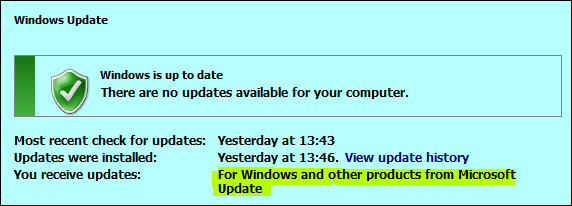
Try deleting ALL network adapters in Device Manager, reboot and use Windows Update including Microsoft.

Capture.PNG
 

My Computer My Computer

At a glance

Win7 H.Prem. 32bit+SP1
Computer Manufacturer/Model Number
Look in my Signature.
OS
Win7 H.Prem. 32bit+SP1
Hi Roderunner,

Thanks for your reply. I have disabled all network adapters except Realtek PCIe GBE Family Controller, as without it, my laptop would not recognise pluged in internet wire. After I have disabled all but one network adapter, internet seems to be working fine in Safe Mode, but not in Normal mode.

However, I don't think I can run Windows Update in Safe Mode. And since I have no internet access in Normal Mode I was unable to run the software update.

Would be great if someone could advise on any further steps I could take to resolve this internet problem.
 

My Computer My Computer

At a glance

Window 7 Home Premium 64-bitIntel Core i7 2675QM8BGAMD HD6750M GDDR5 1GB Hybrid
Computer Manufacturer/Model Number
Samsung 700Z5A-S05
OS
Window 7 Home Premium 64-bit
CPU
Intel Core i7 2675QM
Memory
8BG
Graphics Card(s)
AMD HD6750M GDDR5 1GB Hybrid
Hard Drives
1TB
Hi Roderunner,

Thanks for your reply. I have disabled all network adapters except Realtek PCIe GBE Family Controller, as without it, my laptop would not recognise pluged in internet wire. After I have disabled all but one network adapter, internet seems to be working fine in Safe Mode, but not in Normal mode.

However, I don't think I can run Windows Update in Safe Mode. And since I have no internet access in Normal Mode I was unable to run the software update.

Would be great if someone could advise on any further steps I could take to resolve this internet problem.

I'd have to look at a screen shot of your ipconfig/all before I could tell what's going on here. If it's not working in normal mode most likely it's an installed program or A/V software that is causing the problem.
 

My Computer My Computer

At a glance

Windows 7 Ult, Windows 8.1 Pro,Q9650-4.275GHz, E8600 4.5GHz, E6750-3.8GHzG.Skill PC2 9600 1200Mhz 5 5 5 15 2TGTX480
Computer type
PC/Desktop
Computer Manufacturer/Model Number
Home built
OS
Windows 7 Ult, Windows 8.1 Pro,
CPU
Q9650-4.275GHz, E8600 4.5GHz, E6750-3.8GHz
Motherboard
Evga 780i FTW
Memory
G.Skill PC2 9600 1200Mhz 5 5 5 15 2T
Graphics Card(s)
GTX480
Sound Card
Asus Xonar D2
Monitor(s) Displays
HannsG
Screen Resolution
1680X1050
Hard Drives
GSkill Phoenix Pro 120GB SSD
PSU
ThermalTake Toughpower 1000Watt modular
Case
ThermalTake XaserV
Cooling
Xigmatek S1283
Keyboard
Logitech G15
Mouse
Logitech G9
Internet Speed
T1
chev65,

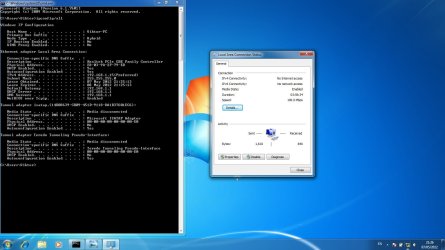
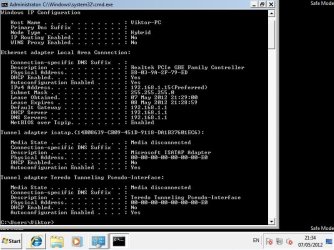
Printscreens attached below (top Normal Mode, bottom Safe Mode):

IPconfig NM.jpg

IPconfig SM.jpg
 

My Computer My Computer

At a glance

Window 7 Home Premium 64-bitIntel Core i7 2675QM8BGAMD HD6750M GDDR5 1GB Hybrid
Computer Manufacturer/Model Number
Samsung 700Z5A-S05
OS
Window 7 Home Premium 64-bit
CPU
Intel Core i7 2675QM
Memory
8BG
Graphics Card(s)
AMD HD6750M GDDR5 1GB Hybrid
Hard Drives
1TB
The ipconfig looks good. If it's working in safe mode then an installed program or A/V software is most likely causing the problem or it's not the correct LAN driver. I couldn't even find your model number listed at the Samsung site for some reason.

Can you enable the wireless adaptor and use that to update the system?
 

My Computer My Computer

At a glance

Windows 7 Ult, Windows 8.1 Pro,Q9650-4.275GHz, E8600 4.5GHz, E6750-3.8GHzG.Skill PC2 9600 1200Mhz 5 5 5 15 2TGTX480
Computer type
PC/Desktop
Computer Manufacturer/Model Number
Home built
OS
Windows 7 Ult, Windows 8.1 Pro,
CPU
Q9650-4.275GHz, E8600 4.5GHz, E6750-3.8GHz
Motherboard
Evga 780i FTW
Memory
G.Skill PC2 9600 1200Mhz 5 5 5 15 2T
Graphics Card(s)
GTX480
Sound Card
Asus Xonar D2
Monitor(s) Displays
HannsG
Screen Resolution
1680X1050
Hard Drives
GSkill Phoenix Pro 120GB SSD
PSU
ThermalTake Toughpower 1000Watt modular
Case
ThermalTake XaserV
Cooling
Xigmatek S1283
Keyboard
Logitech G15
Mouse
Logitech G9
Internet Speed
T1
Here is the link to support page for my laptop on Samsung's website: Support for NP700Z5AH

Will have a look if I can update the system over Wifi.
 

My Computer My Computer

At a glance

Window 7 Home Premium 64-bitIntel Core i7 2675QM8BGAMD HD6750M GDDR5 1GB Hybrid
Computer Manufacturer/Model Number
Samsung 700Z5A-S05
OS
Window 7 Home Premium 64-bit
CPU
Intel Core i7 2675QM
Memory
8BG
Graphics Card(s)
AMD HD6750M GDDR5 1GB Hybrid
Hard Drives
1TB
You might try installing the wireless driver and the chipset drivers as well. Thumb drives come in handy about now.
 

My Computer My Computer

At a glance

Windows 7 Ult, Windows 8.1 Pro,Q9650-4.275GHz, E8600 4.5GHz, E6750-3.8GHzG.Skill PC2 9600 1200Mhz 5 5 5 15 2TGTX480
Computer type
PC/Desktop
Computer Manufacturer/Model Number
Home built
OS
Windows 7 Ult, Windows 8.1 Pro,
CPU
Q9650-4.275GHz, E8600 4.5GHz, E6750-3.8GHz
Motherboard
Evga 780i FTW
Memory
G.Skill PC2 9600 1200Mhz 5 5 5 15 2T
Graphics Card(s)
GTX480
Sound Card
Asus Xonar D2
Monitor(s) Displays
HannsG
Screen Resolution
1680X1050
Hard Drives
GSkill Phoenix Pro 120GB SSD
PSU
ThermalTake Toughpower 1000Watt modular
Case
ThermalTake XaserV
Cooling
Xigmatek S1283
Keyboard
Logitech G15
Mouse
Logitech G9
Internet Speed
T1
Back
Top