
Wireless Icon

Casmo

New member
Hello all :)

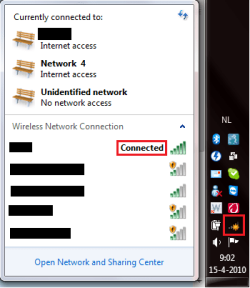
Yesterday I installed BlueSoleil for my bluetooth dongle, and now my wireless icon is acting strange, I've had this before, and never been able to fix this, does anyone have any clues?

Thanks in advance.
 

Attachments

  • WirelessIcon.png
    WirelessIcon.png
    41.2 KB · Views: 28

My Computer

Computer Manufacturer/Model Number
Dell Inspiron 1750
OS
Windows 7 Ultimate
CPU
Intel T6500 2.2gHz Dual-Core
Memory
4 GB dual channel DDR2 SDRAM @ 800 MHz
Graphics Card(s)
Intel GMA X4500MHD
Monitor(s) Displays
17.3" 1600x900
Hard Drives
WD 500GB S-ATA
Internet Speed
Varies (3+ Locations, 150~1024kb down)
fseal said:
This is an old thread but. Do you by any chance have any Adobe products (Photoshop/creative suite etc) installed?

It installs a local DNS service called Bonjour that wreaks havok with several adapters/drivers and gives the symptoms you indicate. Search for Bonjour on the site here for instructions for removing it if you have installed Photoshop or something else from adobe (not flash though)

I can't really find any solutions because I have no idea what causes that symbol and or what to call it. Is it an asterix a star a circle?
 

My Computer

Computer Manufacturer/Model Number
Apple Macbook Pro (April 2009)
OS
W7 Ult. x64 | OS X
CPU
Intel Mobile Core 2 Duo 2.93Ghz [T9800 Penryn]
Motherboard
NVIDIA nForce 730i Rev. B1 [Mac-F2268EC8 (U2E1)]
Memory
4096MB Samsung DDR3 Dual Channel [PC3-8500F 1066Mhz]
Graphics Card(s)
NVIDIA GeForce 9600M GT 512MB [G96M Rev. C1]
Sound Card
SB X-Fi Surround 5.1 USB | Onboard Realtek (Disabled)
Monitor(s) Displays
Acer x223wbd 22" | Apple Anti-Glare 17" (Disabled)
Screen Resolution
{Current} 1440x900 {Acer} 1680x1050 {Apple} 1920x1200
Hard Drives
{Internal}
Seagate Momentus 320GB 2.5" 7200RPM [ST9320421AS]

{Externals}
LaCie 320GB USB 2.0 HDD [301284UR]
LaCie 750GB USB 2.0 FW400 eSATA HDD [301314U]
LaCie 1TB USB 2.0 HDD [301304UR]
PSU
Magsafe
Case
Aluminum/Unibody (MBP52)
Cooling
2 x 6000 RPM Fans
Keyboard
Logitech G-15v2 [PN 920-000379]
Mouse
Logitech G-9 [PN 910-000338]
Internet Speed
12Mbps/2.5Mbps w/ 24Mbps Speed Boost [Comcast]
Other Info
Logitech X-540 Speakers [PN 970223-0122]
Sennheiser PC-151 Headset
The symbol means that there are wireless connections available, but I am already connected to an AP, and it's rather annoying not so see how strong the signal is, but yeah, it looks like an asterisk to me.
 
Last edited:

My Computer

Computer Manufacturer/Model Number
Dell Inspiron 1750
OS
Windows 7 Ultimate
CPU
Intel T6500 2.2gHz Dual-Core
Memory
4 GB dual channel DDR2 SDRAM @ 800 MHz
Graphics Card(s)
Intel GMA X4500MHD
Monitor(s) Displays
17.3" 1600x900
Hard Drives
WD 500GB S-ATA
Internet Speed
Varies (3+ Locations, 150~1024kb down)
it says there are other wireless network available besides WLAN. there's bluetooth access now
 

My Computer

Computer Manufacturer/Model Number
dell latitude e6400
OS
windows 7 64bit
CPU
p8600
Motherboard
dell
Memory
2x2gb samsung hynix ddr2 800
Graphics Card(s)
intel g4500 chipset
Hard Drives
seagate 7200 rpm 500gb
Make sure that you do not have any IP address conflicts I had the same problem not so long ago.
 

My Computer

OS
Windows 7 Ultimate x64 Service Pack 1 (Build 6.1.7601)
CPU
Intel Core 2 Quad Q6600 (G0 Kentsfield) LGA775 (FC-LGA6)
Motherboard
GIGABYTE GA-EP35C-DS3R (Rev. 2.1)
Memory
Corsair TW3X4G1333C9A 4GB PC-10600 (2x XMS3 2GB)
Graphics Card(s)
ASUS nVIDIA GeForce 560
Sound Card
RealTek ALC885/889A/890
Monitor(s) Displays
ChiMei CMV CT-730D 17inch (LCD Monitor)
Screen Resolution
1280-1024 60Hertz (Ture Colour 32bit)
Hard Drives
2x Barracuda 7200.10 SATA 3.0Gb/s 160-GB Hard Drive ST3160815AS (AHCI)
PSU
ANTEC 750w Earthwatts
Case
Thermaltake Shark (VA7000SWA ATX) Full Tower
Cooling
Front 120mm fan (1400 RPM) /Rear 120mm (1400 RPM) blue LED
Keyboard
Labtec Media Desktop Y-SAD65
Mouse
Razer DeathAdder 3G Infrared Sensor (1800DPI)
Internet Speed
Telstra BigPond Elite Liberty ADSL2+ 24Mbps/256kbps
Other Info
ASUS PCE-N13 802.11n Wireless LAN card
@ MDR, even when I disable the bluetooth connection, it shows this icon, so it's not that.

@Crispy, I don't have an IP address conflict...
 

My Computer

Computer Manufacturer/Model Number
Dell Inspiron 1750
OS
Windows 7 Ultimate
CPU
Intel T6500 2.2gHz Dual-Core
Memory
4 GB dual channel DDR2 SDRAM @ 800 MHz
Graphics Card(s)
Intel GMA X4500MHD
Monitor(s) Displays
17.3" 1600x900
Hard Drives
WD 500GB S-ATA
Internet Speed
Varies (3+ Locations, 150~1024kb down)
My Computer

Computer Manufacturer/Model Number
Apple Macbook Pro (April 2009)
OS
W7 Ult. x64 | OS X
CPU
Intel Mobile Core 2 Duo 2.93Ghz [T9800 Penryn]
Motherboard
NVIDIA nForce 730i Rev. B1 [Mac-F2268EC8 (U2E1)]
Memory
4096MB Samsung DDR3 Dual Channel [PC3-8500F 1066Mhz]
Graphics Card(s)
NVIDIA GeForce 9600M GT 512MB [G96M Rev. C1]
Sound Card
SB X-Fi Surround 5.1 USB | Onboard Realtek (Disabled)
Monitor(s) Displays
Acer x223wbd 22" | Apple Anti-Glare 17" (Disabled)
Screen Resolution
{Current} 1440x900 {Acer} 1680x1050 {Apple} 1920x1200
Hard Drives
{Internal}
Seagate Momentus 320GB 2.5" 7200RPM [ST9320421AS]

{Externals}
LaCie 320GB USB 2.0 HDD [301284UR]
LaCie 750GB USB 2.0 FW400 eSATA HDD [301314U]
LaCie 1TB USB 2.0 HDD [301304UR]
PSU
Magsafe
Case
Aluminum/Unibody (MBP52)
Cooling
2 x 6000 RPM Fans
Keyboard
Logitech G-15v2 [PN 920-000379]
Mouse
Logitech G-9 [PN 910-000338]
Internet Speed
12Mbps/2.5Mbps w/ 24Mbps Speed Boost [Comcast]
Other Info
Logitech X-540 Speakers [PN 970223-0122]
Sennheiser PC-151 Headset
fseal said:
This is an old thread but. Do you by any chance have any Adobe products (Photoshop/creative suite etc) installed?

It installs a local DNS service called Bonjour that wreaks havok with several adapters/drivers and gives the symptoms you indicate. Search for Bonjour on the site here for instructions for removing it if you have installed Photoshop or something else from adobe (not flash though)

I can't really find any solutions because I have no idea what causes that symbol and or what to call it. Is it an asterix a star a circle?


Adobe Products:
Yup, I have CS4, but I didn't install Bonjour, so that can't be it.
 

My Computer

Computer Manufacturer/Model Number
Dell Inspiron 1750
OS
Windows 7 Ultimate
CPU
Intel T6500 2.2gHz Dual-Core
Memory
4 GB dual channel DDR2 SDRAM @ 800 MHz
Graphics Card(s)
Intel GMA X4500MHD
Monitor(s) Displays
17.3" 1600x900
Hard Drives
WD 500GB S-ATA
Internet Speed
Varies (3+ Locations, 150~1024kb down)
There must be a way to turn that off in network preferences... Can't seem to find much on it.

If you really want it not to show then download a program like this to enable/disable bluetooth on demand.
Vijay555 - VJVolubilis


It seems that this program is for a PDA, but to disable the bluetooth is easy enough, but that doesn't work.


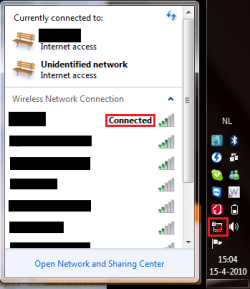
[Update] I uninstalled BlueSoleil, and it got worse... It shows as if a cable is disconnected now...[/]

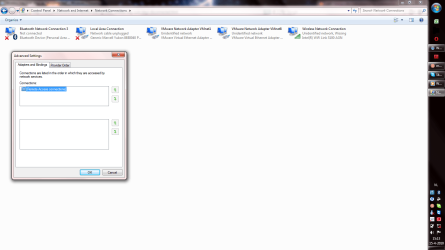
[Update] Now, look at my second picture, all the connections are gone in there...[/]
 

Attachments

  • WirelessIconWorse.png
    WirelessIconWorse.png
    44.2 KB · Views: 17
  • WirelessIconHmmm.png
    WirelessIconHmmm.png
    216.2 KB · Views: 72
Last edited:

My Computer

Computer Manufacturer/Model Number
Dell Inspiron 1750
OS
Windows 7 Ultimate
CPU
Intel T6500 2.2gHz Dual-Core
Memory
4 GB dual channel DDR2 SDRAM @ 800 MHz
Graphics Card(s)
Intel GMA X4500MHD
Monitor(s) Displays
17.3" 1600x900
Hard Drives
WD 500GB S-ATA
Internet Speed
Varies (3+ Locations, 150~1024kb down)

My Computer

Computer Manufacturer/Model Number
packard bell IXTREME M5722
OS
Operating System : Windows 7 Home Premium Edition 6.01.7600 SP1 (x64)
CPU
Processor : Intel Core 2 Quad Q8300 @ 2500 MHz
Motherboard
Mainboard : Packard Bell (Acer EG43M )
Memory
Physical Memory :8GB Corsair4x 2GB 800MHz C5 DDR2
Graphics Card(s)
Video Card : XFX 6700 AMD
Monitor(s) Displays
Maestro 234DL - BenQ V2220 - BenQ VW2420H
Screen Resolution
Current Display :1920x1080p pixels at 60 Hz in HD LED
Hard Drives
Hard Disks : WDC (1000 GB)
Drive C: (Hard Disk) : 428 GB available on 491 GB
Drive D: (Hard Disk) : 426 GB available on 492 GB
SAMSUNG spinpoint HD103SJ 1000.2 GB
(X 2) KINGSTON SSD NOW V 30GB
PSU
XFX ProSeries 550W PSU
Case
PACKARD BELL IXTREME
Cooling
System Blower Current: 150mA Air Flow16CFM ;Akasa 90mm rear
Keyboard
Gigabyte Aivia K8100
Mouse
TRUST-Wireless Laser Mouse - Carbon edition MI-7770C
Internet Speed
TP-LINK > TL-WN951N / AV500 Gigabit Powerline Adapters
Browser
chrome dev
Other Info
EXTRA COOLING>(FAN CONTROLLER) PC Bay Cooler 3 x 40mm fans; Akasa AK-HD-BL Blue hard drive cooler 2 x 40 mm fan 4500 rpm 29.7 dBA
Bios> American Megatrends Inc.
Version : P01-A1
Date : 08/31/2009
I'm a tad half awake right now so bear with me.

To the original poster. Do you have any bridges going between connections? That tends to cause the icon on the taskbar to become messed up.
 

My Computer

Computer Manufacturer/Model Number
Custom | Whitebox
OS
Windows 7 Ultimate, OS X 10.7, Ubuntu 11.04
CPU
Intel E6750 @ 3.80GHz
Motherboard
Gigabyte GA-EP45-UD3L (Revision 1.1)
Memory
2x2GB & 2x1GB (6GB) OCZ Reaper 1066MHz @ 1080MHz
Graphics Card(s)
EVGA nVidia GTX 260 896mb (216 Core) FTW Edition
Sound Card
Realtek ALC888
Monitor(s) Displays
21" VIZIO TV
Screen Resolution
1680x1050 @ 60Hz
Hard Drives
Western Digital WD6401AALS - 640GB
Hitachi HDP725016GLA380 - 160GB
PSU
Corsair 750W
Case
NZXT Nemesis Elite
Cooling
Thermaltake SpinQ
Keyboard
Logitech Wireless S520
Mouse
Logitech Wireless S520 - Microsoft Wireless Arc Mouse
Internet Speed
Download: 20mbps, Upload: 3mbps
i had the same sort of problem that would not go away until i completely removed the blue tooth software with this program: Revo Uninstaller Pro - Uninstall Software, Remove Programs, Solve uninstall problems


How can I be able to remove something that's already removed :) So, no this doesn't work, I did download it, but couldn't find anything that could've worked.


I'm a tad half awake right now so bear with me.

To the original poster. Do you have any bridges going between connections? That tends to cause the icon on the taskbar to become messed up.


No, no bridges, [posted already]: If you go to Network Adapters, then go to Advanced, Advanced Settings, it should show the connections as well and give priority to each one, but there are none there.
 

My Computer

Computer Manufacturer/Model Number
Dell Inspiron 1750
OS
Windows 7 Ultimate
CPU
Intel T6500 2.2gHz Dual-Core
Memory
4 GB dual channel DDR2 SDRAM @ 800 MHz
Graphics Card(s)
Intel GMA X4500MHD
Monitor(s) Displays
17.3" 1600x900
Hard Drives
WD 500GB S-ATA
Internet Speed
Varies (3+ Locations, 150~1024kb down)

My Computer

Computer Manufacturer/Model Number
packard bell IXTREME M5722
OS
Operating System : Windows 7 Home Premium Edition 6.01.7600 SP1 (x64)
CPU
Processor : Intel Core 2 Quad Q8300 @ 2500 MHz
Motherboard
Mainboard : Packard Bell (Acer EG43M )
Memory
Physical Memory :8GB Corsair4x 2GB 800MHz C5 DDR2
Graphics Card(s)
Video Card : XFX 6700 AMD
Monitor(s) Displays
Maestro 234DL - BenQ V2220 - BenQ VW2420H
Screen Resolution
Current Display :1920x1080p pixels at 60 Hz in HD LED
Hard Drives
Hard Disks : WDC (1000 GB)
Drive C: (Hard Disk) : 428 GB available on 491 GB
Drive D: (Hard Disk) : 426 GB available on 492 GB
SAMSUNG spinpoint HD103SJ 1000.2 GB
(X 2) KINGSTON SSD NOW V 30GB
PSU
XFX ProSeries 550W PSU
Case
PACKARD BELL IXTREME
Cooling
System Blower Current: 150mA Air Flow16CFM ;Akasa 90mm rear
Keyboard
Gigabyte Aivia K8100
Mouse
TRUST-Wireless Laser Mouse - Carbon edition MI-7770C
Internet Speed
TP-LINK > TL-WN951N / AV500 Gigabit Powerline Adapters
Browser
chrome dev
Other Info
EXTRA COOLING>(FAN CONTROLLER) PC Bay Cooler 3 x 40mm fans; Akasa AK-HD-BL Blue hard drive cooler 2 x 40 mm fan 4500 rpm 29.7 dBA
Bios> American Megatrends Inc.
Version : P01-A1
Date : 08/31/2009
or use ccleaner to get rid on the rubbish it leaves behind.
 

My Computer

Computer Manufacturer/Model Number
HP Pavilion p6795a
OS
windows 7 64 bit
CPU
intel core i5 3.30GHz Quad Core
Motherboard
HP
Memory
6gb
Graphics Card(s)
AMD RADEON HD 6450 1GB Dedicated
Sound Card
ATI HIGH DEFINITION SOUND
Monitor(s) Displays
LG
Screen Resolution
16:9 Hd
Hard Drives
1TB
Cooling
Fan
Keyboard
Wireless
Mouse
HP wireless keyboard and mouse
Internet Speed
fast enough
Other Info
Beast Of A Machine!
Revo Uninstaller didn't work...
Nor did CCleaner.

Anyone else have any other options that I can try?
 

My Computer

Computer Manufacturer/Model Number
Dell Inspiron 1750
OS
Windows 7 Ultimate
CPU
Intel T6500 2.2gHz Dual-Core
Memory
4 GB dual channel DDR2 SDRAM @ 800 MHz
Graphics Card(s)
Intel GMA X4500MHD
Monitor(s) Displays
17.3" 1600x900
Hard Drives
WD 500GB S-ATA
Internet Speed
Varies (3+ Locations, 150~1024kb down)
Revo Uninstaller didn't work...
Nor did CCleaner.

Anyone else have any other options that I can try?

How about disabling the PAN adapter? I suspect it's still there. Start, type "view net con", enter. Right click and disable anything you are not using.
 

My Computer

Computer type
Laptop
Computer Manufacturer/Model Number
Apple
OS
El Capitan / Windows 10
CPU
i7-4980HQ
Memory
16GB
Graphics Card(s)
Iris 5200
Revo Uninstaller didn't work...
Nor did CCleaner.

Anyone else have any other options that I can try?

How about disabling the PAN adapter? I suspect it's still there. Start, type "view net con", enter. Right click and disable anything you are not using.


I tried that already, and it's not working, sadly.
:(
 

My Computer

Computer Manufacturer/Model Number
Dell Inspiron 1750
OS
Windows 7 Ultimate
CPU
Intel T6500 2.2gHz Dual-Core
Memory
4 GB dual channel DDR2 SDRAM @ 800 MHz
Graphics Card(s)
Intel GMA X4500MHD
Monitor(s) Displays
17.3" 1600x900
Hard Drives
WD 500GB S-ATA
Internet Speed
Varies (3+ Locations, 150~1024kb down)

My Computer

Computer type
Laptop
Computer Manufacturer/Model Number
Apple
OS
El Capitan / Windows 10
CPU
i7-4980HQ
Memory
16GB
Graphics Card(s)
Iris 5200
How about disabling the PAN adapter? I suspect it's still there. Start, type "view net con", enter. Right click and disable anything you are not using.


I tried that already, and it's not working, sadly.
:(

But the PAN adapter is still there?

It's still there.

Just did a System Restore, and that did the trick, never relied on SR, so I didn't think of it that fast, but yeah, it's up and working again.

Thanks for all the help :)
 

My Computer

Computer Manufacturer/Model Number
Dell Inspiron 1750
OS
Windows 7 Ultimate
CPU
Intel T6500 2.2gHz Dual-Core
Memory
4 GB dual channel DDR2 SDRAM @ 800 MHz
Graphics Card(s)
Intel GMA X4500MHD
Monitor(s) Displays
17.3" 1600x900
Hard Drives
WD 500GB S-ATA
Internet Speed
Varies (3+ Locations, 150~1024kb down)

My Computer

Computer type
Laptop
Computer Manufacturer/Model Number
Apple
OS
El Capitan / Windows 10
CPU
i7-4980HQ
Memory
16GB
Graphics Card(s)
Iris 5200
Back
Top