
My custom build PC cannot wirelessly connect to internet. I used to connect both wire and wireless, and both was working fine. But it was often automatically chose wireless, so I disabled the wireless. Now we moved, the modem/router combo is too far to wire connected. I have to use wireless, however, it is not working anymore, keeps identifying.
What I have done:
I tried to wired to the modem/router, worked fine.
I checked wireless card, it is working fine and updated.
Signal is strong, 4 bars, and my laptop can use wireless flawless at the same point.
I turned off and turned the modem/router combo back on three times, no luck.
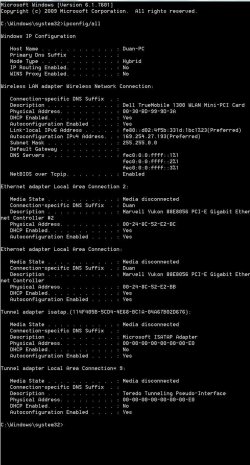
I checked ipconfig, I can see my ip address, as below:
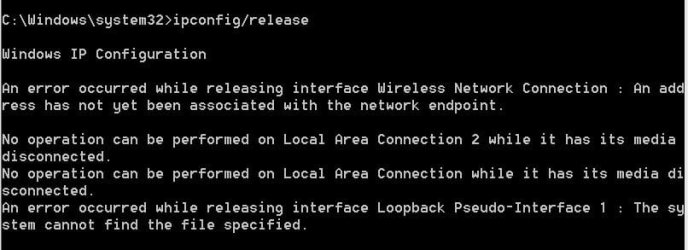
I checked ip release, there was an error as below:
Network adapters:
Dell trueMobile 1300 WLAN Mini-PCI card
driver version: 4.102.15.61
Processor: intel core i7 720
motherboard: asus
OS: windows 7 ultimate x64
I don’t know what else I should do to have my wireless back, Please help, any inputs will be appreciated.
What I have done:
I tried to wired to the modem/router, worked fine.
I checked wireless card, it is working fine and updated.
Signal is strong, 4 bars, and my laptop can use wireless flawless at the same point.
I turned off and turned the modem/router combo back on three times, no luck.
I checked ipconfig, I can see my ip address, as below:
I checked ip release, there was an error as below:
Network adapters:
Dell trueMobile 1300 WLAN Mini-PCI card
driver version: 4.102.15.61
Processor: intel core i7 720
motherboard: asus
OS: windows 7 ultimate x64
I don’t know what else I should do to have my wireless back, Please help, any inputs will be appreciated.
My Computer
- Computer type
- PC/Desktop
- Computer Manufacturer/Model Number
- custom build
- OS
- x64