Wireless network drops out during downloads

scottt732

New member
Local time
2:26 AM
Messages
6
SOLVED! Wireless network drops out during downloads

Hi,

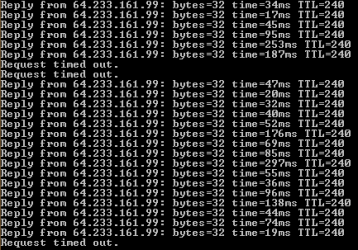
My wireless network speed cuts out every 20 seconds or so during high-speed downloads and/or file transfers within my LAN (i.e., it's not my ISP). My signal strength never drops below 70%, but yet for some reason, the network drops out. It is almost like the entire computer locks up a little bit. I can't even get another web page to load while it's happening until it recovers.

I'm running Win7 RC x64. The adapter is a Realtek RTL8187. I've tried 3 years worth of drivers (including the ones that I had running on my Vista x64 OS), switched the wireless channels from 1 to 6 to 11 and back again. I've tried every possible 'netsh interface tcp set global autotuninglevel=...' value. I've disabled every other adapter in the system. I've tried downloading to different drives, on different controllers, even tried IDE/SATA.

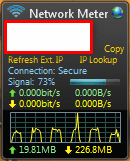
See attachments for samples of whats going on. As I wrote this, the ping window was still running--it's fine... until I download something.

Very very annoying...
 

Attachments
  • arghh.png
    arghh.png
    5.5 KB · Views: 2,408
  • arghh2.png
    arghh2.png
    14.4 KB · Views: 2,421
  • arghh3.png
    arghh3.png
    1.4 KB · Views: 548
Last edited:

My Computer My Computer

Computer Manufacturer/Model Number
Custom
OS
Windows 7
CPU
Core 2 Duo E6600 2.40 GHz
Motherboard
ASUS P5W DH Deluxe
Memory
4GB @ PC2-6400 (4x OCZ2P8001G)
Graphics Card(s)
2x ATI Radeon 4650
Sound Card
M-Audio Firewire 1814, Onboard Realtek disabled
Monitor(s) Displays
2x Samsung SyncMaster 2493HM, 1x Samsung LN46A750
Screen Resolution
1920x1200, 1920x1200, 1920x1080
Hard Drives
C: Western Digital 1TB RE3 (WD1002FBYS)
D: Western Digital 150GB Raptor 3rd gen (WD1500ADFD)
E: Western Digital 500GB Caviar RE2 (WD5000YS)
F: Western Digital 500GB Caviar RE2 (WD5000YS)
PSU
Antec NeoHE 550
Case
Antec Sonata II
Cooling
ThermalTake Big Typhoon
Keyboard
Microsoft Natural Ergonomic Keyboard 4000
Mouse
Logitech MX Revolution
Internet Speed
14.5 Mbps down / 3.75Mbps up
well, a few things you can start to do.... first is to swap out routers if possible. Next, swap out wireless cards if possible or vice versa, cards then router. next would be to do a line stress test, or just a test of the line. This can be done at dslreports.com , tho you may have to signup/register to be able to use this feature.

there is probably a few more things to try, but i would get past these steps first before i go doing much anything else.

btw, am having the same problem here... but my swapping out routers does nothing, and its not the wireless card here, as it happens on the whole network, wireless gets bottlenecked, and therefore shuts down just the wireless signal, if on wire you are fine. Point in case, not just my belkin wireless G, but the laptop gets the same treatment. Atleast by that i mean, if i lose connection here, so does the laptop. I have yet to see if i can create the same results in reverse, having to see if the laptop can crash the wireless network signal. So, i'm still investigating this myself.... welcome aboard matey! Is all i can say for now.
 

My Computer My Computer

Computer Manufacturer/Model Number
CUSTOM
OS
XP/win7 x86 build 7127
CPU
Athlon64 X2 DUAL 4200+ 2.21ghz
Motherboard
ASUS K8 PRO SLI
Memory
2GB Dual Chan DDR2 Corsair
Graphics Card(s)
Nvidia 6800GT
Sound Card
nvidia
Monitor(s) Displays
19' LCD
Screen Resolution
1280x1024
Hard Drives
WD 250, 2x500, 2x1TB IDE/USB
WD 250 SATA (system)
SEAGATE 120 Sata
PSU
coolermaster 450
Case
SUPERFLOWER
Cooling
1 HDD bay fan, 5x80mm Case Fans, AEROGATE II Fan/Temp
Keyboard
MS wireless
Mouse
MS Wireless
Internet Speed
fassssssssst
Hmm.. I sort of figured this was a Win7 issue. I'll have to start doing testing on other machines hooked up to the network. I ran a speed test (Speakeasy.net). It stalls, but then recovers during the test. The test reports the top speed (11 Mbps), not the stall speed (literally 0 Mbps). I also ran a Web100 based Network Diagnostic Tool (NDT) which complains about the receiver window size (I figure this is Vista's auto-adjusting receive window algorithm) and a lot of dropped packets & missing ACK's, but no duplex problems or anything like that. Maybe it's time to start crawling around in the attic and wire it all up. It's been on the ole' todo list for a while now. We've got 3 wireless devices (2 computers, 1 XBOX 360) on an old WRT-54G w/Tomato firmware. So maybe the problem is with the router. I'll try & SSH into the router and see if I can reproduce the problem directly from there, although it could be tricky w/o storage.

Please update this thread if you find anything out. I'll be sure and do the same.

Thanks,
Scott
 

My Computer My Computer

Computer Manufacturer/Model Number
Custom
OS
Windows 7
CPU
Core 2 Duo E6600 2.40 GHz
Motherboard
ASUS P5W DH Deluxe
Memory
4GB @ PC2-6400 (4x OCZ2P8001G)
Graphics Card(s)
2x ATI Radeon 4650
Sound Card
M-Audio Firewire 1814, Onboard Realtek disabled
Monitor(s) Displays
2x Samsung SyncMaster 2493HM, 1x Samsung LN46A750
Screen Resolution
1920x1200, 1920x1200, 1920x1080
Hard Drives
C: Western Digital 1TB RE3 (WD1002FBYS)
D: Western Digital 150GB Raptor 3rd gen (WD1500ADFD)
E: Western Digital 500GB Caviar RE2 (WD5000YS)
F: Western Digital 500GB Caviar RE2 (WD5000YS)
PSU
Antec NeoHE 550
Case
Antec Sonata II
Cooling
ThermalTake Big Typhoon
Keyboard
Microsoft Natural Ergonomic Keyboard 4000
Mouse
Logitech MX Revolution
Internet Speed
14.5 Mbps down / 3.75Mbps up
well, good. Am glad to have a member aboard, its been a long lonely ride until you jumped on the ship. I'm running dd-wrt on both a 54g v 7/8 and a gs... I think the 7/8 is running a v23... and the gs is running the 24 RC7 ver. I am suspect about the firmware as well. Also like you, i am looking to wire up the house shortly here myself, only i'm going the crawl space way instead of the attic, did that in the other house. Little cooler in the crawl space ;)

The interesting point you made was about the RcvWin. I am not sure about 7 innards on this, as i havent tinkered with these setting since the start of XP days, to where the point i found meaningless after win98. That was the only OS that when made changes, i seen an effect from it. I think that we can possibly rule out the WAN side of things, as this ISP is pretty rock solid, to my suprise actually, so...

Even tho like you, i'm in the final process of wiring up the place, i still want to find out what the hell is going on with the WLAN. Also wonder and have to test, about if stressing out the network via a download via wired, will affect the WLAN as well. I have wireless dependable thngs as well, psp, wii, laptop, and a media extender (which will go wired as soon as i get there).

Will keep reporting ...
 

My Computer My Computer

Computer Manufacturer/Model Number
CUSTOM
OS
XP/win7 x86 build 7127
CPU
Athlon64 X2 DUAL 4200+ 2.21ghz
Motherboard
ASUS K8 PRO SLI
Memory
2GB Dual Chan DDR2 Corsair
Graphics Card(s)
Nvidia 6800GT
Sound Card
nvidia
Monitor(s) Displays
19' LCD
Screen Resolution
1280x1024
Hard Drives
WD 250, 2x500, 2x1TB IDE/USB
WD 250 SATA (system)
SEAGATE 120 Sata
PSU
coolermaster 450
Case
SUPERFLOWER
Cooling
1 HDD bay fan, 5x80mm Case Fans, AEROGATE II Fan/Temp
Keyboard
MS wireless
Mouse
MS Wireless
Internet Speed
fassssssssst
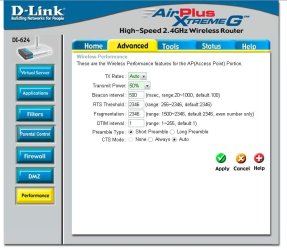
In the router's config page for wireless (in my DI-624 it's under advanced), try to change the beacon interval to 50 , fragmentation and RTS threshold to 2304. Or mess with some other settings here.
 

Attachments

  • Untitled-Captured-01.jpg
    Untitled-Captured-01.jpg
    61.9 KB · Views: 300

My Computer My Computer

Computer Manufacturer/Model Number
self built
OS
7600.20510 x86
CPU
P4 550 3.4 GHz HT running at 3.5 GHz
Motherboard
MSI PM8M3-V (MS-7211 v1.x) Micro-ATX mainboard
Memory
OCZ 2 GB(2x1GB) DDR400mHz running @ 414 mHz
Graphics Card(s)
HIS Radeon HD 3850 IceQ 3 Turbo HDMI Dual DL-DVI AGP
Sound Card
MOTU Traveler firewire studio interface 192 kHz 24 bit
Monitor(s) Displays
22" widescreen Acer X223W LCD, 17" Compaq P75 CRT
Screen Resolution
1680x1050 and 1280x1024
Hard Drives
SATA I x2 WD, 400 GB and 120 GB, SATA 2 WD Caviar Black 1 TB
PSU
350W generic
Case
Cybertronpc, it glows blue
Cooling
stock cpu fan, Ice-Q 3 gpu and system, many case fans
Keyboard
Logitch Classical Keyboard 200
Mouse
Logitech Mediaplay cordless
Internet Speed
1792/448 kbits/sec
Other Info
SATA II PCI fake RAID adapter, 1 GB Readyboost, original ATI Remote Wonder (even works with WMC perfectly), Logitech Rumblepad 2 game controller x2
In the router's config page for wireless (in my DI-624 it's under advanced), try to change the beacon interval to 50 , fragmentation and RTS threshold to 2304. Or mess with some other settings here.

well, i used to fool with this in the beginning, seen no good from it, as the signal strength is strong. What i am thinking is this is and could be a little deeper as how the preambles are taken by the wireless adapter and WLAN. Do you have an ack timing as well, if so what is it set to? Also, as you may know there is a corresponding RTS for the adapter as well.
 

My Computer My Computer

Computer Manufacturer/Model Number
CUSTOM
OS
XP/win7 x86 build 7127
CPU
Athlon64 X2 DUAL 4200+ 2.21ghz
Motherboard
ASUS K8 PRO SLI
Memory
2GB Dual Chan DDR2 Corsair
Graphics Card(s)
Nvidia 6800GT
Sound Card
nvidia
Monitor(s) Displays
19' LCD
Screen Resolution
1280x1024
Hard Drives
WD 250, 2x500, 2x1TB IDE/USB
WD 250 SATA (system)
SEAGATE 120 Sata
PSU
coolermaster 450
Case
SUPERFLOWER
Cooling
1 HDD bay fan, 5x80mm Case Fans, AEROGATE II Fan/Temp
Keyboard
MS wireless
Mouse
MS Wireless
Internet Speed
fassssssssst
Well, I had certain issues in the past where there were monkey-in-the-middle type of attacks, sophisticated....so I ran a cat-5 cable to my downstairs pc and ps3 to avoid using it. And I had real proper security setup too like AES and WPA2 with long random generated pass lol. Just no type of authentication which is usually silly for home use.

But anyway, my settings are the same as when I did run it. No, there's no ack setting. Only what's in the pic I posted.

Ya, there's probably some setting that either the adapter or router is not liking so much, so under load, it becomes apparent.
 

My Computer My Computer

Computer Manufacturer/Model Number
self built
OS
7600.20510 x86
CPU
P4 550 3.4 GHz HT running at 3.5 GHz
Motherboard
MSI PM8M3-V (MS-7211 v1.x) Micro-ATX mainboard
Memory
OCZ 2 GB(2x1GB) DDR400mHz running @ 414 mHz
Graphics Card(s)
HIS Radeon HD 3850 IceQ 3 Turbo HDMI Dual DL-DVI AGP
Sound Card
MOTU Traveler firewire studio interface 192 kHz 24 bit
Monitor(s) Displays
22" widescreen Acer X223W LCD, 17" Compaq P75 CRT
Screen Resolution
1680x1050 and 1280x1024
Hard Drives
SATA I x2 WD, 400 GB and 120 GB, SATA 2 WD Caviar Black 1 TB
PSU
350W generic
Case
Cybertronpc, it glows blue
Cooling
stock cpu fan, Ice-Q 3 gpu and system, many case fans
Keyboard
Logitch Classical Keyboard 200
Mouse
Logitech Mediaplay cordless
Internet Speed
1792/448 kbits/sec
Other Info
SATA II PCI fake RAID adapter, 1 GB Readyboost, original ATI Remote Wonder (even works with WMC perfectly), Logitech Rumblepad 2 game controller x2
I think I'm pretty close to figuring this one out. I went into Device Manager and hit 'View' - 'Devices by connection'. I started disabling every PCI-to-USB device in the system (my network card is USB based) except for the one's connected to my mouse & keyboard. Sure enough, when I disabled the PCI-USB controller hooked up to my bluetooth adapter, I am able to sustain throughput. Enable the USB controller again, throughput goes in and out.

I'm perfectly willing to ditch bluetooth in favor of connectivity, but I'm going to do a little more digging. I was playing around with a bunch of other settings on my wireless adapter. I think I'm running in 802.11b mode now as opposed to 802.11g. I'm going to try and reverse this stuff and see if it's still resolved. It's unclear whether this is a Windows problem or some kind of wireless noise problem. Stay tuned.
 

My Computer My Computer

Computer Manufacturer/Model Number
Custom
OS
Windows 7
CPU
Core 2 Duo E6600 2.40 GHz
Motherboard
ASUS P5W DH Deluxe
Memory
4GB @ PC2-6400 (4x OCZ2P8001G)
Graphics Card(s)
2x ATI Radeon 4650
Sound Card
M-Audio Firewire 1814, Onboard Realtek disabled
Monitor(s) Displays
2x Samsung SyncMaster 2493HM, 1x Samsung LN46A750
Screen Resolution
1920x1200, 1920x1200, 1920x1080
Hard Drives
C: Western Digital 1TB RE3 (WD1002FBYS)
D: Western Digital 150GB Raptor 3rd gen (WD1500ADFD)
E: Western Digital 500GB Caviar RE2 (WD5000YS)
F: Western Digital 500GB Caviar RE2 (WD5000YS)
PSU
Antec NeoHE 550
Case
Antec Sonata II
Cooling
ThermalTake Big Typhoon
Keyboard
Microsoft Natural Ergonomic Keyboard 4000
Mouse
Logitech MX Revolution
Internet Speed
14.5 Mbps down / 3.75Mbps up
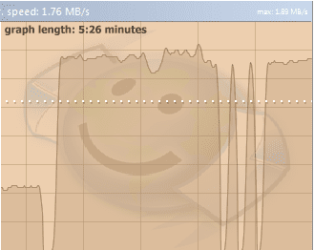
Ok. I'm good. The picture shows me back up and running at 802.11b with some non-default settings on the wireless adapter. Then the setting change to 802.11g/all defaults (the gap, then the high speed). Then I started trying to narrow down whether it was the USB controller, the Bluetooth radio, or one of the logical devices under the bluetooth radio (i.e., Microsoft Bluetooth Enumerator)--that's where the network is cutting in and out. If I disable to Bluetooth Radio and everything below it, I'm back up and running at full speed.

I bought a ~$20 bluetooth adpater off Newegg. It used to require Toshiba drivers and I had to jump through hoops to get the MS drivers running on it instead in order to get it to play nice with my Blackberry. With Win7, it installed the MS drivers automatically and the Blackberry just worked. That was nice, but I guess that's when the network started cutting in and out. I didn't notice it at the time.

I still can't say for sure whether it's the cheap Bluetooth radio, Windows Bluetooth stack bug, radio interference, the Blackberry, BBerry Device Manager/Desktop Manager... but honestly, I don't really care. I'm happy to use a USB cable w/the Blackberry in exchange for having a network again.

---

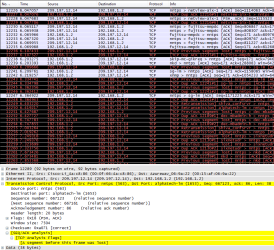
Edit: I was snooping the packets with Wireshark and during the cutting in and out periods, there is a very significant amount of TCP problems (red on black = bad)... duplicate ACK's, lost segments, window adjustments, etc.. When I disabled Bluetooth, everything is blue (blue = good).
 

Attachments

  • Woohoo.png
    Woohoo.png
    15.7 KB · Views: 24
  • Woohoo2.png
    Woohoo2.png
    37.3 KB · Views: 51
Last edited:

My Computer My Computer

Computer Manufacturer/Model Number
Custom
OS
Windows 7
CPU
Core 2 Duo E6600 2.40 GHz
Motherboard
ASUS P5W DH Deluxe
Memory
4GB @ PC2-6400 (4x OCZ2P8001G)
Graphics Card(s)
2x ATI Radeon 4650
Sound Card
M-Audio Firewire 1814, Onboard Realtek disabled
Monitor(s) Displays
2x Samsung SyncMaster 2493HM, 1x Samsung LN46A750
Screen Resolution
1920x1200, 1920x1200, 1920x1080
Hard Drives
C: Western Digital 1TB RE3 (WD1002FBYS)
D: Western Digital 150GB Raptor 3rd gen (WD1500ADFD)
E: Western Digital 500GB Caviar RE2 (WD5000YS)
F: Western Digital 500GB Caviar RE2 (WD5000YS)
PSU
Antec NeoHE 550
Case
Antec Sonata II
Cooling
ThermalTake Big Typhoon
Keyboard
Microsoft Natural Ergonomic Keyboard 4000
Mouse
Logitech MX Revolution
Internet Speed
14.5 Mbps down / 3.75Mbps up
Back
Top