Wireless network (N)

fattyking

New member
Hi there,
Im running a Compaq Presario CQ40 notebook
Specs
Processor: AMD Turion(tm) x2 Ultra Dual-core mobile ZM-84 2.30 GHz
RAM: 4GB
System type: Windows 7 home premium 32-bit

Ny notebook also has a built-in wireless n adapter.
the router is 802.11n
Now my question is how do i know if im using Wireless N and not wireless G.
Thanks
 

My Computer

OS
Windows 7 32bit
Hi there,
Im running a Compaq Presario CQ40 notebook
Specs
Processor: AMD Turion(tm) x2 Ultra Dual-core mobile ZM-84 2.30 GHz
RAM: 4GB
System type: Windows 7 home premium 32-bit

Ny notebook also has a built-in wireless n adapter.
the router is 802.11n
Now my question is how do i know if im using Wireless N and not wireless G.
Thanks


look in task manager Networking see pic


Ken J+
 
Last edited:

My Computer

Computer Manufacturer/Model Number
HP Pavillion dv-7 1005 Tx
OS
Win 8 Release candidate 8400
CPU
[email protected]
Memory
4 gigs
Graphics Card(s)
Nvidia 9600M
Sound Card
HD built-in
Monitor(s) Displays
17" Wxga
Screen Resolution
1440x900
Cooling
none
Internet Speed
45Mb down 5Mb up
R:zigzag3143
thx for that info. So if my link speed is above 54mbps it should be N wireless am i right? Currently my link speed is 108mbps but it jumps from80++ to 140++ .Also how can i increase the signal strength? My signal strength keeps jumping from 2bars to 4bars.
Thanks
 

My Computer

OS
Windows 7 32bit
R:zigzag3143
thx for that info. So if my link speed is above 54mbps it should be N wireless am i right? Currently my link speed is 108mbps but it jumps from80++ to 140++ .Also how can i increase the signal strength? My signal strength keeps jumping from 2bars to 4bars.
Thanks


Actually some G routers can do 108mb. but if you are touching 140 thats "n" Strength is a function of distance and direction. N should have decent range.

doesnt really matter for you bottleneck is going to be your connection to your ISP.


Ken J+
 

My Computer

Computer Manufacturer/Model Number
HP Pavillion dv-7 1005 Tx
OS
Win 8 Release candidate 8400
CPU
[email protected]
Memory
4 gigs
Graphics Card(s)
Nvidia 9600M
Sound Card
HD built-in
Monitor(s) Displays
17" Wxga
Screen Resolution
1440x900
Cooling
none
Internet Speed
45Mb down 5Mb up
Also can i clarify something. Does using a Wireless N router definitely mean that i will be running on wireless 'N' and not 'G'??
 

My Computer

OS
Windows 7 32bit
Nope, routers usually must be configured to use N - same for the adapters!
However, there are some compatibility issues so it can happen it will not work depending on what hardware you use.
 

My Computer

Computer Manufacturer/Model Number
self built
OS
Win7 x86
CPU
PhenomII x2 550 (unlocked 4 cores)
Motherboard
Gigabyte GA-MA770T-UD3P
Memory
2x 2GB Kingston 1333
Graphics Card(s)
Gigabyte HD4850 1GB
Sound Card
onboard Realtek
Monitor(s) Displays
Samsung 2233
Screen Resolution
1920x1080
Hard Drives
2x WD 512GB green sata2
PSU
Corsair 620
Case
Armor MX+
Cooling
all stock
Keyboard
MS Digital Media 3000
Mouse
MS Mouse 3000
Internet Speed
adsl2+
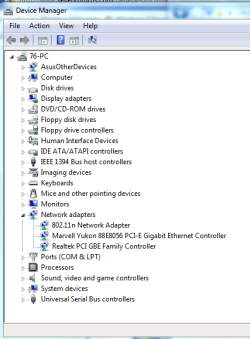
Hi, you could also have a look in the Device Manager and then click on Network Adapters.

de.PNG
 

My Computer

Computer Manufacturer/Model Number
Self Build 64bit
OS
Vista Ult64, Win7600
CPU
Intel Core 2 Quad Q6600 @ 2400 MHz 64bit OS
Motherboard
Asus P5E3 Deluxe WiFi @p 64 bit OS
Memory
4096 MB DDR3-SDRAM
Graphics Card(s)
ATI Radeon HD 3870 Series x2 Crossfired
Sound Card
Realtek on board
Monitor(s) Displays
Samsung SyncMaster - 23 inches
Screen Resolution
1680x1050 pixels at 60 Hz in True Colors
Hard Drives
Hitachi (250 GB)/Samsung 750 GB. /Barracuda 160 GB.
My Book 1 TB external..
PSU
Cooler Master 1000w
Case
Cooler Master Cosmos 1000.
Cooling
Fans and fresh air,
Keyboard
Wireless
Mouse
Wireless
Internet Speed
Never fast enough
Other Info
I use a Magnum.
Nope, routers usually must be configured to use N - same for the adapters!
However, there are some compatibility issues so it can happen it will not work depending on what hardware you use.

Thanks for the info
Now my link speed is jumping from 40mbps to 121mbps in the last 5mins of timing it. Additionally, my wireless signal strength keeps hopping from 2 bars to 4 bars even though i dont move my router or my laptop. Any suggestions? Also how do i configure the router/adapter?
Sorry for so many questions :P im new to this
 

My Computer

OS
Windows 7 32bit
what make/type is the router?

your jumping signal strength indicate a problem with walls or neighbours :)
 

My Computer

Computer Manufacturer/Model Number
self built
OS
Win7 x86
CPU
PhenomII x2 550 (unlocked 4 cores)
Motherboard
Gigabyte GA-MA770T-UD3P
Memory
2x 2GB Kingston 1333
Graphics Card(s)
Gigabyte HD4850 1GB
Sound Card
onboard Realtek
Monitor(s) Displays
Samsung 2233
Screen Resolution
1920x1080
Hard Drives
2x WD 512GB green sata2
PSU
Corsair 620
Case
Armor MX+
Cooling
all stock
Keyboard
MS Digital Media 3000
Mouse
MS Mouse 3000
Internet Speed
adsl2+
Okay that box!
First get the signal strength even - other wireless equipment in the house? (switch off and see), what's your walls? - brick something? or steel-frame construction?
 

My Computer

Computer Manufacturer/Model Number
self built
OS
Win7 x86
CPU
PhenomII x2 550 (unlocked 4 cores)
Motherboard
Gigabyte GA-MA770T-UD3P
Memory
2x 2GB Kingston 1333
Graphics Card(s)
Gigabyte HD4850 1GB
Sound Card
onboard Realtek
Monitor(s) Displays
Samsung 2233
Screen Resolution
1920x1080
Hard Drives
2x WD 512GB green sata2
PSU
Corsair 620
Case
Armor MX+
Cooling
all stock
Keyboard
MS Digital Media 3000
Mouse
MS Mouse 3000
Internet Speed
adsl2+
well i know whats the bottleneck now. cause when im just a few metres nearer to the box, like from my sister's room and i run a speedtest i get 8400kbps down speed. but when im in my room i get 4400kbps >.<. how do i boost the range of the signal?
 

My Computer

OS
Windows 7 32bit
possibility to reposition the router to a best possible place? - (least walls, maybe upstairs since ceilings usually are more shallow)

Townhouse? - interfering neighbours very close by?

once the signal is good and stable - set adapters and router to N and see if it physically works. If so you then you can activate wireless security to prevent others from joining your Internet ride :)
 

My Computer

Computer Manufacturer/Model Number
self built
OS
Win7 x86
CPU
PhenomII x2 550 (unlocked 4 cores)
Motherboard
Gigabyte GA-MA770T-UD3P
Memory
2x 2GB Kingston 1333
Graphics Card(s)
Gigabyte HD4850 1GB
Sound Card
onboard Realtek
Monitor(s) Displays
Samsung 2233
Screen Resolution
1920x1080
Hard Drives
2x WD 512GB green sata2
PSU
Corsair 620
Case
Armor MX+
Cooling
all stock
Keyboard
MS Digital Media 3000
Mouse
MS Mouse 3000
Internet Speed
adsl2+
erm, sorry for sounding all noobish but how do i "set adapters and router to N" :P

Type IP address 192.168.1.1 is the default for Linksys
configure ur settings within that page reboot may be required, and check N only
 

My Computer

Computer Manufacturer/Model Number
custom of course...built by grimreaper
OS
Windows 7 Ultimate X64
CPU
Intel Core 2 Quad Q9650 3.0GHz (3.6GHz 24/7) maxed 4.05GHz
Motherboard
EVGA 790i Ultra SLi Model#132-CK-NF79-A1 BIOS P10
Memory
8GB OCZ DDR3 PC3-14400 @ 1800MHz NVIDIA SLi-Ready
Graphics Card(s)
2XBFG GeForce GTX 280 OC Edition SLi'd
Sound Card
SoundBlaster X-Fi Titanium Fatal1ty Pro Series
Monitor(s) Displays
Samsung 52" 1080P LCD HDTV (LN52B550)
Screen Resolution
1920X1080 @ 60Hz
Hard Drives
3xWestern Digital WD1001FALS Caviar Black 1TB Hard Drive(s) RAID 0 x2 encased in 3xMasscool KuFormula SHF1 HDD Cooler(s)
PSU
ThermalTake ToughPower 1200W P/N:W0133RU Modularized
Case
ThermalTake P/N: VH6000BWS Armor Full-Tower
Cooling
ThermalTake SpinQ P/N: P0466 CPU Cooler
Keyboard
Logitech cordless Y-RAJ56A piece of ****
Mouse
Logitech G7 Laser Cordless mouse black
Internet Speed
10 Mbps DL-1Mbps UL wirelessly DWA-552 extreme N
Other Info
1XSamsung DVD burner SH-S223Q/BEBN SATA
1XSamsung DVD burner SH-S223L/BEBN SATA
1XLG GGW-H20L Blu-Ray burner
4XCooler Master 120mm Blue LED SickleFlow 2000 RPM
1XBelkin UPS F6C1500TWRK) backup power supply
here's an example i just screen saved my dlink router you can choose either mixed (i have to :( but i can also use N only and make sure you configure your security settings as mentioned from MyWin7
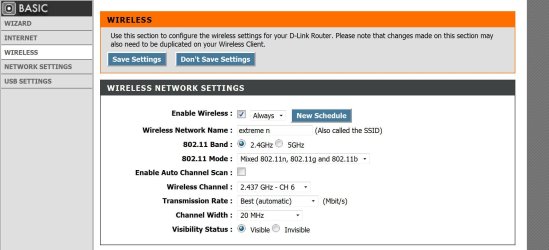
 

Attachments

  • router 1.JPG
    router 1.JPG
    166.4 KB · Views: 20
  • router 2.JPG
    router 2.JPG
    159.9 KB · Views: 13

My Computer

Computer Manufacturer/Model Number
custom of course...built by grimreaper
OS
Windows 7 Ultimate X64
CPU
Intel Core 2 Quad Q9650 3.0GHz (3.6GHz 24/7) maxed 4.05GHz
Motherboard
EVGA 790i Ultra SLi Model#132-CK-NF79-A1 BIOS P10
Memory
8GB OCZ DDR3 PC3-14400 @ 1800MHz NVIDIA SLi-Ready
Graphics Card(s)
2XBFG GeForce GTX 280 OC Edition SLi'd
Sound Card
SoundBlaster X-Fi Titanium Fatal1ty Pro Series
Monitor(s) Displays
Samsung 52" 1080P LCD HDTV (LN52B550)
Screen Resolution
1920X1080 @ 60Hz
Hard Drives
3xWestern Digital WD1001FALS Caviar Black 1TB Hard Drive(s) RAID 0 x2 encased in 3xMasscool KuFormula SHF1 HDD Cooler(s)
PSU
ThermalTake ToughPower 1200W P/N:W0133RU Modularized
Case
ThermalTake P/N: VH6000BWS Armor Full-Tower
Cooling
ThermalTake SpinQ P/N: P0466 CPU Cooler
Keyboard
Logitech cordless Y-RAJ56A piece of ****
Mouse
Logitech G7 Laser Cordless mouse black
Internet Speed
10 Mbps DL-1Mbps UL wirelessly DWA-552 extreme N
Other Info
1XSamsung DVD burner SH-S223Q/BEBN SATA
1XSamsung DVD burner SH-S223L/BEBN SATA
1XLG GGW-H20L Blu-Ray burner
4XCooler Master 120mm Blue LED SickleFlow 2000 RPM
1XBelkin UPS F6C1500TWRK) backup power supply
here's an example i just screen saved my dlink router you can choose either mixed (i have to :( but i can also use N only and make sure you configure your security settings as mentioned from MyWin7
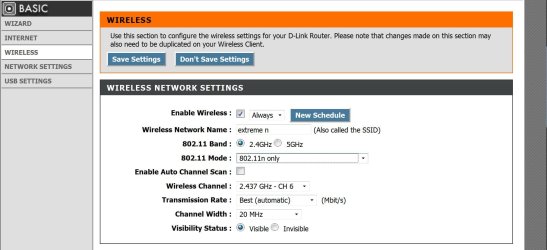
Yea im using Mixed as well since my sister's desktop cant use "N". i have checked my security settings as well. Now i moved the router and its pointing directly at me but i still dont get my 8000 kbps from the speedtest. so im thinking theres something wrong with my adapter on my laptop?
 

My Computer

OS
Windows 7 32bit
here's your options ; update the Linksys router's firmware if there is one, assuming you correctly configured the router where only you and your sister use the connection (maybe she's downloading something at the same time you were running speedtest?).
If there is an update to your router, remember it will clear all settings and you will have to configure the settings again.
 

My Computer

Computer Manufacturer/Model Number
custom of course...built by grimreaper
OS
Windows 7 Ultimate X64
CPU
Intel Core 2 Quad Q9650 3.0GHz (3.6GHz 24/7) maxed 4.05GHz
Motherboard
EVGA 790i Ultra SLi Model#132-CK-NF79-A1 BIOS P10
Memory
8GB OCZ DDR3 PC3-14400 @ 1800MHz NVIDIA SLi-Ready
Graphics Card(s)
2XBFG GeForce GTX 280 OC Edition SLi'd
Sound Card
SoundBlaster X-Fi Titanium Fatal1ty Pro Series
Monitor(s) Displays
Samsung 52" 1080P LCD HDTV (LN52B550)
Screen Resolution
1920X1080 @ 60Hz
Hard Drives
3xWestern Digital WD1001FALS Caviar Black 1TB Hard Drive(s) RAID 0 x2 encased in 3xMasscool KuFormula SHF1 HDD Cooler(s)
PSU
ThermalTake ToughPower 1200W P/N:W0133RU Modularized
Case
ThermalTake P/N: VH6000BWS Armor Full-Tower
Cooling
ThermalTake SpinQ P/N: P0466 CPU Cooler
Keyboard
Logitech cordless Y-RAJ56A piece of ****
Mouse
Logitech G7 Laser Cordless mouse black
Internet Speed
10 Mbps DL-1Mbps UL wirelessly DWA-552 extreme N
Other Info
1XSamsung DVD burner SH-S223Q/BEBN SATA
1XSamsung DVD burner SH-S223L/BEBN SATA
1XLG GGW-H20L Blu-Ray burner
4XCooler Master 120mm Blue LED SickleFlow 2000 RPM
1XBelkin UPS F6C1500TWRK) backup power supply
Back
Top