Wireless Network REALLY Slow

Dominic Warden

New member
Member
VIP
Local time
7:13 PM
Messages
107
Hi, I have the worst internet wireless box ever. It is some TALKTALK router that hardly gives us internet connections. Can i speed it up but doing any tweaks because it is really starting to get on my nerves that i cant connect to the internet.
My PC has a full bars icon on the taskbar but it takes ages to load webpages, I cant watch youtube videos because of its slowness, and its the same on my dads laptop and even the ps3. can i do anything or Does TALKTALK Broadband suck?

Thanks
 

My Computer

Computer type
PC/Desktop
Computer Manufacturer/Model Number
Republic of Gamers
OS
Windows 8 Pro x64
CPU
Intel® Core™2 Quad Processor Q6600 2.40MHz
Memory
8GB DDR2
Graphics Card(s)
NVidia GeForce GT 440
Sound Card
Integrated Sound
Monitor(s) Displays
Packard Bell Visio 230Ws
Screen Resolution
1920x1080
Hard Drives
2 x 500Gb SATA
Case
Midi
Cooling
8 Fans
Hi, I have the worst internet wireless box ever. It is some TALKTALK router that hardly gives us internet connections. Can i speed it up but doing any tweaks because it is really starting to get on my nerves that i cant connect to the internet.
My PC has a full bars icon on the taskbar but it takes ages to load webpages, I cant watch youtube videos because of its slowness, and its the same on my dads laptop and even the ps3. can i do anything or Does TALKTALK Broadband suck?

Thanks

It may just be the wireless settings that you are using.

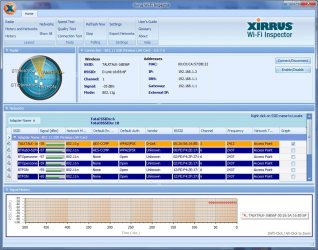
If you can please install the Xirrus WIFI inspector and post a screen shot of it I'd be able to help you with those adjustments.
Wi-Fi Inspector | Xirrus
 

My Computer

Computer type
PC/Desktop
Computer Manufacturer/Model Number
Home built
OS
Windows 7 Ult, Windows 8.1 Pro,
CPU
Q9650-4.275GHz, E8600 4.5GHz, E6750-3.8GHz
Motherboard
Evga 780i FTW
Memory
G.Skill PC2 9600 1200Mhz 5 5 5 15 2T
Graphics Card(s)
GTX480
Sound Card
Asus Xonar D2
Monitor(s) Displays
HannsG
Screen Resolution
1680X1050
Hard Drives
GSkill Phoenix Pro 120GB SSD
PSU
ThermalTake Toughpower 1000Watt modular
Case
ThermalTake XaserV
Cooling
Xigmatek S1283
Keyboard
Logitech G15
Mouse
Logitech G9
Internet Speed
T1
like this?
Picture1.jpg
 

My Computer

Computer type
PC/Desktop
Computer Manufacturer/Model Number
Republic of Gamers
OS
Windows 8 Pro x64
CPU
Intel® Core™2 Quad Processor Q6600 2.40MHz
Memory
8GB DDR2
Graphics Card(s)
NVidia GeForce GT 440
Sound Card
Integrated Sound
Monitor(s) Displays
Packard Bell Visio 230Ws
Screen Resolution
1920x1080
Hard Drives
2 x 500Gb SATA
Case
Midi
Cooling
8 Fans
I'm not really seeing any problems here other than your using wireless g instead of wireless n which is must faster.

If you can get into your routers wireless configuration page and look for the wireless N settings if you have that.

If you can post a screen shot of your ipconfig/all it would help me to spot any other problems.
 

My Computer

Computer type
PC/Desktop
Computer Manufacturer/Model Number
Home built
OS
Windows 7 Ult, Windows 8.1 Pro,
CPU
Q9650-4.275GHz, E8600 4.5GHz, E6750-3.8GHz
Motherboard
Evga 780i FTW
Memory
G.Skill PC2 9600 1200Mhz 5 5 5 15 2T
Graphics Card(s)
GTX480
Sound Card
Asus Xonar D2
Monitor(s) Displays
HannsG
Screen Resolution
1680X1050
Hard Drives
GSkill Phoenix Pro 120GB SSD
PSU
ThermalTake Toughpower 1000Watt modular
Case
ThermalTake XaserV
Cooling
Xigmatek S1283
Keyboard
Logitech G15
Mouse
Logitech G9
Internet Speed
T1
I also see you dns ip address is your gateways address too. Maybe try to directly set the dns to your ISP dns servers. You might see a difference as dns is being forwarded to your router and then the router gives the dns info to the pc.
 

My Computer

Computer type
PC/Desktop
Computer Manufacturer/Model Number
Custom Build
OS
Windows 7 Pro 64bit build 7601 SP1
CPU
Intel Core I5 3570K 3.4Ghz w/ Zalman CNPS9900NT RT
Motherboard
MSI Z77A-G45 Gaming
Memory
G.Skill F3-12800CL9D-8GbXL ; 4Gx2
Graphics Card(s)
EVGA Geforce GTX 770 Superclocked
Sound Card
Creative Sound Blaster Z
Monitor(s) Displays
Dual ViewSonic VX2770Smh-LED Black 27"IPS-Panel
Screen Resolution
1920x1080
Hard Drives
Kingston Hyper X 240GB SSD Win8 Pro 64bit 6GB/s Sata III
Intel 335 Series SSD 240GB Win8 Storage 6GB/s Sata III
Intel 320 Series SSD 600GB Storage 3GB/s Sata II
Western Digital Scorpio Black 1TB - Docked via Esata
PSU
Coolermaster GX 750W
Case
Corsair Vengence C70
Cooling
Coolermaster 120mm and Enermax 140mm
Keyboard
Corsair Vengence K70
Mouse
Logitech G500
Internet Speed
22mbps+
Browser
Firefox, Chrome, IE
Other Info
Swan M50W 2.1 speakers
APC UPS
Thermaltake BlacX HDD Dock
Samsung BD Optical Drive
Netgear WNDR4500
Back
Top