Wireless Network shows "Limited Access"

deand73

New member
Local time
4:51 PM
Messages
2
Hello,
I have a Dell Vostro 1720 with Intel WiFi Link 5300 AGN. Yesterday, my wireless network at home stopped working. In Wireless Network Connections, it says "Limited access". I'm not sending or receiving any packets, but my wireless connection is strong. When I troubleshoot the problem, it says that there might be a problem with the driver for the Wireless Network Connection adapter. I updated the driver and there are no caution signs in the device manager. I made sure I didn't have an AVG connection under Networking Properties as suggested elsewhere. I even tried manually configuring the IPv4 properties. I'm not sure what else to try at this point. Any suggestions?

Thanks!
 

My Computer My Computer

At a glance

Windows 7 Enterprise 64bitIntel Core 2 Duo CPU4 GB
Computer Manufacturer/Model Number
Dell
OS
Windows 7 Enterprise 64bit
CPU
Intel Core 2 Duo CPU
Memory
4 GB

My Computer My Computer

At a glance

Windows 8.1 Pro RTM x64Intel Core-i5-3570K 4-core @ 3.4GHz (Ivy Brid...4 x 4GB DDR3-1600 Corsair Vengeance CMZ8GX3M2...MSI GeForce GTX770 Gaming OC 2GB
Computer type
PC/Desktop
Computer Manufacturer/Model Number
Dwarf Dwf/11/2012 r09/2013
OS
Windows 8.1 Pro RTM x64
CPU
Intel Core-i5-3570K 4-core @ 3.4GHz (Ivy Bridge) (OC 4.4GHz)
Motherboard
ASRock Z77 Extreme4-M
Memory
4 x 4GB DDR3-1600 Corsair Vengeance CMZ8GX3M2A1600C9B (16GB)
Graphics Card(s)
MSI GeForce GTX770 Gaming OC 2GB
Sound Card
Realtek High Definition on board solution (ALC 898)
Monitor(s) Displays
ViewSonic VA1912w Widescreen (VGA)
Screen Resolution
1440x900
Hard Drives
OCZ Agility 3 SSD 120GB SATA III x2 (RAID 0)
Samsung HD501LJ 500GB SATA II x2
Hitachi HDS721010CLA332 1TB SATA II
Iomega 1.5TB Ext USB 2.0
WD 2.0TB Ext USB 3.0
PSU
XFX Pro Series 850W Semi-Modular
Case
Gigabyte IF233
Cooling
1 x 120mm Front Inlet 1 x 120mm Rear Exhaust
Keyboard
Microsoft Comfort Curve Keyboard 3000 (USB)
Mouse
Microsoft Comfort Mouse 3000 for Business (USB)
Internet Speed
NetGear DG834Gv3 ADSL Modem/Router (Ethernet) ~4.0 Mb/s (O2)
Antivirus
Avast! 8.0.1497
Browser
IE 11
Other Info
Optical Drive: HL-DT-ST BD-RE BH10LS30 SATA Bluray
Lexmark S305 Printer/Scanner/Copier (USB)
WEI Score: 8.1/8.1/8.5/8.5/8.25
Asus Eee PC 1011PX Netbook (Windows 7 x86 Starter)
ipconfig results

Here is what ipconfig is saying. I also forgot to mention that I ran an Intel PROSet Wireless Diagnostic and everything passed except the Ping Test. Don't know if that helps... Microsoft Windows [Version 6.1.7601] Copyright (c) 2009 Microsoft Corporation. All rights reserved. C:\Windows\System32>ipconfig /all Windows IP Configuration Host Name . . . . . . . . . . . . : darren Primary Dns Suffix . . . . . . . : Node Type . . . . . . . . . . . . : Hybrid IP Routing Enabled. . . . . . . . : No WINS Proxy Enabled. . . . . . . . : No Tunnel adapter isatap.{461743CC-8DA4-4634-95CB-D897419C3B58}: Media State . . . . . . . . . . . : Media disconnected Connection-specific DNS Suffix . : Description . . . . . . . . . . . : Microsoft ISATAP Adapter Physical Address. . . . . . . . . : 00-00-00-00-00-00-00-E0 DHCP Enabled. . . . . . . . . . . : No Autoconfiguration Enabled . . . . : Yes Tunnel adapter isatap.{F9418168-5287-4983-8829-DE86D1FF4354}: Media State . . . . . . . . . . . : Media disconnected Connection-specific DNS Suffix . : Description . . . . . . . . . . . : Microsoft ISATAP Adapter #2 Physical Address. . . . . . . . . : 00-00-00-00-00-00-00-E0 DHCP Enabled. . . . . . . . . . . : No Autoconfiguration Enabled . . . . : Yes Tunnel adapter Teredo Tunneling Pseudo-Interface: Media State . . . . . . . . . . . : Media disconnected Connection-specific DNS Suffix . : Description . . . . . . . . . . . : Teredo Tunneling Pseudo-Interface Physical Address. . . . . . . . . : 00-00-00-00-00-00-00-E0 DHCP Enabled. . . . . . . . . . . : No Autoconfiguration Enabled . . . . : Yes C:\Windows\System32>
 

My Computer My Computer

At a glance

Windows 7 Enterprise 64bitIntel Core 2 Duo CPU4 GB
Computer Manufacturer/Model Number
Dell
OS
Windows 7 Enterprise 64bit
CPU
Intel Core 2 Duo CPU
Memory
4 GB
Limited access message

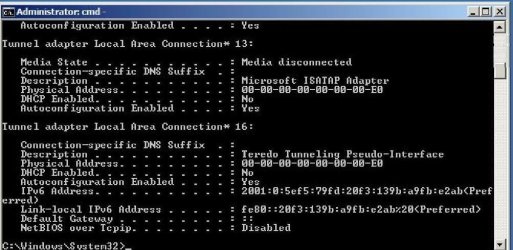
I get the 'limited access' when checking the status of my connection. I followed the advice of Dwarf by using
IP/all and attach the findings. Can anyone explain it to me please ?
 

Attachments

  • IP.jpg
    IP.jpg
    77.3 KB · Views: 18

My Computer My Computer

At a glance

win 7 home premium
OS
win 7 home premium
Back
Top