Wireless not working

haasino

New member
Hey, all...

I just upgraded to Windows 7 from Vista and I can't get my wireless card to work. When I try to troubleshoot, it instructs me to connect an ethernet cable... in fact, it makes no mention of setting up a wireless network. I reinstalled the Linksys drivers from the original CD that it came with, but still no luck. Specs are as follows:

PC - Dell Dimension E520 PC now running Windows 7 Professional (32bit)
Wireless Card - Linksys WMP54G Wireless-G PCI Adaptor (ver. 4.1)

The card was working fine this morning with Windows Vista, but now that it's running Win 7, it doesn't seem to be recognized... and help or suggestions?

Thanks.
 
Last edited:

My Computer

Computer Manufacturer/Model Number
Dell Dimension E520
OS
Windows 7
Hey, all...

I just upgraded to Windows 7 from Vista and I can't get my wireless card to work. When I try to troubleshoot, it instructs me to connect an ethernet cable... in fact, it makes no mention of setting up a wireless network. I reinstalled the Linksys drivers from the original CD that it came with, but still no luck. Specs are as follows:

PC - Dell Dimension E520 PC now running Windows 7 Professional (32bit)
Wireless Card - Linksys WMP54G Wireless-G PCI Adaptor (ver. 4.1)

The card was working fine this morning with Windows Vista, but now that it's running Win 7, it doesn't seem to be recognized... and help or suggestions?

Thanks.

Hi and welcome

Were the drivers in the cd for an XP system? You can use a vusta driver if you install it in compatibility mode

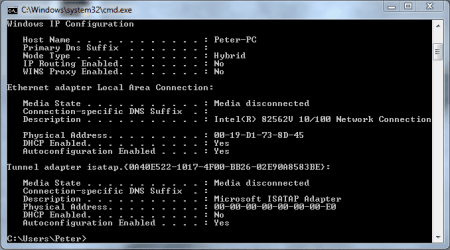
Anyway can y ou type cmd in search>ipconfig /all. then using the snipping tool (type snipping in search make a screen shot of the output. then using the attachment icon uploado it to use for debugging

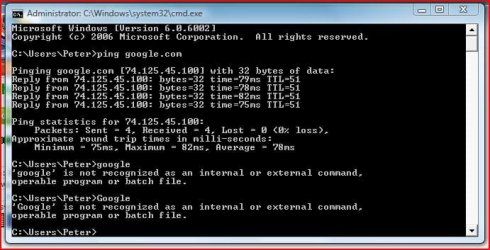
See pics of both

Kenn J+
 
Last edited:

My Computer

Computer Manufacturer/Model Number
HP Pavillion dv-7 1005 Tx
OS
Win 8 Release candidate 8400
CPU
[email protected]
Memory
4 gigs
Graphics Card(s)
Nvidia 9600M
Sound Card
HD built-in
Monitor(s) Displays
17" Wxga
Screen Resolution
1440x900
Cooling
none
Internet Speed
45Mb down 5Mb up

My Computer

Computer Manufacturer/Model Number
Cheap $399.00 E-Machine
OS
Windows 7 Pro & Vista Home Premium
CPU
Athlon 64 3800+ (Orleans) 2.40GHz
Motherboard
Winfast
Memory
2GB DDR2 RAM DIMM
Graphics Card(s)
NVIDIA GeForce 8500 GT 512 MB memory HDMI out
Sound Card
creative X-Fi Exteme 7..1 channel
Monitor(s) Displays
Acer V223W 22" widescreen DVI
Screen Resolution
1680x1050
Hard Drives
WDC WD5 500GB
WDC WD25 250GB
PSU
OCZ 550 watt
Case
Gateway
Cooling
2 fans
Keyboard
Dell
Mouse
Sony Vaio
Internet Speed
18MB/s down - .72MB /s up
Hi and welcome

Were the drivers in the cd for an XP system? You can use a vusta driver if you install it in compatibility mode

I'm not positive on this, since all I have to go by is the information printed on the card itself, and on the CD... but since the card is about 2 years old, I'm guessing the drivers on it are either XP or Vista... definitely not Win 7. I've been trying to find a possible Win 7 driver for the card, but so far have not had any luck.

Also, how does one install in compatibility mode?

Anyway can y ou type cmd in search>ipconfig /all. then using the snipping tool (type snipping in search make a screen shot of the output. then using the attachment icon uploado it to use for debugging

Can you elaborate on this a bit for me? I'm not sure what it is you want me to do here?

Thanks for the help.
 

My Computer

Computer Manufacturer/Model Number
Dell Dimension E520
OS
Windows 7
Update:

I went into the "Manage Wireless Networks" tab and attempted to manually add a wireless network, and I was told that the Windows wireless service is not running.

Could this be causing my issue?
 

My Computer

Computer Manufacturer/Model Number
Dell Dimension E520
OS
Windows 7
You don't need yo manually configure anything,. it should automatically identify It

Go to Start > Run, and type cmd. Now type ping google.com

My average is about45ms

Are you getting a reply.

Now type Google

Does it open the page?
 

My Computer

Computer Manufacturer/Model Number
Cheap $399.00 E-Machine
OS
Windows 7 Pro & Vista Home Premium
CPU
Athlon 64 3800+ (Orleans) 2.40GHz
Motherboard
Winfast
Memory
2GB DDR2 RAM DIMM
Graphics Card(s)
NVIDIA GeForce 8500 GT 512 MB memory HDMI out
Sound Card
creative X-Fi Exteme 7..1 channel
Monitor(s) Displays
Acer V223W 22" widescreen DVI
Screen Resolution
1680x1050
Hard Drives
WDC WD5 500GB
WDC WD25 250GB
PSU
OCZ 550 watt
Case
Gateway
Cooling
2 fans
Keyboard
Dell
Mouse
Sony Vaio
Internet Speed
18MB/s down - .72MB /s up
You don't need yo manually configure anything,. it should automatically identify It

Go to Start > Run, and type cmd. Now type ping google.com

My average is about45ms

Are you getting a reply.

Now type Google

Does it open the page?

Followed the above; results are attached... no the page didn't open.

I still have no internet connection, and it's not recognizing my Linksys wireless card.
 

Attachments

  • Capture.JPG
    Capture.JPG
    67.3 KB · Views: 14

My Computer

Computer Manufacturer/Model Number
Dell Dimension E520
OS
Windows 7

My Computer

Computer Manufacturer/Model Number
Cheap $399.00 E-Machine
OS
Windows 7 Pro & Vista Home Premium
CPU
Athlon 64 3800+ (Orleans) 2.40GHz
Motherboard
Winfast
Memory
2GB DDR2 RAM DIMM
Graphics Card(s)
NVIDIA GeForce 8500 GT 512 MB memory HDMI out
Sound Card
creative X-Fi Exteme 7..1 channel
Monitor(s) Displays
Acer V223W 22" widescreen DVI
Screen Resolution
1680x1050
Hard Drives
WDC WD5 500GB
WDC WD25 250GB
PSU
OCZ 550 watt
Case
Gateway
Cooling
2 fans
Keyboard
Dell
Mouse
Sony Vaio
Internet Speed
18MB/s down - .72MB /s up
No problem there.try this:

Now type Google

Does it open the page?

Look at the status bar. its reaklly "Google"

Wow, okay... I'm a complete idiot!

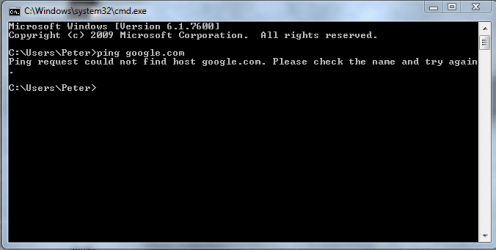
Ignore my last post... I ran the "ping google.com" command on my working laptop, not my Pc that's unable to detect the wireless card... oops.

Just tried it on my PC; results are attached...
 

Attachments

  • Capture.PNG
    Capture.PNG
    63.2 KB · Views: 18

My Computer

Computer Manufacturer/Model Number
Dell Dimension E520
OS
Windows 7
Did you try the download I suggested?

Try a Ethernet cable to rule out the modem.

Are all the correct lights blinking,.

Have you tried resetting the modem?
 

My Computer

Computer Manufacturer/Model Number
Cheap $399.00 E-Machine
OS
Windows 7 Pro & Vista Home Premium
CPU
Athlon 64 3800+ (Orleans) 2.40GHz
Motherboard
Winfast
Memory
2GB DDR2 RAM DIMM
Graphics Card(s)
NVIDIA GeForce 8500 GT 512 MB memory HDMI out
Sound Card
creative X-Fi Exteme 7..1 channel
Monitor(s) Displays
Acer V223W 22" widescreen DVI
Screen Resolution
1680x1050
Hard Drives
WDC WD5 500GB
WDC WD25 250GB
PSU
OCZ 550 watt
Case
Gateway
Cooling
2 fans
Keyboard
Dell
Mouse
Sony Vaio
Internet Speed
18MB/s down - .72MB /s up
Did you try the download I suggested?

Try a Ethernet cable to rule out the modem.

Are all the correct lights blinking,.

Have you tried resetting the modem?

I tried the link... but it gave me a "Server Not found" error message.

The modem is working fine... my laptop is currently connected to it via wireless network... it seems to be the wireless card in my desktop that's not working.
 

My Computer

Computer Manufacturer/Model Number
Dell Dimension E520
OS
Windows 7
Do you have access to another card.

Try this:

Go to Start > Run,. and type cmd. now type ipconfig /all and post the results back here.
 

My Computer

Computer Manufacturer/Model Number
Cheap $399.00 E-Machine
OS
Windows 7 Pro & Vista Home Premium
CPU
Athlon 64 3800+ (Orleans) 2.40GHz
Motherboard
Winfast
Memory
2GB DDR2 RAM DIMM
Graphics Card(s)
NVIDIA GeForce 8500 GT 512 MB memory HDMI out
Sound Card
creative X-Fi Exteme 7..1 channel
Monitor(s) Displays
Acer V223W 22" widescreen DVI
Screen Resolution
1680x1050
Hard Drives
WDC WD5 500GB
WDC WD25 250GB
PSU
OCZ 550 watt
Case
Gateway
Cooling
2 fans
Keyboard
Dell
Mouse
Sony Vaio
Internet Speed
18MB/s down - .72MB /s up
Do you have access to another card.

Try this:

Go to Start > Run,. and type cmd. now type ipconfig /all and post the results back here.

I don't have another card to try at the moment... but the one currently inside my desktop was working fine this afternoon before I upgraded from vista to Windows 7.

Here are the results:
 

Attachments

  • Capture 2.PNG
    Capture 2.PNG
    75.7 KB · Views: 6

My Computer

Computer Manufacturer/Model Number
Dell Dimension E520
OS
Windows 7
Did you try going to Newtwork and Sharing center and go through the troubl-shooter?
 

My Computer

Computer Manufacturer/Model Number
Cheap $399.00 E-Machine
OS
Windows 7 Pro & Vista Home Premium
CPU
Athlon 64 3800+ (Orleans) 2.40GHz
Motherboard
Winfast
Memory
2GB DDR2 RAM DIMM
Graphics Card(s)
NVIDIA GeForce 8500 GT 512 MB memory HDMI out
Sound Card
creative X-Fi Exteme 7..1 channel
Monitor(s) Displays
Acer V223W 22" widescreen DVI
Screen Resolution
1680x1050
Hard Drives
WDC WD5 500GB
WDC WD25 250GB
PSU
OCZ 550 watt
Case
Gateway
Cooling
2 fans
Keyboard
Dell
Mouse
Sony Vaio
Internet Speed
18MB/s down - .72MB /s up
Did you try going to Newtwork and Sharing center and go through the troubl-shooter?

I tried that earlier; it told me to plug an ethernet cable into the network adaptor... but I don't have an ethernet cable since the computer is on a wireless network and the modem is hooked to another computer elsewhere.

I've been trying to get it to recognize my Linksys wireless card, but so far I'm having no luck.
 

My Computer

Computer Manufacturer/Model Number
Dell Dimension E520
OS
Windows 7
Back
Top