Wireshark?

Skylais

Closed as requested
Local time
1:21 PM
Messages
614
Location
Houston, Texas
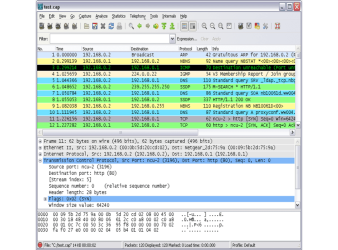
Can someone explain to me what wireshark is and what it does and what everything in this image represents.
 

Attachments

  • Picture1.png
    Picture1.png
    316.1 KB · Views: 8

My Computer

Computer type
Laptop
Computer Manufacturer/Model Number
Lenovo Y560 Laptop
OS
Microsoft Windows 7 Ultimate 64-bit 7601 Multiprocessor Free Service Pack 1
CPU
Intel(R) Core(TM) i7 CPU Q [email protected] (Turbo boost 2.93ghz)
Motherboard
Lenovo KL3
Memory
4.00 GB
Graphics Card(s)
ATI Mobility Radeon HD 5730
Sound Card
(1) ATI HDMI Audio (2) Realtek High Definition Audio
Monitor(s) Displays
1024 x 768 x 32 bits (4294967296 colors) @ 60 Hz
Screen Resolution
1366 x 768 x 32 bits (4294967296 colors) @ 60 Hz
Hard Drives
WDC WD5000BEVT-24A0RT0
Mouse
Logitech M305
Internet Speed
10 Mbps
Antivirus
My brain
Browser
Google Chrome
Other Info
Trying my best to learn.
IMHO, Wireshark is one of the best network traffic analysis tools around. It can monitor and analyze packets from multiple networks, or just one network. If you suspect you have problems on your network then this is the program that can tell you.

An essential tool in all network administrators toolbox, IMHO.

As to what everything means, that is a BIG question, and the best place to go for answers is Wireshark · Go Deep.

It does have a fairly steep learning curve if you don't have a background it networking technologies.

Good Luck
 

My Computer

Computer type
PC/Desktop
Computer Manufacturer/Model Number
Home Made
OS
Linux Mint 17 Cinnamon | Win 7 Ult x64
CPU
Intel I7-3770K @ 4.2ghz
Motherboard
ASRock Extreme 4
Memory
32GB G-Skill C10Q
Graphics Card(s)
EVGA GTX 670 2GB SC
Sound Card
Creative Fatality ExtremeGamer
Monitor(s) Displays
LG E2742V x 2
Screen Resolution
1920x1080
Hard Drives
256GB Vertex 4 SSD
2TB Seagate ST2000DM001
1TB Seagate ST1000DM003
PSU
Corsair HX 650
Case
HAF 932 advanced
Cooling
Corsair H100i liquid cooler
Keyboard
Logitech Wireless
Mouse
Logitech Wireless
Internet Speed
OptusNet NBN 100/40
Antivirus
Malwarebytes
Browser
Firefox 30
Other Info
Router: Sagemcom F@st 3846 Crippled by Optus.
Can someone explain to me what wireshark is and what it does and what everything in this image represents.

The image shows all traffic generated by 192.168.0.2

I'm an advocate of Wireshark but be careful, it can be a malicious tool as well...

Josh :)
 

My Computer

Computer type
PC/Desktop
Computer Manufacturer/Model Number
Custom Built
OS
Windows 7 Professional x64 SP1 ; Windows Server 2012 R2 Standard
CPU
Intel Core i5 2400 @ 3.10GHz
Motherboard
Foxconn H67MP-S/-V/H67MP
Memory
8.0GB DDR3 @ 665MHz (2GBx4)
Graphics Card(s)
AMD Radeon HD 6870
Sound Card
Realtek High Definition Audio
Monitor(s) Displays
AOC 2243W & SMB1930NW
Screen Resolution
1440x900 & 1920x1080
Hard Drives
977GB Seagate ST31000524AS ATA Drive (SATA)
250GB WD iSCSI attached Drive
PSU
750W Gaming PSU
Case
Novatech Night
Cooling
Fan
Keyboard
Dell Standard PS/2 Keyboard
Mouse
R.A.T 07 Gaming Mouse
Internet Speed
Download: 10 Mbps Ping: 30ms Upload: 0.81 Mbps
Browser
Google Chrome
Other Info
Optiarc DVD RW AD-5260S ATA Device
Wireshark uses dissectors to figure out what protocol a given frame is. When you look at the "rainbow" that is windows wireshark traffic you will see a myriad of protocols flying by that you had no idea existed, and you will learn quickly that windows machines are very lonely and want to make friends on a network. A great way to learn about all these protocols is just to go to wikipedia and research them. For example, on your screen, you could research pretty much any of those protocols shown (ARP, DNS, ICMP) and learn alot about what your computer is doing in the background.

 

My Computer

Computer type
PC/Desktop
Computer Manufacturer/Model Number
Build
OS
Windows 7 Profession x64
CPU
Intel Core i5
Motherboard
Intel DB75EN
Memory
16 GB DDR3
Graphics Card(s)
Intel HD Graphics
Sound Card
Realtek High Definition Audio
Monitor(s) Displays
Dual Viewsonic TD2220 touchscreen displays
Hard Drives
Seagate 500GB 7200 RPM
Case
Slimline
Cooling
Standard Intel heat sink / fan.
Keyboard
Microsoft boring keyboard - it works!
Thanks guys! In my cisco class we just covered a lot of these protocols actually.
 

My Computer

Computer type
Laptop
Computer Manufacturer/Model Number
Lenovo Y560 Laptop
OS
Microsoft Windows 7 Ultimate 64-bit 7601 Multiprocessor Free Service Pack 1
CPU
Intel(R) Core(TM) i7 CPU Q [email protected] (Turbo boost 2.93ghz)
Motherboard
Lenovo KL3
Memory
4.00 GB
Graphics Card(s)
ATI Mobility Radeon HD 5730
Sound Card
(1) ATI HDMI Audio (2) Realtek High Definition Audio
Monitor(s) Displays
1024 x 768 x 32 bits (4294967296 colors) @ 60 Hz
Screen Resolution
1366 x 768 x 32 bits (4294967296 colors) @ 60 Hz
Hard Drives
WDC WD5000BEVT-24A0RT0
Mouse
Logitech M305
Internet Speed
10 Mbps
Antivirus
My brain
Browser
Google Chrome
Other Info
Trying my best to learn.
Back
Top