WMC for photo show on dual screen (not second screen use possible?)

MPREv

New member
Member
VIP
Local time
4:52 AM
Messages
136
I found out, that WMC photo slide show is real nice cause it uses the Kent Burn effect (this discreet motion of the pictures).
But I have one problem with it.
Using it on a dual screen system (Notebook screen & beamer) when I start the show on the second screen (beamer) I can’t get back on screen one with the mouse and work there to prepare some other thinks.

Is there a way to archive that?
Playing the photos slide show and using the first screen ?
 

My Computer My Computer

At a glance

Windows 7
OS
Windows 7
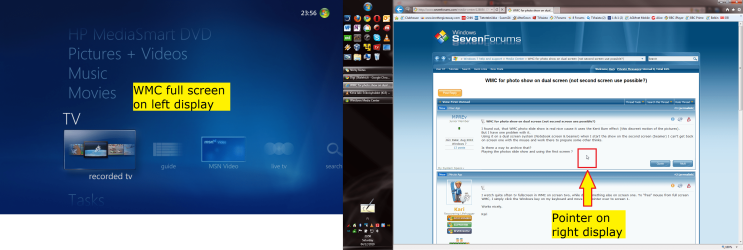
I watch quite often tv fullscreen in WMC on screen two, while doig something else on screen one. To "free" mouse from full screen WMC, I simply click the Windows key on my keyboard and move the pointer over to screen 1.

Works nicely.

Kari

WMC_fullscreen.png
 

My Computer My Computer

At a glance

Windows 10 Pro x64 EN-GB1.6 GHz Intel Core i7-720QM Processor6 GBATI Mobility Radeon HD 5850 Graphics
Computer type
Laptop
Computer Manufacturer/Model Number
HP ENVY 17-1150eg
OS
Windows 10 Pro x64 EN-GB
CPU
1.6 GHz Intel Core i7-720QM Processor
Memory
6 GB
Graphics Card(s)
ATI Mobility Radeon HD 5850 Graphics
Sound Card
Beats sound system with integrated subwoofer
Monitor(s) Displays
17" laptop display, 22" LED and 32" Full HD TV through HDMI
Screen Resolution
1600*900 (1), 1920*1080 (2&3)
Hard Drives
Internal: 2 x 500 GB SATA Hard Disk Drive 7200 rpm
External: 2TB for backups, 3TB USB3 network drive for media
Cooling
As Envy runs a bit warm, I have it on a Cooler Master pad
Keyboard
Logitech diNovo Media Desktop Laser (bluetooth)
Mouse
Logitech Performance Mouse MX
Internet Speed
50/10 Mbps VDSL
Antivirus
Windows Defender 4.3.9431.0
Browser
Maxthon 3.5.2., IE11
... simply click the Windows key ...

Oh yes. Thats it.
But i now have another Question.

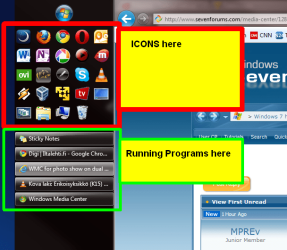
Icons_W7.png

How configure the GUI that way ...
to keep the Programm-Icons there and seperate the running programms. (also at the same time)
 

My Computer My Computer

At a glance

Windows 7
OS
Windows 7
How configure the GUI that way ...
to keep the Programm-Icons there and seperate the running programms. (also at the same time)
:)

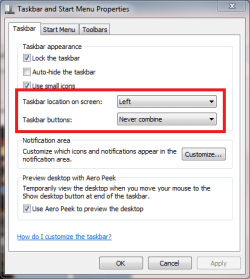
To start, I have tasbar located on the left, small icons, never combine:

Taskbar_properties_1.PNG

Then, I have enabled Quick Launch toolbar (http://www.sevenforums.com/tutorials/888-quick-launch-enable-disable.html). You can change the Quick Launch visual appearance as you like, in my case I use big icons and have disabled both Show Title, which would show the title Quick Launch on that toolbar, and then disable Show Text, which would show the name of each program in Quick Launch. To change these settings, right click an empty spot in Quick Launch to open context menu. Notice that taskbar must be unlocked to open Quick Launch context menu:

QuickLaunch_Properties.png

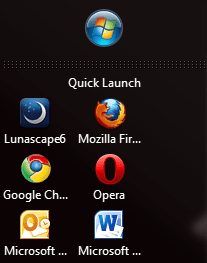
This image shows better what those options Show title and Show Text would do:

QuickLaunch_2.PNG

That's it. Looks good, is very practical and makes opening applications and controlling what is open really easy.

Kari
 

My Computer My Computer

At a glance

Windows 10 Pro x64 EN-GB1.6 GHz Intel Core i7-720QM Processor6 GBATI Mobility Radeon HD 5850 Graphics
Computer type
Laptop
Computer Manufacturer/Model Number
HP ENVY 17-1150eg
OS
Windows 10 Pro x64 EN-GB
CPU
1.6 GHz Intel Core i7-720QM Processor
Memory
6 GB
Graphics Card(s)
ATI Mobility Radeon HD 5850 Graphics
Sound Card
Beats sound system with integrated subwoofer
Monitor(s) Displays
17" laptop display, 22" LED and 32" Full HD TV through HDMI
Screen Resolution
1600*900 (1), 1920*1080 (2&3)
Hard Drives
Internal: 2 x 500 GB SATA Hard Disk Drive 7200 rpm
External: 2TB for backups, 3TB USB3 network drive for media
Cooling
As Envy runs a bit warm, I have it on a Cooler Master pad
Keyboard
Logitech diNovo Media Desktop Laser (bluetooth)
Mouse
Logitech Performance Mouse MX
Internet Speed
50/10 Mbps VDSL
Antivirus
Windows Defender 4.3.9431.0
Browser
Maxthon 3.5.2., IE11
Back
Top