
WMC suddenly showing unwanted file types in "Pictures."

pxfragonard

New member
Power User
VIP
Local time
7:04 PM
Messages
339
Formerly WMC only showed .jpg and .tiff files. Now it's suddenly, and without any prompting on my part, showing my raw .cr2 files.

Because I don't want the codec installed to view them (making their deletion by accident more difficult and helping to speed up my system), they just show as grey tiles with their names. This checkerboard effect is a bit annoying.

I'd like to know how, all of a sudden WMC just started to add this file type to Pictures. Was it an update?

More importantly I need to know how I can limit the file types viewable in WMC pictures.

Thanks in advance.
 

Attachments
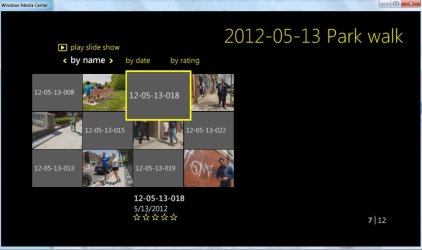
  • screenshot.jpg
    screenshot.jpg
    46 KB · Views: 8

My Computer My Computer

At a glance

Microsoft Windows 7 Home Premium 64-bit 7601 ...Intel(R) Core(TM) i5-2300 CPU @ 2.80GHz6 GBRadeon 6750 1gb
Computer Manufacturer/Model Number
HP Pavilion p6745f
OS
Microsoft Windows 7 Home Premium 64-bit 7601 Multiprocessor Free Service Pack 1
CPU
Intel(R) Core(TM) i5-2300 CPU @ 2.80GHz
Motherboard
PEGATRON CORPORATION 2AB6
Memory
6 GB
Graphics Card(s)
Radeon 6750 1gb
Sound Card
(1) IDT High Definition Audio CODEC (2) Intel(R) Display A
Monitor(s) Displays
Acer x193w
Hard Drives
(1) WDC WD15EARS-60MVWB0 (2) Generic- Compact Flash USB Device (3) Generic- MS/MS-Pro USB Device (4) Generic- SD/MMC USB Device (5) Generic- SM/xD-Picture USB Device (6) WD My Book 1110 USB Device
PSU
Internal 500W (100V-240V)
Case
Mid-size ATX
Cooling
unknown
Keyboard
HP usb multimedia keyboard
Mouse
HP usb compliant mouse
Internet Speed
256 kbps
Other Info
Ver: CHI_713.bin vCHI7.13
WMC will simply try to display whatever files you place in the Media Libraries. For pictures, YOU specify what folders or libraries are to be displayed. (Or WMC will default at setup to My Pictures.) If you don't want to show the cr2 files I would suggest you place those in a separate folder or library then change the setup options under Media Libraries in WMC.

As far as suddenly showing up, the only thing I can think of is that you added the pictures or a folder into an existing library that WMC is using for pictures. Keep that in mind when moving or adding new files or folders.
 

My Computer My Computer

At a glance

Windows 7 Pro-x64i7-2600 3.4GHz - 3.8GHz Turbo8Gb - 2x4GB, Muskin 991770 PC3-1333Integrated Intel HD 2000
Computer type
PC/Desktop
Computer Manufacturer/Model Number
Built 2/11/2011
OS
Windows 7 Pro-x64
CPU
i7-2600 3.4GHz - 3.8GHz Turbo
Motherboard
Intel DH67BL-B3
Memory
8Gb - 2x4GB, Muskin 991770 PC3-1333
Graphics Card(s)
Integrated Intel HD 2000
Sound Card
Integrated Intel 10.1 HD, RealTek ALC892
Monitor(s) Displays
Asus LCD VH222H, Haier HL24XSL2a
Screen Resolution
1920x1080, 1920x1080
Hard Drives
Crucial SSD C300-128Gb,
Western Digital WD5002AALX - 500Gb,
Western Digital WD7501AALS - 750Gb
PSU
Seasonic 650W 80+ Gold Modular
Case
Rosewill Defender
Cooling
Stock CPU, Four 120mm case fans, PCH fan added
Keyboard
Logitech EX100 Y-RBH94 Wireless
Mouse
Logitech EX100 M-RCE95 Wireless
Internet Speed
3.0/1.5 Mbs
Antivirus
Microsoft Security Essentials
Browser
Microsoft Internet Explorer 11
Other Info
Antec Veris Premier-Multimedia IR Station,
Cyber Accoustics-3602 Speakers,
AFT XM-5U Card Reader,
Hauppauge TV-HVR-2250,
Sony LX300 USB Turntable
WMC will simply try to display whatever files you place in the Media Libraries. For pictures, YOU specify what folders or libraries are to be displayed. (Or WMC will default at setup to My Pictures.) If you don't want to show the cr2 files I would suggest you place those in a separate folder or library then change the setup options under Media Libraries in WMC.

As far as suddenly showing up, the only thing I can think of is that you added the pictures or a folder into an existing library that WMC is using for pictures. Keep that in mind when moving or adding new files or folders.

Can't be. The folders have been that way for years.
 

My Computer My Computer

At a glance

Microsoft Windows 7 Home Premium 64-bit 7601 ...Intel(R) Core(TM) i5-2300 CPU @ 2.80GHz6 GBRadeon 6750 1gb
Computer Manufacturer/Model Number
HP Pavilion p6745f
OS
Microsoft Windows 7 Home Premium 64-bit 7601 Multiprocessor Free Service Pack 1
CPU
Intel(R) Core(TM) i5-2300 CPU @ 2.80GHz
Motherboard
PEGATRON CORPORATION 2AB6
Memory
6 GB
Graphics Card(s)
Radeon 6750 1gb
Sound Card
(1) IDT High Definition Audio CODEC (2) Intel(R) Display A
Monitor(s) Displays
Acer x193w
Hard Drives
(1) WDC WD15EARS-60MVWB0 (2) Generic- Compact Flash USB Device (3) Generic- MS/MS-Pro USB Device (4) Generic- SD/MMC USB Device (5) Generic- SM/xD-Picture USB Device (6) WD My Book 1110 USB Device
PSU
Internal 500W (100V-240V)
Case
Mid-size ATX
Cooling
unknown
Keyboard
HP usb multimedia keyboard
Mouse
HP usb compliant mouse
Internet Speed
256 kbps
Other Info
Ver: CHI_713.bin vCHI7.13
Back
Top