WMP 12 Constantly Updating Library!

ryana1980

New member
Well, the title says it all. Everytime I open WMP 12, it starts updating my music library. All of my music is in the library, but yet it keeps updating it. I'm just wondering if any of you out there have this problem, and if so, is it really updating something or is it a bug or what? It's driving me a little crazy. thanks for any help on this.
 

My Computer

OS
Windows 7 RTM / Windows Vista SP2
CPU
AMD Athlon 64 4200 X2
Motherboard
Asus A8N5X (NForce 4)
Memory
2GB
Graphics Card(s)
ATI HD3850
Sound Card
SoundBlaster X-Fi
Hard Drives
Maxtor SATA 160 GB, Maxtor PATA 250 GB, WD MyBook External 500GB
It updates the library in wmp from your saved files. It is not a bug or anything but what it is basically doing is rescanning where you save your music to. Once it has done the scan and added the new items it will then settle down and resume as normal. All is good:)
 

My Computer

Computer Manufacturer/Model Number
Custom Build.
OS
Windows 7 Ultimate x64.
CPU
i5 760 @ 4.2Ghz. 1.18v
Motherboard
Gigabyte - H55M-USB3
Memory
4g Corsair xms3 ddr3, 1600Mhz.
Graphics Card(s)
Gigabyte GTX-560Ti soc edition
Sound Card
Asus Xonar Dx - Logitech Z5500.
Monitor(s) Displays
Acer 22" LCD Wide screen 1680-1050 -Samsung 42" Plasma....
Screen Resolution
1680/1050 -----1920/1080p.
Hard Drives
2x 2TB Seagate Go Flex,
1x 1TB Seagate,
1x 640WD Black,
x16 Gig sandisc flash drive,
1x8Gig sandisc flash drive.
PSU
XigmaTek 80plus NRP-PC702 - 700w dual 30a.
Case
Venus Gamers Midi Tower Case with LED Display
Cooling
Arctic Freezer 7 Pro Rev 2... x2 Arctic F8 case fans........
Keyboard
Logitech G15-v2 Gaming.
Mouse
Microsoft Sidewinder X8.
Internet Speed
Virgin Media - 50mb down- 8mb up.
Other Info
x2 Xbox 360 wireless controllers...

Dual layer optical disc drive...

Chrome 79million

A.V = MSE
OK, thank you so much for replying. So it will keep updating until it has found every file? The reason I ask is that it will update for at least 10 minutes at a time and then say that the update is complete. Then the next time I open media player it does the same thing. I have around 30 gigabytes in music, so that may be why it's taking so long. Who knows! Anyway, thanks for the response.
 

My Computer

OS
Windows 7 RTM / Windows Vista SP2
CPU
AMD Athlon 64 4200 X2
Motherboard
Asus A8N5X (NForce 4)
Memory
2GB
Graphics Card(s)
ATI HD3850
Sound Card
SoundBlaster X-Fi
Hard Drives
Maxtor SATA 160 GB, Maxtor PATA 250 GB, WD MyBook External 500GB
WMP12 will check each time it's run to make sure that any changes with the files are recorded within the player. It's normal for it to take a bit of time as you have so much data, but it shouldn't affect any performance.
 

My Computer

Computer Manufacturer/Model Number
Compaq Desktop
OS
Windows 7 Ultimate x64
CPU
AMD Sempron Dual Core
Memory
3GB
Graphics Card(s)
NVIDIA GeForce 6150SE nForce 430
Screen Resolution
1024x768
Hard Drives
150GB Sata
I had my "My Music" file as a sub-folder of "My Documents" and even if I left WMP on for a couple of hours to index everything, I'd close it and it would start all over again with an empty library.

I had to move "My Music" out of "My Documents" in the end it it was fine.
 

My Computer

Computer Manufacturer/Model Number
Self Build
OS
Win 7 7201 x64
CPU
AMD Athlon 64 X2 6400
Motherboard
Gigabyte GA-M56S-S3
Memory
8Gb DDR2 6400 (4 x 2)
Graphics Card(s)
NVIDIA GeForce 8800GT
Sound Card
Realtek Hi-Def Onboard
Monitor(s) Displays
Sony Bravia 26"
Screen Resolution
1360 x 768
Hard Drives
2 x WD5000AAKS 500GB (RAID 0)
PSU
OCZ 700W ModXStream
Case
XCLIO A380 Twin Engine
Cooling
Air
hmmm. well, that's interesting. but my problem is a little different in that all of my music is there, it just keeps updating. "Updating Media Library" in the bottom corner it says.
 

My Computer

OS
Windows 7 RTM / Windows Vista SP2
CPU
AMD Athlon 64 4200 X2
Motherboard
Asus A8N5X (NForce 4)
Memory
2GB
Graphics Card(s)
ATI HD3850
Sound Card
SoundBlaster X-Fi
Hard Drives
Maxtor SATA 160 GB, Maxtor PATA 250 GB, WD MyBook External 500GB
I had my "My Music" file as a sub-folder of "My Documents" and even if I left WMP on for a couple of hours to index everything, I'd close it and it would start all over again with an empty library.

I had to move "My Music" out of "My Documents" in the end it it was fine.

No need to do that at all.

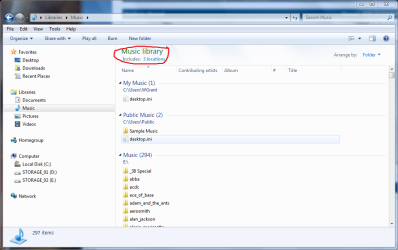
If you go to Libraries > Music.............you will see Includes: X Locations. Click on it and add another location where your music is. Simple...........

Capture.PNG
 

My Computer

Computer Manufacturer/Model Number
This and that with a bit more of this.
OS
Slackware / Windows 7 x64 7100
CPU
AMD X2 5200+ Windsor
Motherboard
ECS (Yeah, I was broke)
Memory
4GB DDR2 PC5300
Graphics Card(s)
GeForce 7300 GS 256MB
Sound Card
Realtek HD
Monitor(s) Displays
Westinghouse 22 in LCD
Screen Resolution
1680 x 1050
Hard Drives
WD 320 GB
WD 500 GB x2
Maxtor OneTouch 4 Mini 250GB
PSU
Antec 450W
Case
Generic
Cooling
Lots.......sounds like an F-18
Keyboard
Logitech S510 combo
Mouse
Logitech S510 Combo
Internet Speed
Fast
No need to do that at all.

If you go to Libraries > Music.............you will see Includes: X Locations. Click on it and add another location where your music is. Simple...........

View attachment 9478

Yeah I know, but I only had the one location and it was a sub-folder in "My Documents" and no matter what I did WMP would forget my library whenever I closed it down. Only thing I could do to fix it was to physically move the folder out of "My Documents" and it was fine.

Incidentally, Libraries seem to track the physical location of folders so if you move them you don't have to tell your Library of the new location, which is a nice feature.
 

My Computer

Computer Manufacturer/Model Number
Self Build
OS
Win 7 7201 x64
CPU
AMD Athlon 64 X2 6400
Motherboard
Gigabyte GA-M56S-S3
Memory
8Gb DDR2 6400 (4 x 2)
Graphics Card(s)
NVIDIA GeForce 8800GT
Sound Card
Realtek Hi-Def Onboard
Monitor(s) Displays
Sony Bravia 26"
Screen Resolution
1360 x 768
Hard Drives
2 x WD5000AAKS 500GB (RAID 0)
PSU
OCZ 700W ModXStream
Case
XCLIO A380 Twin Engine
Cooling
Air
Hi guys,
i've the same problem! Every time i open WMP it starts scanning my drive using half of cpu and in the bottom there's "updating media library", or "retrieving media informations for ...." it works for a couple of hours, then it says "update complete", or something similar. If i close WMP and reopen it, it starts scanning again... but the main problem is that it uses a lot of cpu!
Windows 7 runs fine, but media player 12 sucks!!
 

My Computer

OS
Windows XP
Hi guys,
i've the same problem! Every time i open WMP it starts scanning my drive using half of cpu and in the bottom there's "updating media library", or "retrieving media informations for ...." it works for a couple of hours, then it says "update complete", or something similar. If i close WMP and reopen it, it starts scanning again... but the main problem is that it uses a lot of cpu!
Windows 7 runs fine, but media player 12 sucks!!

You need to tell WMP to NOT download media information:
  1. When in Player view, right-click the main Media Player window, then select "More options..."
  2. Open the "Library" tab
  3. Remove the check from "Retrieve additional information from the Internet"
  4. Click "OK"
 

My Computer

Computer type
PC/Desktop
Computer Manufacturer/Model Number
Virtual Machine
OS
Windows 7 Professional 32-bit SP1
CPU
AMD A4/A6
Motherboard
Intel Corporation 440BX Desktop Reference Platform
Memory
3.00GB EDO
Graphics Card(s)
VMware SVGA 3D
Sound Card
High Definition Audio Device
Monitor(s) Displays
Generic Non-PnP Monitor on VMware SVGA 3D
Screen Resolution
1440x900
Hard Drives
1 x 60GB VMware Virtual SATA Hard Drive ATA Device
Antivirus
Kaspersky Total Security
I did but nothing changed.
Every time i run WMP, in the bottom of the player there's "updating media library [My pictures or My Music]" and my hd starts to work heavy....
Don't know what to do
 

My Computer

OS
Windows XP
I had the same problem; I don't normally use WMP since I use iTunes for music so I decided to disable the library functions entirely until a better solution is found.

Files --> Manage Libraries --> Music

Then delete all the directories listed in there and WMP won't build a library at all. Repeat for the other categories as well if necessary. I realize this is not ideal but at least stops the annoyance.
 

My Computer

Computer Manufacturer/Model Number
Toshiba Satellite A100
OS
Win7 RC
CPU
Intel Centrino Duo 1.6GHz
Memory
1GB
Yes i tried that workaroung one hour ago, but i saw that removing libraries from WMP, it also removes library from Windows too, and i cannot use them then. Microsoft introduced libraries but i prefer a direct link in the start menu to my pictures and music folders, like in windows xp.
So i decided to restore libraries.
It's strange that only few people has this annoyance.
I'm thinking of switching back to windows xp pending the final version released.
 

My Computer

OS
Windows XP
hmm - I have the same problem.

I have a very large music library on a separate drive. I have mapped the "My Music" folder to this the same as I did in Vista and the Win 7 Beta. So it appears as the default location in the Library and WMP.

However, everytime I open WMP it seems to have forgotten all the tracks it had previously catalogued and starts scanning the folders again. As the library is very large it takes well over an hour to find everything.

Have tried turning off the "retrieve additional info from the internet" option but that makes no difference.
 

My Computer

OS
Windows 7 RC
CPU
Intel Core 2 Duo E7400 @2.8GHz
Motherboard
Asus P5N7A-VM
Memory
Crucial 2 x 2GB DDR2 - 800 CL4 Ballistix
Graphics Card(s)
NVIDIA GeForce 9300 / nForce 730i
Other Info
AVG-Free anti virus
Updating Library CPU Hog

I have close to 500gb of music on a USB connected 1TB external HDD. The "Updating Library" has now run more than a couple of days. I believe all the songs are indexed. I turned off the "get media information from the internet" option. This issue seems to even freeze my media center extender (XBOX 360) and is extremely frustraing (I want my music on my TV BADDDD). What are potential workarounds? If I tell my WMP to stop adding files from the folder my music is in, will that delete all the music already indexed or just any additional music I don't manually tell Wmp to add? PLEASE help!
 

My Computer

OS
Windows 7 Build 7100
My situation is a little different.
I added windows xp music folder into music library, and set it as default location for music files.
WMP remembers the tracks, but for some reason it start scanning music/pictures/videos folders every time i run it. And the the processing takes half an hour...
 

My Computer

OS
Windows XP
I have two computers running W7 RC1 - my HTPC, which contains no media itself, and my main PC. They both do the "updating media library" thing when WMP12 is run. The HTPC discovers no media and immediately says "Update complete", while my main PC has about 90GB of music and is still updating several hours after starting media player. My thought at the moment is that it might stop once it has finished checking all new media and this will take a long time for collections like mine (500GB, jivester? I feel so sorry for you!).
 

My Computer

OS
Windows 7 RC1
I have close to 500gb of music on a USB connected 1TB external HDD. The "Updating Library" has now run more than a couple of days. I believe all the songs are indexed. I turned off the "get media information from the internet" option. This issue seems to even freeze my media center extender (XBOX 360) and is extremely frustraing (I want my music on my TV BADDDD). What are potential workarounds? If I tell my WMP to stop adding files from the folder my music is in, will that delete all the music already indexed or just any additional music I don't manually tell Wmp to add? PLEASE help!

Yes it will delete them from media player library as well.
 

My Computer

Computer Manufacturer/Model Number
Custom Build.
OS
Windows 7 Ultimate x64.
CPU
i5 760 @ 4.2Ghz. 1.18v
Motherboard
Gigabyte - H55M-USB3
Memory
4g Corsair xms3 ddr3, 1600Mhz.
Graphics Card(s)
Gigabyte GTX-560Ti soc edition
Sound Card
Asus Xonar Dx - Logitech Z5500.
Monitor(s) Displays
Acer 22" LCD Wide screen 1680-1050 -Samsung 42" Plasma....
Screen Resolution
1680/1050 -----1920/1080p.
Hard Drives
2x 2TB Seagate Go Flex,
1x 1TB Seagate,
1x 640WD Black,
x16 Gig sandisc flash drive,
1x8Gig sandisc flash drive.
PSU
XigmaTek 80plus NRP-PC702 - 700w dual 30a.
Case
Venus Gamers Midi Tower Case with LED Display
Cooling
Arctic Freezer 7 Pro Rev 2... x2 Arctic F8 case fans........
Keyboard
Logitech G15-v2 Gaming.
Mouse
Microsoft Sidewinder X8.
Internet Speed
Virgin Media - 50mb down- 8mb up.
Other Info
x2 Xbox 360 wireless controllers...

Dual layer optical disc drive...

Chrome 79million

A.V = MSE
Ok but it doens't have sense that WMP checks all the files already cataloged at every startup. It should check for new files, instead it seems that it scans everything, catalogued files too....
 

My Computer

OS
Windows XP
I have the same problem of constant library updating. It makes WMP12 almost useless, considering that my music is on an external USB drive (USB is CPU intensive, and the drive is louder than an internal drive.)
this is certainly undesired behavior, having no option to tell wmp how to handle the library. It should have just a simple monitor to update after file additions, and file changes. nothing more.

Maybe Microsoft intended users to never close WMP, and never shut the computer down...
 

My Computer

OS
windows 7
Back
Top