

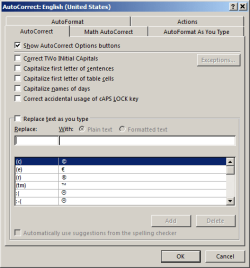
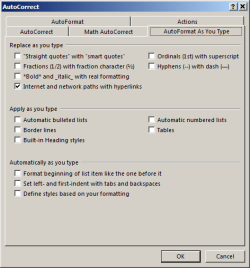
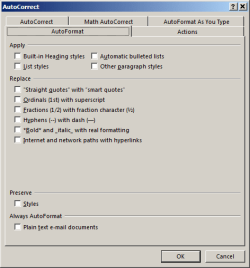
Hi I'm having trouble preventing Word 2013 from automatically formatting a document. I have defined a multi level list associated with the headings style. If I have a line of text that has a number at the beginning of the line, word will automatically apply the heading style that corresponds with the number when instead I just want to create a bulletted list. The little auto format lightning bolt drop down does not appear at all. I have turned off every possible auto format and auto correct option there is, but word is still changing the format. Any help would be appreciated.
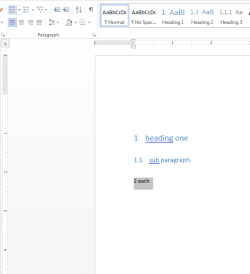
before:
1 heading one
1.1 sub paragraph
2 each
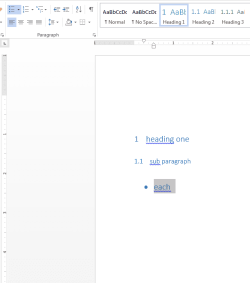
after:
1 heading one
1.1 sub paragraph
• each


before:
1 heading one
1.1 sub paragraph
2 each
after:
1 heading one
1.1 sub paragraph
• each
Attachments
My Computer
At a glance
Windows 7 Professional x64AMD Phenom II X6 1090T 3.20GHz CPU8.0GB DDR3 1333MHz (PC3-10666) SDRAM2x XFX Radeon HD 5870 1GB CrossFire
- Computer type
- PC/Desktop
- Computer Manufacturer/Model Number
- custom build
- OS
- Windows 7 Professional x64
- CPU
- AMD Phenom II X6 1090T 3.20GHz CPU
- Motherboard
- Gigabyte GA-890FXA-UD7 AM3 rev2.0
- Memory
- 8.0GB DDR3 1333MHz (PC3-10666) SDRAM
- Graphics Card(s)
- 2x XFX Radeon HD 5870 1GB CrossFire
- Monitor(s) Displays
- Samsung 2253LW Monitor
- Hard Drives
- Corsair Force GT 240GB SATA 3 6.0Gb/s SSD
- PSU
- Thermaltake TR2 TRX-1200M 1200W PSU
- Case
- CoolerMaster HAF 932 ATX Full Tower
- Cooling
- XIGMATEK Aegir SD128264 CPU Cooler
- Keyboard
- Microsoft Sculpt Ergonomic Keyboard
- Mouse
- Logitech M570 Wireless Trackball
- Internet Speed
- AT&T U-verse Max Turbo (30Mb/s down, 2Mb/s up)
- Antivirus
- ESET Smart Security
- Browser
- Google Chrome
- Other Info
- ASUS RT-AC66U Router
