Solved word and excel 2007 filling effect doesn't work

eagle

New member
Local time
11:27 PM
Messages
8
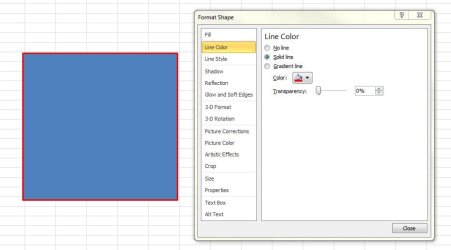
I have got the problem, that for some weeks now I haven't been able to fill shapes by a color, using the filling effect either in word or excel 2007. There are no shadow or 3-dimensional effects activated.

Thank you very much for your help.
Kind regards
 

My Computer My Computer

Computer type
Laptop
OS
Windows 7 64bit

My Computer My Computer

Computer type
PC/Desktop
Computer Manufacturer/Model Number
Golden Mk. I.4
OS
Windows 10 Pro x64 ; Xubuntu x64
CPU
Intel i7 860 @ 2.80 GHz O/C'ed to 4.0GHz
Motherboard
Gigabyte P55A-UD3R Rev.1. Award BIOS F13
Memory
16GB Corsair Vengance DDR3 @ 661 MHz Dual Channel (9-9-9-24)
Graphics Card(s)
EVGA NVidia GTX 560 1024MB
Sound Card
Realtek Integrated
Monitor(s) Displays
Dual Samsung SyncMaster 2494HS
Screen Resolution
1920*1080 and 1920*1080
Hard Drives
1*Samsung 840 EVO 120GB SSD;
1*OCZ Vertex 2 60GB SSD;
2*Samsung F3 SpinPoint 1TB in RAID0;
1*Samsung F1 SpinPoint 1TB;
2*Western Digital 1TB External USB 3.0
1*Western Digital 500GB External USB 3.0
1*Seagate 500GB External USB 2.0
PSU
Thermaltake ToughPower QFan 750W
Case
Thermaltake Element S VK60001W2Z
Cooling
Corsair H60 Water Cooling, 2*230mm and 2*80mm case fans
Keyboard
Logitech G110
Mouse
Logitech MX518
Answer to Golden

Thank you very much for your link.
I have been trying it exactly as discribed in the tutorial of your link, but it doesn't work and more frustratingly it worked a few weeks ago. I am wondering whether there is a problem with one of the different updates of window 7 or office 7.

Kind regards
 

My Computer My Computer

Computer type
Laptop
OS
Windows 7 64bit
No, its definitely not any updates. Check the link carefully.
 

My Computer My Computer

Computer type
PC/Desktop
Computer Manufacturer/Model Number
Golden Mk. I.4
OS
Windows 10 Pro x64 ; Xubuntu x64
CPU
Intel i7 860 @ 2.80 GHz O/C'ed to 4.0GHz
Motherboard
Gigabyte P55A-UD3R Rev.1. Award BIOS F13
Memory
16GB Corsair Vengance DDR3 @ 661 MHz Dual Channel (9-9-9-24)
Graphics Card(s)
EVGA NVidia GTX 560 1024MB
Sound Card
Realtek Integrated
Monitor(s) Displays
Dual Samsung SyncMaster 2494HS
Screen Resolution
1920*1080 and 1920*1080
Hard Drives
1*Samsung 840 EVO 120GB SSD;
1*OCZ Vertex 2 60GB SSD;
2*Samsung F3 SpinPoint 1TB in RAID0;
1*Samsung F1 SpinPoint 1TB;
2*Western Digital 1TB External USB 3.0
1*Western Digital 500GB External USB 3.0
1*Seagate 500GB External USB 2.0
PSU
Thermaltake ToughPower QFan 750W
Case
Thermaltake Element S VK60001W2Z
Cooling
Corsair H60 Water Cooling, 2*230mm and 2*80mm case fans
Keyboard
Logitech G110
Mouse
Logitech MX518
Thank you very much for your link.
I have been trying it exactly as discribed in the tutorial of your link, but it doesn't work and more frustratingly it worked a few weeks ago. I am wondering whether there is a problem with one of the different updates of window 7 or office 7.

Kind regards

This is with Excel 2010.. I pick insert/shapes, choose a circle, move the cross hairs in the size/location you want, (default is blue with mine), right click choose format shape, choose solid fill and select fill with color you want.
So if you tried this, how far do you get?
 

My Computer My Computer

Computer type
PC/Desktop
Computer Manufacturer/Model Number
Self Build
OS
Windows 7 Professional X64 Service Pack 1
CPU
AMD Phenom II X4 955 3.20GHz
Motherboard
Gigabyte GA-MA790X-UD4P
Memory
8G
Graphics Card(s)
GX550 Ti
Sound Card
On board
Monitor(s) Displays
Asus VW246H & Syncmaster 2243swx
Screen Resolution
1920x1080 & 1920x1080
Hard Drives
M4-CT128 SSD2, Samsung 840 256GB, 1 WDC 1TB
PSU
Corsair TX750W-V2
Case
Antec
Cooling
2 120mm fan
Keyboard
Microsoft Wireless 3050
Mouse
Microsoft Wireless 5000
Internet Speed
72/6Mbs (Cable)
Other Info
Asus AC1900 router, 8 port Trendnet Switch - Logitech Webcam Pro 9000
I've just tried it with both Word and Excel2007 - it works OK..


make sure you have selected the shape and the fill options should show automatically
when you select it from the banner....


at what point does your problem occur..?
 

My Computer My Computer

Computer type
PC/Desktop
Computer Manufacturer/Model Number
benchtec, built to personal specs
OS
Windows10 Pro - 64Bit vs.10547
CPU
i7-965 Extreme Edition (8 Cores) at 3.3GHz (no OC)
Motherboard
BloodRageX58 (Socket1366)
Memory
12G Corsair Dominator DDR3 - tripled
Graphics Card(s)
2xAMD SapphireNITRO R9 380(4G) crossfire
Sound Card
Sonar(SB)X-Fi onboard
Monitor(s) Displays
SyncMaster P2050 20"
Screen Resolution
1600x900 (widescreen)
Hard Drives
480G\OCZSolid3SSD, 64G\OCZVertex3SSD,60G\OCZVertex2SSD, 1TB\spinpointF1SATAHDD
PSU
1200w Power Station Gold
Case
ANTEC 900/2 all blue lights, etc..
Cooling
Noctua SE1366 NH-U12P - a tight fit, but a monster cooler!!
Keyboard
Logitech G19 (wired)
Mouse
Logitech G9 Laser (wired)
Internet Speed
150mb unlimited
Browser
IE11(RP)
Other Info
Xbox One, Nokia735 Windows10 mobile, LG HD/DVD/Blu-Ray r/w, CyberlinkPowerDVD15, LogitechZ5500-SS(5.1), LogitechG35Phones-SS(7.1),MSOffice 2007,CorelDrawX7,Painter2016, Wacom Intuos Pro-SE
Thank you very much for your link.
I have been trying it exactly as discribed in the tutorial of your link, but it doesn't work and more frustratingly it worked a few weeks ago. I am wondering whether there is a problem with one of the different updates of window 7 or office 7.

Kind regards

This is with Excel 2010.. I pick insert/shapes, choose a circle, move the cross hairs in the size/location you want, (default is blue with mine), right click choose format shape, choose solid fill and select fill with color you want.
So if you tried this, how far do you get?

I can insert the shape, move it wherever I want by means of the cross-arrow cursor, then mark it so that e.g. for a rectangle its corner are marked by small grey circles, and the midths of its margin lines are marked by small grey squares. After marking, I can vary the thickness of its margin lines but when trying to change the color of the margin lines by clicking on the design color "table" or the standard colors it doesn't work. The same is true for the fill effect button.
 

My Computer My Computer

Computer type
Laptop
OS
Windows 7 64bit
I've just tried it with both Word and Excel2007 - it works OK..


make sure you have selected the shape and the fill options should show automatically
when you select it from the banner....


at what point does your problem occur..?

I can select the shape, e.g. for a rectangle, corners are marked by small grey circles and in the middle of each margin there are small grey squares. When selected and by selecting the button "fill effects", I can vary the thickness of the margin lines, but cannot change their color. Nor can I select a color for filling the rectangle, but it doesn't change the color.
Thanks a lot for your help
 

My Computer My Computer

Computer type
Laptop
OS
Windows 7 64bit
Thank you very much for your link.
I have been trying it exactly as discribed in the tutorial of your link, but it doesn't work and more frustratingly it worked a few weeks ago. I am wondering whether there is a problem with one of the different updates of window 7 or office 7.

Kind regards

This is with Excel 2010.. I pick insert/shapes, choose a circle, move the cross hairs in the size/location you want, (default is blue with mine), right click choose format shape, choose solid fill and select fill with color you want.
So if you tried this, how far do you get?

I can insert the shape, move it wherever I want by means of the cross-arrow cursor, then mark it so that e.g. for a rectangle its corner are marked by small grey circles, and the midths of its margin lines are marked by small grey squares. After marking, I can vary the thickness of its margin lines but when trying to change the color of the margin lines by clicking on the design color "table" or the standard colors it doesn't work. The same is true for the fill effect button.

AFter the rectangle is selected do you right click inside the rectangle and pick format shape?
 

Attachments

  • fe.JPG
    fe.JPG
    38.6 KB · Views: 1
  • fe2.JPG
    fe2.JPG
    40.6 KB · Views: 1

My Computer My Computer

Computer type
PC/Desktop
Computer Manufacturer/Model Number
Self Build
OS
Windows 7 Professional X64 Service Pack 1
CPU
AMD Phenom II X4 955 3.20GHz
Motherboard
Gigabyte GA-MA790X-UD4P
Memory
8G
Graphics Card(s)
GX550 Ti
Sound Card
On board
Monitor(s) Displays
Asus VW246H & Syncmaster 2243swx
Screen Resolution
1920x1080 & 1920x1080
Hard Drives
M4-CT128 SSD2, Samsung 840 256GB, 1 WDC 1TB
PSU
Corsair TX750W-V2
Case
Antec
Cooling
2 120mm fan
Keyboard
Microsoft Wireless 3050
Mouse
Microsoft Wireless 5000
Internet Speed
72/6Mbs (Cable)
Other Info
Asus AC1900 router, 8 port Trendnet Switch - Logitech Webcam Pro 9000
This is with Excel 2010.. I pick insert/shapes, choose a circle, move the cross hairs in the size/location you want, (default is blue with mine), right click choose format shape, choose solid fill and select fill with color you want.
So if you tried this, how far do you get?

I can insert the shape, move it wherever I want by means of the cross-arrow cursor, then mark it so that e.g. for a rectangle its corner are marked by small grey circles, and the midths of its margin lines are marked by small grey squares. After marking, I can vary the thickness of its margin lines but when trying to change the color of the margin lines by clicking on the design color "table" or the standard colors it doesn't work. The same is true for the fill effect button.

AFter the rectangle is selected do you right click inside the rectangle and pick format shape?

No, there is a button called fill effect in the format entry on the multifunctionary bar.
I think it must have something to do with rendering the shapes on my laptop. I downloaded from the computer at my work place a file which contained shapes, filled by a color, onto my laptop, and opened them on the laptop. And indeed the color wasn't there anymore.
 

My Computer My Computer

Computer type
Laptop
OS
Windows 7 64bit
Back
Top