
Solved WordPad got a new icon, and I don't like it

Clairvaux

New member
Pro User
VIP
Local time
9:58 PM
Messages
247
After an express install/uninstall of the Eraser program, WordPad began acting out.

Its association by default with .rtf files was partially broken. I would save a WordPad document in .rtf (as usual), and it would appear with Word's icon instead of WordPad's icon. It would also open under Word. However, .rtf docs previously created with WordPad would continue to open under WordPad. But, their icons had been replaced with a new type of text icon I've never seen before.

I checked the file associations under Control Panel, and, sure enough, .rtf files were associated to Word (I don't know how this changed). I reverted them back to WordPad, and now .rtf docs open again under WordPad. But their Properties box has both icons :
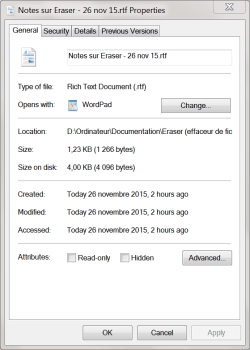
Capture.PNG

I fixed the file association in both of my user accounts, since I understand this is account-specific. I tried a tool published by Brink (I think) to reset the icon database (I can't find it again), without result.

It's possible my switching users without logging off, while doing "something", might have contributed. In case it's relevant, strange things happened recently on my desktop : I would try to delete a shortcut, file or folder, it would stay there and I would get a message saying it can't be deleted because it's no more there. It would disappear after reboot.

Thanks !
 

My Computer My Computer

At a glance

Windows 7 Home Premium 64-bit (OEM)AMD Athlon II X4 640 (3 GHz, 4 cores)Patriot 16Gb DDR3 1600 (2 kits of 2)ATI Radeon HD 4290 (integrated)
Computer type
PC/Desktop
Computer Manufacturer/Model Number
Custom build
OS
Windows 7 Home Premium 64-bit (OEM)
CPU
AMD Athlon II X4 640 (3 GHz, 4 cores)
Motherboard
Asus M4A 89 GTD Pro/USB3
Memory
Patriot 16Gb DDR3 1600 (2 kits of 2)
Graphics Card(s)
ATI Radeon HD 4290 (integrated)
Sound Card
AMD + Realtek HD Audio (integrated)
Monitor(s) Displays
Hewlett-Packard ZR2440w (24")
Screen Resolution
1920 x 1200
Hard Drives
Internal : Samsung SSD 860 EVO 250 Gb (system), Seagate Barrcuda 1 Tb (data), Western Digital Caviar Blue 500 Gb (archives).
External (USB) : 2 x 1 Tb 2,5" Seagate Barracuda (backups).
PSU
Corsair VX 450 W
Case
Antec Solo
Cooling
Cooler Master Hyper 212 Plus, 2 Nexus Real Silent Case fans
Keyboard
Cherry KC 1000
Mouse
Logitech M 90
Internet Speed
Fiber, 300 Mbit/s down, 200 Mbit/s up
Antivirus
Microsoft Security Essentials
Browser
Vivaldi, Tor
Other Info
BIOS Date: 07/18/11 Ver: 08.00.15.
Modem-router : provided by ISP
Solved.

Thanks to a tiny piece of portable freeware named File Types Man by Nirsoft. Hinted at by Ho-to Geek. Who remarks, by the way :
In Windows XP, you could change the icon associated with a file type in Windows Explorer. In Windows 7, you have to do some registry hacking to change a file type’s icon.
  • Download File Types Man.
  • Unzip it wherever you like.
  • Double-click FileTypesMan.exe.
  • Edit / Find / <your file extension> (.rtf, in my case).
  • Verify that the wrong icon is the one you see on the first column starting from left.
  • Double-click the line pertaining to your file type (or right-click, Edit Selected File Type).
  • Default Icon / Browse (the relevant button is labeled [...] instead of Browse).
  • Select an Icon from the List below (in my case, the correct icon was there, but you can also Look for Icons in this File).
  • OK, OK.
  • View / Refresh.
  • Verify that you now have the correct icon on the far-left column.
  • Verify that you now have the correct icons on your computer.
That's it. Easy as pie. No need to reboot, even.
At least, that's how it worked for me.

Fantastic job, by the way, Microsoft : taking out of Windows 7 an elementary function such as this, needed to correct icon problems which seem to occur regularly ! So that a 7-year old piece of freeware developed by a lone, devoted individual is needed to correct your work.

And thank you, Nir Sofer (no sarcasm intended, this time).
 

My Computer My Computer

At a glance

Windows 7 Home Premium 64-bit (OEM)AMD Athlon II X4 640 (3 GHz, 4 cores)Patriot 16Gb DDR3 1600 (2 kits of 2)ATI Radeon HD 4290 (integrated)
Computer type
PC/Desktop
Computer Manufacturer/Model Number
Custom build
OS
Windows 7 Home Premium 64-bit (OEM)
CPU
AMD Athlon II X4 640 (3 GHz, 4 cores)
Motherboard
Asus M4A 89 GTD Pro/USB3
Memory
Patriot 16Gb DDR3 1600 (2 kits of 2)
Graphics Card(s)
ATI Radeon HD 4290 (integrated)
Sound Card
AMD + Realtek HD Audio (integrated)
Monitor(s) Displays
Hewlett-Packard ZR2440w (24")
Screen Resolution
1920 x 1200
Hard Drives
Internal : Samsung SSD 860 EVO 250 Gb (system), Seagate Barrcuda 1 Tb (data), Western Digital Caviar Blue 500 Gb (archives).
External (USB) : 2 x 1 Tb 2,5" Seagate Barracuda (backups).
PSU
Corsair VX 450 W
Case
Antec Solo
Cooling
Cooler Master Hyper 212 Plus, 2 Nexus Real Silent Case fans
Keyboard
Cherry KC 1000
Mouse
Logitech M 90
Internet Speed
Fiber, 300 Mbit/s down, 200 Mbit/s up
Antivirus
Microsoft Security Essentials
Browser
Vivaldi, Tor
Other Info
BIOS Date: 07/18/11 Ver: 08.00.15.
Modem-router : provided by ISP
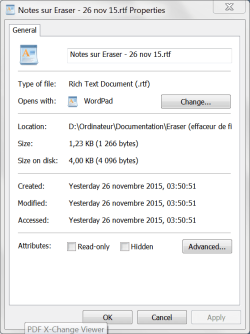
Okay I will be the one to ask.

Could you show us a picture of your new icon for Word Pad?
 

My Computer My Computer

At a glance

Windows 10 Pro. 64/ version 1709 Windows 7 Pr...Intel i7-6800K @ 4.3Corsair Platinum 16 gig @2400EVGA GTX 1070 OC
Computer type
PC/Desktop
Computer Manufacturer/Model Number
Home made Desktop
OS
Windows 10 Pro. 64/ version 1709 Windows 7 Pro/64
CPU
Intel i7-6800K @ 4.3
Motherboard
ASUS X-99 Deluxe II
Memory
Corsair Platinum 16 gig @2400
Graphics Card(s)
EVGA GTX 1070 OC
Monitor(s) Displays
Asus 27" LED LCD/VE278Q
Screen Resolution
1920-1080 or 1280-720 HDMI
Hard Drives
INTEL SSD 730-240 Gb Sata 3.0/
PSU
EVGA Platium 1200W
Case
Phanteks Luxe Tempered Glass 8 fans/ one radiator
Cooling
XSPC/ Water Cooled CPU
Keyboard
Das 4 Professional
Mouse
Logitech M705/MX Anywhere 2-S
Internet Speed
100 mbits
Antivirus
Microsoft Security Essentials/ Malwarebytes Premium 3.0/ SAS
Browser
I.E. 11 default/Firefox/ ISP Time Warner Cable/Spectrum
Other Info
LG BluRay Burner/
Sound system-KLipsch-THX/
Icy Dock ssd Hot Swap bays.
Why, yes. Here is the Properties box of the same file I showed before, with the original (correct) WordPad icon in all three places :

Capture.PNG

By the way, I noticed that my post has been moved from the Installation & Setup section (I think) to the Software section. It seems to me that this is not a specific WordPad issue, so readers having similar icon problems might be tempted to search first in a more generic sub-forum. Just a suggestion... :)
 

My Computer My Computer

At a glance

Windows 7 Home Premium 64-bit (OEM)AMD Athlon II X4 640 (3 GHz, 4 cores)Patriot 16Gb DDR3 1600 (2 kits of 2)ATI Radeon HD 4290 (integrated)
Computer type
PC/Desktop
Computer Manufacturer/Model Number
Custom build
OS
Windows 7 Home Premium 64-bit (OEM)
CPU
AMD Athlon II X4 640 (3 GHz, 4 cores)
Motherboard
Asus M4A 89 GTD Pro/USB3
Memory
Patriot 16Gb DDR3 1600 (2 kits of 2)
Graphics Card(s)
ATI Radeon HD 4290 (integrated)
Sound Card
AMD + Realtek HD Audio (integrated)
Monitor(s) Displays
Hewlett-Packard ZR2440w (24")
Screen Resolution
1920 x 1200
Hard Drives
Internal : Samsung SSD 860 EVO 250 Gb (system), Seagate Barrcuda 1 Tb (data), Western Digital Caviar Blue 500 Gb (archives).
External (USB) : 2 x 1 Tb 2,5" Seagate Barracuda (backups).
PSU
Corsair VX 450 W
Case
Antec Solo
Cooling
Cooler Master Hyper 212 Plus, 2 Nexus Real Silent Case fans
Keyboard
Cherry KC 1000
Mouse
Logitech M 90
Internet Speed
Fiber, 300 Mbit/s down, 200 Mbit/s up
Antivirus
Microsoft Security Essentials
Browser
Vivaldi, Tor
Other Info
BIOS Date: 07/18/11 Ver: 08.00.15.
Modem-router : provided by ISP

My Computer My Computer

At a glance

Windows 10 Pro. 64/ version 1709 Windows 7 Pr...Intel i7-6800K @ 4.3Corsair Platinum 16 gig @2400EVGA GTX 1070 OC
Computer type
PC/Desktop
Computer Manufacturer/Model Number
Home made Desktop
OS
Windows 10 Pro. 64/ version 1709 Windows 7 Pro/64
CPU
Intel i7-6800K @ 4.3
Motherboard
ASUS X-99 Deluxe II
Memory
Corsair Platinum 16 gig @2400
Graphics Card(s)
EVGA GTX 1070 OC
Monitor(s) Displays
Asus 27" LED LCD/VE278Q
Screen Resolution
1920-1080 or 1280-720 HDMI
Hard Drives
INTEL SSD 730-240 Gb Sata 3.0/
PSU
EVGA Platium 1200W
Case
Phanteks Luxe Tempered Glass 8 fans/ one radiator
Cooling
XSPC/ Water Cooled CPU
Keyboard
Das 4 Professional
Mouse
Logitech M705/MX Anywhere 2-S
Internet Speed
100 mbits
Antivirus
Microsoft Security Essentials/ Malwarebytes Premium 3.0/ SAS
Browser
I.E. 11 default/Firefox/ ISP Time Warner Cable/Spectrum
Other Info
LG BluRay Burner/
Sound system-KLipsch-THX/
Icy Dock ssd Hot Swap bays.
That appears to be a default icon.
Absolutely : that's what I was trying to do. Restore the default icon that some evil force had snatched away from me.
I'm wondering if this tutorial would of servered your needs.
By Brink:
http://www.sevenforums.com/tutorials/920-desktop-icons-change-restore-default-icon.html

Thanks, but I understand this is limited to a few system icons belonging on the desktop. WordPad is not included, apparently.
 

My Computer My Computer

At a glance

Windows 7 Home Premium 64-bit (OEM)AMD Athlon II X4 640 (3 GHz, 4 cores)Patriot 16Gb DDR3 1600 (2 kits of 2)ATI Radeon HD 4290 (integrated)
Computer type
PC/Desktop
Computer Manufacturer/Model Number
Custom build
OS
Windows 7 Home Premium 64-bit (OEM)
CPU
AMD Athlon II X4 640 (3 GHz, 4 cores)
Motherboard
Asus M4A 89 GTD Pro/USB3
Memory
Patriot 16Gb DDR3 1600 (2 kits of 2)
Graphics Card(s)
ATI Radeon HD 4290 (integrated)
Sound Card
AMD + Realtek HD Audio (integrated)
Monitor(s) Displays
Hewlett-Packard ZR2440w (24")
Screen Resolution
1920 x 1200
Hard Drives
Internal : Samsung SSD 860 EVO 250 Gb (system), Seagate Barrcuda 1 Tb (data), Western Digital Caviar Blue 500 Gb (archives).
External (USB) : 2 x 1 Tb 2,5" Seagate Barracuda (backups).
PSU
Corsair VX 450 W
Case
Antec Solo
Cooling
Cooler Master Hyper 212 Plus, 2 Nexus Real Silent Case fans
Keyboard
Cherry KC 1000
Mouse
Logitech M 90
Internet Speed
Fiber, 300 Mbit/s down, 200 Mbit/s up
Antivirus
Microsoft Security Essentials
Browser
Vivaldi, Tor
Other Info
BIOS Date: 07/18/11 Ver: 08.00.15.
Modem-router : provided by ISP
Back
Top