Wrong print size

Mike222444

New member
When I draw a line or square in Word 2010 and and specify the size, it will come out slightly smaller than what it should be (like 9,2 instead of 10 cm). In Photoshop, the pictures comes out with the correct size. The printer (Brother HL-2250DN laser) has been updated as far as possible with the help of the Brother support. Has anyone heard of this problem before? Is it a bug in Office 2010?
 

My Computer

Computer Manufacturer/Model Number
Dell Inspiron 530
OS
Windows 7 Home Premium 64bit
CPU
Core 2 Quad Q9550
Motherboard
DG33M03
Memory
3 Gb
Graphics Card(s)
256MB ATI Radeon HD 2600 XT
Sound Card
Sound Blaster X-Fi Xtreme
Monitor(s) Displays
Dell
Hard Drives
750 Gb
PSU
350 W
Anyone please?

I want to know if it is the printer or Word 2010 that causes my printouts to be of the wrong size. Is there anyone out there who could try and print a line that you have specified the length of and see if it comes out with the right length? It doesn't matter what printer you have, but it would have to be Word 2010.
 

My Computer

Computer Manufacturer/Model Number
Dell Inspiron 530
OS
Windows 7 Home Premium 64bit
CPU
Core 2 Quad Q9550
Motherboard
DG33M03
Memory
3 Gb
Graphics Card(s)
256MB ATI Radeon HD 2600 XT
Sound Card
Sound Blaster X-Fi Xtreme
Monitor(s) Displays
Dell
Hard Drives
750 Gb
PSU
350 W
Hi Mike222444 and welcome to Windows 7 Forums :party:

I've only just seen this thread, so apologies for any delays.

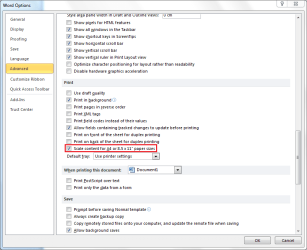
Could it be this option?

Capture.PNG
 

My Computer

Computer type
PC/Desktop
Computer Manufacturer/Model Number
Dwarf Dwf/11/2012 r09/2013
OS
Windows 8.1 Pro RTM x64
CPU
Intel Core-i5-3570K 4-core @ 3.4GHz (Ivy Bridge) (OC 4.4GHz)
Motherboard
ASRock Z77 Extreme4-M
Memory
4 x 4GB DDR3-1600 Corsair Vengeance CMZ8GX3M2A1600C9B (16GB)
Graphics Card(s)
MSI GeForce GTX770 Gaming OC 2GB
Sound Card
Realtek High Definition on board solution (ALC 898)
Monitor(s) Displays
ViewSonic VA1912w Widescreen (VGA)
Screen Resolution
1440x900
Hard Drives
OCZ Agility 3 SSD 120GB SATA III x2 (RAID 0)
Samsung HD501LJ 500GB SATA II x2
Hitachi HDS721010CLA332 1TB SATA II
Iomega 1.5TB Ext USB 2.0
WD 2.0TB Ext USB 3.0
PSU
XFX Pro Series 850W Semi-Modular
Case
Gigabyte IF233
Cooling
1 x 120mm Front Inlet 1 x 120mm Rear Exhaust
Keyboard
Microsoft Comfort Curve Keyboard 3000 (USB)
Mouse
Microsoft Comfort Mouse 3000 for Business (USB)
Internet Speed
NetGear DG834Gv3 ADSL Modem/Router (Ethernet) ~4.0 Mb/s (O2)
Antivirus
Avast! 8.0.1497
Browser
IE 11
Other Info
Optical Drive: HL-DT-ST BD-RE BH10LS30 SATA Bluray
Lexmark S305 Printer/Scanner/Copier (USB)
WEI Score: 8.1/8.1/8.5/8.5/8.25
Asus Eee PC 1011PX Netbook (Windows 7 x86 Starter)
Well, thank you

When that option is checked it prints with the wrong size and when I uncheck it prints with the right size. So problem solved, thank you very much. But to me it sounds strange that it is not the other way around, if you are setting Word to write on A4 paper and your above option is crossed then it should print with correct size?
 

My Computer

Computer Manufacturer/Model Number
Dell Inspiron 530
OS
Windows 7 Home Premium 64bit
CPU
Core 2 Quad Q9550
Motherboard
DG33M03
Memory
3 Gb
Graphics Card(s)
256MB ATI Radeon HD 2600 XT
Sound Card
Sound Blaster X-Fi Xtreme
Monitor(s) Displays
Dell
Hard Drives
750 Gb
PSU
350 W
Hi Mike222444 and welcome to Windows 7 Forums :party:

I've only just seen this thread, so apologies for any delays.

Could it be this option?

View attachment 128745

Good catch Dwarf! I feel like I know MS Word well, but I didn't know that! Rep+
 

My Computer

Computer Manufacturer/Model Number
HP Pavillion dv5t (generation 1)
OS
Vista 64 bit and 32 bit (SP2)
CPU
Intel(R) Core(TM)2 Duo Processor T9400 (2.53 GHz
Memory
4GB DDR2 System Memory (2 Dimm)
Graphics Card(s)
512 MB NVIDIA GeForce 9600M GT
Monitor(s) Displays
15.4" diagonal WSXGA+ High-Definition HP BrightView Widescre
Screen Resolution
1680 x 1050
Hard Drives
320GB 5400RPM SATA Hard Drive with HP ProtectSmart Hard Drive Protection
Keyboard
Built-in HP
Mouse
Built in - Synaptics TouchPad V6.5 on PS/2 Port
Internet Speed
Max
Other Info
~ Intel Next-Gen Wireless-N Mini-card w/Bluetooth ~ Blu-Ray ROM DVD+/-R/RW ~ Integ. HDTV Hybrid Tuner ~ 12 Cell Battery ~ MS Office (Home Premium) 2007 ~
You're welcome. :)
 

My Computer

Computer type
PC/Desktop
Computer Manufacturer/Model Number
Dwarf Dwf/11/2012 r09/2013
OS
Windows 8.1 Pro RTM x64
CPU
Intel Core-i5-3570K 4-core @ 3.4GHz (Ivy Bridge) (OC 4.4GHz)
Motherboard
ASRock Z77 Extreme4-M
Memory
4 x 4GB DDR3-1600 Corsair Vengeance CMZ8GX3M2A1600C9B (16GB)
Graphics Card(s)
MSI GeForce GTX770 Gaming OC 2GB
Sound Card
Realtek High Definition on board solution (ALC 898)
Monitor(s) Displays
ViewSonic VA1912w Widescreen (VGA)
Screen Resolution
1440x900
Hard Drives
OCZ Agility 3 SSD 120GB SATA III x2 (RAID 0)
Samsung HD501LJ 500GB SATA II x2
Hitachi HDS721010CLA332 1TB SATA II
Iomega 1.5TB Ext USB 2.0
WD 2.0TB Ext USB 3.0
PSU
XFX Pro Series 850W Semi-Modular
Case
Gigabyte IF233
Cooling
1 x 120mm Front Inlet 1 x 120mm Rear Exhaust
Keyboard
Microsoft Comfort Curve Keyboard 3000 (USB)
Mouse
Microsoft Comfort Mouse 3000 for Business (USB)
Internet Speed
NetGear DG834Gv3 ADSL Modem/Router (Ethernet) ~4.0 Mb/s (O2)
Antivirus
Avast! 8.0.1497
Browser
IE 11
Other Info
Optical Drive: HL-DT-ST BD-RE BH10LS30 SATA Bluray
Lexmark S305 Printer/Scanner/Copier (USB)
WEI Score: 8.1/8.1/8.5/8.5/8.25
Asus Eee PC 1011PX Netbook (Windows 7 x86 Starter)
I had the same problem and this sorted it nicely :)
FYI found this thread through a Google search.
 

My Computer

OS
Windows 7 Professional 64 bit
Back
Top