Solved wuauserv uses over 2GB of RAM, how to solve it?

Finally I got something to be shown off, an error.
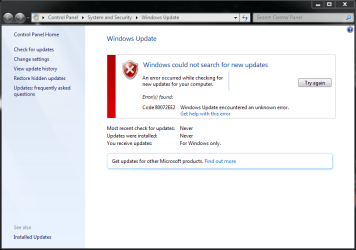
Error.PNG

I don't think I should be happy for an error but it feels better than infinite 'checking for updates', definitely a progress. And based off here this error in on Microsoft's side not mine, sounds like a hope.
 

My Computer My Computer

At a glance

Windows 7 Ultimate x64Intel(R) Core(TM) i7-2630QM CPU @ 2.00GHz4,00 GBIntel HD Graphic Family
Computer type
Laptop
OS
Windows 7 Ultimate x64
CPU
Intel(R) Core(TM) i7-2630QM CPU @ 2.00GHz
Memory
4,00 GB
Graphics Card(s)
Intel HD Graphic Family
Sound Card
Realtek
Screen Resolution
1366x768
Hard Drives
Toshiba MK5059GSXP 500 GB 5400 RPM
Internet Speed
2 Mbps
Antivirus
Microsoft Security Essential
Browser
Internet Explorer
Other Info
It sucks
I was recently reading The shame of Windows Update | Computerworld, Not sure if it will solve your problem but it's worth a try.

Bott and Leonhard each suggest two patches that should be installed prior to letting Windows Update check for missing bug fixes. I installed all four of them, in time sequence. That is, I first installed the October 2015 fix (KB3083710) that Bott suggested, then his November 2015 fix (KB3102810). Each required a system restart.

Next, I installed the March 2016 bug fix (KB3138612) from Woody Leonhard and rebooted again. Finally, I installed Woody's suggested April 2016 bug fix (KB3145739) and rebooted yet again.

I am glad to report that the four fixes worked, Windows Update ran at a normal, reasonable speed. The first check for updates took just under 20 minutes to find 181 missing patches

What language packs are you running please.

Roy


~~~
What language packs are you running please.

Roy

It's Indonesian, does language pack has something to do with Windows Update?
I've seen this note on the updates to the Windows Update Clients (WUC):
Important If you install a language pack after you install this update, you must reinstall this update. Therefore, we recommend that you install any language packs that you need before you install this update.


Hi Oops
Each new update client replaces a previous one
KB3112343 was released in December 2015
Since then there has been at least 2 others that I can remember
KB3138613 was March's
KB3135445 was February's
Not sure if January had one or not ?
Correct - no update to the WUC in January.
The March update is KB3138612
(https://support.microsoft.com/en-us/kb/3138612)


:::goes back to lurking:::

Time for review.
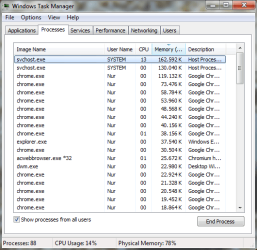
This is the my problem:
Before.PNG
wuauserv under svchost.exe took out all of available room in the RAM

Based on what you guys advised me so far, these are all the updates I installed so far:
Pembaruan.PNG
Each installed manually, in order specified, without internet connection, and a restart in between installation

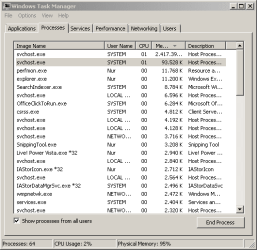
After all of these are installed, here is the result:
After.PNG
RAM issue solved, but it constantly hugging the CPU instead. It gets really hot, even the air coming out from the fan is harmful to the skin.

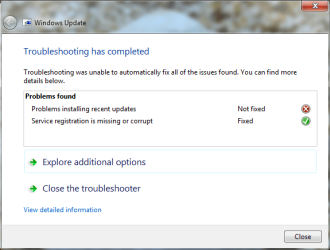
So, as the last measure, I took the innocent way of running Windows Troubleshooter, here is the result:
Pemecahan Masalah.PNG
Interesting note: No matter how many times I ran the WT, the result is always the same, it said 'Service registration is missing or corrupt' is marked as solved, but by the time I ran it again, it says the same thing. In other words, it never get fixed in the first place, or worse, it get fixed then get broken again right after the WT finishes. Meanwhile 'Problems installing recent update' is never get fixed.

In the end, the problem is still the same, Windows Update never ceases 'Checking for update', forever and ever (the latest error message is just a false hope). Latest CBS log attached.

I'm in lost here :confused: ...
 

My Computer My Computer

At a glance

Windows 7 Ultimate x64Intel(R) Core(TM) i7-2630QM CPU @ 2.00GHz4,00 GBIntel HD Graphic Family
Computer type
Laptop
OS
Windows 7 Ultimate x64
CPU
Intel(R) Core(TM) i7-2630QM CPU @ 2.00GHz
Memory
4,00 GB
Graphics Card(s)
Intel HD Graphic Family
Sound Card
Realtek
Screen Resolution
1366x768
Hard Drives
Toshiba MK5059GSXP 500 GB 5400 RPM
Internet Speed
2 Mbps
Antivirus
Microsoft Security Essential
Browser
Internet Explorer
Other Info
It sucks
Hi,
It's better to use resource monitor but dang Chrome soaks up the resources a lot more than anything I've ever seen :confused:
 

My Computer My Computer

At a glance

Win-7-Pro64bit 7-H-Prem-64biti7-5930K 2nd i9-9940x both water blocked VRM'...Trident-z 3200C14 2nd Trident-z 3600C16EVGA 1080ti ftw3 2nd Titan Xp both water blocked
Computer type
PC/Desktop
Computer Manufacturer/Model Number
Custom assembled by me :}
OS
Win-7-Pro64bit 7-H-Prem-64bit
CPU
i7-5930K 2nd i9-9940x both water blocked VRM's too
Motherboard
ASUS SABERTOOTH X99 2nd ASUS x299 Apex
Memory
Trident-z 3200C14 2nd Trident-z 3600C16
Graphics Card(s)
EVGA 1080ti ftw3 2nd Titan Xp both water blocked
Sound Card
Built-in Realtek
Monitor(s) Displays
1-AOC G2460PG 24"G-Sync 144Hz/ 2nd 1-ASUS VG248QE 24" 144Hz
Screen Resolution
1920 x 1080 144Hz
Hard Drives
2-Samsung M.2 Evo & Evo Plus
2-Samsung 850 EVO 500GB SSD's/ 3-2.5 W.D. Black 1tb-&3-1tb/3-3.5 WD Black 1tb hdd's
PSU
EVGA SuperNOVA 1000-P2 2nd 1200-P2
Case
2-Corsair Obsidian Series 450D Black ATX Mid Tower
Cooling
Custom water loops
Keyboard
Logitech G710+/ 2nd Logitech G910
Mouse
2-RedDragon M901 Perdition 16400 dpi Gaming mouse = wired
Internet Speed
Comcast Ping 19ms 89.31mbps download speed 6.12mbps upload
Antivirus
Malwarebytes Pro/ Superantispyware Pro
Browser
FireFox & Pale moon
Other Info
2nd ASUS X299 Apex/Intel i9-9940x with Custom water loop/7H-Prem-x64/Corsair 450D case/Ram Trident-z 3600C16 4x8gb / Samsung970Evo plus 500gb SSD/Dual ssd EZ swap evo/PSU EVGA SuperNova 1200w-P2 80+Platinum/GPU Titan Xp /8-ML-140 on push-pull on 2-280GTX rads
Hi,
It's better to use resource monitor but dang Chrome soaks up the resources a lot more than anything I've ever seen :confused:

Hiya,
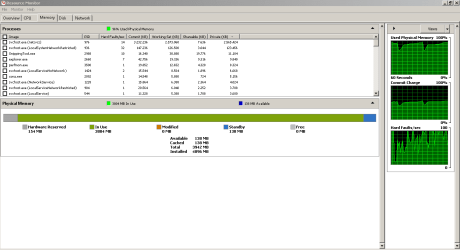
The thing is, it doesn't matter. Here is a situation where Chrome, or anything else that I can turn off, are not running. It's the bare minimum for Windows to run, and yet wuauserv takes all the available memory nonetheless.
TM.PNG

And as per your request, here it is in resource monitor:
RM.PNG
See that 0 MB free RAM, and only 138 MB stand by memory to steal for breathing?

Bet even if I have a whooping 16 GB of RAM, it will be still full anyway.
wuauaserv be like:
wuauserv.jpg
 

My Computer My Computer

At a glance

Windows 7 Ultimate x64Intel(R) Core(TM) i7-2630QM CPU @ 2.00GHz4,00 GBIntel HD Graphic Family
Computer type
Laptop
OS
Windows 7 Ultimate x64
CPU
Intel(R) Core(TM) i7-2630QM CPU @ 2.00GHz
Memory
4,00 GB
Graphics Card(s)
Intel HD Graphic Family
Sound Card
Realtek
Screen Resolution
1366x768
Hard Drives
Toshiba MK5059GSXP 500 GB 5400 RPM
Internet Speed
2 Mbps
Antivirus
Microsoft Security Essential
Browser
Internet Explorer
Other Info
It sucks

My Computer My Computer

At a glance

W7 home premium 32bit/W7HP 64bit/w10 tp insid...E5300 dual core3gbNvidia Geforce 7100 Nforce 630i
Computer type
PC/Desktop
Computer Manufacturer/Model Number
medionl/Aspire 6930G/acer x55a
OS
W7 home premium 32bit/W7HP 64bit/w10 tp insider ring
CPU
E5300 dual core
Motherboard
medion MS7366
Memory
3gb
Graphics Card(s)
Nvidia Geforce 7100 Nforce 630i
Monitor(s) Displays
avixc
Internet Speed
n (isp resticted to 72)
Antivirus
mse/pands
Browser
palemoon
Other Info
Belkin Fd7050 n USB using Railink RT2870 drivers, more upto date

My Computer My Computer

At a glance

Win-7-Pro64bit 7-H-Prem-64biti7-5930K 2nd i9-9940x both water blocked VRM'...Trident-z 3200C14 2nd Trident-z 3600C16EVGA 1080ti ftw3 2nd Titan Xp both water blocked
Computer type
PC/Desktop
Computer Manufacturer/Model Number
Custom assembled by me :}
OS
Win-7-Pro64bit 7-H-Prem-64bit
CPU
i7-5930K 2nd i9-9940x both water blocked VRM's too
Motherboard
ASUS SABERTOOTH X99 2nd ASUS x299 Apex
Memory
Trident-z 3200C14 2nd Trident-z 3600C16
Graphics Card(s)
EVGA 1080ti ftw3 2nd Titan Xp both water blocked
Sound Card
Built-in Realtek
Monitor(s) Displays
1-AOC G2460PG 24"G-Sync 144Hz/ 2nd 1-ASUS VG248QE 24" 144Hz
Screen Resolution
1920 x 1080 144Hz
Hard Drives
2-Samsung M.2 Evo & Evo Plus
2-Samsung 850 EVO 500GB SSD's/ 3-2.5 W.D. Black 1tb-&3-1tb/3-3.5 WD Black 1tb hdd's
PSU
EVGA SuperNOVA 1000-P2 2nd 1200-P2
Case
2-Corsair Obsidian Series 450D Black ATX Mid Tower
Cooling
Custom water loops
Keyboard
Logitech G710+/ 2nd Logitech G910
Mouse
2-RedDragon M901 Perdition 16400 dpi Gaming mouse = wired
Internet Speed
Comcast Ping 19ms 89.31mbps download speed 6.12mbps upload
Antivirus
Malwarebytes Pro/ Superantispyware Pro
Browser
FireFox & Pale moon
Other Info
2nd ASUS X299 Apex/Intel i9-9940x with Custom water loop/7H-Prem-x64/Corsair 450D case/Ram Trident-z 3600C16 4x8gb / Samsung970Evo plus 500gb SSD/Dual ssd EZ swap evo/PSU EVGA SuperNova 1200w-P2 80+Platinum/GPU Titan Xp /8-ML-140 on push-pull on 2-280GTX rads

The biggest key to the above process is being disconnected from the internet for the entire process.
Was that done ?

Hi,

All were done without internet access.

However, that doesn't matter anymore, I decided to give up and get Windows 10 instead, apparently you can upgrade without Windows Update working by using a program from Microsoft, and even though it uses ISO and not Windows Update, it still counted as an upgrade not a clean install, so Windows is still activated. No more update problem right now. Thanks for all the help.
 

My Computer My Computer

At a glance

Windows 7 Ultimate x64Intel(R) Core(TM) i7-2630QM CPU @ 2.00GHz4,00 GBIntel HD Graphic Family
Computer type
Laptop
OS
Windows 7 Ultimate x64
CPU
Intel(R) Core(TM) i7-2630QM CPU @ 2.00GHz
Memory
4,00 GB
Graphics Card(s)
Intel HD Graphic Family
Sound Card
Realtek
Screen Resolution
1366x768
Hard Drives
Toshiba MK5059GSXP 500 GB 5400 RPM
Internet Speed
2 Mbps
Antivirus
Microsoft Security Essential
Browser
Internet Explorer
Other Info
It sucks
Back
Top