XP accessing Win7: Access is denied

enchant

New member
Up to now, I've been purely an XP user, but I recently inherited a computer running Win7. Since it's a more powerful machine than my existing file server, I figured I'd swap it in. But I'm unable to create/edit files on it from any of the WinXP machines in the house. I've searched all over the net and tried many many things.

I'd like to make the entire C: drive accessible to other machines on my LAN, but I'll be happy to get access to specify directories on it. The one I've been working with is C:\http

It took a lot of work, but I can now at least see that drive from my XP machine. However, when I try to copy anything into it, I get:
Cannot copy xxx: Access is denied.
Make sure the disk is not full or write protected and that the file is not currently in use.

If I try to simply create a new text document in that directory, I get:
Unable to create the file 'New Text Document.txt'
Access is denied.

Under Advanced sharing settings, I have the following configured:
Network discovery: ON
File and printer sharing: ON
Public folder sharing: ON
Password protected sharing: OFF
Homegroup connections: Use user accounts and passwords...

I have the following security settings for that http directory:
win7.gif


Can anyone help? I'm totally lost. Thanks.
 

My Computer

OS
Windows 7 Ultimate x64
Hi Enchant, welcome to the Seven Forums.

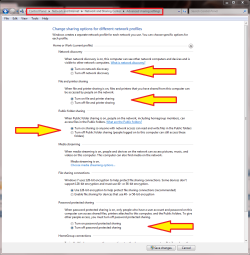
With these settings on Seven I have no problems to save from XP to Seven:

Seven_XP_Sharing.png

The last one, password protected sharing is of course up to you to decide if you want to use passwords or not.

Kari
 

My Computer

Computer type
Laptop
Computer Manufacturer/Model Number
HP ENVY 17-1150eg
OS
Windows 10 Pro x64 EN-GB
CPU
1.6 GHz Intel Core i7-720QM Processor
Memory
6 GB
Graphics Card(s)
ATI Mobility Radeon HD 5850 Graphics
Sound Card
Beats sound system with integrated subwoofer
Monitor(s) Displays
17" laptop display, 22" LED and 32" Full HD TV through HDMI
Screen Resolution
1600*900 (1), 1920*1080 (2&3)
Hard Drives
Internal: 2 x 500 GB SATA Hard Disk Drive 7200 rpm
External: 2TB for backups, 3TB USB3 network drive for media
Cooling
As Envy runs a bit warm, I have it on a Cooler Master pad
Keyboard
Logitech diNovo Media Desktop Laser (bluetooth)
Mouse
Logitech Performance Mouse MX
Internet Speed
50/10 Mbps VDSL
Antivirus
Windows Defender 4.3.9431.0
Browser
Maxthon 3.5.2., IE11
Hi Kari - thanks for the quick response!

It appears that my settings are identical to yours.
 

My Computer

OS
Windows 7 Ultimate x64
Up to now, I've been purely an XP user, but I recently inherited a computer running Win7. Since it's a more powerful machine than my existing file server, I figured I'd swap it in. But I'm unable to create/edit files on it from any of the WinXP machines in the house. I've searched all over the net and tried many many things.

I'd like to make the entire C: drive accessible to other machines on my LAN, but I'll be happy to get access to specify directories on it. The one I've been working with is C:\http

It took a lot of work, but I can now at least see that drive from my XP machine. However, when I try to copy anything into it, I get:
Cannot copy xxx: Access is denied.
Make sure the disk is not full or write protected and that the file is not currently in use.

If I try to simply create a new text document in that directory, I get:
Unable to create the file 'New Text Document.txt'
Access is denied.

Under Advanced sharing settings, I have the following configured:
Network discovery: ON
File and printer sharing: ON
Public folder sharing: ON
Password protected sharing: OFF
Homegroup connections: Use user accounts and passwords...

I have the following security settings for that http directory:
win7.gif


Can anyone help? I'm totally lost. Thanks.

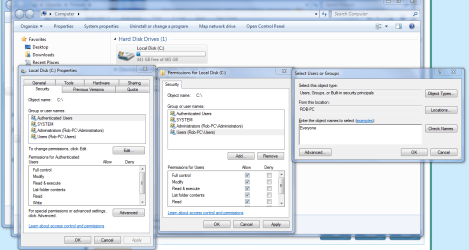
To gain access and full permissions to the actual drive, besides setting up the regular permissions of the drive, you need to right click on the drive itself "choose properties" then use the Security tab to allow access to the entire drive.

The picture below shows where you need to type in "Everyone" for full access.
 

Attachments

  • Sharing C drive EVERYONE.PNG
    Sharing C drive EVERYONE.PNG
    250.3 KB · Views: 623

My Computer

Computer type
PC/Desktop
Computer Manufacturer/Model Number
Home built
OS
Windows 7 Ult, Windows 8.1 Pro,
CPU
Q9650-4.275GHz, E8600 4.5GHz, E6750-3.8GHz
Motherboard
Evga 780i FTW
Memory
G.Skill PC2 9600 1200Mhz 5 5 5 15 2T
Graphics Card(s)
GTX480
Sound Card
Asus Xonar D2
Monitor(s) Displays
HannsG
Screen Resolution
1680X1050
Hard Drives
GSkill Phoenix Pro 120GB SSD
PSU
ThermalTake Toughpower 1000Watt modular
Case
ThermalTake XaserV
Cooling
Xigmatek S1283
Keyboard
Logitech G15
Mouse
Logitech G9
Internet Speed
T1
unless it's a "shared" directory, the everyone group won't cover people. You'll want to "share" the directory now and add the everyone group to the "share".
 

My Computer

OS
7 Pro
unless it's a "shared" directory, the everyone group won't cover people. You'll want to "share" the directory now and add the everyone group to the "share".

I'm sorry, I don't know what you mean by adding to the "share".
 

My Computer

OS
Windows 7 Ultimate x64
That is what your "Security" tab will look like, yes... You'll need to now "share" the C: (NEVER EVER RECOMMENDED!) with the same permission sets...


* you will be opening your root folders to anything and everything *
 

My Computer

OS
7 Pro
I *think* that's what I've got. Does this look right?
win7-1.gif
No it's not the same, these are the regular permissions of the drive which is accessed through the "Sharing" tab you need these permissions set as you have them but more importantly you need to go into the "Security" tab as I mentioned earlier and then add "Everyone" where the picture shows.

Full drive access isn't made easy on purpose because it's considered a Security risk so it's best to share the User folder rather than the entire C drive. This is only for the Win 7 machine.

If you need full access to drives or directories on the XP machine it may help to take ownership of the drive or the directory you need to access from the Win 7 machine.
The link below shows you how.
http://www.sevenforums.com/tutorials/1911-take-ownership-shortcut.html
 
Last edited:

My Computer

Computer type
PC/Desktop
Computer Manufacturer/Model Number
Home built
OS
Windows 7 Ult, Windows 8.1 Pro,
CPU
Q9650-4.275GHz, E8600 4.5GHz, E6750-3.8GHz
Motherboard
Evga 780i FTW
Memory
G.Skill PC2 9600 1200Mhz 5 5 5 15 2T
Graphics Card(s)
GTX480
Sound Card
Asus Xonar D2
Monitor(s) Displays
HannsG
Screen Resolution
1680X1050
Hard Drives
GSkill Phoenix Pro 120GB SSD
PSU
ThermalTake Toughpower 1000Watt modular
Case
ThermalTake XaserV
Cooling
Xigmatek S1283
Keyboard
Logitech G15
Mouse
Logitech G9
Internet Speed
T1
Ok, I just stumbled upon something interesting that might solve my problem, but I'm more confused than ever.

Here is a view from my WinXP machines explorer window:

win7-2.gif


Now as far as I can tell, the two directories that I've marked as #1 and #2 are the same. I get the access denied if I'm trying to write to #1, but if I click on #2, I can write to it. Is this normal?

Thanks again for all the help.
 

My Computer

OS
Windows 7 Ultimate x64
You need to add 'everyone' user

Ref the posting by Chev65, I found that I needed to add the user 'everyone' to my Cdrive security tab and then allow full control. Then go into each folder and right click, share, advanced share and set user to everyone.
 

My Computer

OS
Win7 Pro 64 bit + XP SP3
Back
Top