Yellow Asterisk in Wireless Connection -- Unsolved !

RodFromVT

New member
Local time
3:09 PM
Messages
8
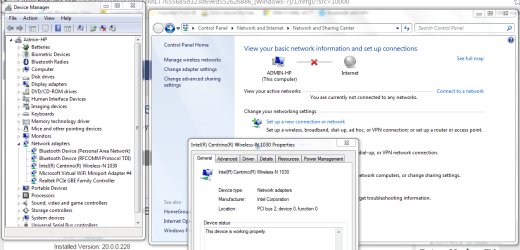
Three days trying to get rid of yellow asterisk on my wireless connection icon. deleted nic adapters, updated drivers,etc, many many attempts, but the Network and Sharing center shows a red X and won't show the full network (something about the connection is Public vs Home or Work -- and can't seem to change that designation, since I don't have a "real" connection. and windows update won't update because I think it thinks I'm unconnected or unsecured - error 80070005/7(perhaps a separate issue?).

Would love to know a definitive fix

See attached picture..

Thanks in advance for any help
 

Attachments

  • Network View.PNG
    Network View.PNG
    191.4 KB · Views: 3

My Computer

Computer type
Laptop
Computer Manufacturer/Model Number
HP-dm4-3050US a6x73ua3aba
OS
Windows 7 64bit Home Premium
CPU
Intel Core i5-2450M 2.5Ghz
Motherboard
1793
Memory
4G (soon to be 8G)
Hard Drives
750G
Antivirus
System Center End Point
Browser
Chrome & IE
First click on Change adapter settings and see if it shows disabled or enabled. If disabled, right click
on it and hit Enable.
Failing that go to Device Manager and open Network adapters - right click on it and open properties
and see if it says 'This device is working properly'. :cool:
 

My Computer

Computer type
Laptop
OS
Windows 7
Thanks Baddog for your speedy reply...yes the adapter are "enabled" and both(LAN & Wifi) are " Working properly" with the latest driver updates. I'm connected, but the network map is all wrong.....I don't understand why the red X...I'm definitely connected to the internet and can connect either by wi-fi (albeit the yellow star remains and I can plug in the Ethernet cable and run at 1G (but I don't get the LAN icon in the system tray --even if I disconnect from my wi-fi connection. I even disabled all other adapters except my LAN from Realtek and my wireless from Intel (see device manager picture). Still can connect by yellow star remains and network map remains wrong(it should show no red Xs.)
Thanks again....this is a tough one !
 

My Computer

Computer type
Laptop
Computer Manufacturer/Model Number
HP-dm4-3050US a6x73ua3aba
OS
Windows 7 64bit Home Premium
CPU
Intel Core i5-2450M 2.5Ghz
Motherboard
1793
Memory
4G (soon to be 8G)
Hard Drives
750G
Antivirus
System Center End Point
Browser
Chrome & IE
That is pretty weird. That red X is usually your router not responding. But if you are connected to the
net you must be going straight from you modem to your system Ethernet connection. But even then
you say you can still connect wireless also? It does mean you local access and wireless adapters are '
also working. Strange. I think on it and see if I can come up with anything next year. ;) 1H 3M left here.
 

My Computer

Computer type
Laptop
OS
Windows 7
Hi Red,
re your other post look at my reply are you in the same boat as him, lease expired.

Roy
 

My Computer

Computer type
PC/Desktop
Computer Manufacturer/Model Number
medionl/Aspire 6930G/acer x55a
OS
W7 home premium 32bit/W7HP 64bit/w10 tp insider ring
CPU
E5300 dual core
Motherboard
medion MS7366
Memory
3gb
Graphics Card(s)
Nvidia Geforce 7100 Nforce 630i
Monitor(s) Displays
avixc
Internet Speed
n (isp resticted to 72)
Antivirus
mse/pands
Browser
palemoon
Other Info
Belkin Fd7050 n USB using Railink RT2870 drivers, more upto date
Lease Expired?

Hi Torchwood...
I do not understand your reply..lease expired? your other reply link? Can you please be a little more specific. TIA
Rod
 

My Computer

Computer type
Laptop
Computer Manufacturer/Model Number
HP-dm4-3050US a6x73ua3aba
OS
Windows 7 64bit Home Premium
CPU
Intel Core i5-2450M 2.5Ghz
Motherboard
1793
Memory
4G (soon to be 8G)
Hard Drives
750G
Antivirus
System Center End Point
Browser
Chrome & IE
in the post below yours. Raider186

Go to command prompt type netconfig /all (note space between g /)
in that report scroll down to the lease expired part, is it out of date.

Roy
 

My Computer

Computer type
PC/Desktop
Computer Manufacturer/Model Number
medionl/Aspire 6930G/acer x55a
OS
W7 home premium 32bit/W7HP 64bit/w10 tp insider ring
CPU
E5300 dual core
Motherboard
medion MS7366
Memory
3gb
Graphics Card(s)
Nvidia Geforce 7100 Nforce 630i
Monitor(s) Displays
avixc
Internet Speed
n (isp resticted to 72)
Antivirus
mse/pands
Browser
palemoon
Other Info
Belkin Fd7050 n USB using Railink RT2870 drivers, more upto date
Expired Lease - Netconfig Command - No-Go

Thanks Roy..I hope you are onto something here...

I tried the "netconfig /all" command and it returned the following message " 'netconfig is not recognized as an internal or external command, operable program or batch file". I open cmd with administrator rights and was at the "c:\windows\system32>" prompt when I attempted the netconfig command you suggested... I can ping google.com find from that prompt, so the path variable is OK

assuming I get to a section that says "lease expired" what is the next step?

Thanks Again !
Rod
 

My Computer

Computer type
Laptop
Computer Manufacturer/Model Number
HP-dm4-3050US a6x73ua3aba
OS
Windows 7 64bit Home Premium
CPU
Intel Core i5-2450M 2.5Ghz
Motherboard
1793
Memory
4G (soon to be 8G)
Hard Drives
750G
Antivirus
System Center End Point
Browser
Chrome & IE
my bad shoud read ipconfig /all

If its expired well have to get into your router setup.

Roy
 

My Computer

Computer type
PC/Desktop
Computer Manufacturer/Model Number
medionl/Aspire 6930G/acer x55a
OS
W7 home premium 32bit/W7HP 64bit/w10 tp insider ring
CPU
E5300 dual core
Motherboard
medion MS7366
Memory
3gb
Graphics Card(s)
Nvidia Geforce 7100 Nforce 630i
Monitor(s) Displays
avixc
Internet Speed
n (isp resticted to 72)
Antivirus
mse/pands
Browser
palemoon
Other Info
Belkin Fd7050 n USB using Railink RT2870 drivers, more upto date
Thanks again, for sticking with me Roy.....I ran ipconfig and see no expired leases. Don't think this has anything to do with my router(a Comcast Gateway modem/router), since I have another computer sitting right next to this one and it's wi-fi and LAN icon(when connected is normal). Here's the results of the ipconfig /all command below.....earlier I did ipconfig release, renewal, flushdns and registerdns -- no change. I'm using only two nic adapters the LAN Realtek and Intel Centrio Wi-fi..both connect fine, so why is the network map so wrong and wifi Icon in system tray greyed out with a yellow asterisk still on it??.....I'm dumb founded!
Here's the screen dump:
Microsoft Windows [Version 6.1.7601]
Copyright (c) 2009 Microsoft Corporation. All rights reserved.

C:\Windows\system32>ipconfig /all

Windows IP Configuration

Host Name . . . . . . . . . . . . : Admin-HP
Primary Dns Suffix . . . . . . . :
Node Type . . . . . . . . . . . . : Hybrid
IP Routing Enabled. . . . . . . . : No
WINS Proxy Enabled. . . . . . . . : No
DNS Suffix Search List. . . . . . : hsd1.fl.comcast.net.

Ethernet adapter Bluetooth Network Connection:

Media State . . . . . . . . . . . : Media disconnected
Connection-specific DNS Suffix . :
Description . . . . . . . . . . . : Bluetooth Device (Personal Area Network)
Physical Address. . . . . . . . . : 4C-80-93-9A-AB-FE
DHCP Enabled. . . . . . . . . . . : Yes
Autoconfiguration Enabled . . . . : Yes

Wireless LAN adapter Wireless Network Connection 6:

Media State . . . . . . . . . . . : Media disconnected
Connection-specific DNS Suffix . :
Description . . . . . . . . . . . : Microsoft Virtual WiFi Miniport Adapter #
5
Physical Address. . . . . . . . . : 4C-80-93-9A-AB-FB
DHCP Enabled. . . . . . . . . . . : Yes
Autoconfiguration Enabled . . . . : Yes

Wireless LAN adapter Wireless Network Connection 5:

Media State . . . . . . . . . . . : Media disconnected
Connection-specific DNS Suffix . :
Description . . . . . . . . . . . : Microsoft Virtual WiFi Miniport Adapter #
4
Physical Address. . . . . . . . . : 4C-80-93-9A-AB-FB
DHCP Enabled. . . . . . . . . . . : Yes
Autoconfiguration Enabled . . . . : Yes

Wireless LAN adapter Wireless Network Connection:

Connection-specific DNS Suffix . : hsd1.fl.comcast.net.
Description . . . . . . . . . . . : Intel(R) Centrino(R) Wireless-N 1030
Physical Address. . . . . . . . . : 4C-80-93-9A-AB-FA
DHCP Enabled. . . . . . . . . . . : Yes
Autoconfiguration Enabled . . . . : Yes
IPv6 Address. . . . . . . . . . . : 2601:6c3:4102:3da1:6ca6:d770:739f:b3c1(Pr
eferred)
Temporary IPv6 Address. . . . . . : 2601:6c3:4102:3da1:28e4:de57:66c5:a9b2(Pr
eferred)
Link-local IPv6 Address . . . . . : fe80::6ca6:d770:739f:b3c1%29(Preferred)
IPv4 Address. . . . . . . . . . . : 10.0.0.24(Preferred)
Subnet Mask . . . . . . . . . . . : 255.255.255.0
Lease Obtained. . . . . . . . . . : Friday, January 01, 2016 2:49:05 PM
Lease Expires . . . . . . . . . . : Friday, January 08, 2016 3:28:18 PM
Default Gateway . . . . . . . . . : fe80::21d:d4ff:fe65:21f1%29
10.0.0.1
DHCP Server . . . . . . . . . . . : 10.0.0.1
DHCPv6 IAID . . . . . . . . . . . : 642547859
DHCPv6 Client DUID. . . . . . . . : 00-01-00-01-16-96-63-10-10-1F-74-68-91-A1

DNS Servers . . . . . . . . . . . : 2001:558:feed::1
2001:558:feed::2
75.75.75.75
75.75.76.76
NetBIOS over Tcpip. . . . . . . . : Enabled

Ethernet adapter Local Area Connection:

Connection-specific DNS Suffix . : hsd1.fl.comcast.net.
Description . . . . . . . . . . . : Realtek PCIe GBE Family Controller
Physical Address. . . . . . . . . : 10-1F-74-68-91-A1
DHCP Enabled. . . . . . . . . . . : Yes
Autoconfiguration Enabled . . . . : Yes
IPv4 Address. . . . . . . . . . . : 10.0.0.23(Preferred)
Subnet Mask . . . . . . . . . . . : 255.255.255.0
Lease Obtained. . . . . . . . . . : Friday, January 01, 2016 2:15:01 PM
Lease Expires . . . . . . . . . . : Friday, January 08, 2016 2:15:00 PM
Default Gateway . . . . . . . . . : 10.0.0.1
DHCP Server . . . . . . . . . . . : 10.0.0.1
DNS Servers . . . . . . . . . . . : 75.75.75.75
75.75.76.76
NetBIOS over Tcpip. . . . . . . . : Enabled

Tunnel adapter Local Area Connection* 18:

Media State . . . . . . . . . . . : Media disconnected
Connection-specific DNS Suffix . :
Description . . . . . . . . . . . : Teredo Tunneling Pseudo-Interface
Physical Address. . . . . . . . . : 00-00-00-00-00-00-00-E0
DHCP Enabled. . . . . . . . . . . : No
Autoconfiguration Enabled . . . . : Yes

Tunnel adapter isatap.{D27547F8-6D53-43B5-8700-152FF2C74D21}:

Media State . . . . . . . . . . . : Media disconnected
Connection-specific DNS Suffix . :
Description . . . . . . . . . . . : Microsoft ISATAP Adapter #3
Physical Address. . . . . . . . . : 00-00-00-00-00-00-00-E0
DHCP Enabled. . . . . . . . . . . : No
Autoconfiguration Enabled . . . . : Yes

Tunnel adapter isatap.hsd1.fl.comcast.net.:

Media State . . . . . . . . . . . : Media disconnected
Connection-specific DNS Suffix . : hsd1.fl.comcast.net.
Description . . . . . . . . . . . : Microsoft ISATAP Adapter #4
Physical Address. . . . . . . . . : 00-00-00-00-00-00-00-E0
DHCP Enabled. . . . . . . . . . . : No
Autoconfiguration Enabled . . . . : Yes

Tunnel adapter isatap.{72913ABC-9F64-46C2-9162-E8FEEAE672AA}:

Media State . . . . . . . . . . . : Media disconnected
Connection-specific DNS Suffix . :
Description . . . . . . . . . . . : Microsoft ISATAP Adapter #5
Physical Address. . . . . . . . . : 00-00-00-00-00-00-00-E0
DHCP Enabled. . . . . . . . . . . : No
Autoconfiguration Enabled . . . . : Yes

Tunnel adapter isatap.{381D2144-D955-47E4-94B1-167E33B162B1}:

Media State . . . . . . . . . . . : Media disconnected
Connection-specific DNS Suffix . :
Description . . . . . . . . . . . : Microsoft ISATAP Adapter #6
Physical Address. . . . . . . . . : 00-00-00-00-00-00-00-E0
DHCP Enabled. . . . . . . . . . . : No
Autoconfiguration Enabled . . . . : Yes

C:\Windows\system32>

 

My Computer

Computer type
Laptop
Computer Manufacturer/Model Number
HP-dm4-3050US a6x73ua3aba
OS
Windows 7 64bit Home Premium
CPU
Intel Core i5-2450M 2.5Ghz
Motherboard
1793
Memory
4G (soon to be 8G)
Hard Drives
750G
Antivirus
System Center End Point
Browser
Chrome & IE
from that output it looks like youve got an ethernet cable plugged in ???.

If you have it may override the bluetooth wifi.

In your device manager can you dissable that Realtek device.
see what happens..

the other thing i see on the Btooth adapter is a temporary IPV6 address not seen that before, but i suspect its something to do with the way your ISP works.

Roy
 

My Computer

Computer type
PC/Desktop
Computer Manufacturer/Model Number
medionl/Aspire 6930G/acer x55a
OS
W7 home premium 32bit/W7HP 64bit/w10 tp insider ring
CPU
E5300 dual core
Motherboard
medion MS7366
Memory
3gb
Graphics Card(s)
Nvidia Geforce 7100 Nforce 630i
Monitor(s) Displays
avixc
Internet Speed
n (isp resticted to 72)
Antivirus
mse/pands
Browser
palemoon
Other Info
Belkin Fd7050 n USB using Railink RT2870 drivers, more upto date
Debug of Yellow Asterisk on Wi-fi continues

Thanks Roy,

I've unchecked all the IP V6 associations from all adapters. Disabled all by one wi-fi and one lan adapter -- both work..when the Ethernet Cable is plugged, the wi-fi icon still shows(still greyed out with yellow *) -- It never changes to show a LAN adapter icon(strange too). When I connect to wi-fi signal, that works too, but in both cases either plugged in or wi-fi connected, the wi-fi icon remains greyed out with a yellow * and the network map remains unchanged too(red X as in my first attached diagram)......so very strange to be able to connect to the internet via either a cable(at 1G) or wi-fi ( at 130mps) and still get network connection map that says I'm not connected when I am....I am very perplexed. I even read that the MS virtual miniport adapters might be the cause, so I did a "netsh wlan set hostednetwork mode=disallowed" to attempt to PERMANENTLY remove them, but somehow this HP computer doesn't cooperate, since after I reboot they both magically re-appear...best I can do is mark them as disabled....then I have only two adapters that are "on"....one being the realtek(LAN) and the other be Intel Centrio wi-fi..all others have been disabled -- yet of course I'm still connected with that darn yellow *....... I may have to ask Bill Gates to get involved.
 

My Computer

Computer type
Laptop
Computer Manufacturer/Model Number
HP-dm4-3050US a6x73ua3aba
OS
Windows 7 64bit Home Premium
CPU
Intel Core i5-2450M 2.5Ghz
Motherboard
1793
Memory
4G (soon to be 8G)
Hard Drives
750G
Antivirus
System Center End Point
Browser
Chrome & IE
Does your comp have its own HP Wireless program facility as part of its bloatware.
might be something in there.

Roy
 

My Computer

Computer type
PC/Desktop
Computer Manufacturer/Model Number
medionl/Aspire 6930G/acer x55a
OS
W7 home premium 32bit/W7HP 64bit/w10 tp insider ring
CPU
E5300 dual core
Motherboard
medion MS7366
Memory
3gb
Graphics Card(s)
Nvidia Geforce 7100 Nforce 630i
Monitor(s) Displays
avixc
Internet Speed
n (isp resticted to 72)
Antivirus
mse/pands
Browser
palemoon
Other Info
Belkin Fd7050 n USB using Railink RT2870 drivers, more upto date
Back
Top