Favorites - Restore Default Favorite Links in Navigation Pane

Restore Default Favorites Links in Navigation Pane of Windows 7 and Windows 8

   Information
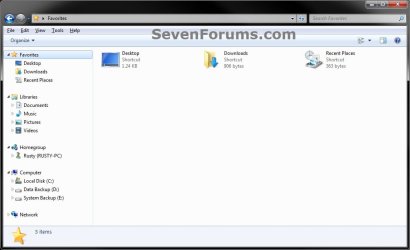
This will show you how to restore the default Desktop, Downloads, and Recent Places links in Favorites in the navigation paneof Windows 7 and Windows 8.

   Note
If your Favorites is completely empty, then also see How to Fix Empty Favorites in Windows Explorer Navigation Pane to see if this may be the issue instead.


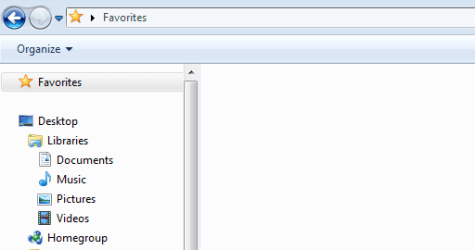
EXAMPLE: Default Favorites Favorites.jpg


OPTION ONE

To Use "Restore favorite links" Context Menu Item

1. Open Windows Explorer (Windows 7) or File Explorer (Windows 8/8.1).

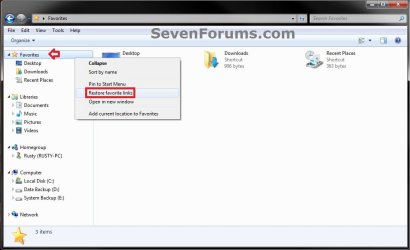
2. Right click on Favorites in the navigation pane, and click on Restore favorite links. (see screenshot below) Option1.jpg


OPTION TWO

To Download and Manually Restore Default Favorite Links

1. Click/tap on the download button below to download the favorite link(s) that you are missing A) Desktop
Download


B) Downloads
Download


C) Recent Places
Download


2. Save the .zip file(s) to your Desktop.

3. Right click or press and hold on each of the downloaded .zip files, click/tap on Extract all, then extract the favorite link to your Desktop.

4. Unblock the extracted favorite link.

5. In Explorer navigate to your C:\Users\(user-name)\Links folder. (see screenshot below) Option2.jpg
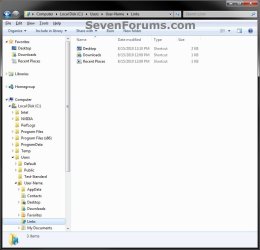
6. Cut and Paste (move) the extracted favorite links to inside the C:\Users\(user-name)\Links folder. (see screenshot above)
That's it,
Shawn


Attachments

Last edited:
Were it not for people like you, the rest of us would shoot ourselves. Thank you for taking the time to be so helpful - as a relative newb, I was able to follow your instructions (elsewhere, can't find the tutorial now) and change the registry key so the my links folder was restored to the navigation pane favourites. I am most grateful to you.
 

My Computer

Computer Manufacturer/Model Number
Aser/Aspire 5742
OS
Windows Home premium 64bit
CPU
Intel(r) Core (TM) i3
Memory
3GB
You're most welcome Calmuse, and welcome to Seven Forums. Thank you for the kind words. :)
 

My Computer

Computer type
PC/Desktop
Computer Manufacturer/Model Number
Self built custom
OS
64-bit Windows 11 Pro for Workstations
CPU
Intel i7-8700K OC'd to 5 GHz
Motherboard
ASUS ROG Maximus XI Formula Z390
Memory
64 GB (4x16GB) G.SKILL TridentZ RGB DDR4 3600 MHz
Graphics Card(s)
ASUS ROG-STRIX-GTX1080TI-O11G-GAMING
Sound Card
Integrated
Monitor(s) Displays
2 x Samsung Odyssey G7 27"
Screen Resolution
2560x1440
Hard Drives
1TB Samsung 990 PRO M.2,
4TB Samsung 990 PRO PRO M.2,
TerraMaster F8 SSD Plus NAS
PSU
Seasonic Prime Titanium 850W
Case
Thermaltake Core P3
Cooling
Corsair Hydro H115i
Keyboard
Logitech wireless K800
Mouse
Logitech MX Master 4
Internet Speed
2 Gb/s Download and 100 Mb/s Upload
Antivirus
Malwarebyte Anti-Malware Premium
Browser
Google Chrome
Other Info
Logitech Z625 speaker system,
Logitech BRIO 4K Pro webcam,
HP Color LaserJet Pro MFP M477fdn,
APC SMART-UPS RT 1000 XL - SURT1000XLI,
Galaxy S23 Plus phone
Dear friends,
The solution provided in this tutorial is just amazing!! my Recent Places link was missing in windows explorer view for about a month and tried many tips shared in the web. nothing worked and got frustrated. This tutorial and the zipped binary file did the majic and I got my Recent Places folder intact!. Thanks a lot to the solution provider! :-) and sevenforums
elavarasan
 

My Computer

OS
windows 7 home basic 64 bit
You're most welcome elavarasan, and welcome to Eight Forums. I'm glad it was able to help. :)
 

My Computer

Computer type
PC/Desktop
Computer Manufacturer/Model Number
Self built custom
OS
64-bit Windows 11 Pro for Workstations
CPU
Intel i7-8700K OC'd to 5 GHz
Motherboard
ASUS ROG Maximus XI Formula Z390
Memory
64 GB (4x16GB) G.SKILL TridentZ RGB DDR4 3600 MHz
Graphics Card(s)
ASUS ROG-STRIX-GTX1080TI-O11G-GAMING
Sound Card
Integrated
Monitor(s) Displays
2 x Samsung Odyssey G7 27"
Screen Resolution
2560x1440
Hard Drives
1TB Samsung 990 PRO M.2,
4TB Samsung 990 PRO PRO M.2,
TerraMaster F8 SSD Plus NAS
PSU
Seasonic Prime Titanium 850W
Case
Thermaltake Core P3
Cooling
Corsair Hydro H115i
Keyboard
Logitech wireless K800
Mouse
Logitech MX Master 4
Internet Speed
2 Gb/s Download and 100 Mb/s Upload
Antivirus
Malwarebyte Anti-Malware Premium
Browser
Google Chrome
Other Info
Logitech Z625 speaker system,
Logitech BRIO 4K Pro webcam,
HP Color LaserJet Pro MFP M477fdn,
APC SMART-UPS RT 1000 XL - SURT1000XLI,
Galaxy S23 Plus phone
empty favorites

Hi, the favorietes icon at the top left of my windows explrer pane is empty. Right clicking the icon does not show properties, but: expand/sort by name/open in new window/restore favorite links/add current locatio to favorites.

So i cannot track down this icon to a folderlocation (nice~). The icon it is supposed to break down in recent places, links etc. The 'recent items' is what i am interested in, because i frequently used it.

I do have a favorites folder C:\Users\<username>\Favorites, which has a folder favorites bar and is furtehr empty.

The recent items are tracked in my startmenu.

I reset all file locations and registry entries i could find in 7 forums, no results.

Any ideas? What would help is if i could track down the logic in windows how to display the favoriters i mentio, so i can fix it.

Thx,
Dirk
windows7
 

My Computer

OS
windows7
Hello Dirk, and welcome to Seven Forums.

Have you already tried the steps in either or both options in the tutorial?
 

My Computer

Computer type
PC/Desktop
Computer Manufacturer/Model Number
Self built custom
OS
64-bit Windows 11 Pro for Workstations
CPU
Intel i7-8700K OC'd to 5 GHz
Motherboard
ASUS ROG Maximus XI Formula Z390
Memory
64 GB (4x16GB) G.SKILL TridentZ RGB DDR4 3600 MHz
Graphics Card(s)
ASUS ROG-STRIX-GTX1080TI-O11G-GAMING
Sound Card
Integrated
Monitor(s) Displays
2 x Samsung Odyssey G7 27"
Screen Resolution
2560x1440
Hard Drives
1TB Samsung 990 PRO M.2,
4TB Samsung 990 PRO PRO M.2,
TerraMaster F8 SSD Plus NAS
PSU
Seasonic Prime Titanium 850W
Case
Thermaltake Core P3
Cooling
Corsair Hydro H115i
Keyboard
Logitech wireless K800
Mouse
Logitech MX Master 4
Internet Speed
2 Gb/s Download and 100 Mb/s Upload
Antivirus
Malwarebyte Anti-Malware Premium
Browser
Google Chrome
Other Info
Logitech Z625 speaker system,
Logitech BRIO 4K Pro webcam,
HP Color LaserJet Pro MFP M477fdn,
APC SMART-UPS RT 1000 XL - SURT1000XLI,
Galaxy S23 Plus phone
Hi Brink,
Yes i did, nothing changed.
See also picture.
Thnaks,
Dirk
 

Attachments

  • Capture.PNG
    Capture.PNG
    18 KB · Views: 80,535

My Computer

OS
windows7
Ok. Sorry, but I have to ask just to make sure.

Did you also try what was in the blue Note box at the top of the tutorial?
 

My Computer

Computer type
PC/Desktop
Computer Manufacturer/Model Number
Self built custom
OS
64-bit Windows 11 Pro for Workstations
CPU
Intel i7-8700K OC'd to 5 GHz
Motherboard
ASUS ROG Maximus XI Formula Z390
Memory
64 GB (4x16GB) G.SKILL TridentZ RGB DDR4 3600 MHz
Graphics Card(s)
ASUS ROG-STRIX-GTX1080TI-O11G-GAMING
Sound Card
Integrated
Monitor(s) Displays
2 x Samsung Odyssey G7 27"
Screen Resolution
2560x1440
Hard Drives
1TB Samsung 990 PRO M.2,
4TB Samsung 990 PRO PRO M.2,
TerraMaster F8 SSD Plus NAS
PSU
Seasonic Prime Titanium 850W
Case
Thermaltake Core P3
Cooling
Corsair Hydro H115i
Keyboard
Logitech wireless K800
Mouse
Logitech MX Master 4
Internet Speed
2 Gb/s Download and 100 Mb/s Upload
Antivirus
Malwarebyte Anti-Malware Premium
Browser
Google Chrome
Other Info
Logitech Z625 speaker system,
Logitech BRIO 4K Pro webcam,
HP Color LaserJet Pro MFP M477fdn,
APC SMART-UPS RT 1000 XL - SURT1000XLI,
Galaxy S23 Plus phone
Hi Brink,
Yes, checked that too.
As i could not find any way to pin-oint the problem, i decided to go nuclear and reinstall a previous version of windows7, including all the updates. That worked. Quite some time for a little nuisance like this, but now i am at peace.
So, issue closed.
Thanks,
Dirk
 

My Computer

OS
windows7
Dirk,

I'm happy to hear that you got it sorted, but sorry you had to go nuclear.
 

My Computer

Computer type
PC/Desktop
Computer Manufacturer/Model Number
Self built custom
OS
64-bit Windows 11 Pro for Workstations
CPU
Intel i7-8700K OC'd to 5 GHz
Motherboard
ASUS ROG Maximus XI Formula Z390
Memory
64 GB (4x16GB) G.SKILL TridentZ RGB DDR4 3600 MHz
Graphics Card(s)
ASUS ROG-STRIX-GTX1080TI-O11G-GAMING
Sound Card
Integrated
Monitor(s) Displays
2 x Samsung Odyssey G7 27"
Screen Resolution
2560x1440
Hard Drives
1TB Samsung 990 PRO M.2,
4TB Samsung 990 PRO PRO M.2,
TerraMaster F8 SSD Plus NAS
PSU
Seasonic Prime Titanium 850W
Case
Thermaltake Core P3
Cooling
Corsair Hydro H115i
Keyboard
Logitech wireless K800
Mouse
Logitech MX Master 4
Internet Speed
2 Gb/s Download and 100 Mb/s Upload
Antivirus
Malwarebyte Anti-Malware Premium
Browser
Google Chrome
Other Info
Logitech Z625 speaker system,
Logitech BRIO 4K Pro webcam,
HP Color LaserJet Pro MFP M477fdn,
APC SMART-UPS RT 1000 XL - SURT1000XLI,
Galaxy S23 Plus phone
I only have "add current location to Favorites" when right-clicking the favorites folder...

Is there a fix for this?
I haven't changed anything on the install I'm on (reg settings) but still the only context menu this entry is present for is the parent Folders.

I have my Links folder, which is a sendto item (as is create shortcut{Desktop}), I'm thinking I could combine the two, and that would achieve what "add current location to favorites" does .. but I'f love to know why it's not there!!

Any ideas?

Working (on favorites!)
V4P9yHI.png


Everywhere else (I think), extended menu
Z6KraFO.png


Weird....
 

My Computer

Computer type
Laptop
Computer Manufacturer/Model Number
Dell
OS
Windows 7 Ultimate 64bit
CPU
2.2
Memory
8Gb
Graphics Card(s)
NVIDIA
Screen Resolution
1280/762
Mouse
built in pad || iphone || MS wireless
Internet Speed
100MB
Antivirus
Avast
Browser
Chrome, Chrome portable
Ah. I'm an idiot. Tip: NEVER try to fix anything without sufficient volumes of caffeine in your bloodstream...

The "add current" works by
a) going to the "target" location
b) right-clicking the fav's icon...
c) Adding shortcut.

Might add a command bar option, or just proceed with the object context (shell/*?) so it's a two-step trip (send-to > favs{shortcut}) ... not as easy as I'd hoped!

Anyone know how to see the innards of the "create shortcut" shortcut (in sendto)?

Need an .lnk editor I think
 

My Computer

Computer type
Laptop
Computer Manufacturer/Model Number
Dell
OS
Windows 7 Ultimate 64bit
CPU
2.2
Memory
8Gb
Graphics Card(s)
NVIDIA
Screen Resolution
1280/762
Mouse
built in pad || iphone || MS wireless
Internet Speed
100MB
Antivirus
Avast
Browser
Chrome, Chrome portable
this site is beyond helpful, thank you.
 

My Computer

Computer type
PC/Desktop
Computer Manufacturer/Model Number
HP
OS
Windows Seven Ultimate x64 SP1
CPU
Intel Core i7 x980 @ 3.33GHz
Memory
12.0 GB
Graphics Card(s)
Nvidia GeForce GTX 260
Back
Top