
How to Rename the "Recycle Bin" in Windows 7
Information
This will show you how to rename the Recycle Bin for all users in Windows 7.
Note
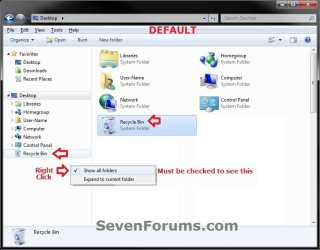
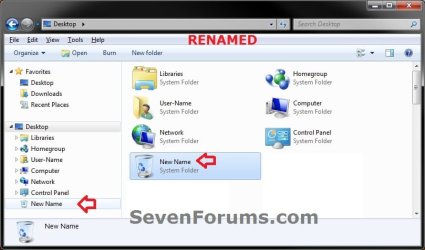
- Both options below will rename the Recycle Bin in Windows Explorer when you have Show all folders checked in the navigation pane.
- Both options below will also rename the Recycle Bin desktop icon.
NOTE: This is the Recycle Bin default name (left screenshot below) and renamed (right screenshot below) in the Navigation Pane.
OPTION ONE
Rename Recycle Bin for Current User Only
NOTE: This will only rename the Recycle Bin for the user account (standard or administrator) that you are currently logged in.
1. Right click on the Recycle Bin desktop icon, and click on Rename.
2. Type in any name that your would like, then press Enter.
OPTION TWO
Rename Recycle Bin for All Users
NOTE: You must be logged in as an administrator to be able to do this option.
1. Open the Start Menu and type regedit in the search line, then press enter.
2. If prompted by UAC, then click on Yes.
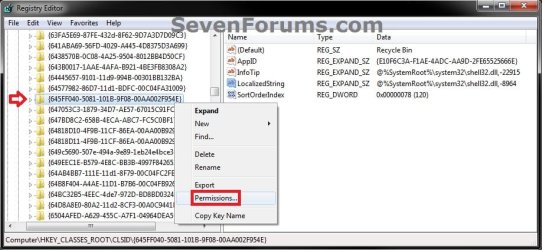
3. In regedit, go to the location below: (see screenshot below step 4)
HKEY_CLASSES_ROOT\CLSID\{645FF040-5081-101B-9F08-00AA002F954E}
4. In the left pane of regedit, right click on the {645FF040-5081-101B-9F08-00AA002F954E} key and click on Permissions. (see screenshot below)
5. Do the following in order below to take ownership and full control of this registry key. (see example screenshot below)
A) Click on the Advanced button.
B) Click on the Owner tab.
C) Select your Administrator account.
D) Click on OK.
E) At the top, select the Administrators group.
F) At the bottom, check the Allow box to the right of Full Control.
G) Click on OK.

6. In the right pane of regedit, right click on LocalizedString and click on Modify. (see screenshot below)
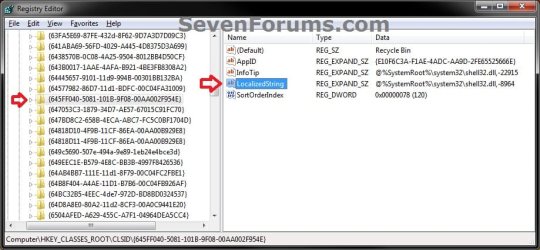
7. To Rename the "Recycle Bin"
A) Type in any name that your would like, then click on OK. (see screenshot below)
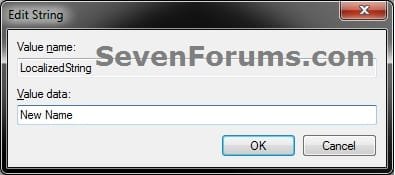
B) Go to step 9.
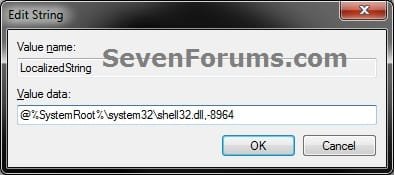
8. To Restore the Default "Recycle Bin" Name
NOTE: This is the default setting.
A) Copy and Paste the value below, then click on OK. (see screenshot below)
@%SystemRoot%\system32\shell32.dll,-8964
9. Close regedit.
That's it,
Shawn
Related Tutorials
- How to Allow or Prevent the Windows 7 Recycle Bin Icon to Display
- How to Pin the Recycle Bin to the Windows 7 Taskbar
- How to Add Empty Recycle Bin to the Windows 7 Desktop Context Menu
- How to Rename "Favorites" in the Windows 7 Explorer Navigation Pane
- How to Rename "Libraries" in the Windows 7 Explorer Navigation Pane
- How to Rename "Homegroup" in the Windows 7 Explorer Navigation Pane
- How to Rename "Computer" in the Windows 7 Explorer Navigation Pane
- How to Rename "Network" in the Windows 7 Explorer Navigation Pane
- How to Rename "Control Panel" in the Windows 7 Explorer Navigation Pane
- How to Add or Remove "Recycle Bin" from Desktop Context Menu
- How to Add or Remove the "Recycle Bin" from the Windows 7 Navigation Pane
Last edited: