WMP 12 Internet Streaming

HOW TO SETUP
INTERNET STREAMING
IN WMP 12

   Information
This will show you how to set up internet streaming in windows 7 using windows media player 12.
   Note
This has worked for me im using Windows 7 RC X64 i would assume that it works the same for all. The Screens might look different but should mostly be the same
   Warning
In order for this to work you must have

1: Windows Live ID Sign-in Assistant 6.5

2: A Live ID ( @hotmail.com @msn.com @live.com should all work, or what ever your LIVE ID is)

3: Your windows accounts do not need the be the same

4: This MUST be done on both systems or all systems that you want to be able to connect too or connect from

5: You are able to connect to more then one remote system


Here's How:
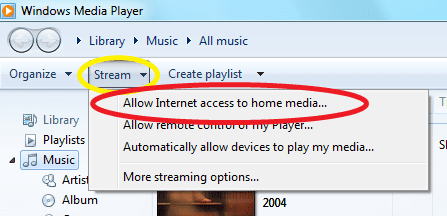
  1. To start open WMP 12
    Once open click at the top of the left side of the window STREAM here in Yellow then click on the Allow Internet Access To Home Media
    1.png
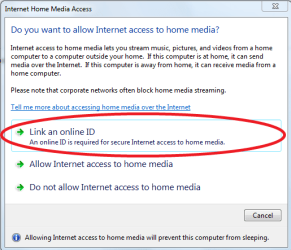
  2. Click on Link an online ID

    2.PNG
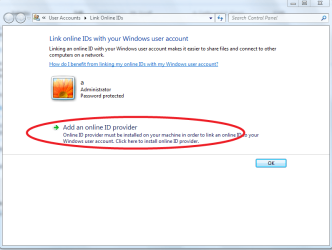
  3. Click on Add An online ID provider.
    3.PNG
  4. Click here

    4.PNG
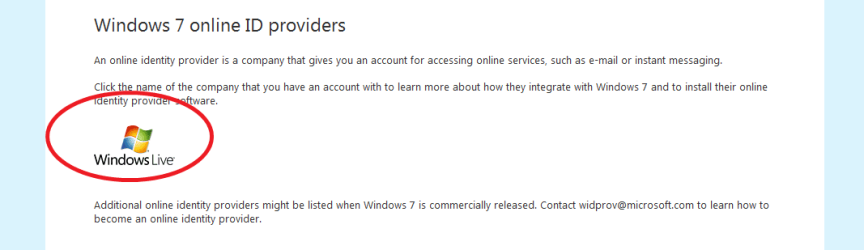
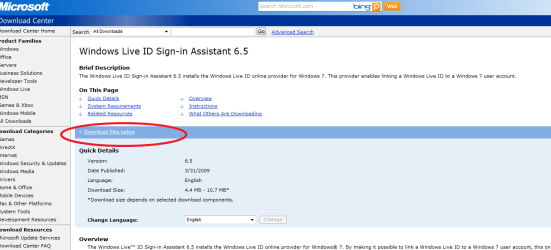
  5. The last step should have opened this window here.

    Click Downloads Below or Scroll Down the page to get to the downloads make sure you pick the right OS 32-bit OR 64-bit

    5.PNG

    6.PNG
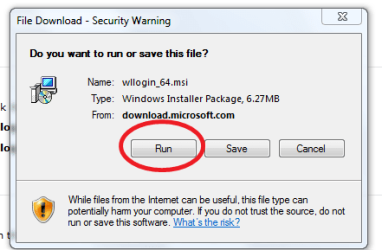
  6. Either Run or Save then run latter.
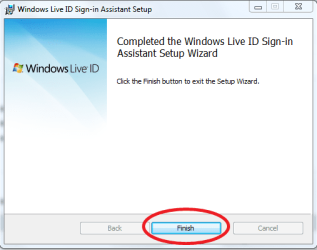
    Just Click Run. Let it download start the installer.
    When done click on Finsh.
    7.PNG

    8.PNG

  7. GO back to WMP 12 you should still have this window here open
    Click on Link A online ID.
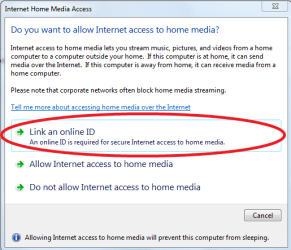
    9.PNG
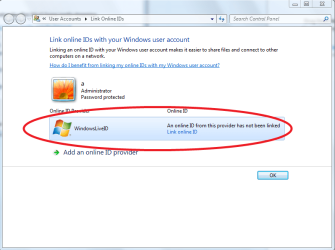
  8. Click on Link Online ID

    10.PNG
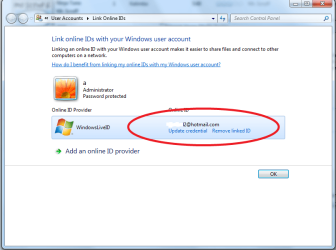
  9. Sign-in with your ID User Name and Password.
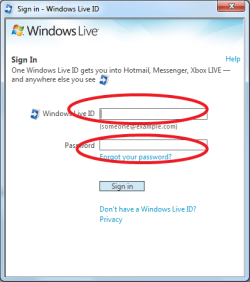
    11.PNG

    12.PNG
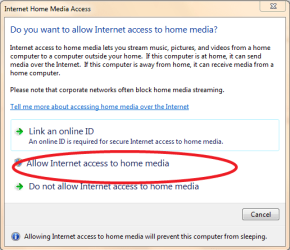
  10. Back to WMP 12 one last time :D
    Allow Internet Access To Home Media

    13.PNG

    14.PNG

    15.PNG

    DONE
 
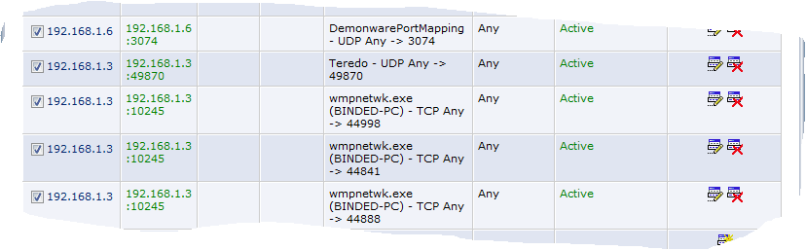
Besides of this great but incompplete tutorial, you need to do some port forwarding on your routeur:
TCP EXt 44785 to INT 10245
and
TCP EXT 443 to INT 10245
And of course the PC that will be pushing the files has to be on a home network, not a domain or a public network.

Enjoy!
 

My Computer

OS
windows 7
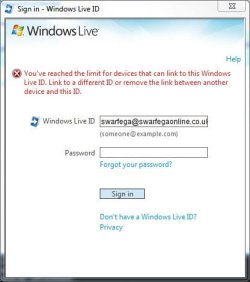
When I try using the live id assistant I get this error:

liveiderror.JPG
 

My Computer

Computer Manufacturer/Model Number
self built
OS
Windows 7 Professional 64-bit
CPU
Intel E8400 3GHz
Motherboard
Intel DX48BT2
Memory
Kingston PC3-10700H 4Gb
Graphics Card(s)
XFX Radeon HD 5850 BlackEd.
Sound Card
Asus Xonar DG
Monitor(s) Displays
2x Samsung SM-T220HD 22"
Screen Resolution
1680x1050 on two monitors
Hard Drives
OCZ Vertex 2 120gb 3.5" (OS)
Seagate Momentus XT 500gb
Samsung F3 1Tb (games)
2x Samsung F1 1Tb
PSU
Thermaltake ToughPower 850w
Case
Thermaltake Armor
Cooling
Scythe Mugen II
Keyboard
Microsoft Comfort Curve USB
Mouse
Razer Diamondback 3G
Internet Speed
8128/443
Besides of this great but incompplete tutorial, you need to do some port forwarding on your routeur:
TCP EXt 44785 to INT 10245
and
TCP EXT 443 to INT 10245
And of course the PC that will be pushing the files has to be on a home network, not a domain or a public network.

Enjoy!


this tut was not a for alll cases mostly just a fast set up
i dont know about what ports need forwarding

but it works for me from home to work from behind a verizon fios set up with just standard settings nothing was done to change router settings also i use wireless to the router

i would guess your right on it needed to be home network for the computer that pushes the computer at work is not joined to the domain but it is a work private network and i can still connect to my work computer and it will push to my home computer no specail settings or ports forrward going though a sonic firewall

thanks for the extra info but as i dont know every ones case i will leave the tut as is unless a admin or mod wants to change it any more then it is

i beleave for most setups this should work just about 75% of the time
 

My Computer

Computer Manufacturer/Model Number
Gateway P-7811 FX
OS
Vista Business X64 / Win 7 RC X64 / Win t X64 RTM no activation
CPU
Intel 2.26GHz Core 2 Duo Mobile P8400
Motherboard
Intel PM45
Memory
4GB DDR3/1066
Graphics Card(s)
NVIDIA® GeForce® 9800M GTS With 512 MB of GDDR3
Sound Card
Conexant High Definition SmartAudio 221
Monitor(s) Displays
17-inch WUXGA TFT (1920 × 1200)
Screen Resolution
1920 × 1200
Hard Drives
200GB Seagate Momentus (7,200 rpm)
Case
1.3 to 1.7-inches (H) × 15.75-inches (W) × 11.75-inches (D)
Internet Speed
FIOS
When I try using the live id assistant I get this error:

View attachment 18607
i dont know what the limit is on the amount of machines that you can link with your live id try unlinking with an account but i dont think theres a limit but i have only used this to stream to my work machine with rc1
and works

how many computers do you have your id linked to try to remove it from one of them
 

My Computer

Computer Manufacturer/Model Number
Gateway P-7811 FX
OS
Vista Business X64 / Win 7 RC X64 / Win t X64 RTM no activation
CPU
Intel 2.26GHz Core 2 Duo Mobile P8400
Motherboard
Intel PM45
Memory
4GB DDR3/1066
Graphics Card(s)
NVIDIA® GeForce® 9800M GTS With 512 MB of GDDR3
Sound Card
Conexant High Definition SmartAudio 221
Monitor(s) Displays
17-inch WUXGA TFT (1920 × 1200)
Screen Resolution
1920 × 1200
Hard Drives
200GB Seagate Momentus (7,200 rpm)
Case
1.3 to 1.7-inches (H) × 15.75-inches (W) × 11.75-inches (D)
Internet Speed
FIOS
Besides of this great but incompplete tutorial, you need to do some port forwarding on your routeur:
TCP EXt 44785 to INT 10245
and
TCP EXT 443 to INT 10245
And of course the PC that will be pushing the files has to be on a home network, not a domain or a public network.

Enjoy!


i have tested this from my personal home computer to my work computer with no settings just the way i have the tut and it works
sonic firewall on the work side no ports forwarded or specail settings needed

also i would not forward port 443 to your computer unless you have a good reason to be forwarding a ssl or running a web server or any thing else that would need ssl


from what i can tell this works by using a push when you load wmp it goes out to live id and says what can i connect too it gives you a list of other librarys
using live id a gateway connection to your other machine and lets each system know how to connect to each other


this is the same idea as TS GATEWAY in win2k8

where you can have a remote app run in a as a remote desktop but just that one app window same idea here

see as win7 and win2k8 is all the same code this is my guess live id just sets up the connections from what i can tell

your right with the forwards but i still would not forward 443
if you have upnp on should take care of most of it

thats why i did not have to forward
as to if the sonic firewall is set to auto upnp dont know
 

Attachments

  • Capture.PNG
    Capture.PNG
    10.4 KB · Views: 863

My Computer

Computer Manufacturer/Model Number
Gateway P-7811 FX
OS
Vista Business X64 / Win 7 RC X64 / Win t X64 RTM no activation
CPU
Intel 2.26GHz Core 2 Duo Mobile P8400
Motherboard
Intel PM45
Memory
4GB DDR3/1066
Graphics Card(s)
NVIDIA® GeForce® 9800M GTS With 512 MB of GDDR3
Sound Card
Conexant High Definition SmartAudio 221
Monitor(s) Displays
17-inch WUXGA TFT (1920 × 1200)
Screen Resolution
1920 × 1200
Hard Drives
200GB Seagate Momentus (7,200 rpm)
Case
1.3 to 1.7-inches (H) × 15.75-inches (W) × 11.75-inches (D)
Internet Speed
FIOS
i dont know what the limit is on the amount of machines that you can link with your live id try unlinking with an account but i dont think theres a limit but i have only used this to stream to my work machine with rc1
and works

how many computers do you have your id linked to try to remove it from one of them


thats the trouble Im only linking to this machine. Trouble is because Ive been testing each new build I have installed it each time. I wonder if its remembered that some how.
 

My Computer

Computer Manufacturer/Model Number
self built
OS
Windows 7 Professional 64-bit
CPU
Intel E8400 3GHz
Motherboard
Intel DX48BT2
Memory
Kingston PC3-10700H 4Gb
Graphics Card(s)
XFX Radeon HD 5850 BlackEd.
Sound Card
Asus Xonar DG
Monitor(s) Displays
2x Samsung SM-T220HD 22"
Screen Resolution
1680x1050 on two monitors
Hard Drives
OCZ Vertex 2 120gb 3.5" (OS)
Seagate Momentus XT 500gb
Samsung F3 1Tb (games)
2x Samsung F1 1Tb
PSU
Thermaltake ToughPower 850w
Case
Thermaltake Armor
Cooling
Scythe Mugen II
Keyboard
Microsoft Comfort Curve USB
Mouse
Razer Diamondback 3G
Internet Speed
8128/443
Did not work on mine... :sleepy:
I recorded the problem with Problem Steps Recorder... (sorry for the foreign language - it's Greek!)
wmp12_problem.zip - Windows Live
djprodg
did you set up the windows id assistant

also this this guide was used for the RC1

but i have sense moved to RTM but i no longer have a job to test this any longer
or another computer

so i could only guess
i did look at your problem file i would guess that you missed a step and did not link widows account with your windows live id account you need to do this on both computers


but your windows accounts do not need to be the same just only your live id

hope that helped
 

My Computer

Computer Manufacturer/Model Number
Gateway P-7811 FX
OS
Vista Business X64 / Win 7 RC X64 / Win t X64 RTM no activation
CPU
Intel 2.26GHz Core 2 Duo Mobile P8400
Motherboard
Intel PM45
Memory
4GB DDR3/1066
Graphics Card(s)
NVIDIA® GeForce® 9800M GTS With 512 MB of GDDR3
Sound Card
Conexant High Definition SmartAudio 221
Monitor(s) Displays
17-inch WUXGA TFT (1920 × 1200)
Screen Resolution
1920 × 1200
Hard Drives
200GB Seagate Momentus (7,200 rpm)
Case
1.3 to 1.7-inches (H) × 15.75-inches (W) × 11.75-inches (D)
Internet Speed
FIOS
Did not work on mine... :sleepy:
I recorded the problem with Problem Steps Recorder... (sorry for the foreign language - it's Greek!)
wmp12_problem.zip - Windows Live
djprodg
did you set up the windows id assistant

also this this guide was used for the RC1

but i have sense moved to RTM but i no longer have a job to test this any longer
or another computer

so i could only guess
i did look at your problem file i would guess that you missed a step and did not link widows account with your windows live id account you need to do this on both computers


but your windows accounts do not need to be the same just only your live id

hope that helped

Thanks for the help. The problem was caused by a registry cleaner i used (for my first time) and formatted my PC to fix it, then I followed the instructions and it's OK. :o

P.S. I will never ever use registry cleaners again... ;)
 

My Computer

OS
-
Back
Top