NVIDIA/AMD Video Card - Test with OCCT

How to Test NVIDIA/AMD Performance with OCCT


1. Download the free 3.1.0 version of OCCT:

Download


   Information

- Version 3.1.0 should be used as the latest versions of OCCT don't provide the same functionality.
- GPU: MEMTEST will ONLY work on cards that supports Nvidia CUDA
- OCCT can be used to diagnose TDR116/117 errors, faults in the video memory or a defective GPU.
- Also works on Windows 8/8.1.


Make sure you have the latest DirectX 9.0 Runtimes
Download: DirectX End-User Runtime - Microsoft Download Center - Download Details

2. Run the setup, and install the program
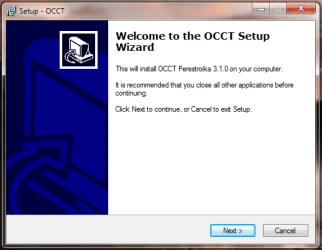
Capture.PNG
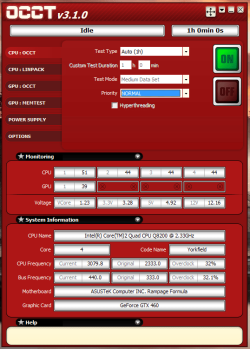
The program contains four different tests as shown below
assa.PNG
Test 1: GPU Stress Test

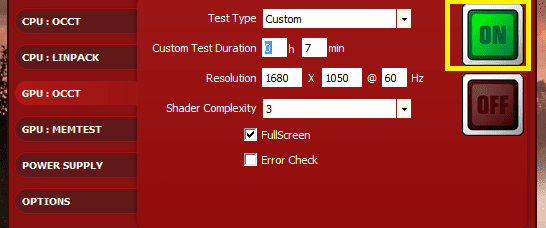
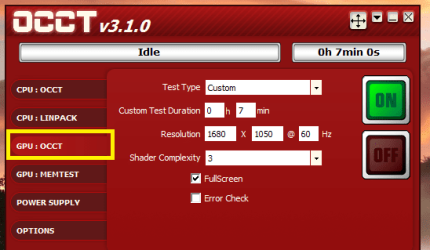
In the GPU: OCCT section select your desired options such as your Test type, Test Duration, Shader complexity 1 Hour is usually recommended for the test
GPU1.PNG
Click ON to start the Stress test
ON.PNG
Enabling the Error Check will allow the program to log any errors found in the test


Test 2: Video Memory Test

OCCT GPU Memtest, based on Nvidia CUDA runs a Memtest-like test on your GPU Memory. It is aimed at detecting manufacturing errors on the GPU memory


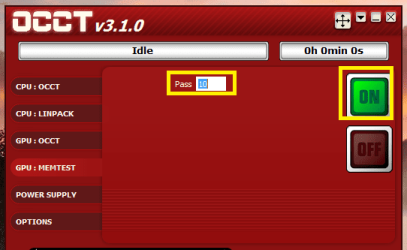
In the GPU: MEMTEST section select the number of Passes, usually 5-7 will be sufficient for detecting errors
passs.PNG
Click ON to start the Stress test

At the end of each test a folder containing graph will be created in C:\Users\[user Name\Documents\OCCT\[Date] as shown below:
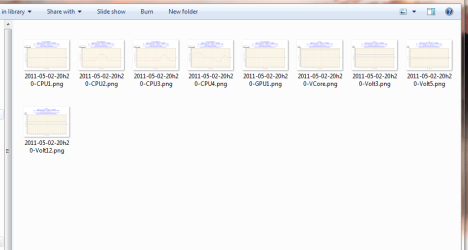
folder.PNG
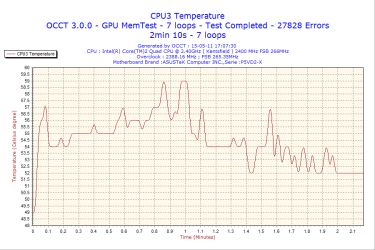
If any errors are found they will be reported on the graphs

Here is an example of a possible defect in GPU Memory:
eee.png
   Warning
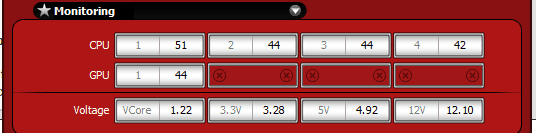
Monitor your GPU temperatures. If you see artifacts, or the temperature of your GPU exceeds 80C, stop the test.
tekmps.PNG


Last edited by a moderator:
Thanks yowanvista
 

My Computer

Computer Manufacturer/Model Number
Brewed
OS
Microsoft Windows 7 Ultimate: x64 (SP1)
CPU
Intel® Core™ i5-2500K Processor
Motherboard
ASUS P8Z68-V PRO
Memory
Kingston DDR3 HyperX 1600MHz 8GB
Graphics Card(s)
ASUS GTX 560 TI DirectCU II 900MHz
Sound Card
Realtek® ALC892 8-Channel High Definition Audio CODEC
Monitor(s) Displays
ACER LCD P246HBD 1920x1080 (24") - Dell 1280x800
Screen Resolution
ACER LCD P246HBD ~ [1920X1080] - DELL ~ [1280x800]
Hard Drives
500 GB WD Caviar SE116 7200rpm SATA2
PSU
Corsair 750W Power Supply
Case
Coolermaster CM Scout
Cooling
Zalman FS-C77 Fatal1ty CPU Cooler
Keyboard
Logitech G15
Mouse
Coolermaster Sentinel Advanced
Internet Speed
[↓ 10 MB/s DL] [↑ 1 MB/s UL]
Other Info
- ROCCAT™ Kave – Solid 5.1 Surround Sound Gaming Headset
- Not overclocking
Good tutorial Yowan, bookmarked.
 

My Computer

Computer type
PC/Desktop
Computer Manufacturer/Model Number
76~2.0
OS
Windows 7 Ult x64 - SP1/ Windows 8 Pro x64
CPU
Intel Core i5-3570K 4.6GHz
Motherboard
Gigabyte GA-Z77X UD3H, f18
Memory
8GB (2X4GB) DDR3 1600 Corsair Vengeance CL8 1.5v
Graphics Card(s)
Sapphire HD 7770 Vapor-X OC 1GB DDR5
Sound Card
Onboard VIA VT2021
Monitor(s) Displays
22" LCD Dell
Screen Resolution
1680x1050
Hard Drives
Samsung 840Pro 128GB SSD,
Seagate Barracuda 500GB SATA2 7200rpm 32MB cache, Seagate Barracuda 1TB SATA2 7200rpm 32MB cache,
PSU
Corsair HX650W
Case
Cooler Master Storm Scout
Cooling
Corsair H80 2x12cm Noctua NF P12 , 2x14cm case fans
Keyboard
Logitech Wave
Mouse
CM Sentinel
Internet Speed
Dismal
Antivirus
Avast
Browser
Opera Next
Other Info
Haswell laptop: HP Envy 17t-j, i7-4700MQ, GeForce 740M 2GB DDR3, 17.3" Full HD 1920x1080, 16GB RAM, Samsung 840 Pro 128GB, 1TB Hitachi 7200 HDD,
Desktop: eSATA ports,
External eSATA Seagate 500GB SATA2 7200rpm,
External WD USB 500GB
Thanks Yowan, this will be helpful.
 

My Computer

Computer type
PC/Desktop
Computer Manufacturer/Model Number
Home Built Desktop By DataTech
OS
Windows 7 Ultimate X64 SP1
CPU
Intel i5-2550K, Differing ~4.4-4.8GHz No built in GPU
Motherboard
ASUS P8Z68-V PRO/GEN3
Memory
16GB G.Skill Sniper 1866MHz @ 2133MHz 2x8GB
Graphics Card(s)
ASUS GTX650TIB-DC2OC-2GD5, (650TI Boost)
Sound Card
Onboard Realtek 5-1
Monitor(s) Displays
Samsung P2570HD
Screen Resolution
1920x1080
Hard Drives
Samsung 840 Pro 256GB SSD for OS, 500GB Seagate Constellation (Enterprise drive) for Data
PSU
Corsair HX650W
Case
Inwin Dragon Rider
Cooling
Hyper 212 EVO w/two Noctua fans, push-pull, @1300 RPM
Keyboard
E-Z Eyes, bright yellow keys with large characters
Mouse
steelseries SENSEI Laser Pro Gaming
Internet Speed
48-51Mbs Mbs down, 11 Mbs up Xfinity Cable
Antivirus
Norton Internet Security 2013
Browser
IE 10, Opera, Pale Moon if needed
Other Info
4 case fans, LG BluRay-RE, ASUS DVD-RW, Mr. Fusion power supply, 1.21 gigawatts.
COol Tut, Thanks
 

My Computer

Computer Manufacturer/Model Number
ASUSTek Computer Inc.
OS
Windows 8 Developer Preview, Windows 7 Ultimate X64 SP1, Windows 7 X32 SP1, Windows 7 Ultimate X64,
CPU
Genuine Intel® Dual-Core E2160 (OC)
Motherboard
BIOStar P4M89-M7-TE
Memory
2.5GB DDR2
Graphics Card(s)
NVIDIA GeForce 8400 GS (OC)
Sound Card
Realtek
Monitor(s) Displays
1
Screen Resolution
1366 X 768
Hard Drives
Sata 160GB , Sata 250GB, Sata 1TB
PSU
450W
Case
Factory Default
Cooling
Factory Default
Keyboard
Factory Default
Mouse
Factory Default
Internet Speed
1Mbit
Nice tutorials dude, well explained... :)
 

My Computer

Computer Manufacturer/Model Number
HP Compaq Presario CQ60-421NR Laptop
OS
Win7 Ultimate SP1 6.1.7601 x86
CPU
Intel Pentium(R) Dual-Core T4300 @ 2094Mhz
Motherboard
HP Compaq Cq60-42NR Laptop Motherboard
Memory
3 Gigabytes of Ram
Graphics Card(s)
Intel Graphics Media Accelerator (Intel GMA)
Sound Card
Realtek Ultra Definition
Monitor(s) Displays
Built-in Compaq Cq60-42nr LED Display 1366x768
Screen Resolution
1366x768
Hard Drives
320 Gigabyte HDD
Case
HP Compaq Presario
Cooling
Built-in Laptop Cooling System
Keyboard
Built-in Laptop Keyboard
Mouse
Built-in Laptop Touchpad
Internet Speed
100Mbps Local Area Network/100kbps Internet (Bayantel)
Thanks yowanvista this will be very helpful much appreciated.
 

My Computer

Computer Manufacturer/Model Number
Alienware
OS
Windows 7 Ultimate x64
CPU
I7
Motherboard
GA-X58-USB3
Memory
6 x 1.5V DDR3 DIMM sockets supporting up to 24 GB of system
Graphics Card(s)
GeForce GTX 580
Sound Card
Realtek ALC892 codec 2/4/5.1/7.1-channel
Monitor(s) Displays
NEC Display Solutions E321 Black 32"
Screen Resolution
1366 x 768
Hard Drives
OCZ Colossus LT Series OCZSSD2-1CLSLT1T 3.5" 1TB SATA II MLC Internal Solid State Drive
PSU
XFX Black Edition XPS-850W-BES 850W ATX12V
Case
Antec
Cooling
Zalman
Keyboard
Microsoft
Mouse
Microsoft
Thanks a lot.
 

My Computer

Computer Manufacturer/Model Number
Asus N53v-DH 72
OS
windows 7 home premium 64bit
CPU
Intel(R) Core(TM) i7-2670QM CPU @ 2.20GHz
Motherboard
ASUSTeK Computer Inc
Memory
6049 MB
Graphics Card(s)
NVIDIA GeForce GT 540M (1024 MB)
Monitor(s) Displays
15.6
Screen Resolution
1920-1080
Hard Drives
ST9750420AS (698 GB, IDE)

C: (NTFS) 293.0 GB (229.9 GB free)
D: (NTFS) 380.6 GB (380.5 GB free)
Total Size 673.6 GB (610.4 GB free)
Keyboard
Standard
Mouse
Optical
Internet Speed
D-12877kbps U-370kbps
Um, you say there are 4 tests but you've only listed two...what are the others?
 

My Computer

OS
windows 7 home premium
Um, you say there are 4 tests but you've only listed two...what are the others?


That thread is from september. I doubt very many ppl will be watching it. If you have a question it is usually better to start your own thread
 

My Computer

Computer Manufacturer/Model Number
HP Pavillion dv-7 1005 Tx
OS
Win 8 Release candidate 8400
CPU
[email protected]
Memory
4 gigs
Graphics Card(s)
Nvidia 9600M
Sound Card
HD built-in
Monitor(s) Displays
17" Wxga
Screen Resolution
1440x900
Cooling
none
Internet Speed
45Mb down 5Mb up
Um, you say there are 4 tests but you've only listed two...what are the others?

Right there in the first screenshot, top left.

(Memory and Power)
 

My Computer

Computer type
PC/Desktop
Computer Manufacturer/Model Number
Systems by SmartEyeball
OS
8 Pro x64
CPU
i7 3770K 4.6GHz
Motherboard
ASUS P8Z77 WS
Memory
16GB G.Skill Trident X 2666mhz
Graphics Card(s)
x2 EVGA 780 Ti Superclocked SLI
Sound Card
SB X-FI Surround 5.1 PRO USB / ATH-AD900 Headphones
Monitor(s) Displays
x3 Dell U2410 / 58" Samsung
Screen Resolution
5760*1200/ 1920*1200
Hard Drives
2x Intel 520 240GB (RAID 0) * 2x WD Caviar Blacks 2TB (RAID 0) * 2TB WD Caviar Black * Sony Optirac DVD
PSU
Silverstone Strider Evolution 1200W
Case
Thermaltake Level 10 GT Snow Edition
Cooling
Noctua NH-D14
Keyboard
Topre Realforce // Ducky Shine MX Black // Filco Ninja TKL
Mouse
Thermaltake Theron (Highly Recommended) + Razer Imperator
Antivirus
MSE
Browser
IE, FF, WaterFox
Other Info
GT Extreme V2 Sim Racing Cockpit + 40" LCD and K/B Mouse stand ▼
Fanatec CSR Elite Wheel + Clubsport V1 Pedals + CSR shifter/7G-H ▼Saitek X52 Pro ▼ TrackIR 5 Pro
Buttkicker v2 Seat Rumbler with Dedicated 5.1 and Sub Woofer attached to frame ▼
=
Bloody Big Grin
OCCT 3.1.0 will not work with AMD cards? (I have AMD Radeon HD 4850).

I do have a need to test my AMD cards - any suggestions?
 

My Computer

Computer Manufacturer/Model Number
Asus P5Q-e, Asus N73Jq, Lenovo T420s
OS
Win 7 Pro 64 bit
Motherboard
Asus P5Q-e
OCCT 3.1.0 will not work with AMD cards? (I have AMD Radeon HD 4850).

I do have a need to test my AMD cards - any suggestions?


Furmark.

But watch your temps closely, it's a pretty heavy stress test.
 

My Computer

OS
Windows 7 Professional 64 bit
Already using Furmark. Max temp at 95 celcius ... normal temp at 80-83 ... good?
 

My Computer

Computer Manufacturer/Model Number
Asus P5Q-e, Asus N73Jq, Lenovo T420s
OS
Win 7 Pro 64 bit
Motherboard
Asus P5Q-e
Already using Furmark. Max temp at 95 celcius ... normal temp at 80-83 ... good?


That's not normal that's close to frying those temps should.t get above 85 on stressing hardcore gaming it would be between 65 c to 75 c but that is what I have experienced and others would agree that's too hot even for stressing
 

My Computer

Computer type
PC/Desktop
Computer Manufacturer/Model Number
CoreI7-6700K MrFingerIII Special Builds
OS
Windows 10 Home Premium 64bit sp1
CPU
Intel I7-6700K @ 4.6 Ghz 1.344 volts everyday OC
Motherboard
Asrock Fatality K6 Z170 Socket 1151
Memory
32GB G-Skill TridentZ 3200mhz 16-18-18-38 DDR4
Graphics Card(s)
Sli Gigabyte Windforce GTX 980 G1
Sound Card
AC97 Creative Rage Tactic 3D Headphones Bluetooth
Monitor(s) Displays
27" Asus ROG Swift PG278Q G-Sync 48" Vizio Smart HD TV
Screen Resolution
2560x1440p 27"- 48" Currently Gaming at 2560x1440p Res 2K
Hard Drives
250GB Samsung Evo840SSD Seagate baracuda 500 GB WD Mybook 500Gb 1TB Seagate Barracuda
PSU
HX1050w Corsair Silver 80plus certified crosfire/sli
Case
Enthod Pro Full Tower
Cooling
Corsair H110i GT 280 mm High Performance WaterBlock
Keyboard
Logitech wireless keyboard
Mouse
Logitech wireless mouse
Internet Speed
Cox Cable 100+ mb
Antivirus
WebRoot Spysweeper with Antivirus
Browser
IE-10, Chrome, Opera
Other Info
My Other Rig is a AMD FX8320E @4.6Ghz 16GB Ballistic Sport Ram
Mobo Asrock Fatality 990FX 120GB OCZ SSD 1TB Seagate Barracuda Corsair H75 Cooling PSU Corsair CX750
GPU GTX Gigabyte 970G1
Already using Furmark. Max temp at 95 celcius ... normal temp at 80-83 ... good?


That's not normal that's close to frying those temps should.t get above 85 on stressing hardcore gaming it would be between 65 c to 75 c but that is what I have experienced and others would agree that's too hot even for stressing

Many thanks. Since my post above, much has happened - including a warranty replacement. I also found out that my (VisionTek) Radeon HD 4850 had multiple revisions since my purchase in 2008 - I found out that my version runs quite hot as per my search on the internet. Regardless, I am trying to manually control the fan speed to keep it around 68C. Additionally, VisionTek sent me a replacement under warranty and the latest version looks completely different and NEVER exceeds 70C even when stress. The latest version idles around 42-43C.

Thanks for the comment.
 
Last edited:

My Computer

Computer Manufacturer/Model Number
Asus P5Q-e, Asus N73Jq, Lenovo T420s
OS
Win 7 Pro 64 bit
Motherboard
Asus P5Q-e
Hello,

I have done all the steps above but the BSOD still appears , i also checked the GPU:3D with OCCT and it says no error , can you please help me , i don`t know what to do further .
Thanks,
 

My Computer

OS
Windows 7 Ultimate x64

My Computer

Computer type
PC/Desktop
Computer Manufacturer/Model Number
Self built custom
OS
64-bit Windows 11 Pro for Workstations
CPU
Intel i7-8700K OC'd to 5 GHz
Motherboard
ASUS ROG Maximus XI Formula Z390
Memory
64 GB (4x16GB) G.SKILL TridentZ RGB DDR4 3600 MHz
Graphics Card(s)
ASUS ROG-STRIX-GTX1080TI-O11G-GAMING
Sound Card
Integrated
Monitor(s) Displays
2 x Samsung Odyssey G7 27"
Screen Resolution
2560x1440
Hard Drives
1TB Samsung 990 PRO M.2,
4TB Samsung 990 PRO PRO M.2,
TerraMaster F8 SSD Plus NAS
PSU
Seasonic Prime Titanium 850W
Case
Thermaltake Core P3
Cooling
Corsair Hydro H115i
Keyboard
Logitech wireless K800
Mouse
Logitech MX Master 4
Internet Speed
2 Gb/s Download and 100 Mb/s Upload
Antivirus
Malwarebyte Anti-Malware Premium
Browser
Google Chrome
Other Info
Logitech Z625 speaker system,
Logitech BRIO 4K Pro webcam,
HP Color LaserJet Pro MFP M477fdn,
APC SMART-UPS RT 1000 XL - SURT1000XLI,
Galaxy S23 Plus phone
When I run the GPU test, my system crash and reboot as soon as the graphics starts to spin (ok maybe after 3 sec)

After reboot it's hard to even start the PC again, and often the PC crash just after windows login. I have to restart maybe 5-6 times before windows run again. And then I try the test and the same happens again.

Any idea what is wrong? I run the test, because many games crash random. Sometimes all works great for 14 days, and then suddenly crash away.

I have a Seasonic M12D 750w ATX PSU and a Asus 580 GTX card. And a Intel I7 3,07 CPU.

Thanks

( I do get random BSOD) I have tried many drivers and a fresh Win install. Up to today, my system have run great for a month. And out of the blue games starts to crash again :(
 

My Computer

Computer Manufacturer/Model Number
Home made
OS
Win 7 64 bit home
CPU
Intel Core i7 Quad Processor i7-950
Motherboard
ASUS P6X58D-E, Socket-1366
Memory
Corsair Dominator DHX+ DDR3 1600MHz 6GB
Graphics Card(s)
ASUS GTX 770 DirectCU II OC 2 GB
Sound Card
Astro 40
Monitor(s) Displays
BenQ XL2420TE 144 hz 1 ms (GTG) Black eQualizer
Screen Resolution
1920*1080
Hard Drives
Main: Vertex 450 - 7mm SATA 3 SSD
BackUp: Samsung SpinPoint F3 1TB
PSU
Seasonic M12D Powersupply 750W
Case
Silverstone Fortress II Midi Tower Black
Cooling
CoolIT VANTAGE A.L.C. CPU Køler Water Cooling
Keyboard
Logitech Illuminated Keyboard
Mouse
Logitech G500 Gaming Mouse,
Internet Speed
60/12
Antivirus
Ofc
Browser
Chrome
Other Info
Plextor DVD±RW burner PX-880SA
When I run the GPU test, my system crash and reboot as soon as the graphics starts to spin (ok maybe after 3 sec)

After reboot it's hard to even start the PC again, and often the PC crash just after windows login. I have to restart maybe 5-6 times before windows run again. And then I try the test and the same happens again.

Any idea what is wrong? I run the test, because many games crash random. Sometimes all works great for 14 days, and then suddenly crash away.

I have a Seasonic M12D 750w ATX PSU and a Asus 580 GTX card. And a Intel I7 3,07 CPU.

Thanks

( I do get random BSOD) I have tried many drivers and a fresh Win install. Up to today, my system have run great for a month. And out of the blue games starts to crash again :(
See Brink's post #18 for instructions for posting in the BSOD forum.
 

My Computer

Computer type
PC/Desktop
Computer Manufacturer/Model Number
Home Built Desktop By DataTech
OS
Windows 7 Ultimate X64 SP1
CPU
Intel i5-2550K, Differing ~4.4-4.8GHz No built in GPU
Motherboard
ASUS P8Z68-V PRO/GEN3
Memory
16GB G.Skill Sniper 1866MHz @ 2133MHz 2x8GB
Graphics Card(s)
ASUS GTX650TIB-DC2OC-2GD5, (650TI Boost)
Sound Card
Onboard Realtek 5-1
Monitor(s) Displays
Samsung P2570HD
Screen Resolution
1920x1080
Hard Drives
Samsung 840 Pro 256GB SSD for OS, 500GB Seagate Constellation (Enterprise drive) for Data
PSU
Corsair HX650W
Case
Inwin Dragon Rider
Cooling
Hyper 212 EVO w/two Noctua fans, push-pull, @1300 RPM
Keyboard
E-Z Eyes, bright yellow keys with large characters
Mouse
steelseries SENSEI Laser Pro Gaming
Internet Speed
48-51Mbs Mbs down, 11 Mbs up Xfinity Cable
Antivirus
Norton Internet Security 2013
Browser
IE 10, Opera, Pale Moon if needed
Other Info
4 case fans, LG BluRay-RE, ASUS DVD-RW, Mr. Fusion power supply, 1.21 gigawatts.
Back
Top