
USB Driver - General Fix for Problems

General Fix for USB Driver Problems

I recommend using a wired mouse and keyboard, removing all USB devices and in the section where it says Uninstall all the faded entries. take that as reading uninstall everything USB, if you cannot get hold of a wired mouse then you will have to follow the tutorial as written.

After going through this tutorial You may need to reinstall some USB device drivers!!

After a USB device is installed and then removed Windows hides the driver, this first part makes all hidden drivers visible.


1. Unplug all USB devices except mouse and keyboard.


2. Click on Start orb, :orb: Type Advanced System settings in the search box and Click on View Advanced System Settings to go there.


3. Click on Advanced tab, Click on Environment Variables.
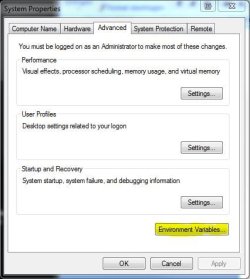

Tutorial 1.JPG


4. Under the window "System variables" Click on New.
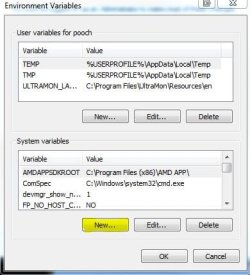

Tutorial 2.JPG


5. Type devmgr_show_nonpresent_devices as the variable name and type 1 as the value.
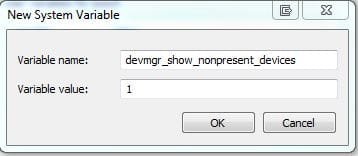

Tutorial 3.JPG


6. Click OK 3 times to close the windows.


7. Click on Start orb, :orb: Type Device Manager in the search box and Click on Device Manager in the list to go there.


8. Click on View, then Show hidden devices.
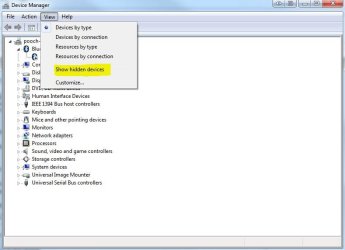

Tutorial 4.JPG


9. You will now notice that you have a list of USB devices and that some lines appear to be faded. Uninstall all the faded entries.
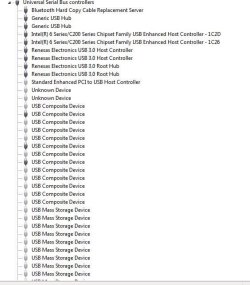

Capture.JPG


The INFCACHE.1 file is used to store information about USB drivers, the information in this file may have become corrupted and may cause windows to load the wrong driver or cause a driver not found message to be generated.
Deleting this file will force windows to generate a new INFCACHE.1 file.


1. Right Click on Start orb :orb: and Click on Open Windows Explorer.


2. Select Computer in the navigation pane, and search for INFCACHE.1
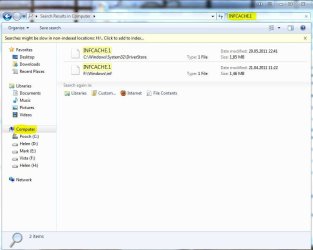

Tutorial 5.JPG


3. Right Click on the file INFCACHE.1 (if you have more instances of Windows installed only do this for INFCACHE.1 C:\Windows\System32\Driver Store)


4. Click on Properties, Click on Security tab, Click on Edit, Click on Add.
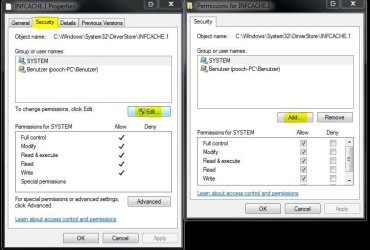

Tutorial 6.JPG


5. Type Administrators in the window with the blinking cursor, Click OK.
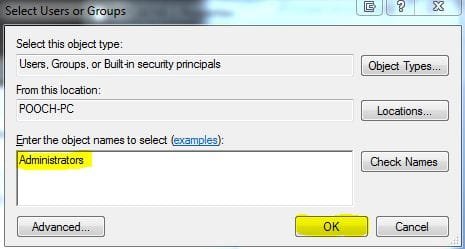

Tutorial 7.JPG


6. Delete the INFCACHE.1 file.


7. Connect a USB device, but not the one you were having trouble with this will make a new INFCACHE.1


8. New Start the PC and try your device again.


NOTE... It may, in a few cases be necessary to go through this Tutorial two or even three times to get this to work.
 
Last edited by a moderator:
Hi there, thanks for the tutorial.

I've been having some BSOD probs (accompanied by the message 'BUGCODE_USB_DRIVER'), and I was directed here by another forum user.

However, I couldn't follow you tutorial entirely. Step 9 of the first part says 'Now uninstall all USB devices.' Does this mean I should uninstall everything in the device list (and the sub-lists) that plugs in to my usb ports?

also, step 6 of part 2 says 'Delete the INFCACHE.1 file.' Even after following your previous instructions, the computer still tells me I need special permission to do this - and won't allow me to delete the file.

If you could fill in the blanks for me on this one I would be so grateful!

Thanks
 

My Computer

Computer Manufacturer/Model Number
Dell Inspiron 1764
OS
64 Bit Windows 7 Home Premium (SP1)
CPU
Intel Core i5 2.27 GHz
Motherboard
Manufacturer: Dell, Model no: 0TKV96
Memory
4 GB
Hello CAGW Welcome to the forum,

Before looking at my answer I would advise you to make sure that all drivers on your PC are up to date I have heard of this problem being caused by the Nvidia Graphic driver conflicting with old USB device drivers.

Yes you should uninstall everything, bear in mind that some USB drivers may not be included in Windows and may need to be reinstalled afterwards ie Printer Drivers or in my case I have Renesas USB3 drivers installed.

Are you absolutely sure you have followed the Tutorial with the Infcache.1?? Have a look here; http://www.sevenforums.com/tutorials/1911-take-ownership-shortcut.html Take good heed of the warnings!!
 

Attachments

  • Capture.JPG
    Capture.JPG
    80 KB · Views: 6,551

My Computer

Computer Manufacturer/Model Number
Something I threw together
OS
Windows 7 Ultimate x64
CPU
Intel Core i7-2600K
Motherboard
Asus P8P67
Memory
16 GB G Skill F3-10666 CL9D-4GBRL
Graphics Card(s)
ATI Radeon HD 6870
Sound Card
ATI Radeon HDMI / Realtek ALC892
Monitor(s) Displays
2 x 22" standard monitors / LG32LC56v TV to watch films
Screen Resolution
1920 x1080
Hard Drives
2 x OCZ Vertex2 111.79GB
3 x Samsung103SJ
1 x Samsung103UJ
1 x WD3200BEVT
1 x Hitachi5K320-160
PSU
Thermaltake Toughpower Cable Management 750W
Case
Antec 300
Cooling
Noctua NH-U12P SE2 and 5 120mm Case fans
Keyboard
Microsoft Comfort Curve Keyboard 2000
Mouse
Hama M3110 / Logitech M305
Internet Speed
16000
Other Info
I have also used Fedora, Suse, Ubuntu Linux
And all other Windows from 95 to date except ME
hi pooch

thanks for the advice.

i used the 'take ownership' programme to delete the INFCACHE.1 file.

ive also updated all my drivers - and there were a few that needed updating.

i haven't deleted the usb devices yet (i'm short on time!) but thanks for your response on that too.

bearing in mind some of my drivers needed updating, would it be best to wait to see if bsod strikes again before deleting the usb devices?

thanks!
 

My Computer

Computer Manufacturer/Model Number
Dell Inspiron 1764
OS
64 Bit Windows 7 Home Premium (SP1)
CPU
Intel Core i5 2.27 GHz
Motherboard
Manufacturer: Dell, Model no: 0TKV96
Memory
4 GB
The tutorial should be done in one go and in order lol or it cannot work and may possibly cause you problems.
Insert a USB device to make a new infcache.
Wait to see if you get any more problems, if yes, go through the tutorial again, completely!!

I hope this helps you and that your problem gets sorted :D
 

My Computer

Computer Manufacturer/Model Number
Something I threw together
OS
Windows 7 Ultimate x64
CPU
Intel Core i7-2600K
Motherboard
Asus P8P67
Memory
16 GB G Skill F3-10666 CL9D-4GBRL
Graphics Card(s)
ATI Radeon HD 6870
Sound Card
ATI Radeon HDMI / Realtek ALC892
Monitor(s) Displays
2 x 22" standard monitors / LG32LC56v TV to watch films
Screen Resolution
1920 x1080
Hard Drives
2 x OCZ Vertex2 111.79GB
3 x Samsung103SJ
1 x Samsung103UJ
1 x WD3200BEVT
1 x Hitachi5K320-160
PSU
Thermaltake Toughpower Cable Management 750W
Case
Antec 300
Cooling
Noctua NH-U12P SE2 and 5 120mm Case fans
Keyboard
Microsoft Comfort Curve Keyboard 2000
Mouse
Hama M3110 / Logitech M305
Internet Speed
16000
Other Info
I have also used Fedora, Suse, Ubuntu Linux
And all other Windows from 95 to date except ME
solution fo 'BUGCODE_USB_DRIVER' bsod

bsd

for those of you who are having issues with the 'BUGCODE_USB_DRIVER' BSOD after installing SP1 from the exe installer (not the dvd iso sp1 installer, or slipstreamed), here is the solution:

Binary files in some USB drivers are not updated after you install Windows 7 SP1 or Windows Server 2008 R2 SP1

the article suggests getting the fix from http://update.microsoft.com/. For offline installers of the fix, check the above mentioned article.

found it here (not needed, just for reference):
The Windows 7 SP1 USB Driver Bug (what it is and how to fix it)
 
Last edited:

My Computer

OS
win 7 Home Prm x64
Hi.

When I came to the most last go tru, where to delete the infcache.1 file, I cannot do it due to priveliges. Ho to solve this ?.
 

My Computer

Computer type
PC/Desktop
Computer Manufacturer/Model Number
Homemade
OS
Windows 7 Ultimate
CPU
E7300
Motherboard
ASUS P5Q DeLuxe
Memory
4g
Graphics Card(s)
NVIDIA GeForce 7300 LE
Sound Card
N/A
Monitor(s) Displays
Acer
Screen Resolution
1600x1200
Hard Drives
Samsung HD503HI ATA Device
PSU
Seasonic
Case
ATX
Cooling
FAN
Keyboard
Logitech
Mouse
HP
Internet Speed
20/2
Antivirus
MSE
Browser
IE9, Chrome, Firefox
Hi.

When I came to the most last go tru, where to delete the infcache.1 file, I cannot do it due to priveliges. Ho to solve this ?.
Look at the post directly under the tutorial
 

My Computer

Computer Manufacturer/Model Number
Something I threw together
OS
Windows 7 Ultimate x64
CPU
Intel Core i7-2600K
Motherboard
Asus P8P67
Memory
16 GB G Skill F3-10666 CL9D-4GBRL
Graphics Card(s)
ATI Radeon HD 6870
Sound Card
ATI Radeon HDMI / Realtek ALC892
Monitor(s) Displays
2 x 22" standard monitors / LG32LC56v TV to watch films
Screen Resolution
1920 x1080
Hard Drives
2 x OCZ Vertex2 111.79GB
3 x Samsung103SJ
1 x Samsung103UJ
1 x WD3200BEVT
1 x Hitachi5K320-160
PSU
Thermaltake Toughpower Cable Management 750W
Case
Antec 300
Cooling
Noctua NH-U12P SE2 and 5 120mm Case fans
Keyboard
Microsoft Comfort Curve Keyboard 2000
Mouse
Hama M3110 / Logitech M305
Internet Speed
16000
Other Info
I have also used Fedora, Suse, Ubuntu Linux
And all other Windows from 95 to date except ME
hi pooch,
do you mind including or linking the solution i posted for the 'BUGCODE_USB_DRIVER' BSOD in your post? it's probably the correct solution for CAGW's problem.

i assume this specific BSOD will be fairly popular the next few months, because it's related to win 7 sp1 installation.

thanks
 
Last edited:

My Computer

OS
win 7 Home Prm x64

My Computer

Computer type
PC/Desktop
Computer Manufacturer/Model Number
Homemade
OS
Windows 7 Ultimate
CPU
E7300
Motherboard
ASUS P5Q DeLuxe
Memory
4g
Graphics Card(s)
NVIDIA GeForce 7300 LE
Sound Card
N/A
Monitor(s) Displays
Acer
Screen Resolution
1600x1200
Hard Drives
Samsung HD503HI ATA Device
PSU
Seasonic
Case
ATX
Cooling
FAN
Keyboard
Logitech
Mouse
HP
Internet Speed
20/2
Antivirus
MSE
Browser
IE9, Chrome, Firefox
hi pooch,
do you mind including or linking the solution i posted for the 'BUGCODE_USB_DRIVER' BSOD in your post? it's probably the correct solution for CAGW's problem.

i assume this specific BSOD will be fairly popular the next few months, because it's related to win 7 sp1 installation.

thanks
I asked someone to move it, you can now find it here; http://www.sevenforums.com/crash-lockup-debug-how/175994-solution-fo-bugcode_usb_driver-bsod.html I think it is better in this location as it shows itself as a BSOD
 

My Computer

Computer Manufacturer/Model Number
Something I threw together
OS
Windows 7 Ultimate x64
CPU
Intel Core i7-2600K
Motherboard
Asus P8P67
Memory
16 GB G Skill F3-10666 CL9D-4GBRL
Graphics Card(s)
ATI Radeon HD 6870
Sound Card
ATI Radeon HDMI / Realtek ALC892
Monitor(s) Displays
2 x 22" standard monitors / LG32LC56v TV to watch films
Screen Resolution
1920 x1080
Hard Drives
2 x OCZ Vertex2 111.79GB
3 x Samsung103SJ
1 x Samsung103UJ
1 x WD3200BEVT
1 x Hitachi5K320-160
PSU
Thermaltake Toughpower Cable Management 750W
Case
Antec 300
Cooling
Noctua NH-U12P SE2 and 5 120mm Case fans
Keyboard
Microsoft Comfort Curve Keyboard 2000
Mouse
Hama M3110 / Logitech M305
Internet Speed
16000
Other Info
I have also used Fedora, Suse, Ubuntu Linux
And all other Windows from 95 to date except ME
hi pooch,
do you mind including or linking the solution i posted for the 'BUGCODE_USB_DRIVER' BSOD in your post? it's probably the correct solution for CAGW's problem.

i assume this specific BSOD will be fairly popular the next few months, because it's related to win 7 sp1 installation.

thanks
I asked someone to move it, you can now find it here; http://www.sevenforums.com/crash-lockup-debug-how/175994-solution-fo-bugcode_usb_driver-bsod.html I think it is better in this location as it shows itself as a BSOD

thx!
 

My Computer

OS
win 7 Home Prm x64
Thank you so much pooch for this great tutorial!

I had BSOD because of some obscure USB driver problem. I think my mouse was the problem.

I've rebooted one hour ago and I have the feeling that my problem is solved - which is great because I have to finish my Master degree Thesis for tomorrow! :D

I wish you all the best for the future!

Take care,
Laurent
 

My Computer

Computer Manufacturer/Model Number
Asus U30JC-QX01X01
OS
Windows 7 Professionnal x64
Thank you so much pooch for this great tutorial!

I had BSOD because of some obscure USB driver problem. I think my mouse was the problem.

I've rebooted one hour ago and I have the feeling that my problem is solved - which is great because I have to finish my Master degree Thesis for tomorrow! :D

I wish you all the best for the future!

Take care,
Laurent
Good I am glad we have been able to help you and good luck with your thesis :D
 

My Computer

Computer Manufacturer/Model Number
Something I threw together
OS
Windows 7 Ultimate x64
CPU
Intel Core i7-2600K
Motherboard
Asus P8P67
Memory
16 GB G Skill F3-10666 CL9D-4GBRL
Graphics Card(s)
ATI Radeon HD 6870
Sound Card
ATI Radeon HDMI / Realtek ALC892
Monitor(s) Displays
2 x 22" standard monitors / LG32LC56v TV to watch films
Screen Resolution
1920 x1080
Hard Drives
2 x OCZ Vertex2 111.79GB
3 x Samsung103SJ
1 x Samsung103UJ
1 x WD3200BEVT
1 x Hitachi5K320-160
PSU
Thermaltake Toughpower Cable Management 750W
Case
Antec 300
Cooling
Noctua NH-U12P SE2 and 5 120mm Case fans
Keyboard
Microsoft Comfort Curve Keyboard 2000
Mouse
Hama M3110 / Logitech M305
Internet Speed
16000
Other Info
I have also used Fedora, Suse, Ubuntu Linux
And all other Windows from 95 to date except ME
i had 3 that did not install but i will plug something else in but the ones that did not install do i just plug in another usb devie or do i goto device manager and uninstall just the ones that are faded and restart my com

i think i know what usb is giving me the trouble i think it is my webcam it says that it detects it as a usb webcam when it is builtin

thank you pooch for your help it was appreciated very much it all went through without a hitch but i just cant figure out why my builtin webcam on my laptop come up as a usb webcam do you have any ideas it would be great
 
Last edited by a moderator:

My Computer

Computer Manufacturer/Model Number
clevo m550g
OS
windows 7 ultimate
CPU
1.73
Motherboard
intel centrino
Memory
1024
Graphics Card(s)
as far as i know its ENE CB-712/714/810 card bus controller
Sound Card
Realtek high definition audio
Monitor(s) Displays
mobile intel(R) 915GM/GMS910,GML express chip family
Screen Resolution
1028x720
Hard Drives
i only have a 40 gig hard drive and it is not partitioned
Internet Speed
wireless
Other Info
i have all these errors and they all came along since i downloaded and installed windows live essentials and when i stated using media center and when i do use media center it wont allow me to play music or watch video files o dvds someone please help me fix my problom if i have to i will go back to using xp if my laptop is not suitable for win 7 ultimate.
Yes I have seen this sort problem before where a USB Wlan device comes up as a CDRom and I do not know why. The best suggestion I have for you is to try updating the webcam drivers, it may be wise to uninstall the web cam in Device Manager before doing this.
 

My Computer

Computer Manufacturer/Model Number
Something I threw together
OS
Windows 7 Ultimate x64
CPU
Intel Core i7-2600K
Motherboard
Asus P8P67
Memory
16 GB G Skill F3-10666 CL9D-4GBRL
Graphics Card(s)
ATI Radeon HD 6870
Sound Card
ATI Radeon HDMI / Realtek ALC892
Monitor(s) Displays
2 x 22" standard monitors / LG32LC56v TV to watch films
Screen Resolution
1920 x1080
Hard Drives
2 x OCZ Vertex2 111.79GB
3 x Samsung103SJ
1 x Samsung103UJ
1 x WD3200BEVT
1 x Hitachi5K320-160
PSU
Thermaltake Toughpower Cable Management 750W
Case
Antec 300
Cooling
Noctua NH-U12P SE2 and 5 120mm Case fans
Keyboard
Microsoft Comfort Curve Keyboard 2000
Mouse
Hama M3110 / Logitech M305
Internet Speed
16000
Other Info
I have also used Fedora, Suse, Ubuntu Linux
And all other Windows from 95 to date except ME
After two days, and probably ten hours of fiddling, experimentation, a great deal of swearing and an immense amount of frustration, this thread got things working in only a few minutes.

Thank you very much for posting it.

I was having problems getting my new Windows 7 Netbook (an Acer Aspire One D257) to see my Garmin GPSMAP 62s unit. I've used it previously under Windows XP and Linux with no problems, it just appears as a mass storage device, so in principle doesn't need any clever drivers.

It doesn't seem to be an uncommon issue for this to happen, and rather oddly Windows seem to find the device, and then disconnect it before you can use it.

So after going through this procedure once, it found the device happily, and loaded up the drivers and now works. :)

Given that I'm currently 5000 miles away from home, with no easy access to equipment that may have helped me solve this, and I wanted to install some maps onto the GPS unit, so I could find my way arouind, this is wonderfuly useful to me.

So thanks for a very clear description of what to do. Given the somewhat involved nature of some of the steps, I don't believe there is any way I would have worked that out myself.
 

My Computer

Computer Manufacturer/Model Number
Acer Aspire One D257
OS
Windows 7 Starter
CPU
N570
Memory
2GB SODIMM
eh

so I went through the first part of the steps all dandy.
However, when searching the computer for INFCACHE nothing comes up.
I am getting so frustrated at this.
I have a Dell (that probably the problem) Inspiron M5010
If I plug a mouse in it doesn't work and after about 10 seconds the computer will freeze I have to force restart.
If I plug in a wireless mouse before I turn it on, it will work, but after close to a minute the computer will " Find New Hardware" try to re-install the working mouse, and then it freezes again.

*****
I found it in the driver store.

Now it says I need admin to do it, which I am. I hate windows so much...
 

My Computer

OS
Home Premium x64
Would you recommend DriveCleanup V0.8.1?

It seems to do the same thing, although I always prefer to do things manually. Has anyone tried this program before?
 

My Computer

Computer type
PC/Desktop
Computer Manufacturer/Model Number
Less is more
OS
Windows 7 Ultimate x64 SP1
CPU
Core i7 2600k (4.6GHz)
Motherboard
ASUS P8Z68 Deluxe (3603)
Memory
16GB G.SKILL Ares 1600MHz
Graphics Card(s)
MSI R6970 Lightning
Sound Card
Asus Xonar Essence ST (UNi drivers 1.41)
Monitor(s) Displays
Samsung P2570, CrossOver 27Q LED-P
Screen Resolution
1920*1080, 2560*1440
Hard Drives
256GB OCZ Vector, 2x Hitachi 4TB (7K4000), Hitachi 3TB (7K3000 & 5K3000)
PSU
Seasonic X750
Case
Lian-Li PC-P80N
Cooling
NZXT HAVIK 140 (2x GELID Wing12PL Push/Pull)
Keyboard
CM Storm Trigger (Brown Switch)
Mouse
Logitech G400
Internet Speed
55Mbps/10Mbps
Other Info
Speakers - Klipsch ProMedia 2.1
Headphones - Sennheiser HD595
Router - ASUS RT-N66U
Webcam - Logitech C910
where do i find the INFCACHE.1,,,, what do you mean by uninstall? you mean that i will uninstall all the USB ports on my LAptop then the INFCACHE.1 will appear? sorry im just a newbie for this problem please help me :(
 

My Computer

OS
windows 7 64 bit
Back
Top