
DLL File - Create with Customized Icons

How to Make Your Own DLL File with Customized Icons

My old XP machine, and I mean old!!, was continually crashing. I got fed up with re-installing and having to re-do my own personal customizations, so I took a leaf out of someone else's book and used this method to quickly reset my PC as to how it was. This I've carried on now I've got Seven.

We're not actually going to be making our own dll file here to store your customized icons, we're going to borrow one. So to start.


Things you'll need.
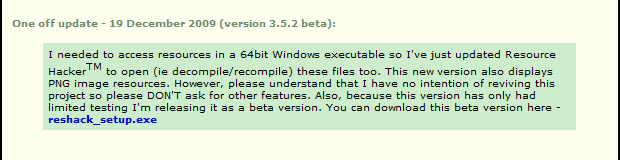
I'm going with ResHacker, an old and trusted program. If you have a personal favourite then that is fine. If you're running a 64bit system make sure you get the latest, 3.5.2 version of ResHack from HERE. Scroll down the page until you see this box:
ResHack 3.5.2.png
That's the one you need.
Now visit this "Add Take Ownership To Context Menu" tutorial and install the reg file as per instructions. Really, you should have this anyway.

Microangelo Librarian trial is good for viewing, but always seems to stumble at saving, specially when the icons contain a 256 png image. It's up to you.

We're Off!

Open C:\Windows\System32 and locate the MORICONS.DLL File.
Copy and paste it into a new "work in progress" folder, Preferably on a different partition so you'll not lose it if things go wrong with your system and you need to re-install.

Now use the "Take Ownership", just to make sure it belongs to you.

Rename the MORICONS.DLL using a unique name (yours?? Unless you are called shell32!). I'm using fimbles here so mine is now called fimbles.dll. Next create a folder with an "AA+" name in the System 32, and the SysWOW64 folder (if you've got it). Occasionally when changing icons you'll get sent to the SysWOW64 folder instead. It depends on what you are changing. By putting your dll in an AA+ folder it will always be the first (maybe second) folder you see when you open the System32 folder. It saves a search!

fimbles.png

Open your borrowed MORICONS.DLL file, now, for me, called fimbles.dll with ResHack.

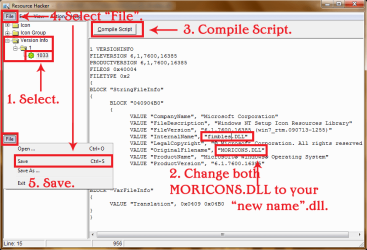
Expand the Version Info key. You'll want to change the two MORICONS.DLL names to your new (fimbles.dll) name. This is not absolutely essential, until your system starts trying to use icons from MORICONS.DLL (highly unlikely, but why chance it?) and discovers there are two. Easier, and more consistent, just to change it now. Once changed, press the Compile Script button, then File, then Save. Well that's the hard bit done!
ResHack Compile.png

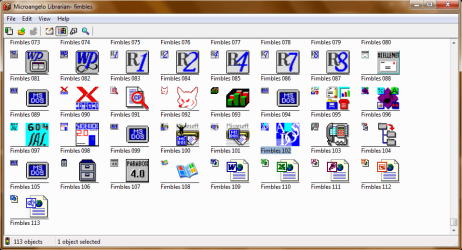
If you have an icon viewer similar to Microangelo Librarian we can now view the icons already installed in our (my) fimbles.dll file.
Librarian.png

Aren't they some beauties? Just crying out to be changed. What interested me though was that there are 113 different icons I could change before I worried about how to add extra icons (easy enough once you know but won't go into that just now, suffice to say you can use ResHacker).

So now all you have to do is replace the original icons in "your" dll file with your modified icons. Once done drop your "fimbles.dll" into your folder(s) you added in to your system and then start changing your icons over.

If you use something like Regshot (I'm attaching, can sometimes be hard to find), to take a "before icon change" and an "after icon change" registry snapshot, you'll then see which registry key, if any, has been changed. You can then export (save) this so you only need to re-enter it after a system re-install to maintain your modified icons. I've actually merged all my registry changes in to one reg file so now I drop two folders in my system folders, double click one reg file, delete the icon and thumbs caches, re-boot and TA-DAA! All modified icons are in place.

For a bit of consistency I've kept numbers 004 and 005 as my default folders open and closed replacements and number 030 as my shortcut arrow overlay replacement. Always remember that Icon Groups are one number lower than the viewed number. This is because your number 001 icon is read by Windows as the default or "no number" icon. So your number 002, to Windows, is 001 etc..

This may sound a bit long winded, but once started is easier than writing it down/reading it. And you only have to do it the once, not every time you re-install.

I've started adding my modified string tables to mine now, but I'll save that for another day.

View attachment 159909
 
Last edited:
I am going to try it at the first chance .... after completing my works .

Good work, Fimble :D
 

My Computer

Computer type
PC/Desktop
Computer Manufacturer/Model Number
Self Assembled
OS
Microsoft Windows 10 Pro Insider Preview 64-bit
CPU
Intel(R) Core(TM) i3-4130 CPU @ 3.40GHz
Motherboard
Gigabyte Technology Co., Ltd. B85M-D3H
Memory
Corsair Vengence 4GB x2 (8.00GB Dual-Channel DDR3 @ 798MHz)
Graphics Card(s)
2047MB GeForce GTS 450 (ZOTAC International)
Sound Card
Onboard (Realtek High Definition Audio)
Monitor(s) Displays
LG Flatron E2040T
Screen Resolution
1600x900
Hard Drives
Western Digital 1 TB
Seagate 500 GB
PSU
Corsair VS550
Case
Cooler Master K380
Cooling
Cooler Master Seidon 120V Plus
Keyboard
Logitech MK260r
Mouse
Logitech MK260r
Internet Speed
PMPL Broadband
Antivirus
Windows Defender + MBAM
Browser
Firefox
Other Info
Dell Studio 15" Laptop
Nice Tute Fimble :thumbsup:

A Guy
 

My Computer

Computer type
PC/Desktop
OS
Windows 10 Home x64
CPU
INTEL Core i5-750 Quad-Core 3.37GHz
Motherboard
ASUS P7P55D
Memory
HyperX Fury Black Series 8GB (2 x 4GB) 1866Mhz
Graphics Card(s)
EVGA GeForce GTX 750 Superclocked 1GB 128-Bit GDDR5
Monitor(s) Displays
LG 32MA68HY 32" IPS
Screen Resolution
1920 x 1080
Hard Drives
Samsung 840 Evo 120GB, SEAGATE 500GB Barracuda® 7200.12, SATA 3 Gb/s, 7200 RPM, 16MB cache
PSU
ANTEC TruePower New TP-550, 80 PLUS, 550W
Case
ANTEC Three Hundred Illusion
Cooling
COOLER MASTER Hyper 212 Plus, 4 x 120mm 1 x 140mm Noctua's
Internet Speed
85 + Mbps
Antivirus
Avast
Browser
Vivaldi
Great work! ;)
 

My Computer

Computer type
PC/Desktop
Computer Manufacturer/Model Number
Custom Build
OS
Windows 10 Pro x64
CPU
Intel Core i5 4440 @Stock
Motherboard
Gigabyte Z97 D3H
Memory
4 x 4GB HyperX Fury DDR3
Graphics Card(s)
Gigabyte GTX 1050Ti O4G
Sound Card
Integrated
Monitor(s) Displays
Dell P2417H
Screen Resolution
1920 x 1080
Hard Drives
Samsung EVO 850 120GB / Toshiba DT01ACA050 1TB 7200prm 32MB
PSU
Riotoro Onyx 750W
Case
NZXT H500 Black-Red
Cooling
Stock CPU + NZXT 120mm + 2x120mm red fans
Keyboard
Modecom Volcano Lanparty
Mouse
Asus ROG Gladius / DeepCool E-Pad Plus
Internet Speed
DOCSIS 50/3 Mbit
Browser
Google Chrome
Other Info
Asus K55VJ(i5 3210M, GT635M / 2GB, 8GB DDR3, 500GB HDD)
Nice tutorial, good work.
 

My Computer

Computer type
PC/Desktop
Computer Manufacturer/Model Number
76~2.0
OS
Windows 7 Ult x64 - SP1/ Windows 8 Pro x64
CPU
Intel Core i5-3570K 4.6GHz
Motherboard
Gigabyte GA-Z77X UD3H, f18
Memory
8GB (2X4GB) DDR3 1600 Corsair Vengeance CL8 1.5v
Graphics Card(s)
Sapphire HD 7770 Vapor-X OC 1GB DDR5
Sound Card
Onboard VIA VT2021
Monitor(s) Displays
22" LCD Dell
Screen Resolution
1680x1050
Hard Drives
Samsung 840Pro 128GB SSD,
Seagate Barracuda 500GB SATA2 7200rpm 32MB cache, Seagate Barracuda 1TB SATA2 7200rpm 32MB cache,
PSU
Corsair HX650W
Case
Cooler Master Storm Scout
Cooling
Corsair H80 2x12cm Noctua NF P12 , 2x14cm case fans
Keyboard
Logitech Wave
Mouse
CM Sentinel
Internet Speed
Dismal
Antivirus
Avast
Browser
Opera Next
Other Info
Haswell laptop: HP Envy 17t-j, i7-4700MQ, GeForce 740M 2GB DDR3, 17.3" Full HD 1920x1080, 16GB RAM, Samsung 840 Pro 128GB, 1TB Hitachi 7200 HDD,
Desktop: eSATA ports,
External eSATA Seagate 500GB SATA2 7200rpm,
External WD USB 500GB

My Computer

OS
windows 7 ultimate
Looks interesting. Maybe I'm dense and not so nimble at the registry as you, but where, exactly did you insert your own icons? How also. This is like a statement "create a .bat file"... I don't know how to do that either.
 

My Computer

Computer type
PC/Desktop
Computer Manufacturer/Model Number
Home Built Desktop By DataTech
OS
Windows 7 Ultimate X64 SP1
CPU
Intel i5-2550K, Differing ~4.4-4.8GHz No built in GPU
Motherboard
ASUS P8Z68-V PRO/GEN3
Memory
16GB G.Skill Sniper 1866MHz @ 2133MHz 2x8GB
Graphics Card(s)
ASUS GTX650TIB-DC2OC-2GD5, (650TI Boost)
Sound Card
Onboard Realtek 5-1
Monitor(s) Displays
Samsung P2570HD
Screen Resolution
1920x1080
Hard Drives
Samsung 840 Pro 256GB SSD for OS, 500GB Seagate Constellation (Enterprise drive) for Data
PSU
Corsair HX650W
Case
Inwin Dragon Rider
Cooling
Hyper 212 EVO w/two Noctua fans, push-pull, @1300 RPM
Keyboard
E-Z Eyes, bright yellow keys with large characters
Mouse
steelseries SENSEI Laser Pro Gaming
Internet Speed
48-51Mbs Mbs down, 11 Mbs up Xfinity Cable
Antivirus
Norton Internet Security 2013
Browser
IE 10, Opera, Pale Moon if needed
Other Info
4 case fans, LG BluRay-RE, ASUS DVD-RW, Mr. Fusion power supply, 1.21 gigawatts.
Nice Tutorial ......:thumbsup:
 

My Computer

Computer Manufacturer/Model Number
Custom self assembled
OS
Windows 7 Ultimate x64
CPU
Intel Core i7 930
Motherboard
Gigabyte GA X58A UD7
Memory
Gskill 2x3 GB Ram
Graphics Card(s)
Sapphire ATI Radeon HD 5870
Monitor(s) Displays
LG 24MP88 24" LED Monitor
Screen Resolution
1920 X 1080
Hard Drives
Seagate barracuda 1 TB
PSU
Corsair GS 600W
Case
Cooler Master 690 II Plus
Cooling
Cooler Master Hyper 212X
Keyboard
Logitech G15 Gaming keyboard
Mouse
Logitech MX518 Gaming Mouse
Internet Speed
Broadband 50 Mbps speed [Hathway]
Other Info
Xbox 360 Wired Controller (x2)
AverMedia TV tuner Card [Internal]
Logitech HD C110 Web Camera
Netgear WGR614 Wireless-N 150 Router
Razer Goliathus Fragged Alpha Control Edition Mouse Pad
Back
Top