Internet Explorer - Cross-site Scripting (XSS) Filter - Turn On or Off

How to Turn the Cross-site Scripting (XSS) Filter On or Off in IE8 and IE9

   Information
Cross-site scripting attacks are a leading online threat. Their aim is to exploit vulnerabilities in the websites you visit. How do they work? By compromising legitimate websites with malicious content that can capture keystrokes and record your login information and password. If your login information and password is captured, your personal data could be compromised.

Internet Explorer (IE8 and IE9) has a Cross-Site Scripting (XSS) Filter feature that can help prevent one website from adding potentially malicious script code to another website. XSS Filter analyzes how websites interact, and when it recognizes a potential attack, it will automatically block script code from running. When this happens, you will see a message in the Notification bar letting you know that the webpage was modified to help protect your privacy and security.

By default the XSS Filter is turned on in IE8 and IE9. This tutorial will show you how to turn the XSS Filter on or off.


For more detailed information about the XSS Filter in IE8 and IE9, see:
   Note
If the modified webpage doesn't work properly, in a new browser window, go to the website's home page, and then navigate to the webpage directly. If the page still doesn't work correctly, contact the website's administrator.
   Warning
It is not recommended to turn off the XSS Filter in IE8 and IE9. Doing so will leave you vulnerable to cross-site scripting attacks as explained above.


EXAMPLE: XSS Filter Alert Message in Internet Explorer
NOTE: When the XSS Filter detects script in a cross-site request, it identifies and disables the script if it is replayed in the server's response. When this happens, a "Internet Explorer has modified this page to help prevent cross-site scripting." message is displayed at the bottom of the webpage in IE8 or IE9.

Capture.JPG


Here's How:
1. In Internet Explorer, click on Tools (Menu bar) or gear icon (in IE9), and click on Internet Options.

2. In Internet Options, click on the Security tab, select the Internet zone, and click on the Custom level button. (see screenshot below)
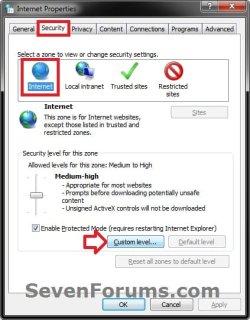
Step1.jpg
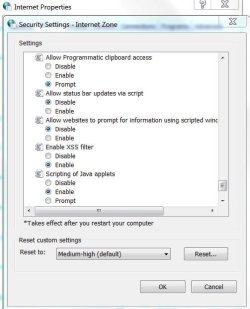
3. Scroll down to the Enable XSS Filter option under the Scripting section. (see screenshot below)
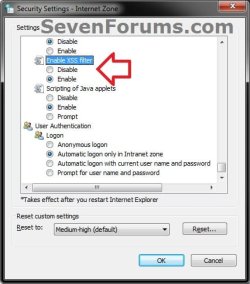
Step2.jpg
4. To Turn On the XSS Filter in IE8 or IE9
NOTE: This is the default setting.
A) Select (dot) Enable under Enable XSS Filter, and click on OK. (see screenshot below step 3)

B) Go to step 6.
5. To Turn Off the XSS Filter in IE8 or IE9
A) Select (dot) Disable under Enable XSS Filter, and click on OK. (see screenshot below step 3)
6. Click on OK. (see screenshot below step 2)
That's it,
Shawn


Last edited:
Thanks for posting! Helped :)
 

My Computer

Computer type
PC/Desktop
OS
10 Home x64
CPU
Intel Core i5 4670K
Motherboard
Gigabyte GA-Z87-D3HP
Memory
Corsair XMS3 8GB DDr3 1600MHz
Graphics Card(s)
Sapphire NITRO Radeon R9 Fury
Sound Card
Asus Xonar DX
Monitor(s) Displays
Acer H236HLbmjd
Screen Resolution
1920x1080
Hard Drives
Force GS 128GB - Seagate 320GB - WD Caviar Black 1TB - WD Caviar Blue 500GB
PSU
EVGA SuperNOVA 650 P2
Case
Silverstone Raven 3 RV03B-W
Keyboard
Topre Realforce 104UG-HiPro
Mouse
Mionix Naos 7000
Internet Speed
76/4 On a good day
Antivirus
SmartScreen
Browser
Internet Explorer 11
You're most welcome Craig. :)
 

My Computer

Computer type
PC/Desktop
Computer Manufacturer/Model Number
Self built custom
OS
64-bit Windows 11 Pro for Workstations
CPU
Intel i7-8700K OC'd to 5 GHz
Motherboard
ASUS ROG Maximus XI Formula Z390
Memory
64 GB (4x16GB) G.SKILL TridentZ RGB DDR4 3600 MHz
Graphics Card(s)
ASUS ROG-STRIX-GTX1080TI-O11G-GAMING
Sound Card
Integrated
Monitor(s) Displays
2 x Samsung Odyssey G7 27"
Screen Resolution
2560x1440
Hard Drives
1TB Samsung 990 PRO M.2,
4TB Samsung 990 PRO PRO M.2,
TerraMaster F8 SSD Plus NAS
PSU
Seasonic Prime Titanium 850W
Case
Thermaltake Core P3
Cooling
Corsair Hydro H115i
Keyboard
Logitech wireless K800
Mouse
Logitech MX Master 4
Internet Speed
2 Gb/s Download and 100 Mb/s Upload
Antivirus
Malwarebyte Anti-Malware Premium
Browser
Google Chrome
Other Info
Logitech Z625 speaker system,
Logitech BRIO 4K Pro webcam,
HP Color LaserJet Pro MFP M477fdn,
APC SMART-UPS RT 1000 XL - SURT1000XLI,
Galaxy S23 Plus phone
I'm baffled. As usual. This is a Windows 7 forum, is it not? Why would anyone running Windows 7 be using Internet Explorer 8 or 9? Even when I've reinstalled a fresh copy of W7 my default browser was IE10. I don't even think you can download IE8 or 9 on a W7 machine.

I am regularly getting these cross-scripting messages on IE11 and did a Google search. It returned this baffling page, which was of no use to me, but made me curious about why the page exists.
 

My Computer

Computer type
Laptop
OS
Windows 7 home premium 64 bit
CPU
AMD K10
Motherboard
Hewlett-Packard 1444 (Socket S1G4)
Memory
3.00GB Dual-Channel DDR3 @ 532MHz
Graphics Card(s)
ATI AMD M880G with ATI Mobility Radeon HD 4250 (HP)
Sound Card
Realtek
Screen Resolution
1366 x 768
Hard Drives
465GB Western Digital
Antivirus
MSE
You have to take into account the date this tutorial was created,

2016-04-27_18h42_30.png

At which time they were the latest browsers.

I'm sure there are some people out there who still have those older browsers.

There are a lot of older threads here that have been resigned to the dusty areas, because newer software or better methods have taken their place.

We don't, as a rule, just delete threads because they get old.
 

My Computer

Computer type
PC/Desktop
Computer Manufacturer/Model Number
Self Built
OS
Win 10 Pro x64
CPU
Intel I5-2500K @3.3GHz
Motherboard
Asrock P67 Extreme4
Memory
16GB G.Skill Ripjaws X (4x4GB)
Graphics Card(s)
EVGA GeForce 750 Ti SC 2GB
Sound Card
ASUS Xonar DG 5.1 Channels 24-bit 96KHz PCI Interface Sound
Monitor(s) Displays
auria eq2367
Screen Resolution
1920 x 1080
Hard Drives
250GB Samsung 850 EVO SSD
1TB WD Blue
1TB Hitachi
PSU
SeaSonic X 650W 80 Plus Gold
Case
Corsair Obsidian 750D
Cooling
Corsair H60, Three 140mm case fans
Keyboard
Logitech Wireless Keyboard K520
Mouse
Logitech Wireless Mouse M310
Internet Speed
Wave Broadband ~ 100 dn 5 up
Antivirus
Windows Defender, Malwarebytes Premium
Browser
Edge, IE11, Chrome
Other Info
Laptop specs: HP g7-1365dx /
CPU: AMD A6-3420M APU with Radeon(tm) HD Graphics /
RAM: Crucial 8Gb (2x4Gb) /
SSD: Crucial M4-CT128M4SSD2 ATA Device/ FW 000F /
GFX: AMD Radeon HD 6520G /
OS: Windows 10 Pro x64
I am regularly getting these cross-scripting messages on IE11 and did a Google search. It returned this baffling page, which was of no use to me, but made me curious about why the page exists.

Hi,
Some things never change in browser versions example these settings still exist in ie11

xss filter.JPG
 

My Computer

Computer type
PC/Desktop
Computer Manufacturer/Model Number
Custom assembled by me :}
OS
Win-7-Pro64bit 7-H-Prem-64bit
CPU
i7-5930K 2nd i9-9940x both water blocked VRM's too
Motherboard
ASUS SABERTOOTH X99 2nd ASUS x299 Apex
Memory
Trident-z 3200C14 2nd Trident-z 3600C16
Graphics Card(s)
EVGA 1080ti ftw3 2nd Titan Xp both water blocked
Sound Card
Built-in Realtek
Monitor(s) Displays
1-AOC G2460PG 24"G-Sync 144Hz/ 2nd 1-ASUS VG248QE 24" 144Hz
Screen Resolution
1920 x 1080 144Hz
Hard Drives
2-Samsung M.2 Evo & Evo Plus
2-Samsung 850 EVO 500GB SSD's/ 3-2.5 W.D. Black 1tb-&3-1tb/3-3.5 WD Black 1tb hdd's
PSU
EVGA SuperNOVA 1000-P2 2nd 1200-P2
Case
2-Corsair Obsidian Series 450D Black ATX Mid Tower
Cooling
Custom water loops
Keyboard
Logitech G710+/ 2nd Logitech G910
Mouse
2-RedDragon M901 Perdition 16400 dpi Gaming mouse = wired
Internet Speed
Comcast Ping 19ms 89.31mbps download speed 6.12mbps upload
Antivirus
Malwarebytes Pro/ Superantispyware Pro
Browser
FireFox & Pale moon
Other Info
2nd ASUS X299 Apex/Intel i9-9940x with Custom water loop/7H-Prem-x64/Corsair 450D case/Ram Trident-z 3600C16 4x8gb / Samsung970Evo plus 500gb SSD/Dual ssd EZ swap evo/PSU EVGA SuperNova 1200w-P2 80+Platinum/GPU Titan Xp /8-ML-140 on push-pull on 2-280GTX rads
Back
Top