Gathering a Startup, Shutdown, Sleep, Hibernate, or Reboot Trace

Microsoft has created a toolset called the Windows Performance Toolkit, or WPT, to help developers and users visualize and troubleshoot performance issues. One of the tools in this toolset is specifically designed to assist with capturing traces of boot, shutdown, or reboot cycles, and can provide insight into drivers, services, winlogon, explorer, disk and CPU utilization, and even help with seeing things like disk fragmentation and driver load order.


Installing the tools

Before gathering any data, you will first need to download the installation packages necessary to install the Windows Performance Toolkit on your Windows 7 machine. The Windows Performance Toolkit is a part of the Windows 7 SDK, but you won’t need to install the entire SDK to get the WPT installation files if you follow this guide. First, you need to download the Windows 7 SDK, which is a 500K web installer (click the “Install Now” link). Once you start the installation, you only need to check the “Windows Performance Toolkit” checkbox under the “Redistributable Packages” section – uncheck EVERYTHING else:
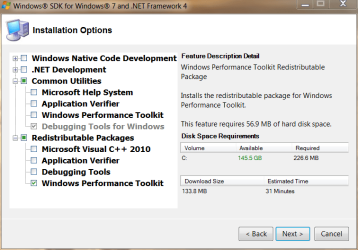
SDK_PerfToolkit.png

After you click next, it will download (only) the installation .MSI packages needed to actually install the WPT. Once the download of the files is complete and you exit the SDK installer, you will need to actually install the version of the WPT that matches the architecture of your OS (the x86 MSI on a 32bit Windows 7 machine, the x64 MSI on a 64bit Windows 7 machine). The downloaded .MSI files will be located (by default) in C:\Program Files\Microsoft SDKs\Windows\v7.1\Redist\Windows Performance Toolkit:
SDK_PerfToolkit_Redist.png

Install the correct installation file that matches the architecture (32bit or 64bit) of your Windows 7 install, taking all the default options and performing a “Complete” installation.


Disable the Paging of the Kernel Executive on x64 Windows

If you have a 64bit installation of Windows, you will need to modify the registry to enable full tracing to work properly. To do this, you will need to open an ELEVATED CMD PROMPT, then type "regedit.exe" from within that command prompt (minus the quotes of course). Once regedit is open, browse to HKEY_LOCAL_MACHINE\System\CurrentControlSet\Control\Session Manager\Memory Management, double-click the "DisablePagingExecutive" value, and change it from "0" to "1". Click "OK" to save the value:
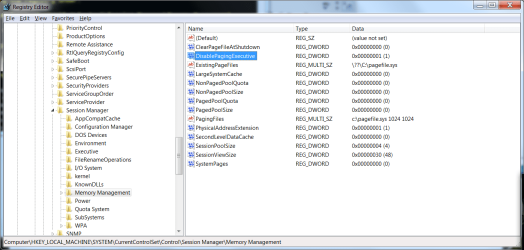
DisablePagingExecutive.png
At this point, you *must* reboot for this change to take effect before you start ANY tracing.

Once you've done the above steps, but before you continue, you will need to open an ELEVATED CMD PROMPT to execute any of the trace options described in this guide. Once you've decided which type of trace to take (or which you've been asked to take by a member of this forum), choose the correct trace section below and follow that section only:


Creating a BOOT trace:

First, you will need have that elevated CMD prompt open. Second, to generate a boot trace, you will need to type the following command into the CMD prompt, and press the ENTER key to execute it – note that this command is ALL ONE LINE:
Code:
xbootmgr –trace boot -traceFlags LATENCY+DISPATCHER+DISK_IO_INIT+NETWORKTRACE+MEMINFO+POWER+PERF_COUNTER+PRIORITY+REGISTRY+FILE_IO+FILE_IO_INIT -postBootDelay 300 -stackWalk Profile+ProcessCreate+CSwitch+ReadyThread+Mark+ThreadCreate+DiskReadInit+DiskWriteInit+DiskFlushInit+RegSetValue+RegCreateKey+RegSetInformation -resultPath C:\Boot_Trace
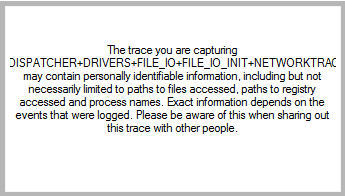
This command will cause your machine to shut down and reboot automatically. Once the system restarts, please log back in (as necessary) as soon as possible to minimize the size of the resulting trace file. Once logged in, the system will present a dialog box letting you know that it is waiting 120 seconds (it will count down) before finishing the trace. DO NOT use your computer to do anything during this time – let the countdown finish and trace files generate:
boot.png
capture_finish.png

Once the trace is complete, you will find a large .ETL file and a log file in C:\Boot_Trace. This .ETL file can then be compressed (using 7zip, winrar, winzip, etc.) and uploaded for analysis - however, due to its size, you will need to upload it to a third-party site such as MediaFire, MegaUpload or RapidShare.


Creating a Shutdown trace:

First, you will need have that elevated CMD prompt open. Second, to generate a boot trace, you will need to type the following command into the CMD prompt, and press the ENTER key to execute it – note that this command is ALL ONE LINE:
Code:
xbootmgr –trace shutdown -traceFlags BASE+LATENCY+DISK_IO_INIT+DISPATCHER+DRIVERS+FILE_IO+FILE_IO_INIT+NETWORKTRACE+PERF_COUNTER+POWER+PRIORITY+REGISTRY -resultPath C:\Shutdown_Trace
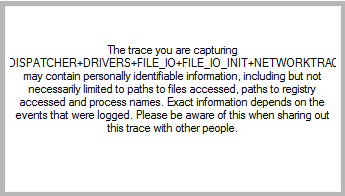
This command will cause your machine to shut down and reboot automatically. Once the system restarts, please log back in (as necessary) as soon as possible. Once logged in, the system will present a dialog box letting you know that it is waiting 120 seconds (it will count down) before rebooting your machine A SECOND TIME. DO NOT click the countdown dialog, or in any other way utilize your computer to do anything during this time – let the countdown finish and the system restart:
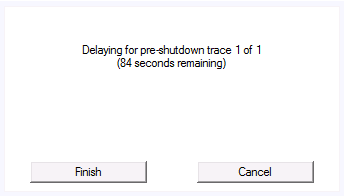
shutdown.png

Again, once the system restarts a second time, please log back in (as necessary) as soon as possible. This time, the trace will finalize:
capture_finish.png

Once the trace is complete, you will find a large .ETL file and a log file in C:\Shutdown_Trace. This .ETL file can then be compressed (using 7zip, winrar, winzip, etc.) and uploaded for analysis - however, due to its size, you will need to upload it to a third-party site such as MediaFire, MegaUpload or RapidShare.


Creating a REBOOT trace:

First, you will need have that elevated CMD prompt open. Second, to generate a boot trace, you will need to type the following command into the CMD prompt, and press the ENTER key to execute it – note that this command is ALL ONE LINE:
Code:
xbootmgr –trace rebootCycle -traceFlags BASE+LATENCY+DISK_IO_INIT+DISPATCHER+DRIVERS+FILE_IO+FILE_IO_INIT+NETWORKTRACE+PERF_COUNTER+POWER+PRIORITY+REGISTRY -resultPath C:\Reboot_Trace
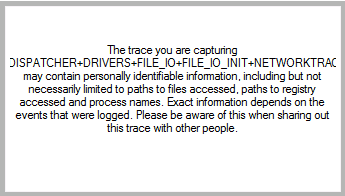
This command will cause your machine to shut down and reboot automatically. Once the system restarts, please log back in (as necessary) as soon as possible. Once logged in, the system will present a dialog box letting you know that it is waiting 120 seconds (it will count down) before rebooting your machine A SECOND TIME. DO NOT click the countdown dialog, or in any other way utilize your computer to do anything during this time – let the countdown finish and the system restart:
reboot.png

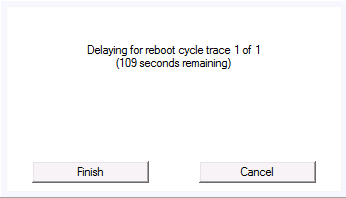
Again, once the system restarts a second time, please log back in (as necessary) as soon as possible. This will start another 120 second countdown, and reboot your machine A THIRD TIME. As before, DO NOT utilize your computer during this time – let the countdown finish (again) and the system restart (again):
reboot_2.png


Once the system restarts a third time, please log back in (as necessary) as soon as possible. This time, the trace will finalize:
capture_finish.png

Once the trace is complete, you will find a large .ETL file and a log file in C:\Reboot_Trace. This .ETL file can then be compressed (using 7zip, winrar, winzip, etc.) and uploaded for analysis - however, due to its size, you will need to upload it to a third-party site such as MediaFire, MegaUpload or RapidShare.
 

Attachments

  • capture_finish (1).png
    capture_finish (1).png
    3.8 KB · Views: 1
  • capture_finish (2).png
    capture_finish (2).png
    3.8 KB · Views: 1
  • reboot_2.png
    reboot_2.png
    1.5 KB · Views: 1
Last edited by a moderator:
Hmmmmm - let me see if I can get creative with you. Give me a few days to see what I can do.
Have you been able to come up with a solution?
 

My Computer My Computer

OS
windows 7 home premium 64
CPU
Intel core i5 2500 4x3.3GHz LGA 1155 6MB cache
Motherboard
Gigabyte GA-Z68X-UD3H-B3
Memory
2 Kingston 4GB 1333MHz DDR3 NON ECC
Graphics Card(s)
none
Sound Card
none
Monitor(s) Displays
LG Flatron W2252TQ
Hard Drives
"C" OCZ VERTEX 3 120GB SATA III 2.5"
WD 1TB SATA III 3.5"64MB Caviar Green Intellipower
PSU
Coolermaster 500W
Case
Coolermaster Elite 431P
Cooling
-
Sorry - Sandy came through and I'm just digging out. Once I get stable internet access and get back to regular work schedule, I'll get a write-up done.
 

My Computer My Computer

Computer type
PC/Desktop
Computer Manufacturer/Model Number
Custom
OS
Windows 10 Pro x64
CPU
Intel Core i7 4790K @ 4.5GHz
Motherboard
Asus Maximus Hero VII
Memory
32GB DDR3
Graphics Card(s)
Nvidia GeForce GTX970
Sound Card
Realtek HD Audio
Screen Resolution
1920x1200
Hard Drives
1x Samsung 250GB SSD
4x WD RE 2TB (RAIDZ)
PSU
Corsair AX760i
Case
Fractal Design Define R4
Cooling
Noctua NH-D15
Sorry - Sandy came through and I'm just digging out. Once I get stable internet access and get back to regular work schedule, I'll get a write-up done.
Thanks for the reply. No problem with delay. Very sorry to hear about Sandy. The situation had a lot of coverage on TV even here in South Australia. Much safer here and weather overall is far better. :cool: Perhaps you should migrate and leave the snow and cyclones behind? I hope you and your family/friends are all ok. Bob

 

My Computer My Computer

OS
windows 7 home premium 64
CPU
Intel core i5 2500 4x3.3GHz LGA 1155 6MB cache
Motherboard
Gigabyte GA-Z68X-UD3H-B3
Memory
2 Kingston 4GB 1333MHz DDR3 NON ECC
Graphics Card(s)
none
Sound Card
none
Monitor(s) Displays
LG Flatron W2252TQ
Hard Drives
"C" OCZ VERTEX 3 120GB SATA III 2.5"
WD 1TB SATA III 3.5"64MB Caviar Green Intellipower
PSU
Coolermaster 500W
Case
Coolermaster Elite 431P
Cooling
-
Hi,

Gregrocker recommended me to post my boot trace here for my booting problem.
Can someone please trace by boot and let me know what is the problem and recommended solution for it. Link for my boot trace file - shutdown_BASE+LATENCY+DISK_IO_INIT+DISPATCHER+DRIVERS+FILE_IO+FILE_IO_INIT+NETWORKTRACE+PERF_COUNTER+POWER+PRIORITY+REGISTRY_1.rar

Thread for my problem - http://www.sevenforums.com/performa...after-booting-applications-freezes-1-min.html

Main problem is my Intel(R) HD & NVIDIA display drivers are interfering and causing windows to resume slow.
 

My Computer My Computer

OS
Windows 7 Home Premium 32 bit
Cannot shutdown/restart

Sorry - Sandy came through and I'm just digging out. Once I get stable internet access and get back to regular work schedule, I'll get a write-up done.
Thanks for the reply. No problem with delay. Very sorry to hear about Sandy. The situation had a lot of coverage on TV even here in South Australia. Much safer here and weather overall is far better. :cool: Perhaps you should migrate and leave the snow and cyclones behind? I hope you and your family/friends are all ok. Bob
I am still hoping that someone can fix my problem with inability to shutdown/restart
 

My Computer My Computer

OS
windows 7 home premium 64
CPU
Intel core i5 2500 4x3.3GHz LGA 1155 6MB cache
Motherboard
Gigabyte GA-Z68X-UD3H-B3
Memory
2 Kingston 4GB 1333MHz DDR3 NON ECC
Graphics Card(s)
none
Sound Card
none
Monitor(s) Displays
LG Flatron W2252TQ
Hard Drives
"C" OCZ VERTEX 3 120GB SATA III 2.5"
WD 1TB SATA III 3.5"64MB Caviar Green Intellipower
PSU
Coolermaster 500W
Case
Coolermaster Elite 431P
Cooling
-
Guys I ran the boot trace as instructed and as soon the system rebooted it blue screened. I tried to reboot several times and the only two options I get are Start-up Recovery and Boot Normally. Please help. The system keeps on rebooting. I can get to the command prompt under Start-up Recovery x:\. Is there a way to stop running the boot trace.
 

My Computer My Computer

OS
64bit
Boot into System Recovery Options on Win7 DVD or System Repair Disk to run Startup Repair repeatedly. It should offer to System Restore for you, but if not and it won't start then run it manually, working back as far as it takes to start Win7.

If this fails work through these steps for Troubleshooting Windows 7 Failure to Start that try everything to repair Win7 to start leading up to if necessary rescuiing your files to run Factory Recovery or get the superior Clean Reinstall - Factory OEM Windows 7 which steps are same for retail.
 
Hi cluberti,

I have recently experienced a sudden degradation in my windows 7 boot time, and have performed a boot trace hoping to determine if there are any underlying hardware issues, since I do not believe I have made any changes on the software side. Would really appreciate your assistance in interpreting the data found in the trace log.

Link to etl file: http://sdrv.ms/12aeLD9
Link to original thread: Thread

Thank you very much!
 

My Computer My Computer

OS
7 64 home premium
Sorry - Sandy came through and I'm just digging out. Once I get stable internet access and get back to regular work schedule, I'll get a write-up done.
Thanks for the reply. No problem with delay. Very sorry to hear about Sandy. The situation had a lot of coverage on TV even here in South Australia. Much safer here and weather overall is far better. :cool: Perhaps you should migrate and leave the snow and cyclones behind? I hope you and your family/friends are all ok. Bob
Hopefully now is a good time for you to be able to look at my problem once again. To reiterate, I cannot get Windows 7-64 to shutdown from the start menu. This has been going on for some months. I did a restore to an earlier point, which fixed problem for a day or so, then it resumed. Haven't been able to instal and run the tools you outlined. Refuses to work despite numerous tries.
 

My Computer My Computer

OS
windows 7 home premium 64
CPU
Intel core i5 2500 4x3.3GHz LGA 1155 6MB cache
Motherboard
Gigabyte GA-Z68X-UD3H-B3
Memory
2 Kingston 4GB 1333MHz DDR3 NON ECC
Graphics Card(s)
none
Sound Card
none
Monitor(s) Displays
LG Flatron W2252TQ
Hard Drives
"C" OCZ VERTEX 3 120GB SATA III 2.5"
WD 1TB SATA III 3.5"64MB Caviar Green Intellipower
PSU
Coolermaster 500W
Case
Coolermaster Elite 431P
Cooling
-
any news yet?

Hmmmmm - let me see if I can get creative with you. Give me a few days to see what I can do.
Have you been able to come up with a solution?
I still haven't been able to load the SDK successfully. I will attach the log file which may help. The computer will not shutdown from the start menu, only by hard shutdown with the power button. I see that my post a few minutes earlier now appears. I thought it had gone into outer space. Anyway, if you read both, it should help. Many thanks. p.s. Turned 70 last Monday, but I am still a junior member. Ha!
 
Last edited:

My Computer My Computer

OS
windows 7 home premium 64
CPU
Intel core i5 2500 4x3.3GHz LGA 1155 6MB cache
Motherboard
Gigabyte GA-Z68X-UD3H-B3
Memory
2 Kingston 4GB 1333MHz DDR3 NON ECC
Graphics Card(s)
none
Sound Card
none
Monitor(s) Displays
LG Flatron W2252TQ
Hard Drives
"C" OCZ VERTEX 3 120GB SATA III 2.5"
WD 1TB SATA III 3.5"64MB Caviar Green Intellipower
PSU
Coolermaster 500W
Case
Coolermaster Elite 431P
Cooling
-
Once logged in, the system will present a dialog box letting you know that it is waiting 120 seconds (it will count down) before finishing the trace
Isn't the command line setting a 300 sec delay? This is for Boot trace.
A week ago the traces were working and now after the delay expires I get a window saying it can't stop the trace and it can't find various kernel loggers. I checked the registry edit and that is still there. Also did a few repair installs but still the same. Any ideas or have you seen this issue before?

Code:
[2013/05/14-16:26:21.006] Couldn't find user-mode logger in active logger list.
[2013/05/14-16:26:21.019] Unable to stop trace.
[2013/05/14-16:26:21.020] Stopping trace...
[2013/05/14-16:26:21.131] Couldn't find kernel logger in active logger list.
[2013/05/14-16:26:21.131] Couldn't find user-mode logger in active logger list.
[2013/05/14-16:26:21.132] Unregistering auto-run...
[2013/05/14-16:26:21.133] Completed auto-run change.
[2013/05/14-16:28:16.775] Detected Win7RTM physical (ReadyBoot) prefetcher; the SysMain service is auto-started.
[2013/05/14-16:28:16.786] Registering for auto-run with a 300000 msec delay...
[2013/05/14-16:28:16.786] Completed auto-run change.
[2013/05/14-16:28:16.819] Starting trace...
[2013/05/14-16:28:17.036] Enabled boot logging to 'C:\Boot_Trace\boot_LATENCY+DISPATCHER+DISK_IO_INIT+NETWORKTRACE+MEMINFO+POWER+PERF_COUNTER+PRIORITY+REGISTRY+FILE_IO+FILE_IO_INIT_1_km_premerge.etl'
[2013/05/14-16:36:22.151] Detected Win7RTM physical (ReadyBoot) prefetcher; the SysMain service is auto-started.
[2013/05/14-16:36:22.179] Stopping trace...
[2013/05/14-16:36:24.768] Stopped kernel logger.
[2013/05/14-16:36:24.769] Couldn't find user-mode logger in active logger list.
[2013/05/14-16:36:24.783] Unable to stop trace.
[2013/05/14-16:36:24.784] Stopping trace...
[2013/05/14-16:36:24.891] Couldn't find kernel logger in active logger list.
[2013/05/14-16:36:24.891] Couldn't find user-mode logger in active logger list.
[2013/05/14-16:36:24.892] Unregistering auto-run...
[2013/05/14-16:36:24.893] Completed auto-run change.

EDIT: ok so the traces were produced, but when I open them it says that 7 buffers were lost and it may not be reliable data. Recommended increasing these buffers, which I'm not familiar with but sounds like it's disk related. I have a 3 month old seagate ST2000 which tests out fine. Hmmmm.......
 
Last edited:

My Computer My Computer

Computer type
PC/Desktop
Computer Manufacturer/Model Number
Custom build
OS
Windows 7 Professional 64 bit
CPU
AMD Phenom II X6 1055T 2.8 GHz (3.51 over clocked)
Motherboard
Asus M4A87TD-EVO
Memory
Corsair 8 GB CMX4GX3M2A1600C9R (1333 mHz)
Graphics Card(s)
Saphire Radeon 5830HD + Hauppauge WinTV-HVR-2250 Dual Tuner
Sound Card
VIA VT1818 High Definition Audio 8-Channel, AMD Radeon HDMI
Monitor(s) Displays
23" Samsung SyncMaster PX2370 + 47" LG 47LH90 LED HDTV
Screen Resolution
1920x1080p
Hard Drives
Western Digital --> WD10EARS-00Y5B1 1 TB 5200 rpm (Backup)
Seagate --> ST2000DM001-1CH164 2 TB 7200 rpm (Media) Mirrored to
Seagate --> ST2000DM001-1CH164 2 TB 7200 rpm
BUSlink --> "USB2.0 Disk-On-The-Go/Lite" 18 GB mini HDD (Bootable Win 7 Insta
PSU
850 WATT OCZ --> OCZ850GXSSLI RTL
Case
Cool Master Scout --> SGC-2000-KKN1-GP RT
Cooling
CM 140mm front & top, 120mm rear & 2x side, stock CPU fan
Keyboard
Razer Lycosa Mirror, Logitech MX3200 wireless
Mouse
Logitech G9x, Logitech MX3200 wireless
Internet Speed
10 Mbps
Antivirus
Microsoft Security Essentials
Browser
Chrome & Internet Explorer 11
Other Info
Custom rig self build.
Recently upgraded for part time Media Center DVR duties.
How do I find the 'tick Mark this thread as solved'? I keep getting messages that are no longer relevant.
 

My Computer My Computer

OS
windows 7 home premium 64
CPU
Intel core i5 2500 4x3.3GHz LGA 1155 6MB cache
Motherboard
Gigabyte GA-Z68X-UD3H-B3
Memory
2 Kingston 4GB 1333MHz DDR3 NON ECC
Graphics Card(s)
none
Sound Card
none
Monitor(s) Displays
LG Flatron W2252TQ
Hard Drives
"C" OCZ VERTEX 3 120GB SATA III 2.5"
WD 1TB SATA III 3.5"64MB Caviar Green Intellipower
PSU
Coolermaster 500W
Case
Coolermaster Elite 431P
Cooling
-
How do I find the 'tick Mark this thread as solved'? I keep getting messages that are no longer relevant.

Hi Bob, sorry to bug you. I don't think there is such a thing as "marked solved" being that it's a tutorial.

I'm asking a question pertaining to the content of the thread, so it's relevant to me and the subject at hand. To no longer receive notifications and unsubscribe:

Click here:

bob1.PNG

Tick this thread and choose Delete.

bob2.png

Having not read to the end, I didn't notice my post was the first addition in a few years, so I'll take this issue to the performance threads and perhaps they want to shutter this one? I don't know. I didn't think twice about it since it is open to new postings but perhaps that's in error.

Cheers.
 

My Computer My Computer

Computer type
PC/Desktop
Computer Manufacturer/Model Number
Custom build
OS
Windows 7 Professional 64 bit
CPU
AMD Phenom II X6 1055T 2.8 GHz (3.51 over clocked)
Motherboard
Asus M4A87TD-EVO
Memory
Corsair 8 GB CMX4GX3M2A1600C9R (1333 mHz)
Graphics Card(s)
Saphire Radeon 5830HD + Hauppauge WinTV-HVR-2250 Dual Tuner
Sound Card
VIA VT1818 High Definition Audio 8-Channel, AMD Radeon HDMI
Monitor(s) Displays
23" Samsung SyncMaster PX2370 + 47" LG 47LH90 LED HDTV
Screen Resolution
1920x1080p
Hard Drives
Western Digital --> WD10EARS-00Y5B1 1 TB 5200 rpm (Backup)
Seagate --> ST2000DM001-1CH164 2 TB 7200 rpm (Media) Mirrored to
Seagate --> ST2000DM001-1CH164 2 TB 7200 rpm
BUSlink --> "USB2.0 Disk-On-The-Go/Lite" 18 GB mini HDD (Bootable Win 7 Insta
PSU
850 WATT OCZ --> OCZ850GXSSLI RTL
Case
Cool Master Scout --> SGC-2000-KKN1-GP RT
Cooling
CM 140mm front & top, 120mm rear & 2x side, stock CPU fan
Keyboard
Razer Lycosa Mirror, Logitech MX3200 wireless
Mouse
Logitech G9x, Logitech MX3200 wireless
Internet Speed
10 Mbps
Antivirus
Microsoft Security Essentials
Browser
Chrome & Internet Explorer 11
Other Info
Custom rig self build.
Recently upgraded for part time Media Center DVR duties.
How do I find the 'tick Mark this thread as solved'? I keep getting messages that are no longer relevant.
That is only available for threads you start. :)
 

My Computer My Computer

Computer type
PC/Desktop
Computer Manufacturer/Model Number
Home Built Desktop By DataTech
OS
Windows 7 Ultimate X64 SP1
CPU
Intel i5-2550K, Differing ~4.4-4.8GHz No built in GPU
Motherboard
ASUS P8Z68-V PRO/GEN3
Memory
16GB G.Skill Sniper 1866MHz @ 2133MHz 2x8GB
Graphics Card(s)
ASUS GTX650TIB-DC2OC-2GD5, (650TI Boost)
Sound Card
Onboard Realtek 5-1
Monitor(s) Displays
Samsung P2570HD
Screen Resolution
1920x1080
Hard Drives
Samsung 840 Pro 256GB SSD for OS, 500GB Seagate Constellation (Enterprise drive) for Data
PSU
Corsair HX650W
Case
Inwin Dragon Rider
Cooling
Hyper 212 EVO w/two Noctua fans, push-pull, @1300 RPM
Keyboard
E-Z Eyes, bright yellow keys with large characters
Mouse
steelseries SENSEI Laser Pro Gaming
Internet Speed
48-51Mbs Mbs down, 11 Mbs up Xfinity Cable
Antivirus
Norton Internet Security 2013
Browser
IE 10, Opera, Pale Moon if needed
Other Info
4 case fans, LG BluRay-RE, ASUS DVD-RW, Mr. Fusion power supply, 1.21 gigawatts.
Can anyone help me out understanding the trace, my system takes 7 minutes to resume from hibernation.. It hibernates in only under a minute

The Trace files can be downloaded here https://mega.co.nz/#!0o032ThK!CBpbj1flPyN_HfKo-scdY2Grd_UaGb8leLqVbL8A1Eg
Yes, but please post this in another thread, so people can find and follow it. Thank you.

It looks like there's a scheduled task running during shutdown, but I can't tell what or from where. Open a new thread and post a link here, and I'll provide some other tshooting steps to follow.
 
Last edited:

My Computer My Computer

Computer type
PC/Desktop
Computer Manufacturer/Model Number
Custom
OS
Windows 10 Pro x64
CPU
Intel Core i7 4790K @ 4.5GHz
Motherboard
Asus Maximus Hero VII
Memory
32GB DDR3
Graphics Card(s)
Nvidia GeForce GTX970
Sound Card
Realtek HD Audio
Screen Resolution
1920x1200
Hard Drives
1x Samsung 250GB SSD
4x WD RE 2TB (RAIDZ)
PSU
Corsair AX760i
Case
Fractal Design Define R4
Cooling
Noctua NH-D15
Hi
I tried installing this SDK having deselecting all check boxes except 'debugging tools for windows' under 'common utlities' and 'windows performance toolkit' under 'Redistributable Packages' but it did not install and gave me a error message. I have attached the 'log file' from Notepad here. I would really appreciate some help as I am trying to get this installed to do a boot trace.
 

Attachments

My Computer My Computer

Computer Manufacturer/Model Number
Sony/Vaio/PCG-71911M
OS
Windows 7 64 bit
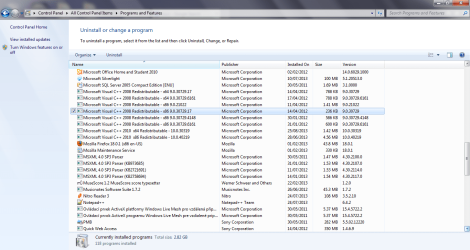
It appears that it's complaining about something on the box pre-existing that's breaking it's ability to self-register properly. If you have Visual C++ runtimes installed, that could be causing it. I can't advise you to remove them, unless you can reinstall the exact same package (if they're installed, something installed probably needs them there), but that's the usual fix for such errors.
 

My Computer My Computer

Computer type
PC/Desktop
Computer Manufacturer/Model Number
Custom
OS
Windows 10 Pro x64
CPU
Intel Core i7 4790K @ 4.5GHz
Motherboard
Asus Maximus Hero VII
Memory
32GB DDR3
Graphics Card(s)
Nvidia GeForce GTX970
Sound Card
Realtek HD Audio
Screen Resolution
1920x1200
Hard Drives
1x Samsung 250GB SSD
4x WD RE 2TB (RAIDZ)
PSU
Corsair AX760i
Case
Fractal Design Define R4
Cooling
Noctua NH-D15
Visual C++.png

Thanks. I seem to have a lot of C++ redistributable programs on my system. I get automatic updates on a Tuesday but they seem to have been installed on other dates without any corresponding programs being installed. Just one query - my computer is 64 bit so would you know why some of the C++ programs that have been installed 86 bit programs? Could I try removing the 86 bit ones?
 

My Computer My Computer

Computer Manufacturer/Model Number
Sony/Vaio/PCG-71911M
OS
Windows 7 64 bit
Back
Top