Safe Mode - Add to Windows Boot Manager Screen in Windows 7

How to Add Windows 7 "Safe Mode" to Windows Boot Manager Screen

   Information
Safe mode is a troubleshooting option for Windows that starts your computer with a minimal set of drivers and services.

This tutorial will show you how to add Windows 7 Safe Mode to the Windows Boot Manager to be able to easily choose Safe Mode, Safe Mode with Networking, Safe Mode with Command Prompt, Windows 8, or any another OS (ex: dual boot) at boot to run at startup.

This can be handy to have as another option to be able to start Windows 7 in Safe Mode as needed.

You must be logged in as an administrator to be able to do the steps in this tutorial.


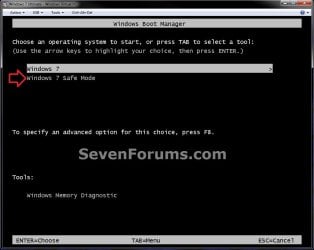
EXAMPLE: "Windows 7 Safe Mode" added to Windows Boot Manager Example.jpg


OPTION ONE

To Add Windows 7 "Safe Mode" to Windows Boot Manager

1. Open an elevated command prompt or a command prompt at boot.

2. In the command prompt, copy and paste the command below and press Enter. (see screenshot below) bcdedit /enum /v


Step1.jpg
3. From under a Windows Boot Loader section, look for the description that has Windows 7 listed, and make note of it's identifier number (ex: {21768871-7128-11e0-8405-b8daa94cc134} ) . (see screenshot above)

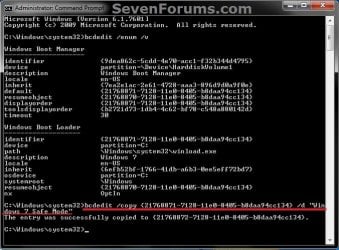
4. In the command prompt, type the command below and press Enter. (see screenshot below)
NOTE: Substitute identifier number in the command below with your actual Windows 7 identifier number from step 3. bcdedit /copy {identifier number} /d “Windows 7 Safe Mode”

OR

bcdedit /copy {identifier number} /d “Windows 7 Safe Mode with Networking”

OR

bcdedit /copy {identifier number} /d “Windows 7 Safe Mode with Command Prompt”

For example: I would type this command below exactly for Safe Mode with my identifier number {21768871-7128-11e0-8405-b8daa94cc134}.

bcdedit /copy {21768871-7128-11e0-8405-b8daa94cc134} /d “Windows 7 Safe Mode”


   Warning
While you could copy and paste the bcdedit /copy {identifier number} part of the command, you must completely type out the /d “Windows 7 Safe Mode” part of the command or you will get the "A description for the new entry must be specified" error message if you try and copy and paste it. Be sure to backspace and then type out the rest of the command to also leave a space between these parts of the same command.

If it doubt, you can always type out the full command.


Step2.jpg

5. If successfully copied, close the elevated command prompt.
NOTE: If you did this from a command prompt at boot, then restart the computer into Windows 7 instead.

6. Open the Start Menu in Windows 7, type msconfig in the search box, and press Enter.

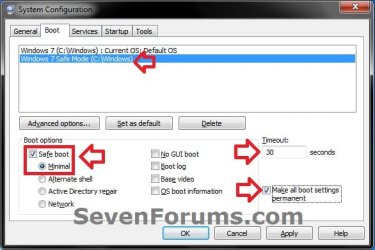
7. Click/tap on the Boot tab, verify that Windows 7 (or the OS you want) is set as the Default OS instead of Windows 7 Safe Mode. (see screenshot below) A) Next, select Windows 7 Safe Mode in the top box, and check the Safe boot box under "Boot options".

B) Select (dot) either Minimal, Alternate shell, or Network for the type of Safe Mode you wanted from step 4 above.


   Note
Safe Mode (Minimal) = This starts Windows with a minimal set of drivers and services.

Safe Mode with Networking (Network) = This starts Windows in safe mode and includes the network drivers and services needed to access the Internet or other computers on your network.

Safe Mode with Command Prompt (Alternate shell) = This starts Windows in safe mode with a command prompt window instead of the usual Windows interface.


C) Set enough seconds (ex: 30) in the Timeout field to be able to have enough time to choose an OS at boot, check the Make all boot settings permanent box, and click/tap on OK. (see screenshot below)
Step3.jpg

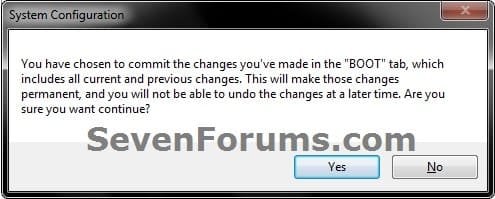
8. Click on Yes. (see screenshot below) Step4.jpg
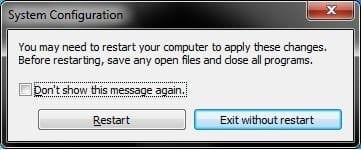
9. Click on Restart. (see screenshot below) Step5.jpg
10. When the computer restarts, you will see that Windows 7 Safe Mode has been added to the Windows Boot Manager.


OPTION TWO

To Remove Windows 7 "Safe Mode" from Windows Boot Manager

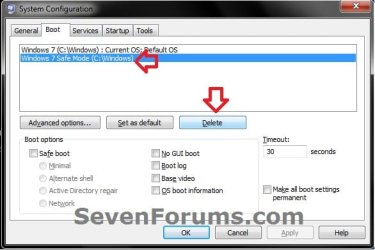
1. Boot into Windows 7, and not the Windows 7 Safe Mode option.

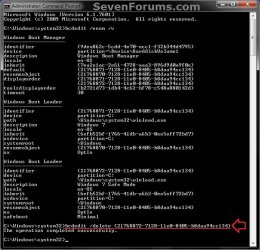
2. Using either option in the tutorial below, delete the Windows 7 Safe Mode entry like in the screenshots below. How to Delete a Operating System Listed in Windows Boot Manager in Windows 7

Step8.jpg

Step6.jpg

Step7.jpg

That's it,
Shawn


Last edited:
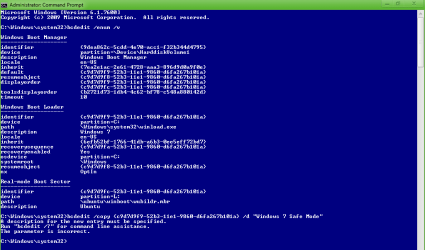
Hi Brink, thanks for the tutorial. But I get this error:

A description for the new entry must be specified.
Run "bcdedit /?" for command line assistance.
The parameter is incorrect.
 

My Computer My Computer

Computer type
PC/Desktop
Computer Manufacturer/Model Number
Novatech iRush Pro
OS
Windows 7 Ultimate SP1 - 64 Bit
CPU
Intel Core i5 2500k
Motherboard
Foxconn H67M-S/H67M-V/H67
Memory
2x4GB DDR3 1333Hz
Graphics Card(s)
Ati Radeon 6770
Sound Card
None
Monitor(s) Displays
Samsung S22B150
Screen Resolution
1920x1080
Hard Drives
2x500GB
PSU
500W
Cooling
Fan
Keyboard
HP KU0316
Mouse
Wireless Logitech M185
Internet Speed
20MB/s
Antivirus
Avast Free
Browser
Google Chrome
Other Info
Logitech M185 Mouse
KU-M316 Keyboard
Hello Infinite,

It sounds like you may have made a typo or spacing mistake. Could you post a screenshot of your command prompt like in the tutorial showing what you typed in when it gave you this error? :)
 

My Computer My Computer

Computer type
PC/Desktop
Computer Manufacturer/Model Number
Self built custom
OS
64-bit Windows 11 Pro for Workstations
CPU
Intel i7-8700K OC'd to 5 GHz
Motherboard
ASUS ROG Maximus XI Formula Z390
Memory
64 GB (4x16GB) G.SKILL TridentZ RGB DDR4 3600 MHz
Graphics Card(s)
ASUS ROG-STRIX-GTX1080TI-O11G-GAMING
Sound Card
Integrated
Monitor(s) Displays
2 x Samsung Odyssey G7 27"
Screen Resolution
2560x1440
Hard Drives
1TB Samsung 990 PRO M.2,
4TB Samsung 990 PRO PRO M.2,
TerraMaster F8 SSD Plus NAS
PSU
Seasonic Prime Titanium 850W
Case
Thermaltake Core P3
Cooling
Corsair Hydro H115i
Keyboard
Logitech wireless K800
Mouse
Logitech MX Master 4
Internet Speed
2 Gb/s Download and 100 Mb/s Upload
Antivirus
Malwarebyte Anti-Malware Premium
Browser
Google Chrome
Other Info
Logitech Z625 speaker system,
Logitech BRIO 4K Pro webcam,
HP Color LaserJet Pro MFP M477fdn,
APC SMART-UPS RT 1000 XL - SURT1000XLI,
Galaxy S23 Plus phone
Here:
Image.png
 

My Computer My Computer

Computer type
PC/Desktop
Computer Manufacturer/Model Number
Novatech iRush Pro
OS
Windows 7 Ultimate SP1 - 64 Bit
CPU
Intel Core i5 2500k
Motherboard
Foxconn H67M-S/H67M-V/H67
Memory
2x4GB DDR3 1333Hz
Graphics Card(s)
Ati Radeon 6770
Sound Card
None
Monitor(s) Displays
Samsung S22B150
Screen Resolution
1920x1080
Hard Drives
2x500GB
PSU
500W
Cooling
Fan
Keyboard
HP KU0316
Mouse
Wireless Logitech M185
Internet Speed
20MB/s
Antivirus
Avast Free
Browser
Google Chrome
Other Info
Logitech M185 Mouse
KU-M316 Keyboard
Did you type the command out, or did you copy and paste any part of it?

If you copied and pasted it, then that may be the issue when copying a space and it acting as a enter instead of space and not actually using the "Windows 7 Safe Mode" (description) part of the command. Try typing it out completely to see if it may work then. :)
 

My Computer My Computer

Computer type
PC/Desktop
Computer Manufacturer/Model Number
Self built custom
OS
64-bit Windows 11 Pro for Workstations
CPU
Intel i7-8700K OC'd to 5 GHz
Motherboard
ASUS ROG Maximus XI Formula Z390
Memory
64 GB (4x16GB) G.SKILL TridentZ RGB DDR4 3600 MHz
Graphics Card(s)
ASUS ROG-STRIX-GTX1080TI-O11G-GAMING
Sound Card
Integrated
Monitor(s) Displays
2 x Samsung Odyssey G7 27"
Screen Resolution
2560x1440
Hard Drives
1TB Samsung 990 PRO M.2,
4TB Samsung 990 PRO PRO M.2,
TerraMaster F8 SSD Plus NAS
PSU
Seasonic Prime Titanium 850W
Case
Thermaltake Core P3
Cooling
Corsair Hydro H115i
Keyboard
Logitech wireless K800
Mouse
Logitech MX Master 4
Internet Speed
2 Gb/s Download and 100 Mb/s Upload
Antivirus
Malwarebyte Anti-Malware Premium
Browser
Google Chrome
Other Info
Logitech Z625 speaker system,
Logitech BRIO 4K Pro webcam,
HP Color LaserJet Pro MFP M477fdn,
APC SMART-UPS RT 1000 XL - SURT1000XLI,
Galaxy S23 Plus phone
OK, I did copy and paste it before Yes. Now it is working, thanks.

However the Boot Manager list order is:
Windows 7
Ubuntu
Windows 7 Safe Mode

How can I move Ubuntu below Windows 7 Safe Mode, so the list order is
Windows 7
Windows 7 Safe Mode
Ubuntu

Also if I want No GUI Boot, would I just need to select Windows 7 from MSConfig and select No GUI Boot?
 

My Computer My Computer

Computer type
PC/Desktop
Computer Manufacturer/Model Number
Novatech iRush Pro
OS
Windows 7 Ultimate SP1 - 64 Bit
CPU
Intel Core i5 2500k
Motherboard
Foxconn H67M-S/H67M-V/H67
Memory
2x4GB DDR3 1333Hz
Graphics Card(s)
Ati Radeon 6770
Sound Card
None
Monitor(s) Displays
Samsung S22B150
Screen Resolution
1920x1080
Hard Drives
2x500GB
PSU
500W
Cooling
Fan
Keyboard
HP KU0316
Mouse
Wireless Logitech M185
Internet Speed
20MB/s
Antivirus
Avast Free
Browser
Google Chrome
Other Info
Logitech M185 Mouse
KU-M316 Keyboard
That's great news Infinite. :)

That would be correct for No GUI Boot.

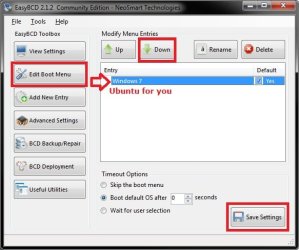
The easiest way to move Ubuntu down one level is to download and install and run the free EasyBCD (registration not required to download) in Windows 7, go to the Edit Boot Menu location in the screenshot below, select (highlight) Ubuntu, click on the Down button, and click on the Save Settings button.

EasyBCD.jpg
 

My Computer My Computer

Computer type
PC/Desktop
Computer Manufacturer/Model Number
Self built custom
OS
64-bit Windows 11 Pro for Workstations
CPU
Intel i7-8700K OC'd to 5 GHz
Motherboard
ASUS ROG Maximus XI Formula Z390
Memory
64 GB (4x16GB) G.SKILL TridentZ RGB DDR4 3600 MHz
Graphics Card(s)
ASUS ROG-STRIX-GTX1080TI-O11G-GAMING
Sound Card
Integrated
Monitor(s) Displays
2 x Samsung Odyssey G7 27"
Screen Resolution
2560x1440
Hard Drives
1TB Samsung 990 PRO M.2,
4TB Samsung 990 PRO PRO M.2,
TerraMaster F8 SSD Plus NAS
PSU
Seasonic Prime Titanium 850W
Case
Thermaltake Core P3
Cooling
Corsair Hydro H115i
Keyboard
Logitech wireless K800
Mouse
Logitech MX Master 4
Internet Speed
2 Gb/s Download and 100 Mb/s Upload
Antivirus
Malwarebyte Anti-Malware Premium
Browser
Google Chrome
Other Info
Logitech Z625 speaker system,
Logitech BRIO 4K Pro webcam,
HP Color LaserJet Pro MFP M477fdn,
APC SMART-UPS RT 1000 XL - SURT1000XLI,
Galaxy S23 Plus phone
Just a thought, you could try making a tutorial for how to add Safe mode for networking or Safe mode for command prompt to Boot Manager or continue it from this, or perhaps that isn't possible.
 

My Computer My Computer

Computer type
PC/Desktop
Computer Manufacturer/Model Number
Novatech iRush Pro
OS
Windows 7 Ultimate SP1 - 64 Bit
CPU
Intel Core i5 2500k
Motherboard
Foxconn H67M-S/H67M-V/H67
Memory
2x4GB DDR3 1333Hz
Graphics Card(s)
Ati Radeon 6770
Sound Card
None
Monitor(s) Displays
Samsung S22B150
Screen Resolution
1920x1080
Hard Drives
2x500GB
PSU
500W
Cooling
Fan
Keyboard
HP KU0316
Mouse
Wireless Logitech M185
Internet Speed
20MB/s
Antivirus
Avast Free
Browser
Google Chrome
Other Info
Logitech M185 Mouse
KU-M316 Keyboard
Sure, you would do the same thing in this tutorial except check the "Boot option" you wanted instead in step 7 OPTION ONE instead, and change the description at step 4. :)

I'll add it to the list of tutorials to do though.
 

My Computer My Computer

Computer type
PC/Desktop
Computer Manufacturer/Model Number
Self built custom
OS
64-bit Windows 11 Pro for Workstations
CPU
Intel i7-8700K OC'd to 5 GHz
Motherboard
ASUS ROG Maximus XI Formula Z390
Memory
64 GB (4x16GB) G.SKILL TridentZ RGB DDR4 3600 MHz
Graphics Card(s)
ASUS ROG-STRIX-GTX1080TI-O11G-GAMING
Sound Card
Integrated
Monitor(s) Displays
2 x Samsung Odyssey G7 27"
Screen Resolution
2560x1440
Hard Drives
1TB Samsung 990 PRO M.2,
4TB Samsung 990 PRO PRO M.2,
TerraMaster F8 SSD Plus NAS
PSU
Seasonic Prime Titanium 850W
Case
Thermaltake Core P3
Cooling
Corsair Hydro H115i
Keyboard
Logitech wireless K800
Mouse
Logitech MX Master 4
Internet Speed
2 Gb/s Download and 100 Mb/s Upload
Antivirus
Malwarebyte Anti-Malware Premium
Browser
Google Chrome
Other Info
Logitech Z625 speaker system,
Logitech BRIO 4K Pro webcam,
HP Color LaserJet Pro MFP M477fdn,
APC SMART-UPS RT 1000 XL - SURT1000XLI,
Galaxy S23 Plus phone
So it would be like this?

bcdedit /copy {identifier number} /d “Windows 7 Safe Mode with Networking”
bcdedit /copy {identifier number} /d “Windows 7 Safe Mode with Command Prompt”

Then you enable permanent boot settings, and if you added all three you would have all 3 options?
 

My Computer My Computer

Computer type
PC/Desktop
Computer Manufacturer/Model Number
Novatech iRush Pro
OS
Windows 7 Ultimate SP1 - 64 Bit
CPU
Intel Core i5 2500k
Motherboard
Foxconn H67M-S/H67M-V/H67
Memory
2x4GB DDR3 1333Hz
Graphics Card(s)
Ati Radeon 6770
Sound Card
None
Monitor(s) Displays
Samsung S22B150
Screen Resolution
1920x1080
Hard Drives
2x500GB
PSU
500W
Cooling
Fan
Keyboard
HP KU0316
Mouse
Wireless Logitech M185
Internet Speed
20MB/s
Antivirus
Avast Free
Browser
Google Chrome
Other Info
Logitech M185 Mouse
KU-M316 Keyboard
So it would be like this?

bcdedit /copy {identifier number} /d “Windows 7 Safe Mode with Networking”
bcdedit /copy {identifier number} /d “Windows 7 Safe Mode with Command Prompt”

Then you enable permanent boot settings, and if you added all three you would have all 3 options?

Yes, but you would also need to check the "Safe Mode" option (ex: Network instead of Minimal) you wanted instead at step 7 as well.

You have to do them one at a time from start to finish, and not together or you'll have a real mess to clean up.

I'll have a tutorial for this probably by tomorrow though.

EDIT:
Here they are. :)

http://www.sevenforums.com/tutorial...tworking-add-windows-boot-manager-screen.html

and

http://www.sevenforums.com/tutorial...d-prompt-add-windows-boot-manager-screen.html
 
Last edited:

My Computer My Computer

Computer type
PC/Desktop
Computer Manufacturer/Model Number
Self built custom
OS
64-bit Windows 11 Pro for Workstations
CPU
Intel i7-8700K OC'd to 5 GHz
Motherboard
ASUS ROG Maximus XI Formula Z390
Memory
64 GB (4x16GB) G.SKILL TridentZ RGB DDR4 3600 MHz
Graphics Card(s)
ASUS ROG-STRIX-GTX1080TI-O11G-GAMING
Sound Card
Integrated
Monitor(s) Displays
2 x Samsung Odyssey G7 27"
Screen Resolution
2560x1440
Hard Drives
1TB Samsung 990 PRO M.2,
4TB Samsung 990 PRO PRO M.2,
TerraMaster F8 SSD Plus NAS
PSU
Seasonic Prime Titanium 850W
Case
Thermaltake Core P3
Cooling
Corsair Hydro H115i
Keyboard
Logitech wireless K800
Mouse
Logitech MX Master 4
Internet Speed
2 Gb/s Download and 100 Mb/s Upload
Antivirus
Malwarebyte Anti-Malware Premium
Browser
Google Chrome
Other Info
Logitech Z625 speaker system,
Logitech BRIO 4K Pro webcam,
HP Color LaserJet Pro MFP M477fdn,
APC SMART-UPS RT 1000 XL - SURT1000XLI,
Galaxy S23 Plus phone
Back
Top