Recycle Bin - Fix For Custom Icons Not Refreshing

How to Fix Custom Recycle Bin Icons Not Automatically Refreshing


   Information
The Recycle Bin provides a safety net when deleting files or folders. When you delete any of these items from your hard disk, Windows places it in the Recycle Bin and the Recycle Bin icon changes from empty to full.

Sometimes, when using different custom icons for both the Full and Empty Recycle Bin, the icons will not change to the proper icon when filled or emptied, unless you manually refresh the Desktop.

This will show you how to fix the refreshing problem when you use custom icons for the Recycle Bin in Vista and Windows 7.
   Tip
To use custom icons for the Recycle Bin, see this tutorial here - Desktop Icons - Add or Remove
   Note


  • If you change one or both icons to different ones after you have applied the changes in Regedit, you will need to apply the registry changes again for the new ones
  • Removable drives do not use or have a Recycyle Bin. Files deleted from removable drives are permanently deleted instead.


Here's How:
1. Open the Registry Editor by going to the Start Menu and typing in Regedit. Click yes for UAC prompt.

2. Navigate to-
Code:
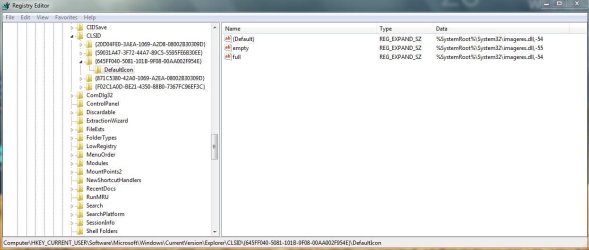
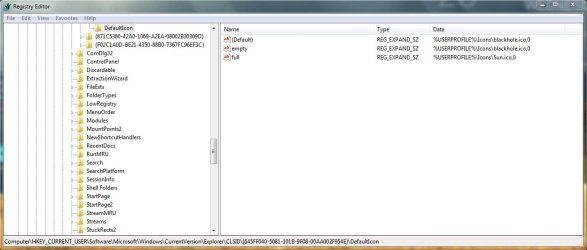
HKEY_CURRENT_USER/Software/Microsoft/Windows/CurrentVersion/Explorer/CLSID/{645FF040-5081-101B-9F08-00AA002F954E}/Default Icon
3. In the right hand pane, double click on the (Default) string, and change the entry from this - %USERPROFILE%\Icons\blackhole.ico to this %USERPROFILE%\Icons\blackhole.ico,0
NOTE: Instead of blackhole.ico, you will have your custom icon file name instead.

4. Click OK.

5. Repeat Step 3 for the empty and full string entries as well. When done, it should look like this -

2009-09-13_185526.jpg
6. Close Regedit and the changes should apply without having to log off and on or restart. You can try it out by deleting something when it's Empty, and see if it changes to the Full custom icon.


That's it.
Airbot


Last edited by a moderator:
Cool , I was planning on writing a tut for this after he found the answer but I'm happy you did =P

Thanks again man and keep up the great tuts!
 

My Computer

Computer Manufacturer/Model Number
Custom
OS
Windows 7
CPU
AMD Phenom II X4 940 3.0 Stock
Motherboard
Gigabyte GA-MA78GM-S2H
Memory
G.SKILL DDR2 800 PI Black 4GB+Corsair XMS2 Xtrm Gaming 2GB
Graphics Card(s)
ASUS EN8800GT TOP (Fact OC)
Monitor(s) Displays
Optiquest 20" Flatscreen
Screen Resolution
1680x1050
Hard Drives
Seagate 3.5' 7200RPM 750GB HDD
PSU
Antec NeoHE 550W
Cooling
Stock AMD Phenom HSF
Keyboard
Logitech G15
Internet Speed
Charter HighSpeed 10 Down / 5 Up
This is excellent! I been bugged by the custom trash icons for a while now.
 

My Computer

Computer Manufacturer/Model Number
Custom
OS
Win7 64bit Ultimate
CPU
AMD Phenom II X6 1100T Black Edition Thuban 3.3GHz, 3.7GHz
Motherboard
Gigabyte GA-890FXA-UD5
Memory
CORSAIR DOMINATOR GT 8GB (2 x 4GB) 1866 DDR3
Graphics Card(s)
XFX HD-697A-CNDC Radeon HD6970 2GB 256-bit
Sound Card
Creative SoundBlaster X-Fi Platinum Fatal1ty Edition
Monitor(s) Displays
Dual 25 Inch Hanns-G HZ251
Screen Resolution
1920x1080 X 2
PSU
Corsair 850W Single Rail
Case
Thermaltake V9 BlacX w/ Dual HDD Docking Station
Cooling
Air lots and lots of air and copper...
Keyboard
Kensington (Low-Profile)
Mouse
Creative Fatal1ty
Internet Speed
15Gbit (15 Down 5 Up)
Other Info
XIGMATEK HDT-S1284F 120mm HYPRO Bearing CPU Cooler, LG Blu-Ray Burner.
Most excellent !!

Happened a couple of times to me already and it is really annoying !!
Nice simple fix, thanks a lot !! :thumbsup:
All the best,
Mick C.
 

My Computer

Computer type
PC/Desktop
Computer Manufacturer/Model Number
Arbico i7 PC
OS
Windows 7 Home Premium 64 bit - SP1
CPU
Intel Core i7 920 (2.66GHz 8MB L2 Cache)
Motherboard
Asus P6X58D-E
Memory
6Gb (3 x Kingston 2Gb PC12800 DDR3 1600MHZ)
Graphics Card(s)
ATI Radeon HD 5850 1Gb
Sound Card
AMD HIgh Def HDMI
Monitor(s) Displays
LG 24EB23 Digital
Screen Resolution
1920x1080 (32bit) (60Hz)
Hard Drives
Samsung HD103SJ
Samsung HD5021J
Samsung HD204UI
Samsung M3 External USB 3
PSU
Nexus RX-8500 850w
Case
NZXT Hush Black ATA
Cooling
3 x Xilence Red Wing 120mm Case Fans
Keyboard
Microsoft Wireless Keyboard 6000 v3.0
Mouse
Microsoft Wireless Laser Mouse 6000 v 2.0
Internet Speed
60.0 Mbps Average
Antivirus
Spybot Search & Destroy
Browser
Avant Browser
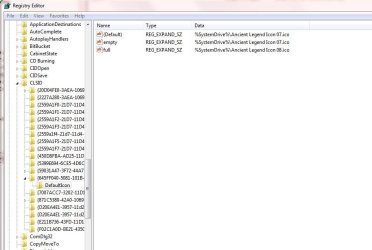
I thought this thread would solve my problem. Sadly, when I navigated the registry I found the default key set to E:\Icons\Toxic Empty.ico and the full and empty also to E/.
Is there anything else I can try?
 

My Computer

OS
Win 7 Ultimate 32&64
Hello Alan, and welcome to Seven Forums.

You might give this a try to see if it may help.

Recycle Bin - Vista Forums

Hope this helps,
Shawn
 

My Computer

Computer type
PC/Desktop
Computer Manufacturer/Model Number
Self built custom
OS
64-bit Windows 11 Pro for Workstations
CPU
Intel i7-8700K OC'd to 5 GHz
Motherboard
ASUS ROG Maximus XI Formula Z390
Memory
64 GB (4x16GB) G.SKILL TridentZ RGB DDR4 3600 MHz
Graphics Card(s)
ASUS ROG-STRIX-GTX1080TI-O11G-GAMING
Sound Card
Integrated
Monitor(s) Displays
2 x Samsung Odyssey G7 27"
Screen Resolution
2560x1440
Hard Drives
1TB Samsung 990 PRO M.2,
4TB Samsung 990 PRO PRO M.2,
TerraMaster F8 SSD Plus NAS
PSU
Seasonic Prime Titanium 850W
Case
Thermaltake Core P3
Cooling
Corsair Hydro H115i
Keyboard
Logitech wireless K800
Mouse
Logitech MX Master 4
Internet Speed
2 Gb/s Download and 100 Mb/s Upload
Antivirus
Malwarebyte Anti-Malware Premium
Browser
Google Chrome
Other Info
Logitech Z625 speaker system,
Logitech BRIO 4K Pro webcam,
HP Color LaserJet Pro MFP M477fdn,
APC SMART-UPS RT 1000 XL - SURT1000XLI,
Galaxy S23 Plus phone
Thanks for the welcome. That didn't work either. Perhaps I could have explained the problem better.

With default icons the recycle bin works properly. If I change the icons for any others in the %SystemRoot%\System32\imageres.dll,216 that also works fine.

The problem is when I try to use custom icons and then it only changes when I refresh the desktop.

I know in the grand scheme of things this is a very minor matter but it is becoming an obsession with me.:(
 

My Computer

OS
Win 7 Ultimate 32&64
Alan,

Can you post a screenshot of yours like I have here.

Capture.JPG
 

My Computer

Computer type
PC/Desktop
Computer Manufacturer/Model Number
Airbot 2.0
OS
Windows 7 Ultimate x64 SP1
CPU
Core i7 920 (D0) @ 4Ghz, *26c idle *65c full load on air
Motherboard
Asus P6X58D Premium - Sata 6Gb/s - USB 3.0
Memory
12GB DDR3 Corsair Dominator -CMD12GX3M6A1600C8 at 1600MHz
Graphics Card(s)
Zotac Geforce GTX 770
Sound Card
ASUS Xonar D2X
Monitor(s) Displays
1 LG 24" Flatron W2453V-PF 1 Samsung 24" P2450H both 2ms RT
Screen Resolution
1920x1080@60hz
Hard Drives
1 Samsung 250GB 840 Evo SSD
1 OCZ Vertex2 180GB SSD
1 TB Samsung Spinpoint F1 7200RPM 32MB cache
2 500GB WD Caviar Blacks 7200RPM 32MB cache (WD5001AALS)

Pioneer DVD Burner DVR-S18M
PSU
Corsair HX1000W
Case
Cooler Master HAF 932
Cooling
Case Fans *3 230mm, *1 140mm/CPU - *Tuniq Tower 120 Extreme
Keyboard
Logitech Wireless MK700
Mouse
Logitech Wireless MK700
Internet Speed
DL 15 Mbps UL 0.98 Mbps
Antivirus
None
Browser
Firefox Nightly
Other Info
Processor-7.7 *RAM- 7.9 *Graphics-7.9 *Gaming Graphics- 7.9 *SSD- 7.8 W.E.I final score= 7.7
*Phone- LG Nexus 5
Thanks for the welcome. That didn't work either. Perhaps I could have explained the problem better.

With default icons the recycle bin works properly. If I change the icons for any others in the %SystemRoot%\System32\imageres.dll,216 that also works fine.

The problem is when I try to use custom icons and then it only changes when I refresh the desktop.

I know in the grand scheme of things this is a very minor matter but it is becoming an obsession with me.:(

The recycle icons in imageres.dll are 54 and 55 in "Icon Group"

When you go there in "reshacker" you will get an error - "Out of resources", as I recall. Just click past that. Replace the group with the single icon you want. It works for me, using either large or small icons on the desktop or taskbar.
 
Last edited:

My Computer

Computer Manufacturer/Model Number
Gateway, Toshiba Laptop, and Home Brew
OS
Windows 7 x64 HP, Windows 7 HP, Windows 7 Ult
CPU
Intel I3, Cerelon, Pentium 4 @ 3Ghz
Motherboard
Intel, Intel, Asus
Memory
8G, 3G, 3G
Graphics Card(s)
On-board Intel, On-board nVidia, nVIDIA card
Sound Card
on-board, on-board, SoundBlaster
Monitor(s) Displays
Hannspree HF237, Toshiba, SyncMaster 931B
Screen Resolution
default (all)
Hard Drives
1T internal, 320G internal, 160G internal, 1T networked
PSU
300w, unk, 650w
Case
black, black, grey
Cooling
air (all)
Keyboard
standard wired (all)
Mouse
standard wired (all)
Internet Speed
6M down, 768K up
Other Info
Home LAN through Linksys hub to 4 port and wireless switch/router. Networked HP 2600n. Wife's computer running Windows 7, and spare laptop running Ubuntu "Karmic Kola" (9.10).
I hope this is what you wanted Airbot.
 

Attachments

  • reg.JPG
    reg.JPG
    78.5 KB · Views: 923

My Computer

OS
Win 7 Ultimate 32&64
=The recycle icons in imageres.dll are 54 and 55 in "Icon Group"

When you go there in "reshacker" you will get an error - "Out of resources", as I recall. Just click past that. Replace the group with the single icon you want. It works for me, using either large or small icons on the desktop or taskbar.

Thanks for replying
I don't know too much about reshacker but I think it is for 32 bit and I have 64bit.
 

My Computer

OS
Win 7 Ultimate 32&64
=The recycle icons in imageres.dll are 54 and 55 in "Icon Group"

When you go there in "reshacker" you will get an error - "Out of resources", as I recall. Just click past that. Replace the group with the single icon you want. It works for me, using either large or small icons on the desktop or taskbar.
Thanks for replying
I don't know too much about reshacker but I think it is for 32 bit and I have 64bit.

You're right - reshacker is for 32 bit. "Restorator" works in both 32 and 64 bit. Here's the link to the trial download version - Download Trial Version - Restorator - Bome Software

(I used it to remove the logon/logoff brand marking at the bottom of the screen, then removed it.)
 

My Computer

Computer Manufacturer/Model Number
Gateway, Toshiba Laptop, and Home Brew
OS
Windows 7 x64 HP, Windows 7 HP, Windows 7 Ult
CPU
Intel I3, Cerelon, Pentium 4 @ 3Ghz
Motherboard
Intel, Intel, Asus
Memory
8G, 3G, 3G
Graphics Card(s)
On-board Intel, On-board nVidia, nVIDIA card
Sound Card
on-board, on-board, SoundBlaster
Monitor(s) Displays
Hannspree HF237, Toshiba, SyncMaster 931B
Screen Resolution
default (all)
Hard Drives
1T internal, 320G internal, 160G internal, 1T networked
PSU
300w, unk, 650w
Case
black, black, grey
Cooling
air (all)
Keyboard
standard wired (all)
Mouse
standard wired (all)
Internet Speed
6M down, 768K up
Other Info
Home LAN through Linksys hub to 4 port and wireless switch/router. Networked HP 2600n. Wife's computer running Windows 7, and spare laptop running Ubuntu "Karmic Kola" (9.10).
=You're right - reshacker is for 32 bit. "Restorator" works in both 32 and 64 bit. Here's the link to the trial download version - Download Trial Version - Restorator - Bome Software

(I used it to remove the logon/logoff brand marking at the bottom of the screen, then removed it.)

I will have to come clean I've no idea how to use these programes. I've downloaded Restorator and found my way to the dll and icon 54 and 55 but what do I do now?
 

My Computer

OS
Win 7 Ultimate 32&64
I hope this is what you wanted Airbot.


Where do you have the custom icons that you're using for the full and empty recycle bin?


What I have done for me is I've made a New Library in Libraries, for all my custom icons, which I've named "Icons". That way when I change the recycle bin full and empty from Personalization-Change Desktop Icons, I can just click on the full one and the empty one and Browse to the location of my Icon library I made, pick the icons I want for each. Then it will switch from %SystemDrive% to %USERPROFILE%

Default Windows icons

D1.JPG

Custom icons pointing to my Icon Library with comma and zero at ends.

D2.JPG

Then I open regedit, and put the ,0 on the end of the 3 strings. It should work that way.

It's one way you can try if you like.
 

My Computer

Computer type
PC/Desktop
Computer Manufacturer/Model Number
Airbot 2.0
OS
Windows 7 Ultimate x64 SP1
CPU
Core i7 920 (D0) @ 4Ghz, *26c idle *65c full load on air
Motherboard
Asus P6X58D Premium - Sata 6Gb/s - USB 3.0
Memory
12GB DDR3 Corsair Dominator -CMD12GX3M6A1600C8 at 1600MHz
Graphics Card(s)
Zotac Geforce GTX 770
Sound Card
ASUS Xonar D2X
Monitor(s) Displays
1 LG 24" Flatron W2453V-PF 1 Samsung 24" P2450H both 2ms RT
Screen Resolution
1920x1080@60hz
Hard Drives
1 Samsung 250GB 840 Evo SSD
1 OCZ Vertex2 180GB SSD
1 TB Samsung Spinpoint F1 7200RPM 32MB cache
2 500GB WD Caviar Blacks 7200RPM 32MB cache (WD5001AALS)

Pioneer DVD Burner DVR-S18M
PSU
Corsair HX1000W
Case
Cooler Master HAF 932
Cooling
Case Fans *3 230mm, *1 140mm/CPU - *Tuniq Tower 120 Extreme
Keyboard
Logitech Wireless MK700
Mouse
Logitech Wireless MK700
Internet Speed
DL 15 Mbps UL 0.98 Mbps
Antivirus
None
Browser
Firefox Nightly
Other Info
Processor-7.7 *RAM- 7.9 *Graphics-7.9 *Gaming Graphics- 7.9 *SSD- 7.8 W.E.I final score= 7.7
*Phone- LG Nexus 5
I have no idea why adding ,0 works but it did and I think tonight I will sleep.

Thank you so much for your time Airbot and also TheSchaft for his help.

Alan
 

My Computer

OS
Win 7 Ultimate 32&64
No problem. That's what this tutorial is for, adding the ,0 at the end for it to work.
 

My Computer

Computer type
PC/Desktop
Computer Manufacturer/Model Number
Airbot 2.0
OS
Windows 7 Ultimate x64 SP1
CPU
Core i7 920 (D0) @ 4Ghz, *26c idle *65c full load on air
Motherboard
Asus P6X58D Premium - Sata 6Gb/s - USB 3.0
Memory
12GB DDR3 Corsair Dominator -CMD12GX3M6A1600C8 at 1600MHz
Graphics Card(s)
Zotac Geforce GTX 770
Sound Card
ASUS Xonar D2X
Monitor(s) Displays
1 LG 24" Flatron W2453V-PF 1 Samsung 24" P2450H both 2ms RT
Screen Resolution
1920x1080@60hz
Hard Drives
1 Samsung 250GB 840 Evo SSD
1 OCZ Vertex2 180GB SSD
1 TB Samsung Spinpoint F1 7200RPM 32MB cache
2 500GB WD Caviar Blacks 7200RPM 32MB cache (WD5001AALS)

Pioneer DVD Burner DVR-S18M
PSU
Corsair HX1000W
Case
Cooler Master HAF 932
Cooling
Case Fans *3 230mm, *1 140mm/CPU - *Tuniq Tower 120 Extreme
Keyboard
Logitech Wireless MK700
Mouse
Logitech Wireless MK700
Internet Speed
DL 15 Mbps UL 0.98 Mbps
Antivirus
None
Browser
Firefox Nightly
Other Info
Processor-7.7 *RAM- 7.9 *Graphics-7.9 *Gaming Graphics- 7.9 *SSD- 7.8 W.E.I final score= 7.7
*Phone- LG Nexus 5
Recycle Bin refresh related to desktop refresh

Had siimliar problem on notebook with new install of Windows 7. Whenever I deleted items they would not disappear from folder in explorer unless I manually refreshed and would not appear in Recycle Bin unless I refreshed screen manually. Found out it is related to Aero Themes. Whenever I choose a desktop picture from the Aero group, problem occurs. If I reboot problem temporaily disappears, but returns shortly. Choose a picture from the internet or your personal pictures and problem will disappear. Use this procedure until Microsoft issues a fix.:D
 

My Computer

OS
Windows7
Just wanted to say thanks :)

Hope that Microsoft will fix this (and other problems) in SP1.
 

My Computer

OS
Windows 7 Pro x64
CPU
C2D E6550
Motherboard
Asus P5K-SE
Memory
DDR2 PC2-5300 4x1GB
Graphics Card(s)
Asus ENGT430 (NVidia 430GT)
Sound Card
Xonar DX
Monitor(s) Displays
LG W2241T
Screen Resolution
1680x1050
Hard Drives
80GB and 1TB from WD
250GB from Seagate
PSU
CM eXtreme Power 430W
Case
elite 330
Cooling
Stock
Keyboard
Powerlogic ZEN Z200
Mouse
MS Basic Optical Mouse 2.0
Thanks for this tutorial. :)
 

My Computer

Computer Manufacturer/Model Number
TOSHIBA EQUIUM A200 (X86-based PC AT/AT COMPATIBLE)
OS
Windows 7 Ultimate x86
CPU
Intel(R) Pentium(R) Dual CPU T2310 @ 1.46GHz
Motherboard
Intel Corporation SANTA ROSA CRB
Memory
2GB
Graphics Card(s)
Mobile Intel(R) 965 Express Chipset Family
Screen Resolution
1280 * 800 Pixels
Hard Drives
ST9120822AS ATA Device (IDE)
Back
Top