Advanced Window Color and Appearance - Add to Desktop Context Menu

How to Add or Remove "Advanced Window Color and Appearance" from Desktop Context Menu in Windows 7


   Information
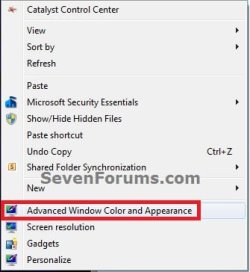
This tutorial will show you how to add or remove "Advanced Window Color and Appearance" (advanced appearance settings) from the desktop context menu for all users in Windows 7.

You must be logged in as an administrator to be able to do the steps in this tutorial.


EXAMPLE: "Advanced Window Color and Appearance" Added to Desktop Context MenuDesktop_Context_menu.jpg

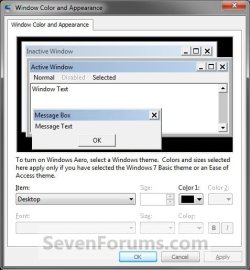
EXAMPLE: Window Color and Appearance (Advanced Appearance Settings)
NOTE: This is what this context menu item opens.Window_Color_and_Appearance.jpg


Here's How:

1. Do step 2 or 3 below for what you would like to do.

2. To Add "Advanced Window Color and Appearance" to Desktop Context MenuA) Click on the download button below to download the file below, and go to step 4 below.Add_Window_Color_and_Appearance_to_Desktop_Context_Menu.reg


Download


3. Remove "Advanced Window Color and Appearance" from Desktop Context Menu
NOTE: This is the default setting.A) Click on the download button below to download the file below, and go to step 4 below.Remove_Window_Color_and_Appearance_to_Desktop_Context_Menu.reg


Download


4. Save the .reg file to the desktop.

5. Right click on the downloaded .reg file, and click on Merge.

6. When prompted, click on Run, Yes (UAC), Yes, and OK to approve merging the .reg file.

7. You can now delete the downloaded .reg file if you like.


That's it,
Shawn


Attachments

Last edited:
This is how to add an extended "Appearance (Control panel)" grouped context menu, instead of having the default individual entries.

[original]_desktop_context-menu.png Appearance_custom_[W7].png Appearance_custom_[W10].png
(Only the menu layout is going to change, not the colors.)
This is tested both on Windows 7,10. (but possibly works on Windows Vista to 11 too).

Notes:
To make a .reg file:

1. Make a New Text Document: R.Click on empty space, > New > New Text Document
2. Copy/Paste the Code in the notepad and Save it:Open the New Text Document.txt

Paste the Code in the notepad and Save it, and then,
Rename it by replacing the corresponding file-name and the file-extension.

eg.: from "New Text Document.txt" to "ADD_Custom_Appearance-Desktop-Menu.reg"

Note: If you can't see the file extensions, you need to enable them:
(Strongly recommended to leave them enabled for security and many other reasons.)
Explorer's menu (bar) > Tools > Folder Options... > View (tab) > "Hide extensions for known file types"
UNtick the checkbox "Hide extensions for known file types" > and press OK

Alternatively to Unhide file's extensions, Run as Administrator a Command Prompt, and Paste this:
REG ADD HKEY_CURRENT_USER\SOFTWARE\Microsoft\Windows\CurrentVersion\Explorer\Advanced /v HideFileExt /t REG_DWORD /d 0 /f

To ADD this menu, save the following .reg code as:
ADD_Custom_Appearance-Desktop-Menu.reg
Code:
Windows Registry Editor Version 5.00

; ::::::::::::::::::: by adonios77 :::: (supports Windows 7) :::::::::::::::::::

[HKEY_CLASSES_ROOT\DesktopBackground\Shell\Appearance_custom]
"Icon"="themecpl.dll"
"MUIVerb"="Appearance (Control Panel)"
"Position"="Bottom"
"SubCommands"=""

[HKEY_CLASSES_ROOT\DesktopBackground\Shell\Appearance_custom\Shell]

[-HKEY_CLASSES_ROOT\DesktopBackground\Shell\Display] ; Screen Resolution - Display (default)
[HKEY_CLASSES_ROOT\DesktopBackground\Shell\Appearance_custom\Shell\01_ScreenResolution]
"Icon"="display.dll,-1"
"MUIVerb"="Screen Resolution"
"CommandFlags"=dword:00000020

[HKEY_CLASSES_ROOT\DesktopBackground\Shell\Appearance_custom\Shell\01_ScreenResolution\Command]
@="control.exe desk.cpl,Settings @[URL="https://www.sevenforums.com/members/set.html"]Set[/URL]tings"

[-HKEY_CLASSES_ROOT\DesktopBackground\Shell\Personalize] ; Personalize (default)
[HKEY_CLASSES_ROOT\DesktopBackground\Shell\Appearance_custom\Shell\02_Personalize]
@=hex(2):40,00,25,00,73,00,79,00,73,00,74,00,65,00,6d,00,72,00,6f,00,6f,00,74,\
  00,25,00,5c,00,73,00,79,00,73,00,74,00,65,00,6d,00,33,00,32,00,5c,00,74,00,\
  68,00,65,00,6d,00,65,00,63,00,70,00,6c,00,2e,00,64,00,6c,00,6c,00,2c,00,2d,\
  00,31,00,30,00,00,00
"HideInSafeMode"=""
"ControlPanelName"="Microsoft.Personalization"
"Icon"=hex(2):25,00,73,00,79,00,73,00,74,00,65,00,6d,00,72,00,6f,00,6f,00,74,\
  00,25,00,5c,00,73,00,79,00,73,00,74,00,65,00,6d,00,33,00,32,00,5c,00,74,00,\
  68,00,65,00,6d,00,65,00,63,00,70,00,6c,00,2e,00,64,00,6c,00,6c,00,2c,00,2d,\
  00,31,00,00,00

[HKEY_CLASSES_ROOT\DesktopBackground\Shell\Appearance_custom\Shell\02_Personalize\command]
"DelegateExecute"="{06622D85-6856-4460-8DE1-A81921B41C4B}"
"CommandFlags"=dword:00000040

[HKEY_CLASSES_ROOT\DesktopBackground\Shell\Appearance_custom\Shell\03_WindowColor&Appearance]
"Icon"="themecpl.dll"
"MUIVerb"="Window Color and Appearance"
"CommandFlags"=dword:00000020

[HKEY_CLASSES_ROOT\DesktopBackground\Shell\Appearance_custom\Shell\03_WindowColor&Appearance\Command]
@="explorer.exe shell:::{ED834ED6-4B5A-4bfe-8F11-A626DCB6A921} -Microsoft.Personalization\\pageColorization"

[HKEY_CLASSES_ROOT\DesktopBackground\Shell\Appearance_custom\Shell\04_DesktopBackground]
"Icon"="imageres.dll,-110"
"MUIVerb"="Desktop Background"

[HKEY_CLASSES_ROOT\DesktopBackground\Shell\Appearance_custom\Shell\04_DesktopBackground\Command]
@="explorer.exe shell:::{ED834ED6-4B5A-4bfe-8F11-A626DCB6A921} -Microsoft.Personalization\\pageWallpaper"

[HKEY_CLASSES_ROOT\DesktopBackground\Shell\Appearance_custom\Shell\05_DesktopIconSettings]
"MUIVerb"="Desktop Icon Settings"
"Icon2"="desk.cpl"
"Icon"="imageres.dll,-110"

[HKEY_CLASSES_ROOT\DesktopBackground\Shell\Appearance_custom\Shell\05_DesktopIconSettings\Command]
@="rundll32 shell32.dll,Control_RunDLL desk.cpl,,0"

[HKEY_CLASSES_ROOT\DesktopBackground\Shell\Appearance_custom\Shell\06_ScreenSaverSettings]
"Icon"="PhotoScreensaver.scr"
"MUIVerb"="Screen Saver Settings"

[HKEY_CLASSES_ROOT\DesktopBackground\Shell\Appearance_custom\Shell\06_ScreenSaverSettings\Command]
@="rundll32.exe shell32.dll,Control_RunDLL desk.cpl,screensaver @[URL="https://www.sevenforums.com/members/screensaver.html"]Screensaver[/URL]"

[HKEY_CLASSES_ROOT\DesktopBackground\Shell\Appearance_custom\Shell\07_MouseProperties]
"Icon"="main.cpl"
"MUIVerb"="Mouse Properties"

[HKEY_CLASSES_ROOT\DesktopBackground\Shell\Appearance_custom\Shell\07_MouseProperties\Command]
@="rundll32.exe shell32.dll,Control_RunDLL main.cpl,,1"

[HKEY_CLASSES_ROOT\DesktopBackground\Shell\Appearance_custom\Shell\08_Sounds]
"Icon"="mmsys.cpl"
"MUIVerb"="Sounds"

[HKEY_CLASSES_ROOT\DesktopBackground\Shell\Appearance_custom\Shell\08_Sounds\Command]
@="rundll32.exe shell32.dll,Control_RunDLL mmsys.cpl ,2"

[-HKEY_CLASSES_ROOT\DesktopBackground\Shell\Gadgets] ; Gadgets (default)
[HKEY_CLASSES_ROOT\DesktopBackground\Shell\Appearance_custom\Shell\09_Gadgets]
"MUIVerb"=hex(2):40,00,25,00,50,00,72,00,6f,00,67,00,72,00,61,00,6d,00,46,00,\
  69,00,6c,00,65,00,73,00,25,00,5c,00,57,00,69,00,6e,00,64,00,6f,00,77,00,73,\
  00,20,00,53,00,69,00,64,00,65,00,62,00,61,00,72,00,5c,00,73,00,69,00,64,00,\
  65,00,62,00,61,00,72,00,2e,00,65,00,78,00,65,00,2c,00,2d,00,31,00,31,00,31,\
  00,30,00,30,00,00,00
"Icon"="C:\\Program Files\\Windows Sidebar\\sidebar.exe,-100"
"CommandFlags"=dword:00000020

[HKEY_CLASSES_ROOT\DesktopBackground\Shell\Appearance_custom\Shell\09_Gadgets\command]
@="C:\\Program Files\\Windows Sidebar\\sidebar.exe /showGadgets"

To REMOVE this menu, save the following .reg code as:
REMOVE_Custom_Appearance-Desktop-Menu.reg
Code:
Windows Registry Editor Version 5.00

; This will remove the "Appearance_Custom" (Desktop-RClick-Menu) from registry. (adonios77)
[-HKEY_CLASSES_ROOT\DesktopBackground\Shell\Appearance_custom]


To Revert the original menus,

1) save the following .reg code as:
Screen Resolution(Display)_[default].reg
Code:
Windows Registry Editor Version 5.00

[HKEY_CLASSES_ROOT\DesktopBackground\Shell\Display]
@=hex(2):40,00,25,00,53,00,79,00,73,00,74,00,65,00,6d,00,52,00,6f,00,6f,00,74,\
  00,25,00,5c,00,53,00,79,00,73,00,74,00,65,00,6d,00,33,00,32,00,5c,00,64,00,\
  69,00,73,00,70,00,6c,00,61,00,79,00,2e,00,64,00,6c,00,6c,00,2c,00,2d,00,34,\
  00,00,00
"ControlPanelName"="Microsoft.Display"
"ControlPanelPage"="Settings"
"Icon"=hex(2):25,00,53,00,79,00,73,00,74,00,65,00,6d,00,52,00,6f,00,6f,00,74,\
  00,25,00,5c,00,53,00,79,00,73,00,74,00,65,00,6d,00,33,00,32,00,5c,00,64,00,\
  69,00,73,00,70,00,6c,00,61,00,79,00,2e,00,64,00,6c,00,6c,00,2c,00,2d,00,31,\
  00,00,00
"Position"="Bottom"

[HKEY_CLASSES_ROOT\DesktopBackground\Shell\Display\command]
"DelegateExecute"="{06622D85-6856-4460-8DE1-A81921B41C4B}"

2) save the following .reg code as:
Gadgets_[default].reg
Code:
Windows Registry Editor Version 5.00

[HKEY_CLASSES_ROOT\DesktopBackground\Shell\Gadgets]
"MUIVerb"=hex(2):40,00,25,00,50,00,72,00,6f,00,67,00,72,00,61,00,6d,00,46,00,\
  69,00,6c,00,65,00,73,00,25,00,5c,00,57,00,69,00,6e,00,64,00,6f,00,77,00,73,\
  00,20,00,53,00,69,00,64,00,65,00,62,00,61,00,72,00,5c,00,73,00,69,00,64,00,\
  65,00,62,00,61,00,72,00,2e,00,65,00,78,00,65,00,2c,00,2d,00,31,00,31,00,31,\
  00,30,00,30,00,00,00
"Position"="Bottom"
"Icon"="C:\\Program Files\\Windows Sidebar\\sidebar.exe,-100"

[HKEY_CLASSES_ROOT\DesktopBackground\Shell\Gadgets\command]
@="C:\\Program Files\\Windows Sidebar\\sidebar.exe /showGadgets"
3) save the following .reg code as:
Personalize_[default].reg
Code:
Windows Registry Editor Version 5.00

[HKEY_CLASSES_ROOT\DesktopBackground\Shell\Personalize]
@=hex(2):40,00,25,00,73,00,79,00,73,00,74,00,65,00,6d,00,72,00,6f,00,6f,00,74,\
  00,25,00,5c,00,73,00,79,00,73,00,74,00,65,00,6d,00,33,00,32,00,5c,00,74,00,\
  68,00,65,00,6d,00,65,00,63,00,70,00,6c,00,2e,00,64,00,6c,00,6c,00,2c,00,2d,\
  00,31,00,30,00,00,00
"HideInSafeMode"=""
"ControlPanelName"="Microsoft.Personalization"
"Position"="Bottom"
"Icon"=hex(2):25,00,73,00,79,00,73,00,74,00,65,00,6d,00,72,00,6f,00,6f,00,74,\
  00,25,00,5c,00,73,00,79,00,73,00,74,00,65,00,6d,00,33,00,32,00,5c,00,74,00,\
  68,00,65,00,6d,00,65,00,63,00,70,00,6c,00,2e,00,64,00,6c,00,6c,00,2c,00,2d,\
  00,31,00,00,00

[HKEY_CLASSES_ROOT\DesktopBackground\Shell\Personalize\command]
"DelegateExecute"="{06622D85-6856-4460-8DE1-A81921B41C4B}"
 
Last edited:

My Computers

System One System Two

  • Computer type
    PC/Desktop
    OS
    W7U x64
    CPU
    AMD A4-6300 APU with Radeon(tm) HD Graphics 3.70 GHz
    Motherboard
    ASRock FM2A78M-DG3+
    Memory
    2x8GB
    Graphics Card(s)
    NVidia GT710 2GB DDR3
    Sound Card
    Tascam US-122L
    Monitor(s) Displays
    3
    Screen Resolution
    1920x1080 + (1280x1024 x2)
    Hard Drives
    HDDs
  • Computer type
    PC/Desktop
Back
Top