
Error 0x8007000D when Editing MP3 Metadata - Fix

How to Fix 0x8007000D Error when Editing MP3 Metadata

Here's the error you will commonly see:
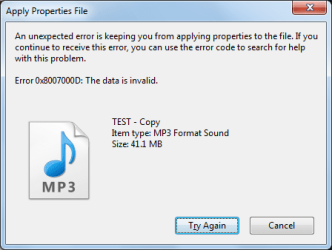
Error Image.png

As you can see, Windows isn't allowing you to edit the ID3 tag of the file. This is due to the ID3 tags of the files being v2.4, which is unsupported by both Windows Explorer and Windows Media Player. They support v2.3 and below, so all we need to do to fix this is to convert the ID3 tags to v2.3, here's how:

  1. Download and install ID3-TagIT:

    ID3-TagIT
  2. Using the navigation pane on the left, find the folder containing the files you want to fix.
  3. Select all of the files that need fixing and click Extended Functions > Transfer/Convert TAGs or press F7.
  4. Select Convert TAG Ver. 2.4 to Ver. 2.3 and click OK.
  5. Accept any warning given about incompatability.
  6. Press Ctrl+S to save the changes.
  7. Enjoy your new, fixed, files!

Tom
 
Last edited by a moderator:
This error 0x8007000D can also be fixed using Foobar2000 freeware audio player.

1. install Foobar2000
2. load the mp3 files into foobar2000.
3. in foobar2000 select the effected mp3 files
4. right click on any of the selected files then on popup menu select tagging>mp3 tag types
5. on the mp3 tag types window tick override id3v2revision: and select v2.3, then click update files

the id3 tags for the effected mp3 files will have been changed to v2.3 and can now be viewed/edited in windows explorer.
 

My Computer

Computer type
PC/Desktop
Computer Manufacturer/Model Number
dell
OS
Windows 7 Professional spk1 x64
CPU
intel i7-2600
Motherboard
dell
Memory
8 gb
Graphics Card(s)
amd radeon hd 6700 series
Hard Drives
Seagate st32000641as
Antivirus
avast antivirus pro 2015
Browser
ie11
Back
Top