Outlook Email Account - Set Up Automatic Reply Message

How to Send Automatic Vacation Reply Message for your Outlook Email Account

   Information
This tutorial will help show you how to set up and send an automatic vacation reply message to the sender of received emails for your Hotmail or Outlook email account.


Here's How:

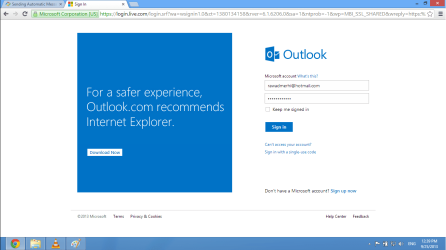
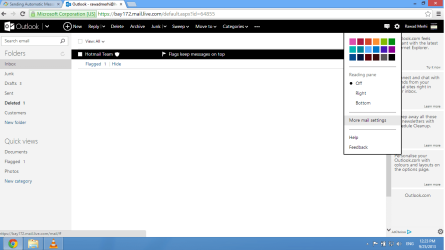
1) Sign in online at www.outlook.com to your Hotmail or Outlook email account. last.png2) Click/tap on the gear icon at the top right, and click/tap on the More mail settings option.
Automess1.png
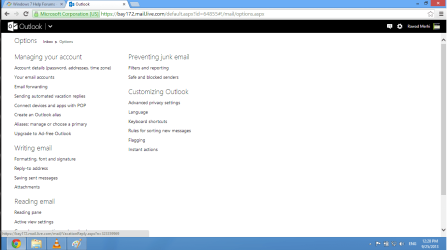
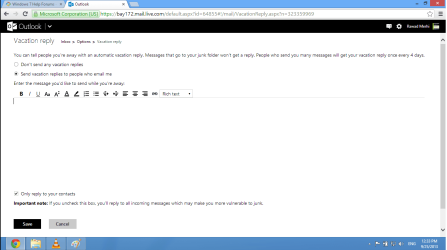
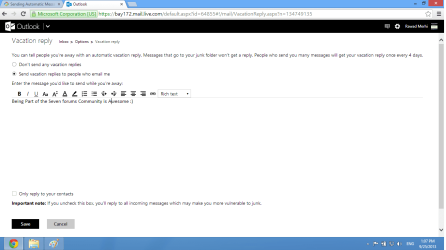
3) Click/tap on the Sending automated vacation replies option under the Managing your account section. Automess2.png4) Select (dot) Send vacation replies to people who email me, and enter the message you would like to send.
NOTE: You can select the Don't send any vacation replies option when you no longer wish to have an automatic reply message sent. Automess3.png5) Uncheck the Only reply to your contacts box, and click/tap on the Save button. uncehck.png6) When you now receive an email, the sender will receive this automatic reply message. Untitled.png
 
Last edited by a moderator:
I glanced at the web based settings and I do not see one for Auto-Reply; maybe I missed it.

Perhaps others know of a way to do what you want... maybe via an e-mail client on your computer.
 

My Computer

Computer type
Laptop
Computer Manufacturer/Model Number
Employer provided Dell Latitude
OS
W7 Pro SP1 64bit
CPU
i7
Memory
8GB
Graphics Card(s)
Intel HD Graphics
Hard Drives
crappy SSD
Antivirus
Employer mandated Symantec Endpoint Protection
Browser
Pale Moon 64bit, IE11 64bit & Chrome 64bit
I glanced at the web based settings and I do not see one for Auto-Reply; maybe I missed it.

Perhaps others know of a way to do what you want... maybe via an e-mail client on your computer.


UsernameIssues you just go to Hotmail or Outlook , then you see a settings icon , once you do that you will see a more email settings. From there you go to Sending automated vacation replies . There you are :)
 

My Computer

Computer type
Laptop
Computer Manufacturer/Model Number
Acer Aspire M5100
OS
Windows 8.1 64 bit
CPU
Windows 8.1 64-bit
Motherboard
Toshiba L745D
Memory
4096 MB RAM
Graphics Card(s)
Microsoft Basic Display Adapter
Sound Card
High Definition Audio Device
Monitor(s) Displays
1366x768
Screen Resolution
1366x768
Keyboard
Logitech Keyboard K800
Antivirus
MalwareBytes
Browser
Google Chrome
The vacation feature is disabled on the Hotmail account that I checked. Perhaps if you have a phone number associated wit the account - it gets turned on.
 

My Computer

Computer type
Laptop
Computer Manufacturer/Model Number
Employer provided Dell Latitude
OS
W7 Pro SP1 64bit
CPU
i7
Memory
8GB
Graphics Card(s)
Intel HD Graphics
Hard Drives
crappy SSD
Antivirus
Employer mandated Symantec Endpoint Protection
Browser
Pale Moon 64bit, IE11 64bit & Chrome 64bit
The vacation feature is disabled on the Hotmail account that I checked. Perhaps if you have a phone number associated wit the account - it gets turned on.

Yeah , I haven't tried Hotmail but Outlook works fine.
 

My Computer

Computer type
Laptop
Computer Manufacturer/Model Number
Acer Aspire M5100
OS
Windows 8.1 64 bit
CPU
Windows 8.1 64-bit
Motherboard
Toshiba L745D
Memory
4096 MB RAM
Graphics Card(s)
Microsoft Basic Display Adapter
Sound Card
High Definition Audio Device
Monitor(s) Displays
1366x768
Screen Resolution
1366x768
Keyboard
Logitech Keyboard K800
Antivirus
MalwareBytes
Browser
Google Chrome
Hotmail is handled thru the same outlook.com web-based interface these days.

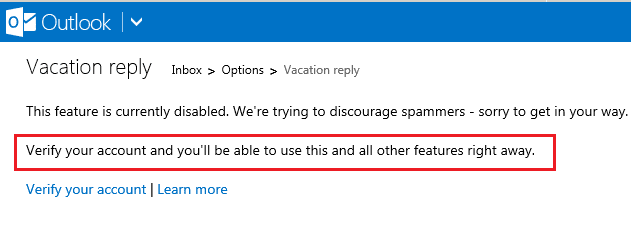
If the account has not been verified - then you should see this:

outlook1.png

outlook2.png

And those screenshots are from an outlook.com account.
 

My Computer

Computer type
Laptop
Computer Manufacturer/Model Number
Employer provided Dell Latitude
OS
W7 Pro SP1 64bit
CPU
i7
Memory
8GB
Graphics Card(s)
Intel HD Graphics
Hard Drives
crappy SSD
Antivirus
Employer mandated Symantec Endpoint Protection
Browser
Pale Moon 64bit, IE11 64bit & Chrome 64bit

My Computer

Computer type
Laptop
Computer Manufacturer/Model Number
Acer Aspire M5100
OS
Windows 8.1 64 bit
CPU
Windows 8.1 64-bit
Motherboard
Toshiba L745D
Memory
4096 MB RAM
Graphics Card(s)
Microsoft Basic Display Adapter
Sound Card
High Definition Audio Device
Monitor(s) Displays
1366x768
Screen Resolution
1366x768
Keyboard
Logitech Keyboard K800
Antivirus
MalwareBytes
Browser
Google Chrome
I understand that... but you have a good thread title. Many people will follow Google straight to this thread. I wanted it mentioned the hotmail/outlook accounts will not have the feature turned on unless one jumps thru the verification hoops.

Thanks for letting me throw so info into the thread - even if you don't need it :-)
 

My Computer

Computer type
Laptop
Computer Manufacturer/Model Number
Employer provided Dell Latitude
OS
W7 Pro SP1 64bit
CPU
i7
Memory
8GB
Graphics Card(s)
Intel HD Graphics
Hard Drives
crappy SSD
Antivirus
Employer mandated Symantec Endpoint Protection
Browser
Pale Moon 64bit, IE11 64bit & Chrome 64bit
I understand that... but you have a good thread title. Many people will follow Google straight to this thread. I wanted it mentioned the hotmail/outlook accounts will not have the feature turned on unless one jumps thru the verification hoops.

Thanks for letting me throw so info into the thread - even if you don't need it :-)

No worries , always enjoying helping others for those who need it :)
 

My Computer

Computer type
Laptop
Computer Manufacturer/Model Number
Acer Aspire M5100
OS
Windows 8.1 64 bit
CPU
Windows 8.1 64-bit
Motherboard
Toshiba L745D
Memory
4096 MB RAM
Graphics Card(s)
Microsoft Basic Display Adapter
Sound Card
High Definition Audio Device
Monitor(s) Displays
1366x768
Screen Resolution
1366x768
Keyboard
Logitech Keyboard K800
Antivirus
MalwareBytes
Browser
Google Chrome
Back
Top