|
 |
|
Aero Snap - Turn On or Off
How to Turn Aero Snap and Aero Shake On or Off in Windows 7
Published by Brink
28 Jan 2009
|
 Published by |
|
|
How to Turn Aero Snap and Aero Shake On or Off in Windows 7
 Information
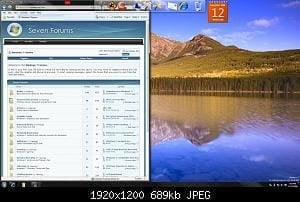
This will show you how to turn Aero Snap and Aero Shake feature on or off in Windows 7. - Dragging a window by the title bar to the left and right edge of the screen will fill that half the screen with that window when the mouse pointer reaches the edge of the screen. Dragging the window down a bit will restore the window back to how it was before.
- Placing the mouse pointer on the top or bottom border of a window until the mouse pointer turns into an up-down double arrow and left click and hold, then drag the top or bottom window border to the top or bottom edge of the screen. This will fill the top and bottom of the screen within the left and right borders of the window. Dragging the window down a bit, or double clicking in the window's title bar, will restore the window back to how it was before.
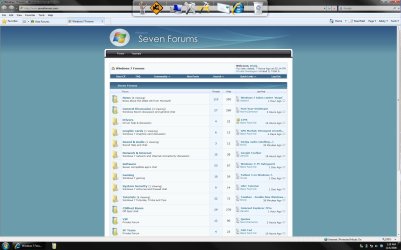
- Dragging a window by the title bar to the top edge of the screen will maximize the window to fill the desktop when the mouse pointer reaches the top edge of the screen. Dragging the window down a bit, or double clicking in the window's title bar, will restore the window back to how it was before.
 Note
Aero Snap is turned on by default in Windows 7 if your system meets the Aero requirements below.
 Warning
Aero Requirements to be Enabled in Windows 7
NOTE: While Aero Snap works in all available themes in Windows 7, if your system does need to meet the requirements for Aero for Aero Snap to be supported, then Aero Snap will not work even when turned on. - Aero is not included in Windows 7 Home Basic or Windows 7 Starter editions.
- 1 GHz 32-bit or 64-bit processor
- 1 GB of system memory
- A graphics card with support for DirectX 9 graphics with at least 128 MB of memory.
- The graphics card must support Pixel Shader 2.0 and the Windows Display Driver Model (WDDM).
- The computer display color depth must be set to 32 bits per pixel.
- Desktop composition needs to be enabled (checked) in Visual Effects.
- The Desktop Window Manager Session Manager and Themes Services need to be set as Started and Automatic.
- Refresh or update your WEI score. You will need an WEI score minimum of 2.0 in both Graphics & Gaming graphics in order for Aero to be activated.
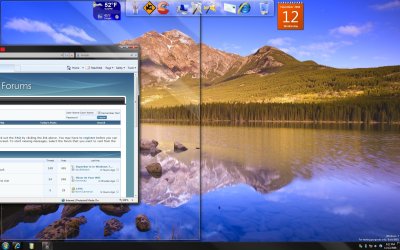
EXAMPLE: Aero Snap to Fill a Screen Side with a Window
EXAMPLE: Aero Snap to Maximize a Window
 OPTION ONE 
Through the Ease Of Access Center
1. Open the Control Panel (All Items view), and click on the Ease of Access Center icon.
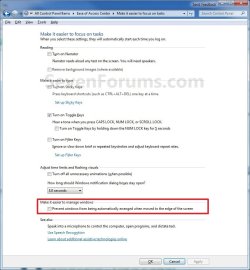
2. Click on either the Make the mouse easier to use, Make the Keyboard Easier To Use, or Make it easier to focus on tasks link. (See screenshot below)
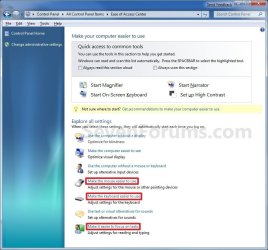
3. To Turn On Aero Snap and Aero ShakeA) Uncheck the Prevent windows from being automatically arranged when moved to the edged of the screen box. (See screenshots below step 5)
B) Go to step 5.
4. To Turn Off Aero Snap and Aero ShakeA) Check the Prevent windows from being automatically arranged when moved to the edged of the screen box. (See screenshots below step 5)
5. Click on OK. (See screenshots below)

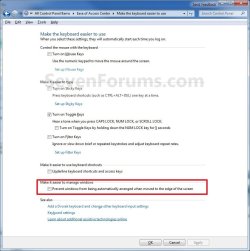
6. Close the Ease of Access Center window. (See screenshot below step 2)
 OPTION TWO 
Using a REG File Download
1. To Enable Aero Snap and Aero ShakeA) Click on the Download button below to download the file below.Enabled_Aero_Snap.reg

B) Go to step 3.
2. To Disable Aero Snap and Aero ShakeA) Click on the Download button below to download the file below.Disabled_Aero_Snap.reg

3. Save the .reg file to your desktop.
4. Right click on the downloaded .reg file, and click on Merge.
5. Click on Run, Yes (UAC), Yes, and OK when prompted.
6. Log off and log on, or restart the computer to apply.
7. When done, you can delete the downloaded .reg file if you like.
 OPTION THREE 
Manually in Registry Editor
1. Open the Start Menu, then type regedit in the search boxand press Enter. (See screenshot below)
2. If prompted by UAC, then click on Yes.
3. In regedit, go to: (See screenshot below)
HKEY_CURRENT_USER\Control Panel\Desktop
4. In the right pane, right click on WindowArrangementActive, click on Modify, and do step 5 or 6 below. (See screenshot above)
5. To Enable Aero Snap and Aero ShakeA) Type in 1, click on OK, and go to step 7 below. (See screenshot below step 6A)
6. To Disable Aero Snap and Aero ShakeA) Type in 0 (number), click on OK, and go to step 7 below. (See screenshot below)
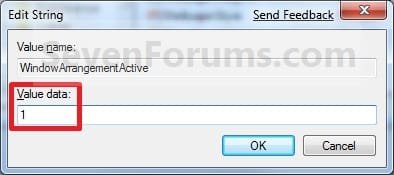
7. In the right pane, right click on DockMoving, click on Modify, and repeat step 5 or 6 above. (see screenshot below step 3)
8. Close regedit.
9. Log off and log on, or restart the computer.
That's it,
Shawn
|
|
|
|
|
28 Jan 2009
|
#1
|
|
|
That's where it is, I was looking for the location to turn it off if ever needed. I actually set SnapSizing in the registry to 0 thinking it might disable it. It didn't and suddenly my Action Center went off saying my AV and Windows Defender were disabled/not installed.  LMAO
Thanks Shawn!
|
My System Specs |
|
Computer type PC/Desktop
System Manufacturer/Model Number Airbot 2.0
OS Windows 7 Ultimate x64 SP1
CPU Core i7 920 (D0) @ 4Ghz, *26c idle *65c full load on air
Motherboard Asus P6X58D Premium - Sata 6Gb/s - USB 3.0
Memory 12GB DDR3 Corsair Dominator -CMD12GX3M6A1600C8 at 1600MHz
Graphics Card Zotac Geforce GTX 770
Sound Card ASUS Xonar D2X
Monitor(s) Displays 1 LG 24" Flatron W2453V-PF 1 Samsung 24" P2450H both 2ms RT
Screen Resolution 1920x1080@60hz
Keyboard Logitech Wireless MK700
Mouse Logitech Wireless MK700
PSU Corsair HX1000W
Case Cooler Master HAF 932
Cooling Case Fans *3 230mm, *1 140mm/CPU - *Tuniq Tower 120 Extreme
Hard Drives 1 Samsung 250GB 840 Evo SSD
1 OCZ Vertex2 180GB SSD
1 TB Samsung Spinpoint F1 7200RPM 32MB cache
2 500GB WD Caviar Blacks 7200RPM 32MB cache (WD5001AALS)
Pioneer DVD Burner DVR-S18M
Internet Speed DL 15 Mbps UL 0.98 Mbps
Antivirus None
Browser Firefox Nightly
Other Info Processor-7.7 *RAM- 7.9 *Graphics-7.9 *Gaming Graphics- 7.9 *SSD- 7.8 W.E.I final score= 7.7
*Phone- LG Nexus 5
|
28 Jan 2009
|
#2
|
|
|
You're welcome Aaron.
LOL, I would of loved to have seen your face when that happened.
|
My System Specs |
|
Computer type PC/Desktop
System Manufacturer/Model Number Self built custom
OS 64-bit Windows 10 Pro
CPU Intel i7-3930K 3.2 Ghz (O/C 4 Ghz)
Motherboard ASRock X79 Extreme11
Memory 32 GB (4x8GB) G.SKILL DDR3 Quad PC3-19200 2400MHz
Graphics Card MSI N760 TF 4GB5/OC GTX 760 4GB
Sound Card SB Recon 3Di Integrated Chip
Monitor(s) Displays 3 x 27" Asus VE278Q
Screen Resolution 1920x1080
Keyboard Logitech wireless K800
Mouse Logitech MX Master
PSU OCZ Series Gold OCZZ1000M 1000W
Case Corsair Air 740
Cooling Corsair Hydro H115i
Hard Drives 256GB OCZ Vector
6TB WD Black WD6001FZWX
Internet Speed 300 Mb/s Download and 30 Mb/s Upload
Antivirus Malwarebyte Anti-Malware Premium
Browser IE11
Other Info Creative F200 webcam
* Lite-On iHBS212 12x BD Writer
* Samsung CLX-3175FW Printer
* Linksys EA9500 Router
* Arris SB6190 Cable Modem
* APC SMART-UPS RT 1000 XL
|
28 Jan 2009
|
#3
|
|
|
Probably turned red, LOL.
|
My System Specs |
|
Computer type PC/Desktop
System Manufacturer/Model Number Airbot 2.0
OS Windows 7 Ultimate x64 SP1
CPU Core i7 920 (D0) @ 4Ghz, *26c idle *65c full load on air
Motherboard Asus P6X58D Premium - Sata 6Gb/s - USB 3.0
Memory 12GB DDR3 Corsair Dominator -CMD12GX3M6A1600C8 at 1600MHz
Graphics Card Zotac Geforce GTX 770
Sound Card ASUS Xonar D2X
Monitor(s) Displays 1 LG 24" Flatron W2453V-PF 1 Samsung 24" P2450H both 2ms RT
Screen Resolution 1920x1080@60hz
Keyboard Logitech Wireless MK700
Mouse Logitech Wireless MK700
PSU Corsair HX1000W
Case Cooler Master HAF 932
Cooling Case Fans *3 230mm, *1 140mm/CPU - *Tuniq Tower 120 Extreme
Hard Drives 1 Samsung 250GB 840 Evo SSD
1 OCZ Vertex2 180GB SSD
1 TB Samsung Spinpoint F1 7200RPM 32MB cache
2 500GB WD Caviar Blacks 7200RPM 32MB cache (WD5001AALS)
Pioneer DVD Burner DVR-S18M
Internet Speed DL 15 Mbps UL 0.98 Mbps
Antivirus None
Browser Firefox Nightly
Other Info Processor-7.7 *RAM- 7.9 *Graphics-7.9 *Gaming Graphics- 7.9 *SSD- 7.8 W.E.I final score= 7.7
*Phone- LG Nexus 5
|
28 Jan 2009
|
#4
|
|
|
 Fantastic thread!!! I actually uninstalled an earlier version of 7 a few times because this feature dissabled its self.
And i love it
|
My System Specs |
|
System Manufacturer/Model Number Home Brew
OS Vista X64 ultimate/ 7 X64 Ultimate (7264)
CPU Q6600 @3.4GHz
Motherboard Asus P5Q-Pro
Memory Crucial Ballastix 4GB DDR2 PC2-6400C4 @ 1033MHz
Graphics Card Nvidia 7600gt (Got better things to do than game!)
Sound Card Onboard
Monitor(s) Displays 19" Widescreen
Screen Resolution 1440 x 900
Keyboard Generic
Mouse Logitech MX1100 Laser Cordless
PSU Hiper Type-M 880W
Case Tai-Chi
Cooling Custom water
Hard Drives WD800HLFS OS Drive
1.5TB Total Storage
Internet Speed 20Meg
|
28 Jan 2009
|
#5
|
|
|
Shawn, this setting ( Prevent windows from being automatically arranged when moved to the edged of the screen) is actually in the "Make the Keyboard easier to use" and the "Make it easier to focus on tasks" sections as well.
|
My System Specs |
|
Computer type PC/Desktop
System Manufacturer/Model Number Airbot 2.0
OS Windows 7 Ultimate x64 SP1
CPU Core i7 920 (D0) @ 4Ghz, *26c idle *65c full load on air
Motherboard Asus P6X58D Premium - Sata 6Gb/s - USB 3.0
Memory 12GB DDR3 Corsair Dominator -CMD12GX3M6A1600C8 at 1600MHz
Graphics Card Zotac Geforce GTX 770
Sound Card ASUS Xonar D2X
Monitor(s) Displays 1 LG 24" Flatron W2453V-PF 1 Samsung 24" P2450H both 2ms RT
Screen Resolution 1920x1080@60hz
Keyboard Logitech Wireless MK700
Mouse Logitech Wireless MK700
PSU Corsair HX1000W
Case Cooler Master HAF 932
Cooling Case Fans *3 230mm, *1 140mm/CPU - *Tuniq Tower 120 Extreme
Hard Drives 1 Samsung 250GB 840 Evo SSD
1 OCZ Vertex2 180GB SSD
1 TB Samsung Spinpoint F1 7200RPM 32MB cache
2 500GB WD Caviar Blacks 7200RPM 32MB cache (WD5001AALS)
Pioneer DVD Burner DVR-S18M
Internet Speed DL 15 Mbps UL 0.98 Mbps
Antivirus None
Browser Firefox Nightly
Other Info Processor-7.7 *RAM- 7.9 *Graphics-7.9 *Gaming Graphics- 7.9 *SSD- 7.8 W.E.I final score= 7.7
*Phone- LG Nexus 5
|
28 Jan 2009
|
#6
|
|
|
Aaron,
Added.
|
My System Specs |
|
Computer type PC/Desktop
System Manufacturer/Model Number Self built custom
OS 64-bit Windows 10 Pro
CPU Intel i7-3930K 3.2 Ghz (O/C 4 Ghz)
Motherboard ASRock X79 Extreme11
Memory 32 GB (4x8GB) G.SKILL DDR3 Quad PC3-19200 2400MHz
Graphics Card MSI N760 TF 4GB5/OC GTX 760 4GB
Sound Card SB Recon 3Di Integrated Chip
Monitor(s) Displays 3 x 27" Asus VE278Q
Screen Resolution 1920x1080
Keyboard Logitech wireless K800
Mouse Logitech MX Master
PSU OCZ Series Gold OCZZ1000M 1000W
Case Corsair Air 740
Cooling Corsair Hydro H115i
Hard Drives 256GB OCZ Vector
6TB WD Black WD6001FZWX
Internet Speed 300 Mb/s Download and 30 Mb/s Upload
Antivirus Malwarebyte Anti-Malware Premium
Browser IE11
Other Info Creative F200 webcam
* Lite-On iHBS212 12x BD Writer
* Samsung CLX-3175FW Printer
* Linksys EA9500 Router
* Arris SB6190 Cable Modem
* APC SMART-UPS RT 1000 XL
|
29 Jan 2009
|
#7
|
|
|
Thanks, Brink
|
My System Specs |
|
Computer type PC/Desktop
System Manufacturer/Model Number Custom Built
OS Windows 8.1 Pro x64
CPU Intel Core i7 4790k
Motherboard MSI Z97S Krait Edition
Memory 8GB Corsair Dominator 1600MHz
Graphics Card MSI TwinFrozr GeForce GTX770
Sound Card ASUS Xonar DX/XD 7.1
Monitor(s) Displays Dell 24" S2409W + Dell 20" E207WFP
Screen Resolution 1920x1080 + 1680x1050
Keyboard Logitech G510S Keyboard
Mouse Logitech G500S Laser Mouse
PSU Corsair HX850 modular
Case Fractal Design Define R4
Cooling Corsair H60 w/ twin Corsair SP120 fans
Hard Drives 1x 120GB OCZ Agility 3, 1x 750GB Western Digital Caviar Black, 1x 1TB Western Digital Caviar Blue
Internet Speed 40Mbps
Antivirus Microsoft Security Essentials
Browser Google Chrome
Other Info LG Blu-Ray player
|
29 Jan 2009
|
#8
|
|
|
You're welcome Everlong.
|
My System Specs |
|
Computer type PC/Desktop
System Manufacturer/Model Number Self built custom
OS 64-bit Windows 10 Pro
CPU Intel i7-3930K 3.2 Ghz (O/C 4 Ghz)
Motherboard ASRock X79 Extreme11
Memory 32 GB (4x8GB) G.SKILL DDR3 Quad PC3-19200 2400MHz
Graphics Card MSI N760 TF 4GB5/OC GTX 760 4GB
Sound Card SB Recon 3Di Integrated Chip
Monitor(s) Displays 3 x 27" Asus VE278Q
Screen Resolution 1920x1080
Keyboard Logitech wireless K800
Mouse Logitech MX Master
PSU OCZ Series Gold OCZZ1000M 1000W
Case Corsair Air 740
Cooling Corsair Hydro H115i
Hard Drives 256GB OCZ Vector
6TB WD Black WD6001FZWX
Internet Speed 300 Mb/s Download and 30 Mb/s Upload
Antivirus Malwarebyte Anti-Malware Premium
Browser IE11
Other Info Creative F200 webcam
* Lite-On iHBS212 12x BD Writer
* Samsung CLX-3175FW Printer
* Linksys EA9500 Router
* Arris SB6190 Cable Modem
* APC SMART-UPS RT 1000 XL
|
12 Feb 2009
|
#9
|
|
|
the little off-top
Just one question about additional taskbar panel on the top of the screenshots, is it standart win7 feature or 3rd party app? If so, what is?
Thanks,
Andriy
|
My System Specs |
|
|
|