
How to Change Date Format in Windows 7
Information
This tutorial will show you how to change the region date format to how you want it to display in Windows 7.
Here's How: 1. Open the Control Panel (icons view), and click/tap on the Regional and Language Options icon, then close the Control Panel.
2. Under the Formats tab, select the format regional language that you want to use. (See screenshot below step 3)
3. Change the date formats to how you want them displayed, and click/tap on the Apply button. (See screenshot below)
NOTE: This will be for how the Short date, Long date, and First day of the week will be displayed as.
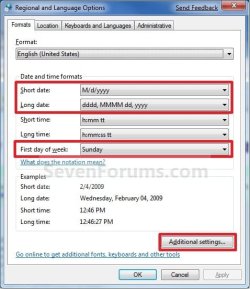
4. Click/tap on the Additional Settings button. (See screenshot above)
NOTE: This will allow you to further customize the date format.
5. Click/tap on the Date tab, and select or type in the date formats to how you want them displayed. (See screenshot below)
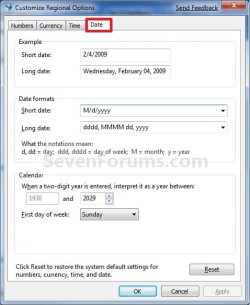
6. When done, click/tap on OK. (See screenshot above)
7. Click/tap on OK. (See screenshot below step 4)
That's it,
Shawn
Related Tutorials
- How to Show Day and Month Names in the Windows 7 Taskbar System Tray Date
- How to Change the Time Zone in Windows 7
- How to Change Date and Time in Windows 7
- How to Change Regional Format Language in Windows 7 and Windows 8
- How to Change Time Format in Windows 7
- How to Change Numbers and Measurements Format in Windows 7 and Windows 8
- How to Change Currency Format in Windows 7 and Windows 8
- How to Restore Default Regional Format Settings in Windows 7 and Windows 8
- How to Copy Your Region and Language Settings to New Users and Welcome Screen
- How to Create a "Date and Time" Shortcut in Vista, Windows 7, and Windows 8
- How to Add or Remove the "Formats" Tab in Region and Language
- How to Add Additional Clocks in Windows 7 and Windows 8
Last edited:

