Windows Live Mail - Import Windows 7 and Vista Contacts

How to Import Vista and Windows 7 Contacts and Contact Groups into Windows Live Mail

   Information
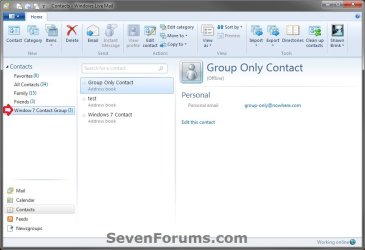
This will show you how to import your contacts and contact groups from Vista into Windows Live Mail that is in Windows 7.

   Note
If you already have your contacts saved (step 2), then Windows Live Mail will automatically import them after installing and opening Windows Live Mail the first time.

   Tip
You can get information on how to download the latest version of Windows Live Mail here.

   Warning
In Contact Groups from Vista Windows Mail, only the contacts that are also included as normal Contacts will be imported into Windows Live Mail. Contacts that were created for the Contact Group only will not be imported into Windows Live Mail. You will need to write these down and manually add them back into Windows Live Mail.


Here's How:
1. To Import Windows 7 Contacts and Contact Groups into Windows Live Mail
A) Go to step 3.
2. To Import Vista Contacts and Contact Groups
NOTE: This is if you wanted to import your contacts and contact groups from Vista into Windows 7 first, then import them into Windows Live Mail that you have installed in Windows 7.
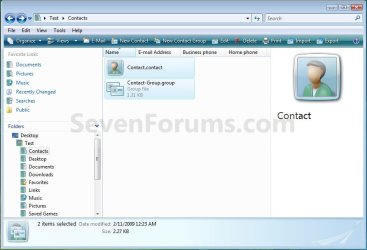
A) In Vista, navigate to the C:\Users\(user name)\Contacts folder, then copy all of your contacts and contact groups to something (ex: DVD, USB drive, etc...) to use to save into Windows 7 from. (see screenshot below)
WARNING: Be sure to read the warning box about Contacts that were created only for the Contact Group.
Vista_Contacts.jpg
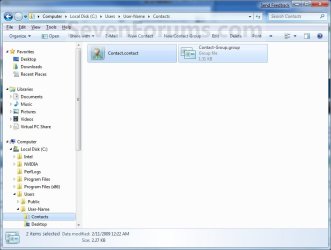
B) In Windows 7, copy the Vista contacts and contact groups into your C:\Users\(user name)\Contacts folder. (See screenshot below)
NOTE: If you already have your contacts saved here, then Windows Live Mail will automatically import them after installing and opening Windows Live Mail the first time.
Windows7_Contacts.jpg
3. Open Windows Live Mail.

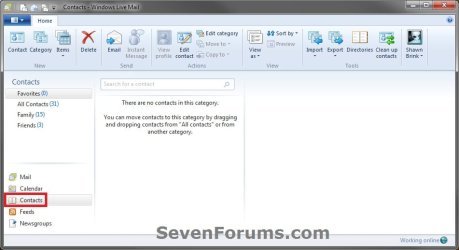
4. In the left folder pane towards the bottom left of Windows Live Mail, click on Contacts. (see screenshot below)
WLM-1.jpg
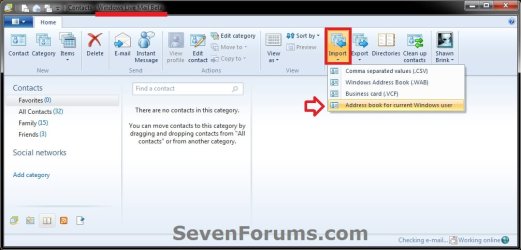
5. In the Windows Live Mail Contacts window, click on the Import ribbon icon, and click on Address book for current Windows user. (see screenshot below)
WLM_Wave-4_Beta-Import.jpg
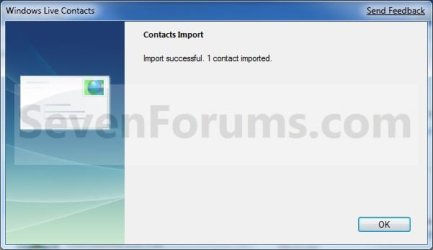
6. Click on OK. (see screenshot below)
Import-2.jpg
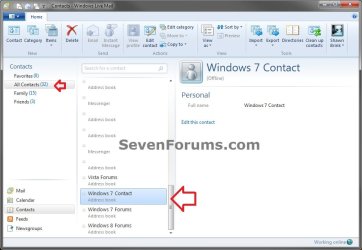
7. The Vista or Windows 7 contacts and contact groups are now imported into Windows Live Mail. (see screenshot below)
Import.jpg

Contact_Groups.jpg
That's it,
Shawn


Last edited:
thanks forthat shaun

much appreciated
 

My Computer

Computer Manufacturer/Model Number
packard bell g5800
OS
windows 7 64 bit
CPU
i7 870
Motherboard
packard bell
Memory
12gig ddr3
Graphics Card(s)
firepro v4800
Monitor(s) Displays
hazro 27inch
Screen Resolution
2550x1550
Hard Drives
corsair ssd 250gig
seagate 500gig
packard bell 1tb
You're most welcome Thinktank. :)
 

My Computer

Computer type
PC/Desktop
Computer Manufacturer/Model Number
Self built custom
OS
64-bit Windows 11 Pro for Workstations
CPU
Intel i7-8700K OC'd to 5 GHz
Motherboard
ASUS ROG Maximus XI Formula Z390
Memory
64 GB (4x16GB) G.SKILL TridentZ RGB DDR4 3600 MHz
Graphics Card(s)
ASUS ROG-STRIX-GTX1080TI-O11G-GAMING
Sound Card
Integrated
Monitor(s) Displays
2 x Samsung Odyssey G7 27"
Screen Resolution
2560x1440
Hard Drives
1TB Samsung 990 PRO M.2,
4TB Samsung 990 PRO PRO M.2,
TerraMaster F8 SSD Plus NAS
PSU
Seasonic Prime Titanium 850W
Case
Thermaltake Core P3
Cooling
Corsair Hydro H115i
Keyboard
Logitech wireless K800
Mouse
Logitech MX Master 4
Internet Speed
2 Gb/s Download and 100 Mb/s Upload
Antivirus
Malwarebyte Anti-Malware Premium
Browser
Google Chrome
Other Info
Logitech Z625 speaker system,
Logitech BRIO 4K Pro webcam,
HP Color LaserJet Pro MFP M477fdn,
APC SMART-UPS RT 1000 XL - SURT1000XLI,
Galaxy S23 Plus phone
Shawn: I have done exactly what you've described to import contacts from Vista Windows Mail into Win 7 Windows Live mail - with problems resulting. I have 16 folders (groups) of contacts, containing approx 500 contacts, and about 350 contacts not categorized. The first time I tried the process, I transferred 15 of 16 contact groups, and about 850 total contacts. Since one group was missing, I deleted everything and tried again. Now when I go though the process, I transfer only 2 of 16 contact groups (folders) and about 850 contacts go into the preset "all contacts" folder. I have deleted all contacts and re transferred with the same results. How do I transfer all the groups and contacts accurately, at this point?

Thanks for any help
coolhand
 
Last edited:

My Computer

OS
Windows 7 64 bit
Hello Coolhand, and welcome to Seven Forums.

Were these contacts that were added to a group, or were they contacts Created for Group Only like in the red warning box at the top of the tutorial?

Do you by chance have these contacts and contact groups tied to a Windows Live account (ex: hotmail)? If so, Windows Live Mail has a feature to transfer all contacts from the Live account into Windows Live Mail automatically.
 

My Computer

Computer type
PC/Desktop
Computer Manufacturer/Model Number
Self built custom
OS
64-bit Windows 11 Pro for Workstations
CPU
Intel i7-8700K OC'd to 5 GHz
Motherboard
ASUS ROG Maximus XI Formula Z390
Memory
64 GB (4x16GB) G.SKILL TridentZ RGB DDR4 3600 MHz
Graphics Card(s)
ASUS ROG-STRIX-GTX1080TI-O11G-GAMING
Sound Card
Integrated
Monitor(s) Displays
2 x Samsung Odyssey G7 27"
Screen Resolution
2560x1440
Hard Drives
1TB Samsung 990 PRO M.2,
4TB Samsung 990 PRO PRO M.2,
TerraMaster F8 SSD Plus NAS
PSU
Seasonic Prime Titanium 850W
Case
Thermaltake Core P3
Cooling
Corsair Hydro H115i
Keyboard
Logitech wireless K800
Mouse
Logitech MX Master 4
Internet Speed
2 Gb/s Download and 100 Mb/s Upload
Antivirus
Malwarebyte Anti-Malware Premium
Browser
Google Chrome
Other Info
Logitech Z625 speaker system,
Logitech BRIO 4K Pro webcam,
HP Color LaserJet Pro MFP M477fdn,
APC SMART-UPS RT 1000 XL - SURT1000XLI,
Galaxy S23 Plus phone
This procedure works for Windows 8!

Thank you so much. I spent an evening and half a day searching for your solution. It works fine for Windows 8 as well. I was importing contact files recovered from a dead Vista system

Clean and concise.

ctmsr
 

My Computer

Computer type
Laptop
Computer Manufacturer/Model Number
Toshiba
OS
Windows 8 home premium, 64 bit
CPU
Intel
Motherboard
2.40 gigahertz Intel Core i3-3110M
Memory
4 gig
Graphics Card(s)
unknown
Hard Drives
Hitachi HTS547550A9E384 [Hard drive] (500.11 GB) -- drive
Antivirus
webroot
Browser
IE10
You're most welcome ctmst, and welcome to Seven Forums.

I'm glad it was able to help, and thank you for confirming that it also works in Windows 8. :)
 

My Computer

Computer type
PC/Desktop
Computer Manufacturer/Model Number
Self built custom
OS
64-bit Windows 11 Pro for Workstations
CPU
Intel i7-8700K OC'd to 5 GHz
Motherboard
ASUS ROG Maximus XI Formula Z390
Memory
64 GB (4x16GB) G.SKILL TridentZ RGB DDR4 3600 MHz
Graphics Card(s)
ASUS ROG-STRIX-GTX1080TI-O11G-GAMING
Sound Card
Integrated
Monitor(s) Displays
2 x Samsung Odyssey G7 27"
Screen Resolution
2560x1440
Hard Drives
1TB Samsung 990 PRO M.2,
4TB Samsung 990 PRO PRO M.2,
TerraMaster F8 SSD Plus NAS
PSU
Seasonic Prime Titanium 850W
Case
Thermaltake Core P3
Cooling
Corsair Hydro H115i
Keyboard
Logitech wireless K800
Mouse
Logitech MX Master 4
Internet Speed
2 Gb/s Download and 100 Mb/s Upload
Antivirus
Malwarebyte Anti-Malware Premium
Browser
Google Chrome
Other Info
Logitech Z625 speaker system,
Logitech BRIO 4K Pro webcam,
HP Color LaserJet Pro MFP M477fdn,
APC SMART-UPS RT 1000 XL - SURT1000XLI,
Galaxy S23 Plus phone
Shawn, I followed the procedure you outlined, but was told nothing was imported.

Only 20 of my original total of over 100 contacts are now shown in WLM contacts.

Is it possible to import contacts from my image backups of my C drive, and if so how.

Your early reply would be appreciated.

Thanks and regards,
Roy Whitethread
 

My Computer

Computer Manufacturer/Model Number
Desktop System Built by local OEM
OS
Windows 7 Professsional 32 bit
CPU
Intel Core 2 Duo [email protected]
Motherboard
4Core1333FullHD
Memory
4GB DDR2
Graphics Card(s)
ATI RADEON Xpress 1200 Series
Sound Card
Realtek High Definition Audio
Monitor(s) Displays
BenQ E2200HD D-Sub
Screen Resolution
1440x900
Hard Drives
5 (1 connected via USB)
PSU
PC Star
Keyboard
Standard PS/2 Keyboard
Mouse
Microsoft PS/2 Mouse

My Computer

Computer type
PC/Desktop
Computer Manufacturer/Model Number
Self built custom
OS
64-bit Windows 11 Pro for Workstations
CPU
Intel i7-8700K OC'd to 5 GHz
Motherboard
ASUS ROG Maximus XI Formula Z390
Memory
64 GB (4x16GB) G.SKILL TridentZ RGB DDR4 3600 MHz
Graphics Card(s)
ASUS ROG-STRIX-GTX1080TI-O11G-GAMING
Sound Card
Integrated
Monitor(s) Displays
2 x Samsung Odyssey G7 27"
Screen Resolution
2560x1440
Hard Drives
1TB Samsung 990 PRO M.2,
4TB Samsung 990 PRO PRO M.2,
TerraMaster F8 SSD Plus NAS
PSU
Seasonic Prime Titanium 850W
Case
Thermaltake Core P3
Cooling
Corsair Hydro H115i
Keyboard
Logitech wireless K800
Mouse
Logitech MX Master 4
Internet Speed
2 Gb/s Download and 100 Mb/s Upload
Antivirus
Malwarebyte Anti-Malware Premium
Browser
Google Chrome
Other Info
Logitech Z625 speaker system,
Logitech BRIO 4K Pro webcam,
HP Color LaserJet Pro MFP M477fdn,
APC SMART-UPS RT 1000 XL - SURT1000XLI,
Galaxy S23 Plus phone
Shawn, thanks but I should have mentioned that my image files were created using Macrium Reflect. Can you tell me how to extract the contacts from those images?
 

My Computer

Computer Manufacturer/Model Number
Desktop System Built by local OEM
OS
Windows 7 Professsional 32 bit
CPU
Intel Core 2 Duo [email protected]
Motherboard
4Core1333FullHD
Memory
4GB DDR2
Graphics Card(s)
ATI RADEON Xpress 1200 Series
Sound Card
Realtek High Definition Audio
Monitor(s) Displays
BenQ E2200HD D-Sub
Screen Resolution
1440x900
Hard Drives
5 (1 connected via USB)
PSU
PC Star
Keyboard
Standard PS/2 Keyboard
Mouse
Microsoft PS/2 Mouse

My Computer

Computer type
PC/Desktop
Computer Manufacturer/Model Number
Self built custom
OS
64-bit Windows 11 Pro for Workstations
CPU
Intel i7-8700K OC'd to 5 GHz
Motherboard
ASUS ROG Maximus XI Formula Z390
Memory
64 GB (4x16GB) G.SKILL TridentZ RGB DDR4 3600 MHz
Graphics Card(s)
ASUS ROG-STRIX-GTX1080TI-O11G-GAMING
Sound Card
Integrated
Monitor(s) Displays
2 x Samsung Odyssey G7 27"
Screen Resolution
2560x1440
Hard Drives
1TB Samsung 990 PRO M.2,
4TB Samsung 990 PRO PRO M.2,
TerraMaster F8 SSD Plus NAS
PSU
Seasonic Prime Titanium 850W
Case
Thermaltake Core P3
Cooling
Corsair Hydro H115i
Keyboard
Logitech wireless K800
Mouse
Logitech MX Master 4
Internet Speed
2 Gb/s Download and 100 Mb/s Upload
Antivirus
Malwarebyte Anti-Malware Premium
Browser
Google Chrome
Other Info
Logitech Z625 speaker system,
Logitech BRIO 4K Pro webcam,
HP Color LaserJet Pro MFP M477fdn,
APC SMART-UPS RT 1000 XL - SURT1000XLI,
Galaxy S23 Plus phone
Shawn. thanks again. I knew how to browse Macrium images, and that I could copy and paste items from the images, but I can't find out how to import contacts from the backup of Windows Live Mail. (I have a full and a number of incremental backups of my C drive, and also a separate backup plus incrementals of Windows Live Mail).

Please advise further.

Thanks and regards,
Roy
 

My Computer

Computer Manufacturer/Model Number
Desktop System Built by local OEM
OS
Windows 7 Professsional 32 bit
CPU
Intel Core 2 Duo [email protected]
Motherboard
4Core1333FullHD
Memory
4GB DDR2
Graphics Card(s)
ATI RADEON Xpress 1200 Series
Sound Card
Realtek High Definition Audio
Monitor(s) Displays
BenQ E2200HD D-Sub
Screen Resolution
1440x900
Hard Drives
5 (1 connected via USB)
PSU
PC Star
Keyboard
Standard PS/2 Keyboard
Mouse
Microsoft PS/2 Mouse
I would think that you should be able to extract the contact files from the Macrium image, then go through the steps in the tutorial to select the extracted contact files to import them.
 

My Computer

Computer type
PC/Desktop
Computer Manufacturer/Model Number
Self built custom
OS
64-bit Windows 11 Pro for Workstations
CPU
Intel i7-8700K OC'd to 5 GHz
Motherboard
ASUS ROG Maximus XI Formula Z390
Memory
64 GB (4x16GB) G.SKILL TridentZ RGB DDR4 3600 MHz
Graphics Card(s)
ASUS ROG-STRIX-GTX1080TI-O11G-GAMING
Sound Card
Integrated
Monitor(s) Displays
2 x Samsung Odyssey G7 27"
Screen Resolution
2560x1440
Hard Drives
1TB Samsung 990 PRO M.2,
4TB Samsung 990 PRO PRO M.2,
TerraMaster F8 SSD Plus NAS
PSU
Seasonic Prime Titanium 850W
Case
Thermaltake Core P3
Cooling
Corsair Hydro H115i
Keyboard
Logitech wireless K800
Mouse
Logitech MX Master 4
Internet Speed
2 Gb/s Download and 100 Mb/s Upload
Antivirus
Malwarebyte Anti-Malware Premium
Browser
Google Chrome
Other Info
Logitech Z625 speaker system,
Logitech BRIO 4K Pro webcam,
HP Color LaserJet Pro MFP M477fdn,
APC SMART-UPS RT 1000 XL - SURT1000XLI,
Galaxy S23 Plus phone
Hello Shawn,

In the Macrium Reflect image files, what file extension should I look for to import contacts?
 

My Computer

Computer Manufacturer/Model Number
Desktop System Built by local OEM
OS
Windows 7 Professsional 32 bit
CPU
Intel Core 2 Duo [email protected]
Motherboard
4Core1333FullHD
Memory
4GB DDR2
Graphics Card(s)
ATI RADEON Xpress 1200 Series
Sound Card
Realtek High Definition Audio
Monitor(s) Displays
BenQ E2200HD D-Sub
Screen Resolution
1440x900
Hard Drives
5 (1 connected via USB)
PSU
PC Star
Keyboard
Standard PS/2 Keyboard
Mouse
Microsoft PS/2 Mouse
I'd restore the whole Contacts folder from the image.
 

My Computer

Computer type
PC/Desktop
Computer Manufacturer/Model Number
Self built custom
OS
64-bit Windows 11 Pro for Workstations
CPU
Intel i7-8700K OC'd to 5 GHz
Motherboard
ASUS ROG Maximus XI Formula Z390
Memory
64 GB (4x16GB) G.SKILL TridentZ RGB DDR4 3600 MHz
Graphics Card(s)
ASUS ROG-STRIX-GTX1080TI-O11G-GAMING
Sound Card
Integrated
Monitor(s) Displays
2 x Samsung Odyssey G7 27"
Screen Resolution
2560x1440
Hard Drives
1TB Samsung 990 PRO M.2,
4TB Samsung 990 PRO PRO M.2,
TerraMaster F8 SSD Plus NAS
PSU
Seasonic Prime Titanium 850W
Case
Thermaltake Core P3
Cooling
Corsair Hydro H115i
Keyboard
Logitech wireless K800
Mouse
Logitech MX Master 4
Internet Speed
2 Gb/s Download and 100 Mb/s Upload
Antivirus
Malwarebyte Anti-Malware Premium
Browser
Google Chrome
Other Info
Logitech Z625 speaker system,
Logitech BRIO 4K Pro webcam,
HP Color LaserJet Pro MFP M477fdn,
APC SMART-UPS RT 1000 XL - SURT1000XLI,
Galaxy S23 Plus phone
Does anyone have a sample contacts file for me to download? Please provide me with one.
 

My Computer

Computer type
PC/Desktop
Computer Manufacturer/Model Number
BIOS: BIOS Date: 08/20/18 12:33:01 Ver: 05.0000D.
OS
Windows 7
CPU
Processor: AMD Ryzen 7 - 1800X - 8 Core Processor - 3.6GHz.
Motherboard
AMD Ryzen 7 - 1800X - 8 Core Processor.
Memory
16 GB RAM.
Graphics Card(s)
NVIDIA GeForce GTX 1060 6GB.
Sound Card
NVIDIA/Realtek High Definition Audio.
Monitor(s) Displays
Generic PnP Monitor.
Screen Resolution
1920x1080
Hard Drives
8TB Hard Drives.
PSU
Current Setting: {5C67A112-A4C9-483F-B4A7-1D473BECAFDC}.
Case
Antec.
Cooling
N/A
Keyboard
HID Keyboard Device.
Mouse
HID Compliant Mouse.
Internet Speed
Broadband 20MB.
Antivirus
Microsoft Security Essentials, Win/MS Defender, Malwarebytes
Browser
Microsoft Edge, Internet Explorer, Google Chrome, Opera.
Other Info
Since I am using Windows 7 a lot for creating .themepack theme files, I need to have access to the SevenForums to view and download cursor packs for Windows 7 when I create fully customized themes. This website has many dazzling cursor packs available for download where users can apply them to suit the good mood look for Windows 7 to make it more attractive.
Does anyone have a sample contacts file for me to download? Please provide me with one.

Hello mate, :-)

You can open your "C:\Users\<username>\Contacts" folder, and select to create a New > Contact file from there to use a sample.
 

My Computer

Computer type
PC/Desktop
Computer Manufacturer/Model Number
Self built custom
OS
64-bit Windows 11 Pro for Workstations
CPU
Intel i7-8700K OC'd to 5 GHz
Motherboard
ASUS ROG Maximus XI Formula Z390
Memory
64 GB (4x16GB) G.SKILL TridentZ RGB DDR4 3600 MHz
Graphics Card(s)
ASUS ROG-STRIX-GTX1080TI-O11G-GAMING
Sound Card
Integrated
Monitor(s) Displays
2 x Samsung Odyssey G7 27"
Screen Resolution
2560x1440
Hard Drives
1TB Samsung 990 PRO M.2,
4TB Samsung 990 PRO PRO M.2,
TerraMaster F8 SSD Plus NAS
PSU
Seasonic Prime Titanium 850W
Case
Thermaltake Core P3
Cooling
Corsair Hydro H115i
Keyboard
Logitech wireless K800
Mouse
Logitech MX Master 4
Internet Speed
2 Gb/s Download and 100 Mb/s Upload
Antivirus
Malwarebyte Anti-Malware Premium
Browser
Google Chrome
Other Info
Logitech Z625 speaker system,
Logitech BRIO 4K Pro webcam,
HP Color LaserJet Pro MFP M477fdn,
APC SMART-UPS RT 1000 XL - SURT1000XLI,
Galaxy S23 Plus phone
I have done that. Thanks for the tip.
 

My Computer

Computer type
PC/Desktop
Computer Manufacturer/Model Number
BIOS: BIOS Date: 08/20/18 12:33:01 Ver: 05.0000D.
OS
Windows 7
CPU
Processor: AMD Ryzen 7 - 1800X - 8 Core Processor - 3.6GHz.
Motherboard
AMD Ryzen 7 - 1800X - 8 Core Processor.
Memory
16 GB RAM.
Graphics Card(s)
NVIDIA GeForce GTX 1060 6GB.
Sound Card
NVIDIA/Realtek High Definition Audio.
Monitor(s) Displays
Generic PnP Monitor.
Screen Resolution
1920x1080
Hard Drives
8TB Hard Drives.
PSU
Current Setting: {5C67A112-A4C9-483F-B4A7-1D473BECAFDC}.
Case
Antec.
Cooling
N/A
Keyboard
HID Keyboard Device.
Mouse
HID Compliant Mouse.
Internet Speed
Broadband 20MB.
Antivirus
Microsoft Security Essentials, Win/MS Defender, Malwarebytes
Browser
Microsoft Edge, Internet Explorer, Google Chrome, Opera.
Other Info
Since I am using Windows 7 a lot for creating .themepack theme files, I need to have access to the SevenForums to view and download cursor packs for Windows 7 when I create fully customized themes. This website has many dazzling cursor packs available for download where users can apply them to suit the good mood look for Windows 7 to make it more attractive.

My Computer

Computer type
PC/Desktop
Computer Manufacturer/Model Number
Self built custom
OS
64-bit Windows 11 Pro for Workstations
CPU
Intel i7-8700K OC'd to 5 GHz
Motherboard
ASUS ROG Maximus XI Formula Z390
Memory
64 GB (4x16GB) G.SKILL TridentZ RGB DDR4 3600 MHz
Graphics Card(s)
ASUS ROG-STRIX-GTX1080TI-O11G-GAMING
Sound Card
Integrated
Monitor(s) Displays
2 x Samsung Odyssey G7 27"
Screen Resolution
2560x1440
Hard Drives
1TB Samsung 990 PRO M.2,
4TB Samsung 990 PRO PRO M.2,
TerraMaster F8 SSD Plus NAS
PSU
Seasonic Prime Titanium 850W
Case
Thermaltake Core P3
Cooling
Corsair Hydro H115i
Keyboard
Logitech wireless K800
Mouse
Logitech MX Master 4
Internet Speed
2 Gb/s Download and 100 Mb/s Upload
Antivirus
Malwarebyte Anti-Malware Premium
Browser
Google Chrome
Other Info
Logitech Z625 speaker system,
Logitech BRIO 4K Pro webcam,
HP Color LaserJet Pro MFP M477fdn,
APC SMART-UPS RT 1000 XL - SURT1000XLI,
Galaxy S23 Plus phone
:-)
 

My Computer

Computer type
PC/Desktop
Computer Manufacturer/Model Number
BIOS: BIOS Date: 08/20/18 12:33:01 Ver: 05.0000D.
OS
Windows 7
CPU
Processor: AMD Ryzen 7 - 1800X - 8 Core Processor - 3.6GHz.
Motherboard
AMD Ryzen 7 - 1800X - 8 Core Processor.
Memory
16 GB RAM.
Graphics Card(s)
NVIDIA GeForce GTX 1060 6GB.
Sound Card
NVIDIA/Realtek High Definition Audio.
Monitor(s) Displays
Generic PnP Monitor.
Screen Resolution
1920x1080
Hard Drives
8TB Hard Drives.
PSU
Current Setting: {5C67A112-A4C9-483F-B4A7-1D473BECAFDC}.
Case
Antec.
Cooling
N/A
Keyboard
HID Keyboard Device.
Mouse
HID Compliant Mouse.
Internet Speed
Broadband 20MB.
Antivirus
Microsoft Security Essentials, Win/MS Defender, Malwarebytes
Browser
Microsoft Edge, Internet Explorer, Google Chrome, Opera.
Other Info
Since I am using Windows 7 a lot for creating .themepack theme files, I need to have access to the SevenForums to view and download cursor packs for Windows 7 when I create fully customized themes. This website has many dazzling cursor packs available for download where users can apply them to suit the good mood look for Windows 7 to make it more attractive.
Back
Top