
DreamScene - Install in Windows 7 and Vista

How to Install DreamScene in Windows 7 and Vista (non-Ultimate)


   Information
This will show you how to install & configure Windows DreamScene in Windows 7 and in Vista.This article applies to:
Windows 7:Home Basic,Home Premium,Proffessional,Ultimate (x32,x64)
Vista: Home Basic,Home Premium,Business (x32,x64)


Official DreamScenes is only available for Vista Ultimate (more details in this tutorial CLICK ) there is no DreamScene for Vista non-Ultimate versions and for Windows 7.In Windows 7 is only available slideshow pictures (more details here CLICK ).Neverless there are two unofficial methods to enable DreamScenes on Vista non-Ultimate and in Windows 7

METHOD I

This method based on DreamScene from Vista Ultimate, it adds DreamScene.dll to C:\Windows\System32 and DreamScene.dll.mui to C:\Windows\System32\en-us plus special fix to registry. On the Web there are many various DreamScene patches but unfortunatelly many of them is incorect done, some authors of their works seems do not accept fact there are 64bit systems as well :mad:, some installers not working when UAC is on, even more there are also installers not working when UAC is off, or some patches are unconfortable to install. Thus I recommend program made by @alfawaves from mydigitallife.info :) -it work great for all Vista non-Ultimate and Windows 7 all versions both 32 and 64bit.


I.How to install

It's very easy to install,just download application from below:


Download


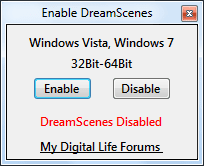
unpack it,and place it in anywhere,run Enable DreamScenes.exe
DreamScene2.png


and click Enable bottom,next choose "reboot Windows",apply and after restarting system you can enjoy DreamScene

DreamScene.png

II.How to use

WHAT KIND OF VIDEO FORMATS ARE SUPPORTED?

Windows DreamScene only allows files in *.MPG and *.WMV extension to be set as wallpaper,and officiall only these media are supported.
However there is way to workaround it and play also other video formats.

HOW TO PLAY OTHER VIDEO FILES (different than *.MPG,*.WMV)

To do that make sure you have proper codec installed.For example if you want play DivX video you have to install DivX codec,etc.Probably you want to play many various video formats,the best solution would be install any good codec pack.I recommend install Shark007 codecs Shark007's FREE Codec solutions - Windows 7 codecs,next add extra extension *.MPG or *.WMV to the end of the file name what do you want play,i.e if the file name is DreamScene.avi you have to rename it to Dreamscene.avi.mpg or to DreamScene.avi.wmv


SET VIDEO CLIP AS WALLPAPER

There are two methods to set video clip as animated wallpaper

1. METHOD I (work only for Vista)

right click on Desktop>>Personalization>>Desktop Background,choose video clip and apply

2.METHOD II (work for Vista and Windows 7)

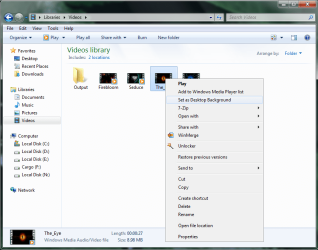
Open folder where you store video clips,right click on video clip and choose "Set as Desktop backgroud"
DreamScene5.png

Option "Set as Desktop Background" is only availabe for files with *.MPG and *.WMV extensions

ADJUST THE DREAMSCENE VOLUME LEVEL

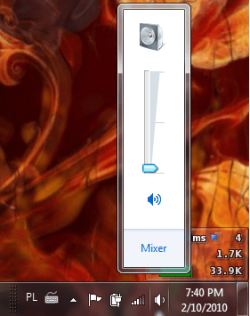
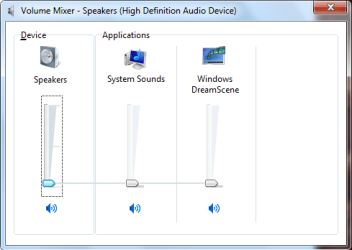
If video clip have included audio stream you can also listen sound too.To set Volume level go to Volume speaker icon in taskbar,left clik on it,choose Mixer option
DS11.png
and now you will have acces to adjusting Volume level for DreamScenes
DS10.png

PLAY/PAUSE DREAM SCENE

If you want you can pause wallpaper motion,right click on desktop and choose "pause dream scene"
PauseDreamScene.png,
if you want re-enable wallpaper motion again
right click on desktop and choose "play dream scene"
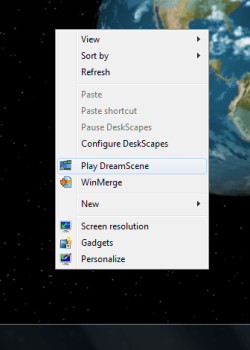
PlayDreamScene.png

POSSIBLE ISSUES WITH DREAM SCENES

1.HIGH CPU USAGE BY EXPLORER.EXE

The best way to avoid this problem is to have the modern hardware (the newer the better) and up to date BIOS and drivers for chipset and video card.
You can also try convert video files to another format,or change codecs and ensure your video files are not too big.Another method is to use any 3p application for DreamScene (see METHOD II)

2.MESSING UP DESKTOP ICON TEXT

(this problem is only in Windows 7)

At the present time there is no pernamently solution,you can only fix it per session:switch to another video (or image) wallpaper and next back to previous video wallpaper

III.HOW TO UNINSTALL PATCH

If due to any reason you want dispose patch then restore image wallpaper next run Enable DreamScene.exe and choose "Disable".Sometimes this option may not work and following error is returned:
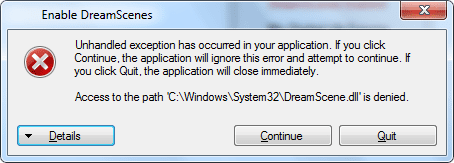
DreamScene6.png

In this case follow below:

1.Close window with error message,and again run Enable DreamScene.exe file
2.Open taskmanager and kill explorer.exe,(click on explorer.exe and press bottom "End process")
3.Go back to Enable DreamScene.exe and click in that "Disable" bottom (this time it should work)
4.Navigate back to taskmanager and rerun explorer.exe

(File>>New Task,type C:\Windows\explorer.exe and apply. (image)
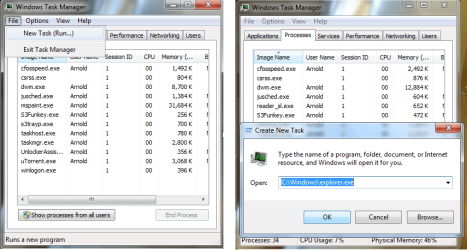
DS5.png


METHOD II

Another method to have DreamScenes is to install any 3p program.Until now I know three programs which let you enjoy animated wallpapers: VLC Media Player,DeskScapes,DreamScene VideoWallpaper
Unfortunatelly only VLC Media Player is freeware.

Maybe there are more of them-Google your friend :).
 

Attachments

Last edited by a moderator:
Hmm. No joy. Downloaded, unzipped, installed that utility to get dreamscene active, but when I go to backgrounds there is no Video option like I had with Vista before. Do I need to do something else?
 

My Computer

Computer Manufacturer/Model Number
Self-built
OS
Windows 7 Ultimate 64 bit
CPU
AMD quad core
Memory
8GB
Graphics Card(s)
GeForce 7900
Sound Card
Soundblaster Titanium X-Fi
Monitor(s) Displays
Acer 19 inch 1600x900
Hard Drives
Two 500GB SATA, One 300MB PATA
Hmm. No joy. Downloaded, unzipped, installed that utility to get dreamscene active, but when I go to backgrounds there is no Video option like I had with Vista before. Do I need to do something else?
I said in my tutorial it is impossible to set video wallpaper through Personalize>>Backgrounds in Win 7,you have to navigate to folder where you store video clips,choose one,right click on it and choose "Set as desktop background" (this option should be available)
 
Last edited:

My Computer

Computer Manufacturer/Model Number
Custom made
OS
Windows 7 Professional x64 PL
CPU
AMD Athlon 4450e
Motherboard
Giga-Byte GA-MA69G-S3H
Memory
GoodRam DDR2 2x2048MB (FSB 800MHz)
Graphics Card(s)
nVidia GeForce 9600GT (G94-300) 1024 MB
Monitor(s) Displays
SAMSUNG SyncMaster HS2P301688
Hard Drives
Seagate ST3750330AS 750GB
PSU
Corsair 550W
Cooling
AeroCool ExtremeEngine 3T
hmmmm...this looks interesting...
i'll try it later...

thanks btw
 

My Computer

OS
Windows 7 Ultimate
Please help, Dreamscene is great but I downloaded some cool video with black background, but when i try it the background is grey, i want pure black, also, when i try to play in wmp12 its grey also, but when in divx player its pure black, i tried to disable nvidia services, tried on mediaplayer, its now pure black, but when i try to set it as a background, its grey, please help, its always bright and its horrible
 

My Computer

Computer Manufacturer/Model Number
Custom
OS
Windows 7 Ultimate x64
CPU
Intel® Core™ 2 Quad Q8400 | 3.2GHz | 1.28v
Motherboard
Asus P5KPL-AM/PS
Memory
4GB (2x 2GB DDR2-800)
Graphics Card(s)
Inno3D GeForce GTX 470 825|1650|3600|1.1v
Sound Card
Realtek HD Autdio
Monitor(s) Displays
Samsung B2230
Screen Resolution
1080p
Hard Drives
Seagate Barracuda 250GB | 160GB | 1TB
PSU
Silverstone ST50F-230
Case
NZXT Tempest Evo | Sentry 2
Cooling
Deep Cool IceBlade pro
Keyboard
Nortek Diva
Mouse
Spyker SPY-BD-2388
Please help, Dreamscene is great but I downloaded some cool video with black background, but when i try it the background is grey, i want pure black, also, when i try to play in wmp12 its grey also, but when in divx player its pure black, i tried to disable nvidia services, tried on mediaplayer, its now pure black, but when i try to set it as a background, its grey, please help, its always bright and its horrible

Because you have problems with videoclips under many media players too then it is issue with codecks not with DreamScene patch.

1.Do you have problem with all extensions?What about movies with *.MPG,*.WMV (without any second extensions)
2.What kind of codecks do you have? Maybe you should change it.Can you play movies by using players which don't use build-in codecks i.e VLC Media player?
 

My Computer

Computer Manufacturer/Model Number
Custom made
OS
Windows 7 Professional x64 PL
CPU
AMD Athlon 4450e
Motherboard
Giga-Byte GA-MA69G-S3H
Memory
GoodRam DDR2 2x2048MB (FSB 800MHz)
Graphics Card(s)
nVidia GeForce 9600GT (G94-300) 1024 MB
Monitor(s) Displays
SAMSUNG SyncMaster HS2P301688
Hard Drives
Seagate ST3750330AS 750GB
PSU
Corsair 550W
Cooling
AeroCool ExtremeEngine 3T
I have vlc media player, and its the same with wmp12, they play brighter than usual. i have divx codec
 

My Computer

Computer Manufacturer/Model Number
Custom
OS
Windows 7 Ultimate x64
CPU
Intel® Core™ 2 Quad Q8400 | 3.2GHz | 1.28v
Motherboard
Asus P5KPL-AM/PS
Memory
4GB (2x 2GB DDR2-800)
Graphics Card(s)
Inno3D GeForce GTX 470 825|1650|3600|1.1v
Sound Card
Realtek HD Autdio
Monitor(s) Displays
Samsung B2230
Screen Resolution
1080p
Hard Drives
Seagate Barracuda 250GB | 160GB | 1TB
PSU
Silverstone ST50F-230
Case
NZXT Tempest Evo | Sentry 2
Cooling
Deep Cool IceBlade pro
Keyboard
Nortek Diva
Mouse
Spyker SPY-BD-2388

My Computer

Computer Manufacturer/Model Number
Custom made
OS
Windows 7 Professional x64 PL
CPU
AMD Athlon 4450e
Motherboard
Giga-Byte GA-MA69G-S3H
Memory
GoodRam DDR2 2x2048MB (FSB 800MHz)
Graphics Card(s)
nVidia GeForce 9600GT (G94-300) 1024 MB
Monitor(s) Displays
SAMSUNG SyncMaster HS2P301688
Hard Drives
Seagate ST3750330AS 750GB
PSU
Corsair 550W
Cooling
AeroCool ExtremeEngine 3T
Im going to try what you said

I have no problem in my games

here are my games,

css, bf2, bfbc2, WiC, L4D2, Grid, GTA4, Dirt2, thats it, no probs


EDIT: Made no difference, wtf

EDIT2: OMFG i cant uninstall it. garbage software.
 

My Computer

Computer Manufacturer/Model Number
Custom
OS
Windows 7 Ultimate x64
CPU
Intel® Core™ 2 Quad Q8400 | 3.2GHz | 1.28v
Motherboard
Asus P5KPL-AM/PS
Memory
4GB (2x 2GB DDR2-800)
Graphics Card(s)
Inno3D GeForce GTX 470 825|1650|3600|1.1v
Sound Card
Realtek HD Autdio
Monitor(s) Displays
Samsung B2230
Screen Resolution
1080p
Hard Drives
Seagate Barracuda 250GB | 160GB | 1TB
PSU
Silverstone ST50F-230
Case
NZXT Tempest Evo | Sentry 2
Cooling
Deep Cool IceBlade pro
Keyboard
Nortek Diva
Mouse
Spyker SPY-BD-2388

My Computer

Computer Manufacturer/Model Number
Custom made
OS
Windows 7 Professional x64 PL
CPU
AMD Athlon 4450e
Motherboard
Giga-Byte GA-MA69G-S3H
Memory
GoodRam DDR2 2x2048MB (FSB 800MHz)
Graphics Card(s)
nVidia GeForce 9600GT (G94-300) 1024 MB
Monitor(s) Displays
SAMSUNG SyncMaster HS2P301688
Hard Drives
Seagate ST3750330AS 750GB
PSU
Corsair 550W
Cooling
AeroCool ExtremeEngine 3T
Nevermind, i deleted the folder.

anyways, I think its my video card, or my codec.

i give up.
 

My Computer

Computer Manufacturer/Model Number
Custom
OS
Windows 7 Ultimate x64
CPU
Intel® Core™ 2 Quad Q8400 | 3.2GHz | 1.28v
Motherboard
Asus P5KPL-AM/PS
Memory
4GB (2x 2GB DDR2-800)
Graphics Card(s)
Inno3D GeForce GTX 470 825|1650|3600|1.1v
Sound Card
Realtek HD Autdio
Monitor(s) Displays
Samsung B2230
Screen Resolution
1080p
Hard Drives
Seagate Barracuda 250GB | 160GB | 1TB
PSU
Silverstone ST50F-230
Case
NZXT Tempest Evo | Sentry 2
Cooling
Deep Cool IceBlade pro
Keyboard
Nortek Diva
Mouse
Spyker SPY-BD-2388

My Computer

Computer Manufacturer/Model Number
Custom made
OS
Windows 7 Professional x64 PL
CPU
AMD Athlon 4450e
Motherboard
Giga-Byte GA-MA69G-S3H
Memory
GoodRam DDR2 2x2048MB (FSB 800MHz)
Graphics Card(s)
nVidia GeForce 9600GT (G94-300) 1024 MB
Monitor(s) Displays
SAMSUNG SyncMaster HS2P301688
Hard Drives
Seagate ST3750330AS 750GB
PSU
Corsair 550W
Cooling
AeroCool ExtremeEngine 3T
I ran 1-click maintenance and had 1xx problems and installed divx again.
 

My Computer

Computer Manufacturer/Model Number
Custom
OS
Windows 7 Ultimate x64
CPU
Intel® Core™ 2 Quad Q8400 | 3.2GHz | 1.28v
Motherboard
Asus P5KPL-AM/PS
Memory
4GB (2x 2GB DDR2-800)
Graphics Card(s)
Inno3D GeForce GTX 470 825|1650|3600|1.1v
Sound Card
Realtek HD Autdio
Monitor(s) Displays
Samsung B2230
Screen Resolution
1080p
Hard Drives
Seagate Barracuda 250GB | 160GB | 1TB
PSU
Silverstone ST50F-230
Case
NZXT Tempest Evo | Sentry 2
Cooling
Deep Cool IceBlade pro
Keyboard
Nortek Diva
Mouse
Spyker SPY-BD-2388
captureakj.png


The one in the left is played by media player 12 and it is my background

The one in the right is played by divx plus player. it should be like that but i dont know how to fix it
 

My Computer

Computer Manufacturer/Model Number
Custom
OS
Windows 7 Ultimate x64
CPU
Intel® Core™ 2 Quad Q8400 | 3.2GHz | 1.28v
Motherboard
Asus P5KPL-AM/PS
Memory
4GB (2x 2GB DDR2-800)
Graphics Card(s)
Inno3D GeForce GTX 470 825|1650|3600|1.1v
Sound Card
Realtek HD Autdio
Monitor(s) Displays
Samsung B2230
Screen Resolution
1080p
Hard Drives
Seagate Barracuda 250GB | 160GB | 1TB
PSU
Silverstone ST50F-230
Case
NZXT Tempest Evo | Sentry 2
Cooling
Deep Cool IceBlade pro
Keyboard
Nortek Diva
Mouse
Spyker SPY-BD-2388
Damn Removing the video card fixed it

But the colors looks like dull.

Maybe drivers?
 

My Computer

Computer Manufacturer/Model Number
Custom
OS
Windows 7 Ultimate x64
CPU
Intel® Core™ 2 Quad Q8400 | 3.2GHz | 1.28v
Motherboard
Asus P5KPL-AM/PS
Memory
4GB (2x 2GB DDR2-800)
Graphics Card(s)
Inno3D GeForce GTX 470 825|1650|3600|1.1v
Sound Card
Realtek HD Autdio
Monitor(s) Displays
Samsung B2230
Screen Resolution
1080p
Hard Drives
Seagate Barracuda 250GB | 160GB | 1TB
PSU
Silverstone ST50F-230
Case
NZXT Tempest Evo | Sentry 2
Cooling
Deep Cool IceBlade pro
Keyboard
Nortek Diva
Mouse
Spyker SPY-BD-2388
Video card settings worked.

problem solved
 

My Computer

Computer Manufacturer/Model Number
Custom
OS
Windows 7 Ultimate x64
CPU
Intel® Core™ 2 Quad Q8400 | 3.2GHz | 1.28v
Motherboard
Asus P5KPL-AM/PS
Memory
4GB (2x 2GB DDR2-800)
Graphics Card(s)
Inno3D GeForce GTX 470 825|1650|3600|1.1v
Sound Card
Realtek HD Autdio
Monitor(s) Displays
Samsung B2230
Screen Resolution
1080p
Hard Drives
Seagate Barracuda 250GB | 160GB | 1TB
PSU
Silverstone ST50F-230
Case
NZXT Tempest Evo | Sentry 2
Cooling
Deep Cool IceBlade pro
Keyboard
Nortek Diva
Mouse
Spyker SPY-BD-2388

My Computer

Computer Manufacturer/Model Number
Custom made
OS
Windows 7 Professional x64 PL
CPU
AMD Athlon 4450e
Motherboard
Giga-Byte GA-MA69G-S3H
Memory
GoodRam DDR2 2x2048MB (FSB 800MHz)
Graphics Card(s)
nVidia GeForce 9600GT (G94-300) 1024 MB
Monitor(s) Displays
SAMSUNG SyncMaster HS2P301688
Hard Drives
Seagate ST3750330AS 750GB
PSU
Corsair 550W
Cooling
AeroCool ExtremeEngine 3T
Thankyou very much too for helping :)
 

My Computer

Computer Manufacturer/Model Number
Custom
OS
Windows 7 Ultimate x64
CPU
Intel® Core™ 2 Quad Q8400 | 3.2GHz | 1.28v
Motherboard
Asus P5KPL-AM/PS
Memory
4GB (2x 2GB DDR2-800)
Graphics Card(s)
Inno3D GeForce GTX 470 825|1650|3600|1.1v
Sound Card
Realtek HD Autdio
Monitor(s) Displays
Samsung B2230
Screen Resolution
1080p
Hard Drives
Seagate Barracuda 250GB | 160GB | 1TB
PSU
Silverstone ST50F-230
Case
NZXT Tempest Evo | Sentry 2
Cooling
Deep Cool IceBlade pro
Keyboard
Nortek Diva
Mouse
Spyker SPY-BD-2388
dream scene animated desktop background

ive installed & rebooted ive tryed right clicking on a wmv but not getting option to set as background im on windows 7 ultimate quad core 4gb nvidia 9800gt 1gb what am i doing wrong & is there a different way to get this working plz get back to me as soon as possible
 

My Computer

Computer Manufacturer/Model Number
asrock
OS
windows 7 ultimate
CPU
quad core amd2
Motherboard
asrock
Memory
4gb
Graphics Card(s)
nvidia 9800gt 1gb
Monitor(s) Displays
dell 22inch
Hard Drives
3tb
Back
Top